Rokt connection rokt-destination
Overview overview
Rokt unlocks value in ecommerce using AI-driven real-time decisioning to make each Transaction Moment™ more relevant. It delivers personalized experiences and connects advertisers with high-intent customers. Connect Adobe Experience Platform audiences to Rokt to improve campaign performance through smarter targeting, suppression, and personalization. Reach the right customers at the right time while reducing wasted spend.
support@rokt.com.Use cases use-cases
The following use cases show how Experience Platform customers can use the Rokt destination.
Use case #1: Retargeting use-case-1
Re-engage high-intent customers who visited your site or app but did not convert. Build an audience in Experience Platform including users who browsed specific product categories or abandoned a checkout flow. Then push that audience to Rokt to serve personalized offers at the point of purchase on partner sites. Rokt operates within the transaction moment, immediately after a customer completes a purchase elsewhere. Retargeted audiences are reached when purchase intent is at its peak, driving higher conversion rates than traditional display retargeting.
Use case #2: Suppression lists use-case-2
Prevent wasted spend and irrelevant experiences by suppressing audiences who should not receive certain Rokt offers. Common suppression use cases include excluding recent converters, loyalty members in an active promotion, or users who opted out of marketing. For example, exclude customers who purchased in the last 30 days. Sync these suppression audiences from Experience Platform to Rokt in real time. This keeps campaigns focused on net-new or re-engageable users. This improves ROI and protects the customer experience.
Prerequisites prerequisites
Before setting up the Rokt destination in Adobe Experience Platform, you must obtain the following credentials from your Rokt Account Manager:
- API Key: use this as the Username when authenticating the destination connection.
- API Secret: use this as the Password when authenticating the destination connection.
Your Rokt Account Manager will provision these credentials in the Rokt platform prior to your setup. Contact your Account Manager if you have not yet received them.
Supported identities supported-identities
Rokt supports the activation of identities described in the table below. Learn more about identities.
xdm:_id) as a fallback identifier.Supported audiences supported-audiences
This section describes which types of audiences you can export to this destination.
This category includes all audience origins outside of audiences generated through the Segmentation Service. Read about the various audience origins. Some examples include:
- custom upload audiences imported into Experience Platform from CSV files,
- look-alike audiences,
- federated audiences,
- audiences generated in other Experience Platform apps such as Adobe Journey Optimizer,
- and more.
Supported audiences by audience data type:
Export type and frequency export-type-frequency
Refer to the table below for information about the destination export type and frequency.
Connect to the destination connect
To connect to this destination, follow the steps described in the destination configuration tutorial. In the configure destination workflow, fill in the fields listed in the two sections below.
Authenticate to destination authenticate
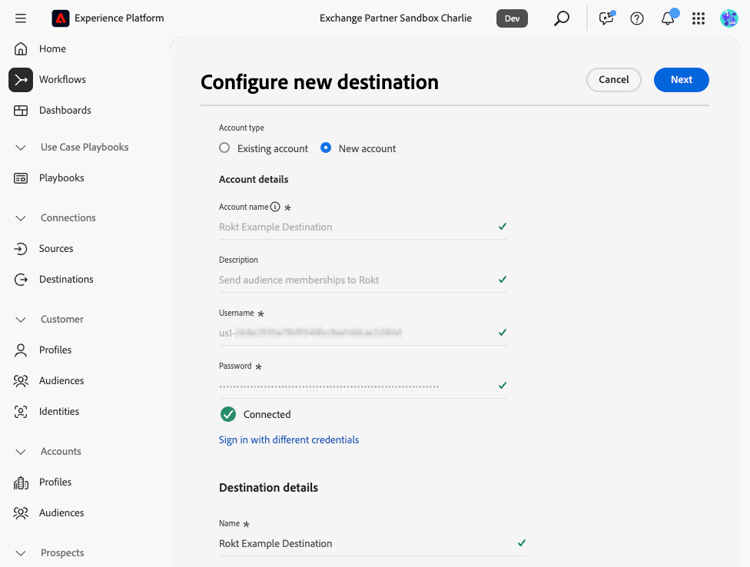
To authenticate to the destination, fill in the required fields and select Connect to destination.
-
Username: Your API Key, provided by your Rokt Account Manager.
-
Password: Your API Secret, provided by your Rokt Account Manager.
Fill in destination details destination-details
To configure details for the destination, fill in the required and optional fields below. An asterisk next to a field in the UI indicates that the field is required.
- Name: A name by which you will recognize this destination in the future (e.g., “Rokt - Retargeting Audiences”).
- Description: A description that will help you identify this destination in the future.
Enable alerts enable-alerts
You can enable alerts to receive notifications on the status of the dataflow to your destination. Select an alert from the list to subscribe to receive notifications on the status of your dataflow. For more information on alerts, see the guide on subscribing to destinations alerts using the UI.
When you are finished providing details for your destination connection, select Next.
Activate audiences to this destination activate
- To activate data, you need the View Destinations, Activate Destinations, View Profiles, and View Segments access control permissions. Read the access control overview or contact your product administrator to obtain the required permissions.
- To export identities, you need the View Identity Graph access control permission.
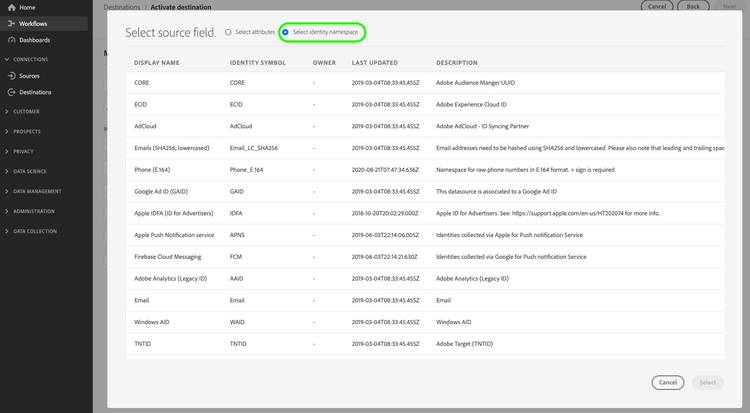
Read Activate profiles and audiences to streaming audience export destinations for instructions on activating audiences to this destination.
Map attributes and identities map
The Rokt destination supports the mapping of identity namespaces from Experience Platform to Rokt identity fields. You must map at least one identity to successfully activate an audience. The recommended mappings are shown in the table below.
IdentityMap: EmailIdentity: emailIdentityMap: Email_LC_SHA256Identity: emailSha256IdentityMap: PhoneIdentity: phoneIdentityMap: Phone_SHA256Identity: phoneSha256IdentityMap: GAIDIdentity: gaidIdentityMap: IDFAIdentity: idfaxdm: _idIdentity: aepProfileIdHere is an example of a full mapping:
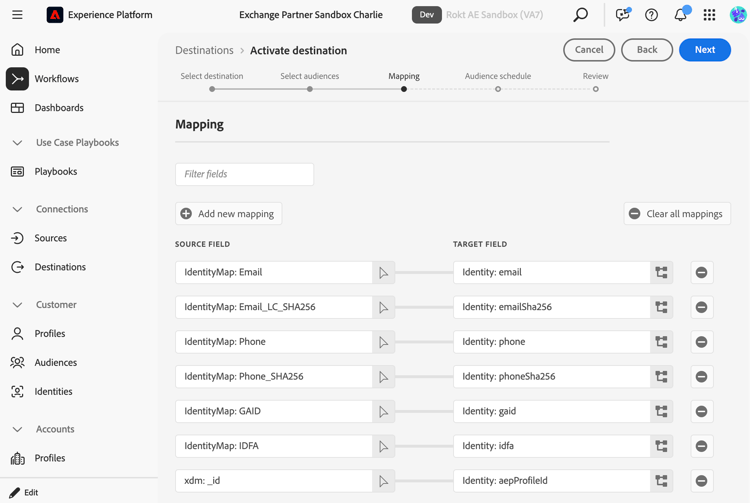
email or emailSha256) is strongly recommended to maximize match rates in Rokt.Configure audience schedule audience-schedule
After completing the mapping step, configure an audience schedule for each selected audience. Provide a Start date for when the audience should begin syncing, and a Mapping ID (a label used to identify this audience within Rokt). You can use the Experience Platform audience name or any descriptive string that helps you and your Rokt Account Manager identify the audience.
Data usage and governance data-usage-governance
All Experience Platform destinations are compliant with data usage policies when handling your data. For detailed information on how Experience Platform enforces data governance, read the Data Governance overview.