Kevel connection kevel
Kevel provides the AI-enabled technology and expert guidance that help innovative commerce leaders launch, scale, and succeed in retail media. Kevel’s Retail Media Cloud powers targeted, attributable, customizable ad formats for on-site and off-site advertising.
Use the Kevel streaming destination to activate Adobe audiences directly into Kevel’s UserDB and Segment Management APIs and support real-time targeting at ad decision time. You can also export profile attributes, such as a user’s incrementality testing group assignment, for Kevel to act on at decision time.
Use cases use-cases
Target retail media audiences in real time. You can activate rich first-party behavioral audiences across your retail media experiences to deliver more relevant ads and stronger performance. In Experience Platform, you build high-value, intent-based audiences, such as frequent category shoppers or users with recent product interest, and sync those memberships to Kevel in real time. Kevel immediately makes these segments available for ad decisioning, enabling precise targeting for sponsored products and other formats across search, browse, and app experiences. As soon as users qualify, you can act on these signals to drive more relevant impressions, better targeting, and improved measurement and ROAS.
Measure incremental impact. You can also export a user’s group assignment as a profile attribute to power Kevel’s incrementality testing. Kevel holds out a control cohort and compares it against exposed users to quantify the causal lift your campaigns drive, rather than relying on proxy metrics such as new-to-brand counts or correlation-based lift. This lets you prove incremental sales and conversions while Kevel minimizes revenue impact by serving the next best eligible ad to held-out users.
Prerequisites prerequisites
To prepare for using the Kevel destination, ensure the following prerequisites are met:
- You must have an active Kevel network and API access.
- You need a Kevel API key with permissions to create segments and update UserDB records.
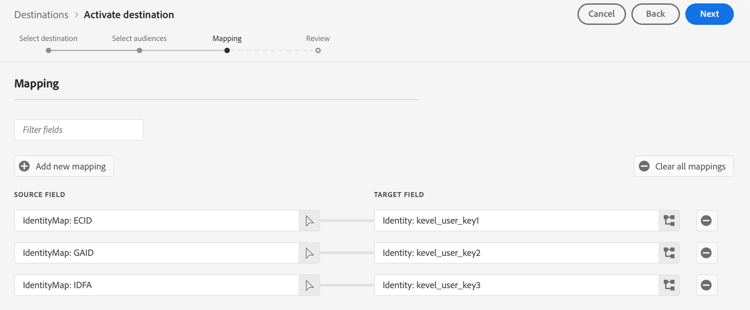
- You must configure identity namespaces in Experience Platform that map to the identities your site or app sends during Kevel ad requests, such as ECID, GAID, IDFA, and loyalty ID.
- Only map identities that you send during real-time ad requests. Each mapped identity results in a UserDB record.
Supported identities supported-identities
The Kevel destination supports activation for any identity that your application may use when sending ad requests to Kevel. You may map up to three identity namespaces to generate corresponding UserDB records.
Kevel supports the following Experience Platform identity namespaces:
Support for custom identity namespaces custom-identity-namespaces
The Kevel destination also accepts custom namespaces, as defined in your Experience Platform implementation.
This means:
- You can map customer-specific identity namespaces, such as
loyalty_id,gigya_id, or any custom identity you’ve defined in Identity Service. - You can assign these namespaces to
kevel_user_key1,kevel_user_key2, orkevel_user_key3the same way as global namespaces.
Identity mapping behavior identity-mapping-behavior
- You may map up to three Experience Platform identity namespaces to Kevel’s three identity slots.
- For each activated profile, Kevel generates one UserDB record per instance of each mapped identity, allowing real-time matching at ad decision time for each identifier your systems send.
- Only map identities that you send in ad requests to Kevel to avoid unnecessary UserDB storage.
Supported audiences supported-audiences
The Kevel destination supports the following audience origins and audience data types.
This category includes all audience origins outside of audiences generated through the Segmentation Service. Read about the various audience origins. Some examples include:
- custom upload audiences imported into Experience Platform from CSV files,
- look-alike audiences,
- federated audiences,
- audiences generated in other Experience Platform apps such as Adobe Journey Optimizer,
- and more.
Supported audiences by audience data type:
Export type and frequency export-type-frequency
The Kevel destination exports data using the following type and frequency.
Connect to the destination connect
Follow the standard Experience Platform connect a destination workflow.
Authenticate to destination authenticate
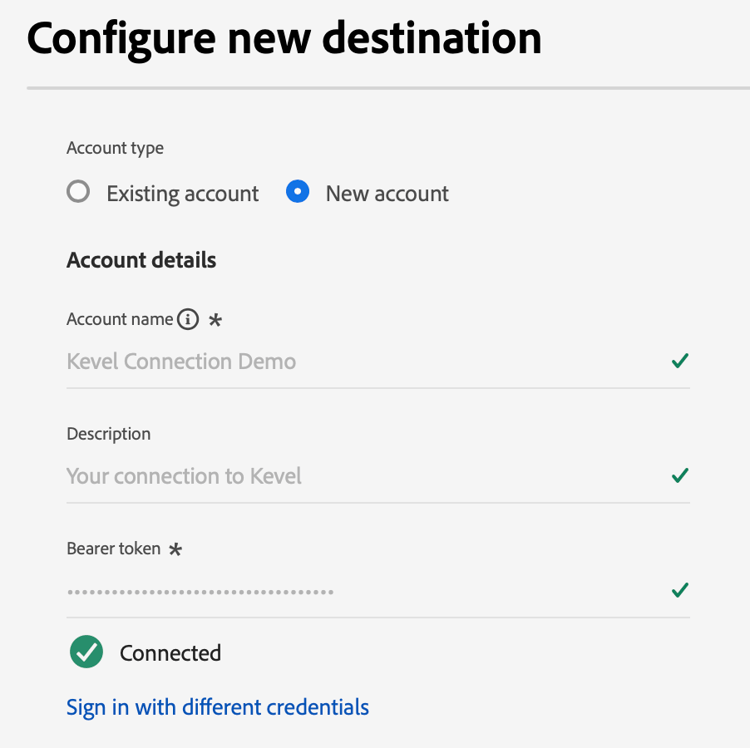
When connecting to Kevel, provide the following field:
- Bearer token: Your Kevel API key.
Fill in destination details destination-details
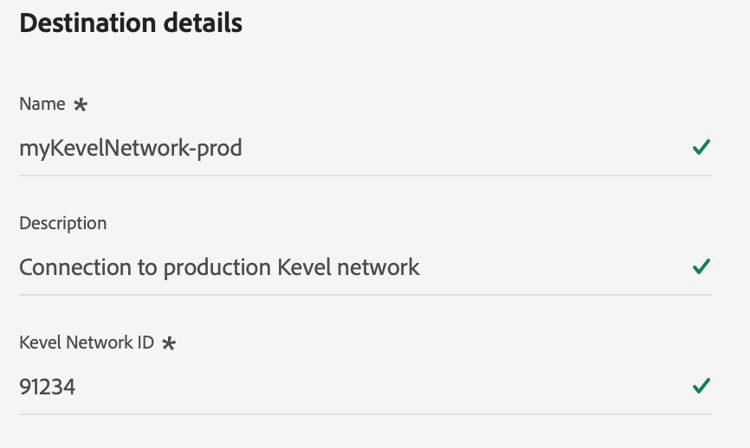
After authentication, configure:
- Name: A label to identify this destination instance.
- Description: Optional text to describe this destination instance.
- Kevel Network ID: Your Kevel network identifier.
Activate audiences to this destination activate
To send audiences to Kevel, follow the workflow in Activate audiences to streaming destinations.
Deactivate audiences deactivate
When an audience is deactivated or removed from the Kevel destination in Experience Platform, Experience Platform stops sending further profile qualification updates for that audience. Any existing segment created in Kevel remains available and is not automatically deleted.
If the Kevel segment is currently being used in an active campaign, Kevel prevents deletion to avoid disrupting live delivery. In this case, deactivation in Experience Platform results in the following:
- The Experience Platform dataflow stops.
- The Kevel segment continues to exist and may remain attached to campaigns until manually removed or the campaign is updated.
To fully stop targeting in Kevel, ensure the segment is removed from any active campaigns in Kevel’s campaign management system.
Map attributes and identities map
Kevel requires:
- Identity namespaces: Up to three identity namespaces mapped to Kevel identity slots.
- Audience membership: No manual mapping required. Experience Platform automatically passes audience membership identifiers and aliases.
During activation, select the identity namespaces you have configured for Kevel. Each identity generates its own UserDB update call.
Profile attributes (optional) profile-attributes
You can optionally map XDM profile attributes to Kevel. The destination recognizes the following target attribute name.
kevelGroupTo map a group attribute, add a new mapping row in the Mapping step and configure:
- Source field: Select the XDM attribute or computed attribute that contains the user’s group number, such as
_yourSchema.incrementalityGroup. - Target field: Open the target-field selector, keep Select attributes chosen, and select
kevelGroup(Integer) from the schema.

Validate the data export exported-data
When a profile qualifies for or exits an audience, Experience Platform sends a streaming update to Kevel.
Sample payload received by Kevel UserDB sample-payload
Experience Platform sends the following sample payload to Kevel’s UserDB API.
PUT /udb/{networkId}/segments?userKey=ECID-12345&group=42
{
  "segments": [1723, 3344, 9988]
}
kevelGroup target field.Sample Experience Platform profile used during export sample-profile
When activating audiences to the Kevel destination, Experience Platform sends profile fragments that contain both segment qualifications and the identities you mapped to Kevel’s identity slots.
Below is an example of an exported profile showing:
- Multiple identity namespaces mapped to
kevel_user_key1,kevel_user_key2, andkevel_user_key3 - A single activated segment in the
upsnamespace - A profile attribute mapped to
kevelGroupfor incrementality testing
{
  "attributes": {
    "kevelGroup": 42
  },
  "segmentMembership": {
    "ups": {
      "9d161bbb-c785-474a-965b-7d7bc2adf879": {
        "status": "realized",
        "lastQualificationTime": "2025-12-10T21:43:38.541076Z"
      }
    }
  },
  "identityMap": {
    "kevel_user_key1": [
      {
        "id": "ECID-fN1zo"
      },
      {
        "id": "ECID-9Xr2p"
      }
    ],
    "kevel_user_key2": [
      {
        "id": "GAID-4oic4"
      }
    ],
    "kevel_user_key3": [
      {
        "id": "IDFA-nB5fU"
      }
    ]
  }
}
How Kevel interprets this profile kevel-profile-interpretation
With the Kevel destination configuration, each mapped identity generates a distinct UserDB record, meaning Kevel receives:
- One update for
ECID-fN1zo - One update for
ECID-9Xr2p - One update for
GAID-4oic4 - One update for
IDFA-nB5fU
This allows the same person to be recognized at ad decision time using any of their available identities, with each identity carrying an identical set of segment memberships.
When a kevelGroup attribute is mapped and present on the profile, each UserDB update also includes the user’s group assignment as the group query parameter, enabling Kevel’s incrementality testing feature to determine test and control cohort membership at ad decision time.
Data usage and governance data-usage-governance
All Adobe Experience Platform destinations are compliant with data usage policies when handling your data. For detailed information on how Adobe Experience Platform enforces data governance, read the Data Governance overview.