[Beta]{class="badge informative"}
FreeWheel connection freewheel
Overview overview
FreeWheel is a global advertising technology platform that powers programmatic buying and selling across connected TV (CTV), video, and display inventory. FreeWheel provides a data-driven marketplace that connects advertisers with premium media owners worldwide.
Use this destination to send audiences from Adobe Experience Platform to FreeWheel. Audiences are delivered as daily batch files and are made available for targeting in FreeWheel deals and campaigns.
Prerequisites prerequisites
Before you can activate audiences to FreeWheel, review the following requirements:
- FreeWheel network ID: You must have a valid FreeWheel network ID. This is provided by FreeWheel when your account is set up.
Supported identities supported-identities
FreeWheel supports the activation of identities described in the table below. In addition to these identities, you can use any identity available in your FreeWheel account. See Map attributes and identities for instructions on how to map an identity that is not in the table below. Learn more about identities.
idfaaaidctvipipv6Supported audiences supported-audiences
This section describes which types of audiences you can export to this destination.
This category includes all audience origins outside of audiences generated through the Segmentation Service. Read about the various audience origins. Some examples include:
- custom upload audiences imported into Experience Platform from CSV files,
- look-alike audiences,
- federated audiences,
- audiences generated in other Experience Platform apps such as Adobe Journey Optimizer,
- and more.
Supported audiences by audience data type:
Export type and frequency export-type-frequency
Refer to the table below for information about the destination export type and frequency.
Connect to the destination connect
To connect to this destination, follow the steps described in the destination configuration tutorial. In the configure destination workflow, fill in the fields listed in the two sections below.
Authenticate to destination authenticate
Authentication to the FreeWheel destination is handled automatically by Adobe. No credentials or API keys are required from you during authentication. Adobe manages the secure connection to FreeWheel on your behalf.
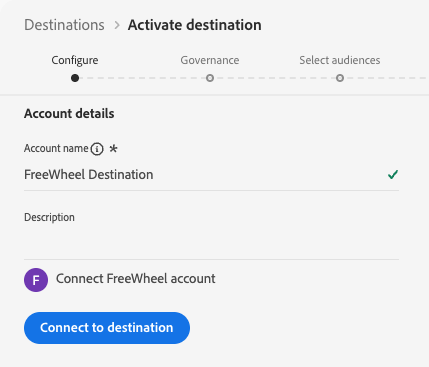
Select Connect to destination to proceed to the destination details step.
Fill in destination details destination-details
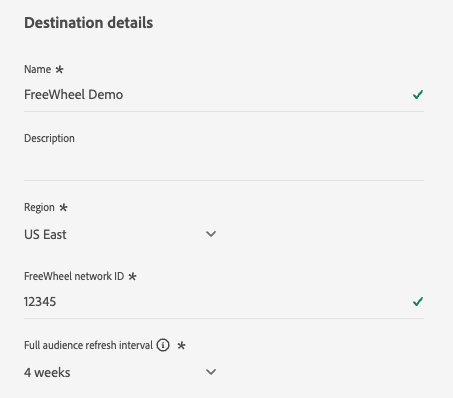
To configure details for the destination, fill in the required and optional fields below. An asterisk next to a field in the UI indicates that the field is required.
-
Name: A name by which you will recognize this destination in the future.
-
Description: A description that will help you identify this destination in the future.
-
Region: The FreeWheel region where your account is hosted. Select one of the following options:
- US East
- Europe
- Asia Pacific
-
FreeWheel network ID: Your FreeWheel network ID. This value is provided by FreeWheel and uniquely identifies your organization in the FreeWheel platform.
-
Full audience refresh interval: The frequency at which a full audience export is sent to FreeWheel in addition to daily incremental updates. A full audience export keeps your audience members from expiring in FreeWheel, so you don’t experience drops in targeted members while your campaigns are running. Select an interval from the dropdown.
Enable alerts enable-alerts
You can enable alerts to receive notifications on the status of the dataflow to your destination. Select an alert from the list to subscribe to receive notifications on the status of your dataflow. For more information on alerts, see the guide on subscribing to destinations alerts using the UI.
When you are finished providing details for your destination connection, select Next.
Activate audiences to this destination activate
- To activate data without changing the export schedule, you need the View Destinations, Activate Destinations, View Profiles, and View Segments access control permissions. Read the access control overview or contact your product administrator to obtain the required permissions.
- Unlike most other batch destinations, FreeWheel sets the export schedule at the destination level instead of the audience level. To change the export schedule, you need the Manage Destinations access control permission.
- To export identities, you need the View Identity Graph access control permission.
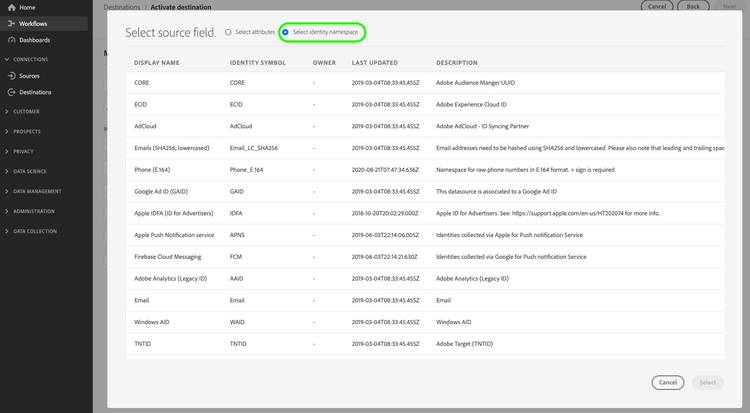
Read Activate audience data to batch profile export destinations for instructions on activating audiences to this destination.
Schedule audience exports schedule
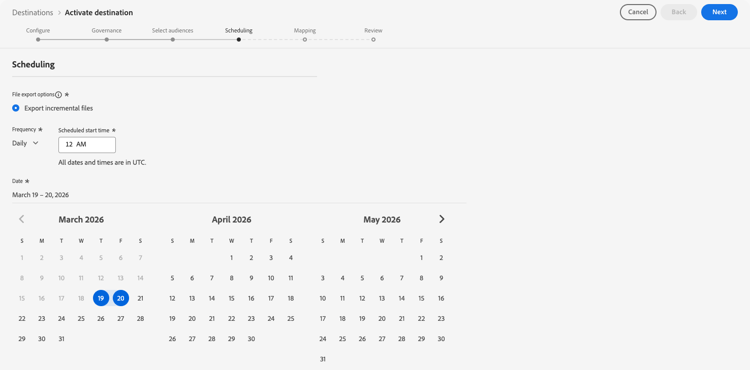
In the Scheduling step, configure the export schedule for the destination. FreeWheel uses a hybrid export model: the first export for each activated audience is a full snapshot, followed by daily incremental updates.
Configure the following fields:
- File export options: Export incremental files is preselected and is the only supported option. The first export automatically includes a full snapshot of all qualified profiles. Subsequent exports deliver only new audience qualifications and exits since the last export.
- Frequency: Select Daily. FreeWheel expects daily incremental file delivery.
- Scheduled start time: Enter the time in UTC at which the daily export should run.
- Date: Set the start and end date for the activation. The start date determines when the first full snapshot export is sent.
Map attributes and identities map
In the mapping step, select the source fields from your Experience Platform profiles and map them to the identity types supported by FreeWheel. At least one mapping is required.
If your FreeWheel account supports identity types that are not listed in the supported identities table, you can map to them by manually entering the identity name in the target field instead of selecting from the predefined list.
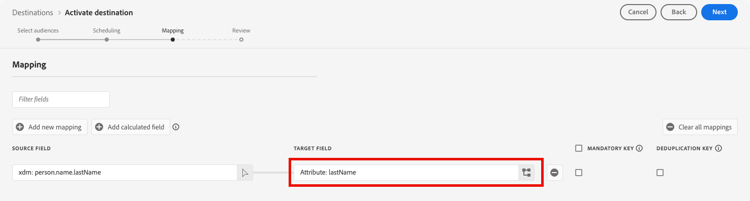
The following are example mappings. Your actual mappings will depend on your profile schema and the identity types your FreeWheel account supports.
identityMap.IDFAidfaidentityMap.GAIDaaidhomeAddress.ipAddressipExported data / Validate data export exported-data
FreeWheel receives two types of files per export. Both file types are generated and delivered automatically. There is no action required on your part.
Identity (data) files contain the audience membership data. Each row maps a user identifier to one or more audience IDs. The files are delivered to FreeWheel in CSV format without column headers. Separate files are produced for each identity type present in the export (for example, one file for aaid and a separate file for idfa).
Example data file format:
aebc1234-56f7-89ab-cdef-0123456789ab,segment_1,segment_2
f7c9a8b0-4d33-11ec-81d3-0242ac130003,segment_1,segment_3
123e4567-e89b-12d3-a456-426614174000,segment_2
Taxonomy files describe the audiences included in the export. These files are delivered alongside the data files and include the audience ID, name, and TTL (time to live) in days. The maximum TTL supported by FreeWheel is 90 days. The values in the example below are illustrative.
Example taxonomy file format:
Segment ID,Segment Name,TTL
segment_1,my_first_segment,30
segment_2,my_second_segment,30
segment_3,my_third_segment,30
Data usage and governance data-usage-governance
All Adobe Experience Platform destinations are compliant with data usage policies when handling your data. For detailed information on how Adobe Experience Platform enforces data governance, see the Data Governance overview.
Additional resources additional-resources
For additional information about FreeWheel and its advertising technology platform, see the FreeWheel website.