Adform connection adform
Overview overview
Adform is a leading provider of programmatic media buying and selling solutions. By connecting Adform to the Adobe Experience Platform, you can activate your first party audiences through Adform based on the Experience Cloud ID (ECID).
support@adform.com.Use cases use-cases
To help you better understand how and when you should use the Adform destination, here are sample use cases that Adobe Experience Platform customers can solve by using this destination.
Adobe Real-Time CDP audience activation use-case-1
Use this destination to send Adobe Real-Time CDP audiences to Adform for activation based on the Experience Cloud ID (ECID) and Adform’s ID Fusion. Adform’s ID Fusion is Adform’s ID resolution service for activating your first party audiences based on the Experience Cloud ID (ECID).
A common case is re-targeting of your website visitors to your website or app based on the Experience Cloud ID (ECID). All you need to do is to send the Experience Cloud ID (ECID) to Adform via the readily available Event Streaming or client-side Adform extensions. After that you can share audiences with Adform via the Adform destination for activation - solely based on the Experience Cloud ID (ECID).
Prerequisites prerequisites
-
You need to be an existing Adform customer to use this destination.
-
You need to have your Adform Audience Base Data Connection credentials.
- If you don’t have Adform Audience Base Data Connection credentials, contact your Adform representative.
-
For proper synchronization you need to either have an Event Streaming or client-side connection from your entities to Adform Site Tracking.
- If you don’t have an Event Streaming or client-side connection from your entities to Adform Site Tracking, contact your Adform representative.
- Adform provides Adobe CX Enterprise extensions for both Event Streaming and client-side.
Supported identities supported-identities
Adform supports the activation of identities described in the table below. Learn more about identities.
Supported audiences supported-audiences
This section describes which type of audiences you can export to this destination.
This category includes all audience origins outside of audiences generated through the Segmentation Service. Read about the various audience origins. Some examples include:
- custom upload audiences imported into Experience Platform from CSV files,
- look-alike audiences,
- federated audiences,
- audiences generated in other Experience Platform apps such as Adobe Journey Optimizer,
- and more.
Supported audiences by audience data type:
Export type and frequency export-type-frequency
Refer to the table below for information about the destination export type and frequency.
Connect to the destination connect
To connect to this destination, follow the steps described in the destination configuration tutorial. In the configure destination workflow, fill in the fields listed in the two sections below.
Authenticate to destination authenticate
To authenticate to the destination, fill in the required fields and select Connect to destination.
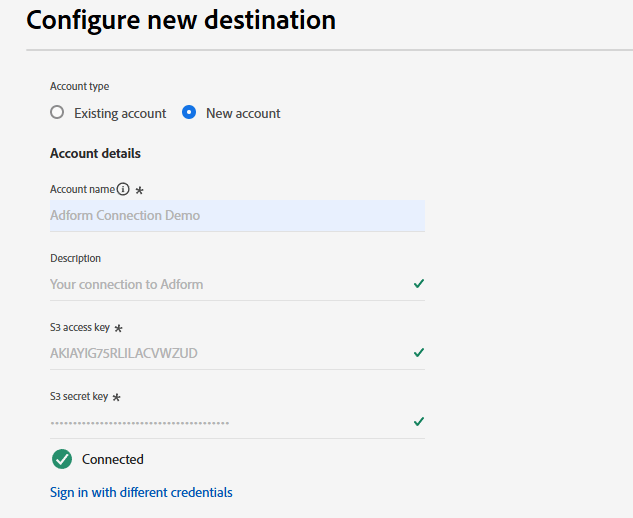
- Account name: Enter an account name by which you can identify this destination connection in the future…
- S3 Access Key ID: Fill in the S3 Access Key provided by Adform.
- S3 Secret Access Key: Fill in the S3 Secret Access Key provided by Adform.
Fill in destination details destination-details
To configure details for the destination, fill in the required and optional fields below. An asterisk next to a field in the UI indicates that the field is required.
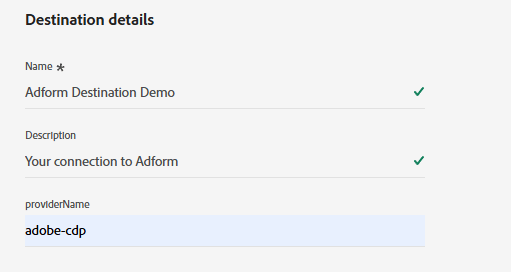
- Name: A name by which you will recognize this destination in the future.
- Description: A description that will help you identify this destination in the future.
- Provider Name: Your Adform account name provided by Adform.
Enable alerts enable-alerts
You can enable alerts to receive notifications on the status of the dataflow to your destination. Select an alert from the list to subscribe to receive notifications on the status of your dataflow. For more information on alerts, see the guide on subscribing to destinations alerts using the UI.
When you are finished providing details for your destination connection, select Next.
Activate audiences to this destination activate
- To activate data, you need the View Destinations, Activate Destinations, View Profiles, and View Segments access control permissions. Read the access control overview or contact your product administrator to obtain the required permissions.
- To export identities, you need the View Identity Graph access control permission.
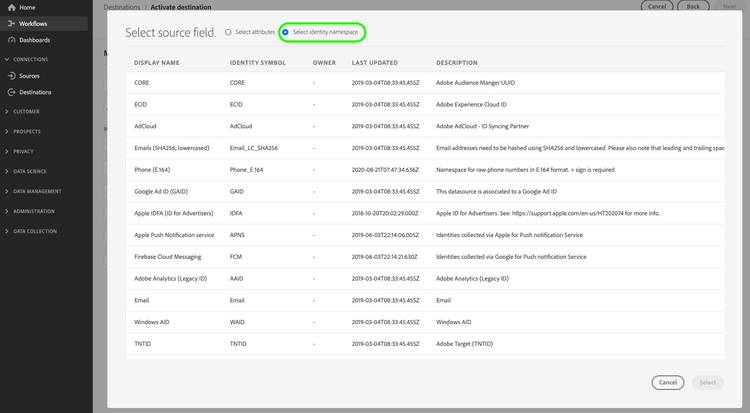
Read Activate audience data to batch profile export destinations for instructions on activating audiences to this destination.
Map attributes and identities map
- ECID (Experience Cloud ID)
During the mapping step, use only the ECID target identity mapping. Do not include any other identity fields, as this will prevent the activation from completing successfully.
Exported data / Validate data export exported-data
The destination connector exports only the ECID identity to the destination. No other identity is exported. To check if the data export was successful, please log into your Adform Audience Base account and check if the audiences are available.
Data usage and governance data-usage-governance
All Adobe Experience Platform destinations are compliant with data usage policies when handling your data. For detailed information on how Adobe Experience Platform enforces data governance, read the Data Governance overview.
Additional resources additional-resources
For additional information about the Adform Audience Base, see the Adform Audience Base documentation.