AEM Edge Function deployment strategy on AEM as a Cloud Service
On AEM as a Cloud Service, an AEM Edge Function binds to an environment. Every environment your program provisions, RDE, Dev, Stage, and Prod, gets its own AEM Edge Function instance. Plan your promotion, secrets, and testing around that scope before you build it into your release process.
How AEM Edge Functions are scoped
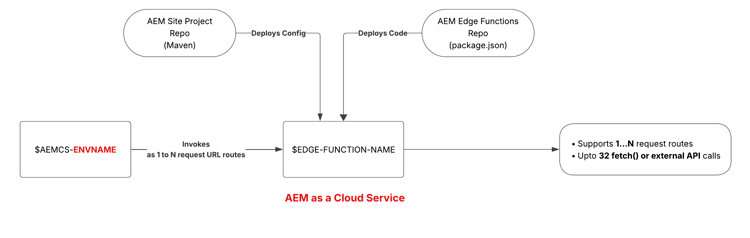
Each environment, RDE, Dev, Stage, and Prod, runs its own AEM Edge Function instance. All instances deploy from the same code repository (with a package.json file), but each instance keeps its own config, secrets, and KV data.
Promote code through your environments
On AEM as a Cloud Service, your CDN configuration (edgeFunctions.yaml and cdn.yaml) lives in the AEM site project repository to consolidate all your CDN configuration in one place. However, your AEM Edge Function code lives in a separate AEM Edge Functions project repository.
Promoting to the next environment means merging into both repositories, then deploying each. The high-level steps are:
-
Merge your configuration (
edgeFunctions.yamlandcdn.yaml) changes into the AEM site project’s git branch. -
In Cloud Manager, verify the config pipeline uses the merged branch and targets the desired environment.
-
Run the Cloud Manager config pipeline to deploy the
edgeFunctions.yamlandcdn.yamlfiles to the target environment. -
Merge your AEM Edge Function code changes into the AEM Edge Functions project’s git branch.
-
Verify the CLI context (or CI/CD system) uses the merged branch and targets the desired environment using the
aio aem edge-functions infocommand. -
Run
aio aem edge-functions deploy <name>(via the CLI or CI/CD system) to deploy the function code to the target environment.
Manage secrets per environment
Secrets are set per environment. In Cloud Manager, add them in the target environment’s Configuration tab.
Non-secret configs work the same regardless of environment: you declare them directly in edgeFunctions.yaml, committed to Git. For the exact steps, see Use configs and secrets.
Plan your SDLC around environment scope
- Test function logic on RDE before it reaches other environments.
- Keep environment-specific secrets and KV data isolated so a promotion never carries stale config forward.
- Track config and secret drift between environments as part of your release checklist, not as an afterthought.