AEM Edge Functions
AEM Edge Functions let you run JavaScript on Adobe CDN at the edge, close to your visitors and without a round trip to origin. They work on AEM as a Cloud Service and Edge Delivery Services sites with Adobe Managed CDN.
What are AEM Edge Functions
AEM Edge Functions are JavaScript modules deployed to and executed on Adobe CDN (powered by Fastly Compute). When a request matches a CDN routing rule in cdn.yaml, the AEM Edge Function intercepts it, reads headers, calls backends, transforms responses, and returns the result from the edge.
Common patterns include server-rendered personalization, secure API proxying, and response aggregation.
When to use AEM Edge Functions
Use the following guide when choosing between AEM Edge Functions and other AEM extensibility options.
Prefer AEM Edge Functions for dynamic content or data that needs speed, security and scalability without a round trip to origin.
Why use AEM Edge Functions
AEM Edge Functions address four common challenges when building dynamic, CDN-delivered experiences.
How it works
An AEM Edge Function sits between the CDN cache and your backends. It processes matching requests before they reach origin.
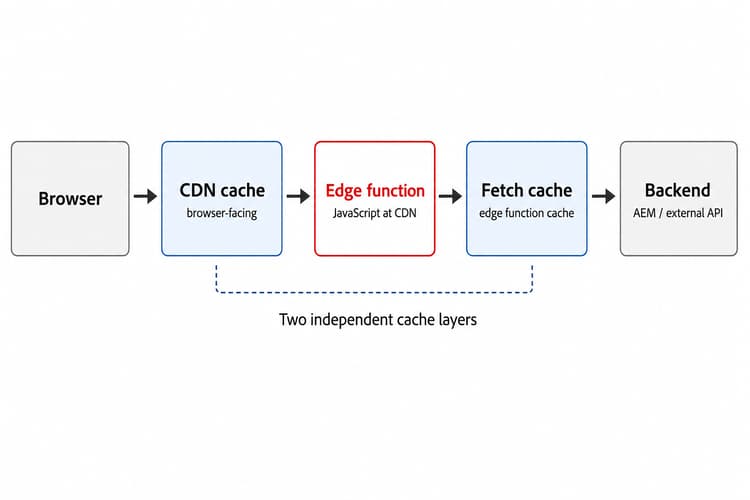
Two independent cache layers exist: the CDN cache (what the browser sees) and the fetch cache (what the AEM Edge Function sees when calling backends). Invalidate each layer separately when underlying data changes.
For more information, see Caching in AEM Edge Functions.
How to get started
Choose if you are using AEM as a Cloud Service or Edge Delivery Services site and follow the setup tutorial. You deploy a JavaScript AEM Edge Function with /hello-world and /weather routes, configure CDN routing, push the code to Adobe CDN, and verify responses from the edge.
Set up on AEM as a Cloud Service
Install the CLI, deploy WKND (or your site), configure CDN routing, and verify AEM Edge Function endpoints on AEM as a Cloud Service.
Set up on Edge Delivery Services
Onboard your Edge Delivery site in Cloud Manager, link your repository, and deploy AEM Edge Function endpoints on Edge Delivery Services.
Build a dynamic Edge Delivery Services block
Once your AEM Edge Function is set up, learn how to connect it to an Edge Delivery Services block. Combine two upstream API calls into one response, connect the block to the endpoint with environment-aware URL switching and CORS for local dev, then deploy both projects together.
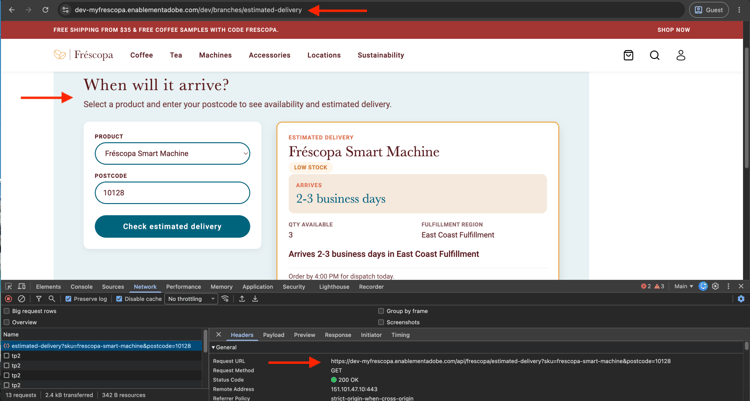
Build a dynamic Edge Delivery Services block with an AEM Edge Function
Build an estimated delivery checker block that calls an AEM Edge Function, using a real two-repo local dev and deployment workflow.
How to
Code-focused guides for common AEM Edge Function patterns.
edgeFunctions.yaml and read them in codePlatform limits
Keep the following limits in mind when you design AEM Edge Function logic.
For the complete list of limitations, see Limitations in the AEM Edge Functions product documentation.