Use configs and secrets with Edge Functions
Learn how to pass non-sensitive configs and sensitive secrets to an AEM Edge Function through edgeFunctions.yaml and read them in your code.
Configs vs secrets
Both configs and secrets are key/value pairs that you expose to your AEM Edge Function.
The difference is where the value lives and how sensitive it is.
configssecretsedgeFunctions.yaml, committed to GitedgeFunctions.yamlconfig_defaultsecret_defaultConfigStore.get() (synchronous)SecretStoreManager.getSecret() (async)${{SECRET_NAME}} is committed in edgeFunctions.yamlconfigs. The edgeFunctions.yaml file is committed to Git, so its config values are visible to anyone with repository access. Use secrets for tokens, keys, and credentials.Where you declare configs and secrets
Declare both under data in edgeFunctions.yaml, as siblings of functions. They are not nested under an individual function.
# config/edgeFunctions.yaml
kind: "EdgeFunctions"
version: "1"
data:
  functions:
    - name: my-edge-function
  configs:
    - key: TRIPS_API_BASE_URL
      value: "https://api.example.com/trips"
    - key: ADVENTURE_CACHE_TTL_SECONDS
      value: "300"
  secrets:
    - key: TRIPS_API_TOKEN
      value: ${{WKND_TRIPS_API_TOKEN}}
Key names are case-sensitive. The key you declare here is the same name your code reads at runtime.
For all supported properties, see Declare functions.
Use configs
Configs hold non-sensitive values that vary by environment. Config values are always strings, so cast them when you need a number or boolean.
Read configs in code
Open the config_default store, then call get() with the key you declared. The call is synchronous.
// src/index.js or handler file
import { ConfigStore } from "fastly:config-store";

const config = new ConfigStore("config_default");

// read a config value (always a string)
const apiBaseUrl = config.get("TRIPS_API_BASE_URL");

// cast to a number, with a fallback if the key is missing
const ttlSeconds = Number(config.get("ADVENTURE_CACHE_TTL_SECONDS") || "300");
Use secrets
Secrets hold sensitive values, such as an API token. The value stays in a Cloud Manager secret. Your edgeFunctions.yaml references it with the ${{SECRET_NAME}} syntax, so the value never appears in Git.
Two names are involved, and they are different on purpose.
TRIPS_API_TOKEN (the key)edgeFunctions.yaml and your codegetSecret()WKND_TRIPS_API_TOKEN (inside ${{ }})This example uses one key and one secret, the pattern for AEM as a Cloud Service. On Edge Delivery Services, you repeat the pattern once per site, since one config pipeline serves all three sites.
Add the secret on AEM as a Cloud Service
Define the Cloud Manager secret and run the config pipeline before you use it in your AEM Edge Function. Each environment (RDE, Dev, Stage, Prod) has its own Configuration tab, so a secret you add to Dev does not exist in Stage or Prod until you add it there too.
- In Cloud Manager, navigate to your Program > Environment > Configuration tab.
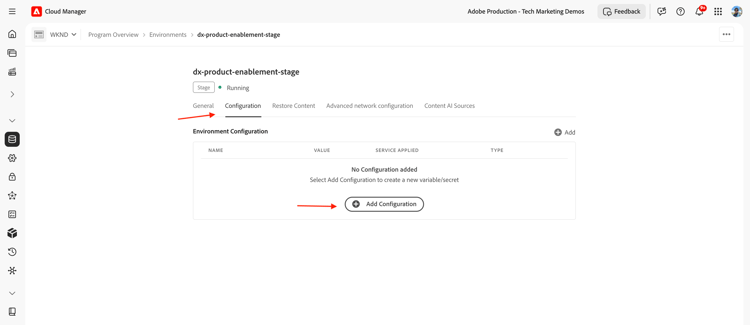
- Select +Add Configuration. In the Environment Configuration modal, enter the name and value, choose the service to apply it to, and set the type to Secret.
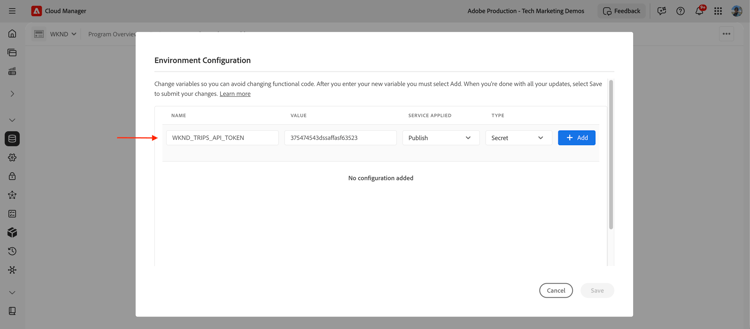
- Select +Add, then Save.
Add the secret on Edge Delivery Services
Edge Delivery Services has one config pipeline per program, not one per site. It deploys a single edgeFunctions.yaml for the whole program, shared by every site, rather than a separate file per site.
The Dev, Stage, and Prod sites all share that one pipeline, so you cannot add the same variable name three times with three different values, and you cannot rely on a branch-specific edgeFunctions.yaml to pick the right one.
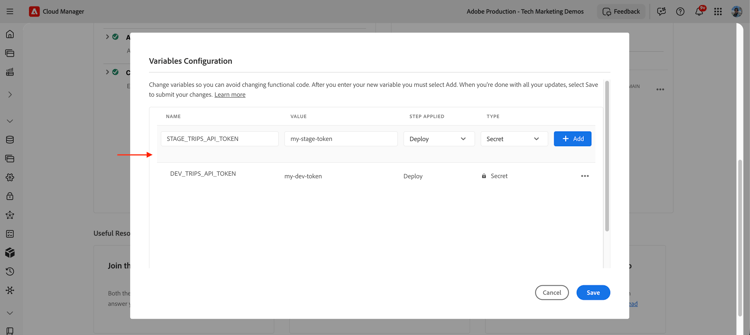
Prefix each variable name with its site so the three sites never collide, for example DEV_TRIPS_API_TOKEN, STAGE_TRIPS_API_TOKEN, and MAIN_TRIPS_API_TOKEN. Declare all three in the same edgeFunctions.yaml, then let your code pick the right one at runtime.
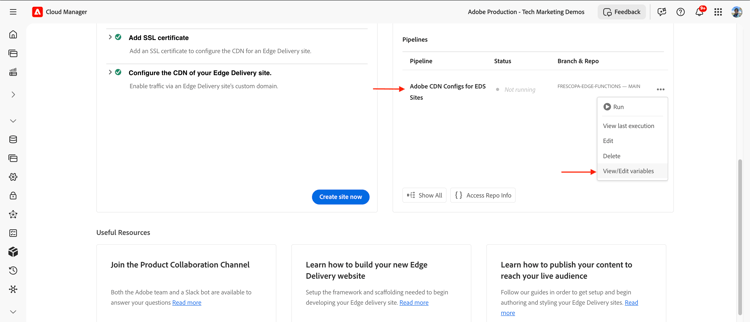
- In Cloud Manager, navigate to your Program > Edge Delivery > Pipelines section. Select the ellipsis (
...) next to the pipeline, then View/Edit variables.
- Add one variable per site, using the site prefix, and set the type to Secret.
- Declare all three prefixed secrets in the single
edgeFunctions.yaml, since the pipeline deploys it once for every site.
# config/edgeFunctions.yaml
secrets:
  - key: TRIPS_API_TOKEN_DEV
    value: ${{DEV_TRIPS_API_TOKEN}}
  - key: TRIPS_API_TOKEN_STAGE
    value: ${{STAGE_TRIPS_API_TOKEN}}
  - key: TRIPS_API_TOKEN_MAIN
    value: ${{MAIN_TRIPS_API_TOKEN}}
The AEM Edge Function must decide which key to read at runtime, based on the site it’s currently serving. The next section shows the lookup.
Read secrets in code
Read the secret at runtime through the SecretStoreManager helper that the boilerplate provides in src/lib/config.js. It reads from the secret_default store. The call is asynchronous on both platforms, but the key you look up differs.
On AEM as a Cloud Service, the key is fixed, since each environment has its own secret behind the same key name:
// src/index.js or handler file
import { SecretStoreManager } from "./lib/config";

const token = await SecretStoreManager.getSecret("TRIPS_API_TOKEN");
if (!token) {
  throw new Error("TRIPS_API_TOKEN is not configured");
}
On Edge Delivery Services, build the key from the current site first, since one shared edgeFunctions.yaml declares a separate key per site:
// src/index.js or handler file
import { SecretStoreManager } from "./lib/config";

const site = getCurrentSite(); // for example, "DEV", "STAGE", or "MAIN" based on the origin header
const token = await SecretStoreManager.getSecret(`TRIPS_API_TOKEN_${site}`);
if (!token) {
  throw new Error(`TRIPS_API_TOKEN_${site} is not configured`);
}
Once you have the token, use it in your outbound request the same way on both platforms:
// use the token in an outbound request, never in a response to the client
const request = new Request("https://api.example.com/trips", {
  headers: { Authorization: `Bearer ${token}` },
});
Keep the secret inside the AEM Edge Function. Do not return it to the client or log it.
Guidelines
- Use
configsfor anything safe to commit, andsecretsfor anything that must stay private. - Match key names exactly. All key names are case-sensitive.
- Cast config values before use, because every config value is a string.
- Add the Cloud Manager secret before the pipeline runs, or the
${{SECRET_NAME}}reference fails to resolve. - On Edge Delivery Services, prefix each secret and variable name with its site (
DEV_,STAGE_,MAIN_). One config pipeline serves all three sites, so unprefixed names collide, and your code must pick the right prefix at runtime.