Prompt Management prompt-management
Prompt Management helps you define, organize, and maintain the prompts used to measure your brand’s visibility across AI platforms.
Prompt Management enables you to build a comprehensive prompt strategy, discover new visibility opportunities, and manage the prompt library used to monitor Brand Presence.
It is where you move from discovering opportunities to actively tracking them: you review suggested prompts and topics, then add the ones that matter into the prompt library that LLM Optimizer runs on a recurring basis to measure your brand’s visibility over time. Unlike AI Visibility - which gives immediate insights from Semrush Enterprise AIO’s shared AI prompt database - Prompt Management is about the curated set of prompts your organization actively monitors.
Use Prompt Management to:
- Identify topics and conversations relevant to your business.
- Discover opportunities to expand prompt coverage.
- Build and refine your prompt strategy.
- Manage the prompts used to measure visibility.
- Monitor prompt coverage across categories, intents, and tracked URLs.
Capabilities in Prompt Management capabilities
Prompt Management includes two capabilities:
- Prompt Strategy - Review suggested prompts and topics from trusted data sources, and add the most relevant ones to the prompts you actively track.
- Prompt Library - Manage the prompts that are actively tracked for your brand, and monitor the overall health and coverage of your prompt strategy.
Prompt Strategy prompt-strategy
Prompt Strategy helps you identify the conversations that matter most to your business and discover new opportunities to expand visibility coverage.
Powered by recommendations from Semrush, Google Search Console, Synthetic Personas, and Citation Attempt, Prompt Strategy surfaces topics where your brand has an opportunity to improve visibility as well as topics where your brand already performs well. It is where you review suggested prompts and topics before adding them to the prompts you actively track in your Prompt Library.
Use Prompt Strategy to:
- Discover new topics and conversations to track.
- Identify visibility gaps and emerging opportunities.
- Understand where competitors are gaining visibility.
- Expand coverage across relevant customer journeys.
- Build a more comprehensive prompt strategy.
How it works prompt-strategy-how-it-works
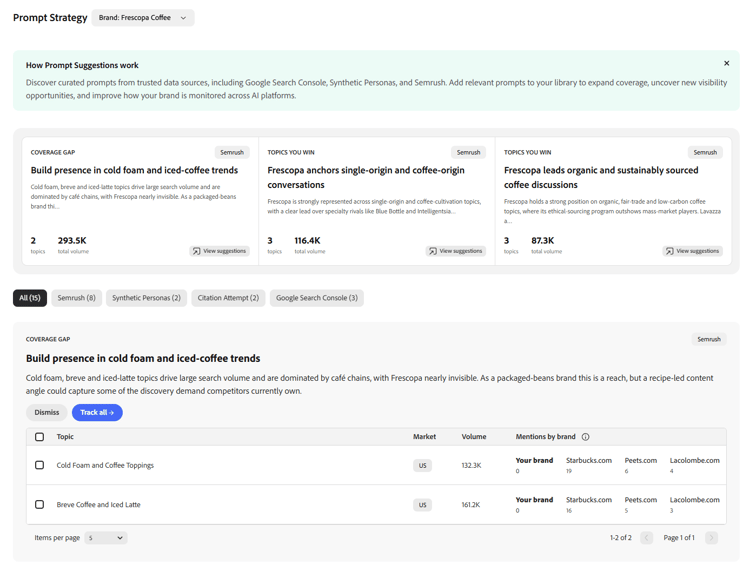
Prompt Strategy presents a queue of suggested prompts and topics, curated from several trusted data sources. You can filter the queue by source to focus on one type of suggestion at a time, review the prompts on each recommendation, and then Track the ones you want - adding them to your Prompt Library for ongoing monitoring.
Suggestions are grouped by the source they came from. Semrush suggestions are additionally organized into strategic categories (for example, topics you already win versus opportunities to grow).
Suggestion sources suggestion-sources
Prompt Strategy draws on four suggestion sources (click each source source for more details):
Adding suggestions to your library adding-suggestions
To act on a suggestion, review the prompts or topics on a recommendation and choose Track. You can select specific prompts to add or Track the whole recommendation all at once. A confirmation dialog then adds the selected prompts to your Prompt Library.
Newly added prompts need to be processed before they begin contributing to Brand Presence - see Prompt Library for details.
Prompt Library prompt-library
The Prompt Library is the central workspace for managing the prompts used to measure your organization’s Brand Presence. It contains the curated set of prompts your organization actively monitors - the prompts that are run on a recurring basis to measure your brand’s visibility across supported AI platforms and to track changes over time.
A well-designed prompt library helps ensure that Brand Presence accurately reflects the topics, customer journeys, and markets that are most important to your business.
Use Prompt Library to:
- Manage the prompts used to measure Brand Presence.
- Organize prompts for ongoing tracking.
- Search, filter, import, and export prompts.
- Monitor the health and coverage of your prompt library.
- Expand prompt coverage as your business priorities evolve.
Prompt Library is most effective when used alongside AI Visibility and Prompt Strategy. As you identify new topics and add additional prompts, Prompt Library provides increasingly comprehensive coverage of the conversations that matter most to your business.
For the best results:
- Use AI Visibility to identify relevant topics and opportunities.
- Use Prompt Strategy to discover recommended prompts.
- Add selected prompts to your Prompt Library.
- Use Brand Presence to monitor visibility over time.
Prompt Library experiences prompt-library-experiences
The Prompt Library experience varies depending on your Adobe Brand Visibility edition.
Prompt Library prompt-library-paid
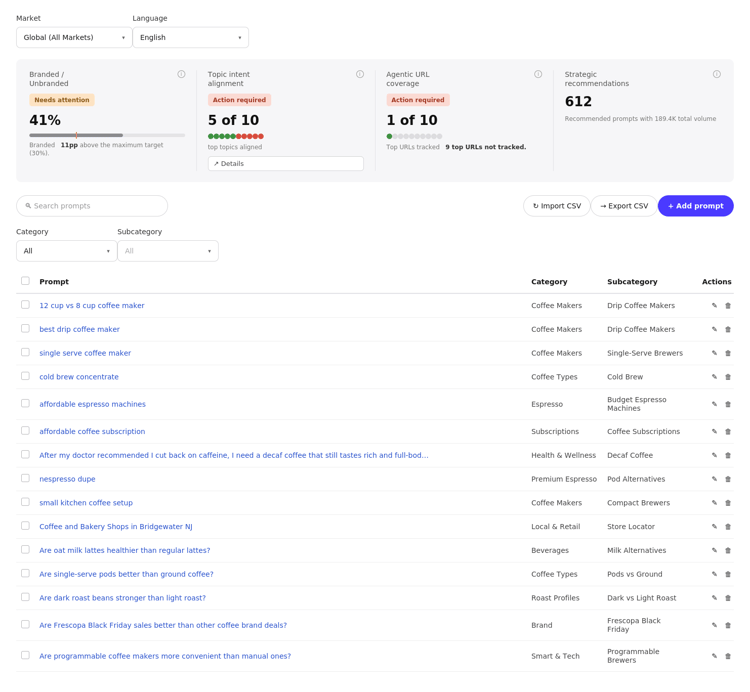
The Prompt Library experience included with paid Adobe Brand Visibility is powered by Semrush Enterprise AIO and serves as the central workspace for managing the curated set of prompts that continuously measure your Brand Presence.
Prompts are displayed in a flat list and organized using:
- Category
- Subcategory
- Market
- Language
Prompt Library includes built-in health indicators to help you evaluate:
- Branded / Unbranded - the balance between prompts that mention your brand or products (which protect existing awareness) and prompts that don’t (which expand reach to audiences who don’t yet know your brand). The tile flags when your branded share drifts outside a healthy range.
- Intent coverage - how well your prompts represent the different customer intents relevant to your business, so your Brand Presence reflects the full customer journey rather than a single stage.
- Agentic URL coverage - how well your prompts cover the pages on your site that AI bots visit most. If those pages aren’t represented by any prompt, you can’t measure how AI represents your brand on them.
- Strategic recommendations - when recommendations are available, a shortcut to opportunities that can strengthen your library. Opening it takes you to Prompt Strategy to review and add recommended prompts.
You can also:
- Search and filter prompts.
- Add prompts for continuous tracking.
- Import and export prompts.
- Manage prompts across markets and languages.
Prompt Library (Trial) prompt-library-trial
The Trial experience provides the same core Prompt Library capabilities for managing the prompts used to measure Brand Presence.
In the Trial experience:
- Prompts are organized by Topics, with individual prompts nested under each topic.
- Users create a topic and then add prompts within that topic.
- Each prompt displays its Origin and Status.
The remaining Prompt Library capabilities-including health indicators, strategic recommendations, search, filtering, importing, exporting, and adding prompts-are consistent with the paid experience.

Transitioning from Trial to Enhanced transitioning-trial-to-paid
When you upgrade from the Trial experience to a paid Adobe Brand Visibility account, the core Prompt Library workflow remains the same. You continue to manage the prompts that measure your Brand Presence, while benefiting from an updated organization model powered by Semrush Enterprise AIO.
The primary differences are summarized below.