Live chat and meeting booking overview overview
A concierge answers most questions on its own. Some conversations need a person: a pricing negotiation, a procurement questionnaire, a demo request. Live chat and meeting booking are the two ways Brand Concierge hands that conversation to a human without losing the context the visitor already provided.
- Live chat connects the visitor to an available representative immediately, in the same chat window.
- Meeting booking offers the visitor real open slots from a representative’s calendar and books the meeting.
Both are offered by the same skill, Handoff to sales, and both route through Adobe Marketo Qualifier (formerly Sales Qualifier), where your representatives connect their calendars, set their availability, and take chats.
How a handoff works how-it-works
Four pieces have to line up before a visitor can reach a person.
At runtime, the visitor says something that matches one of the skill’s Use when conditions. The skill fires and calls whichever integrations are attached to it. Routing then resolves a representative, and the visitor is offered a chat, a meeting, or both.
The visitor experience visitor-experience
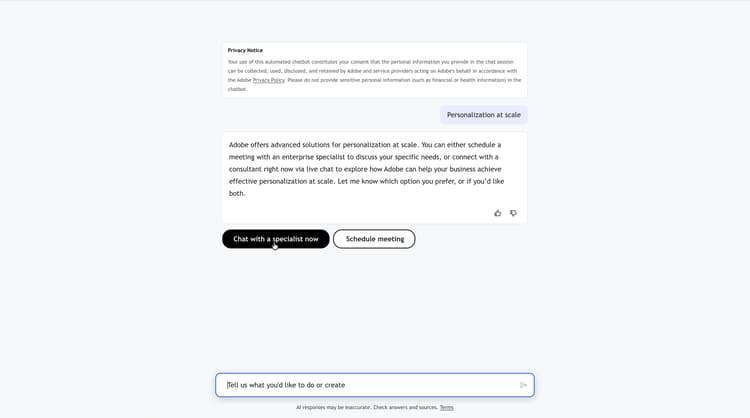
When the skill fires, the concierge explains the options and presents them as buttons in the conversation.
Live chat visitor-live-chat
If the visitor chooses to chat, the concierge shows a connecting state while routing finds an available representative.

Before the representative joins, the visitor completes a short pre-chat form. Those answers travel with the conversation and appear to the representative as Form details in the chat inbox, so the visitor does not have to repeat anything.
The visitor can end the chat at any time and is asked to confirm.

Meeting booking visitor-meeting-booking
If the visitor chooses to book a meeting, the concierge shows a calendar with the slots that are genuinely open on the routed representative’s calendar, in the visitor’s own time zone.

After the visitor confirms a slot, the visitor receives the representative’s confirmation email, which optionally includes a Microsoft Teams link. The conversation context goes to the representative with the invitation.
What you need before you start prerequisites
- Access to Adobe Marketo Qualifier, with your representatives added as users in the Adobe Admin Console.
- At least one representative who has connected a calendar. The Meeting Booking integration cannot be activated until one has.
- At least one representative who has set live chat availability. The Live Chat integration cannot be activated until one has.
- A concierge in Composer that you can add integrations and skills to.
Set up live chat and meeting booking setup-path
Work through these in order.
- Set up representatives in Adobe Marketo Qualifier — connect a calendar, define the confirmation email, and set calendar and live chat availability.
- Route conversations to representatives — choose round robin, a direct agent, or custom rules built on Marketo attributes.
- Activate live chat and meeting booking — connect the two integrations and activate the Handoff to sales skill.
- Chat inbox — what representatives do once a chat arrives, including scoring the conversation.
- Brand Concierge data in Marketo Engage — the lead fields and activity types written back to Marketo, and how to use them in Smart Campaigns.
- Monitor meetings and live chats — the bookings list and the performance dashboard.
Data retention retention
Live chat conversations are retained for 30 days.