Monitor meetings and live chats monitor
Adobe Marketo Qualifier keeps the operational record of every handoff: the meetings that were booked, the chats that were held, and how meeting bookings are performing.
Review booked meetings bookings
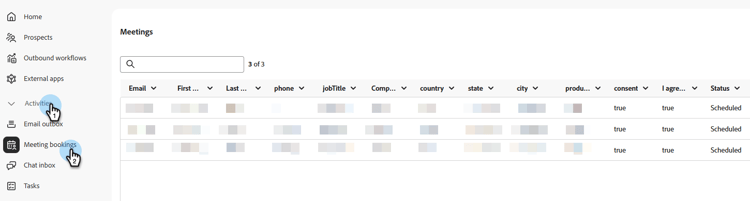
Under Activities, select Meeting bookings to review meetings that have been booked, see the information captured for each one, and learn when each meeting was scheduled.
Review live chats chats
Under Activities, select Chat inbox, and then open the All tab to see every conversation, including ones that have ended. See Chat inbox.
Analyze meeting performance performance
Under Analytics, select Meeting performance to see how many meetings visitors requested, how many were booked, and how many were missed. You can also see daily, weekly, and monthly trends, the percentage of requested meetings that were booked, and which representatives took the most meetings.

Analyze concierge engagement in Marketo Engage marketo
For deeper segmentation, including conversation score, routing type, and abandoned meeting bookings, use the concierge activity types in Marketo Engage. See Brand Concierge data in Marketo Engage.