Limits

In this use case, you want to report on the top 5 occurrences of product names during 2023.

Customer Journey Analytics

An example Limit panel for the use case:
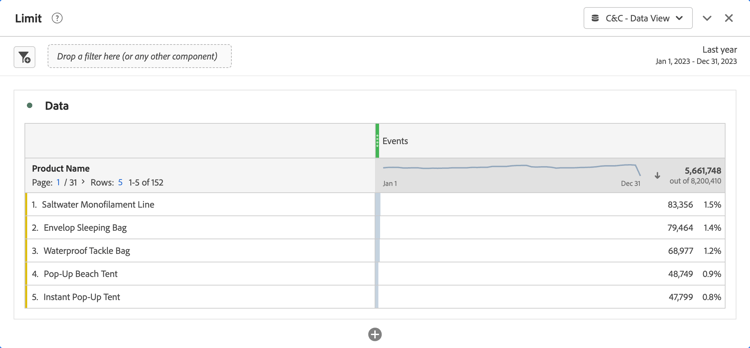
Customer Journey Analytics Limit panel

BI tools
note prerequisites
PREREQUISITES
Ensure you have validated a successful connection, can list data views, and use a data view for the BI tool for which you want to try out this use case.
tabs
Power BI Desktop
  1. In the Data pane:

    1. Select daterange.
    2. Select product_name.
    3. Select sum occurrences.
  2. In the Filters pane:

    1. Select daterange is (All) from Filters on this visual.
    2. Select Relative date as the Filter type.
    3. Define the filter to Show items when the value is in the last 1 calendar years.
    4. Select Apply filter.
    5. Select product_name is (All) from Filters on this visual.
    6. Select Top N as the Filter type.
    7. Select Show Items Top 5 By value.
    8. Drag and drop sum occurrences from the Data pane and drop it on Add data fields here.
    9. Select Apply filter.
  3. In the Visualization pane:

    • Select CrossSize75 to remove daterange from Columns.

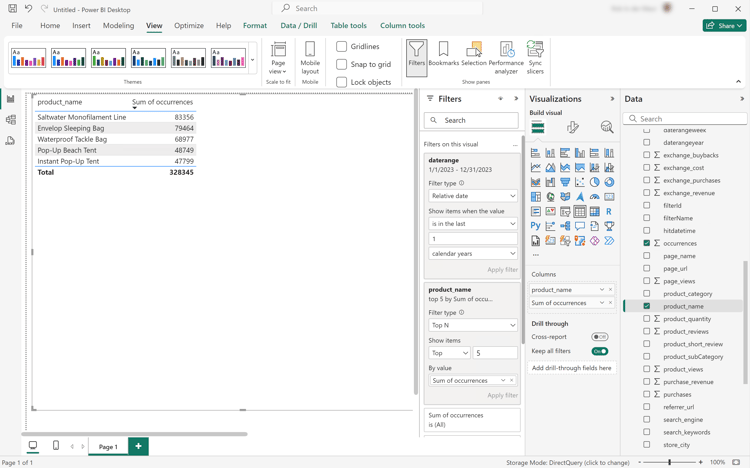
    Your Power BI Desktop should look like below.

    Power BI Desktop Using Date Range Names To Filter

The query executed by Power BI Desktop using the BI extension is including a limit statement but not the one expected. The limit to the top 5 occurrences is enforced by Power BI Desktop using explicit product name results.

code language-sql
select "_"."product_name",
    "_"."a0"
from
(
    select "rows"."product_name" as "product_name",
        sum("rows"."occurrences") as "a0"
    from
    (
        select "_"."daterangeName",
            "_"."daterange",
            "_"."filterId",
            "_"."filterName",
            "_"."timestamp",
            "_"."affiliate_name",
            "_"."affiliate_url",
            "_"."commerce.order.priceTotal",
            "_"."customer_city",
            "_"."customer_region",
            "_"."daterangeday",
            "_"."daterangefifteenminute",
            "_"."daterangefiveminute",
            "_"."daterangehour",
            "_"."daterangeminute",
            "_"."daterangemonth",
            "_"."daterangequarter",
            "_"."daterangesecond",
            "_"."daterangethirtyminute",
            "_"."daterangeweek",
            "_"."daterangeyear",
            "_"."hitdatetime",
            "_"."page_name",
            "_"."page_url",
            "_"."product_category",
            "_"."product_name",
            "_"."product_short_review",
            "_"."product_subCategory",
            "_"."referrer_url",
            "_"."search_engine",
            "_"."search_keywords",
            "_"."store_city",
            "_"."store_name",
            "_"."store_region",
            "_"."store_type",
            "_"."timepartdayofmonth",
            "_"."timepartdayofweek",
            "_"."timepartdayofyear",
            "_"."timeparthourofday",
            "_"."timepartminuteofhour",
            "_"."timepartmonthofyear",
            "_"."timepartquarterofyear",
            "_"."timepartweekofyear",
            "_"."cm_session_end_rate_defaultmetric",
            "_"."cm_session_person_defaultmetric",
            "_"."cm_session_start_rate_defaultmetric",
            "_"."cm_timespent_person_defaultmetric",
            "_"."cm_timespent_session_defaultmetric",
            "_"."cm_product_name_count_distinct",
            "_"."ad_views",
            "_"."adobe_sessionends",
            "_"."adobe_sessionstarts",
            "_"."adobe_timespent",
            "_"."exchange_buybacks",
            "_"."exchange_cost",
            "_"."exchange_purchases",
            "_"."exchange_revenue",
            "_"."occurrences",
            "_"."page_views",
            "_"."product_quantity",
            "_"."product_reviews",
            "_"."product_views",
            "_"."purchase_revenue",
            "_"."purchases",
            "_"."visitors",
            "_"."visits"
        from "public"."cc_data_view" "_"
        where (("_"."product_name" in ('Saltwater Monofilament Line', 'Pop-Up Beach Tent', 'Instant Pop-Up Tent', 'Envelop Sleeping Bag', 'Waterproof Tackle Bag')) and "_"."daterange" < date '2024-01-01') and "_"."daterange" >= date '2023-01-01'
    ) "rows"
    group by "product_name"
) "_"
where not "_"."a0" is null
limit 1000001
Tableau Desktop
  1. Select the Sheet 1 tab at the bottom to switch from Data source. In the Sheet 1 view:

    1. Drag Daterange entry from the Tables list in the Filters shelf.

    2. In the Filter Field [Daterange] dialog, select Range of Dates and select Next >.

    3. In the Filter [Daterange] dialog, select Relative dates, select Years, and select Previous years. Select Apply and OK.

    4. Drag Product Name from the Tables list to Rows.

    5. Drag Occurrences entry from the Tables list and drop the entry in the field next to Columns. The value changes to SUM(Occurrences).

    6. Select Text Table from Show Me.

    7. Select Fit Width from the Fit drop-down menu.

    8. Select Product Name in Rows. Select Filter from the drop-down menu.

      1. In the Filter [Product Name] dialog, select the Top tab.

      2. Select By field: Top 5 by Occurrences Sum.

      3. Select Apply and OK.

        AlertRed You notice that the table disappears. Selecting the top 5 product names by occurrences does not work properly using this filter.

      4. Select the Product Name in the Filter shelf and from the drop-down menu select Remove. The table reappears.

    9. Select SUM(Occurrences) in the Marks shelf. Select Filter from the drop-down menu.

      1. In the Filter [Occurrences] dialog, select At least.

      2. Enter 47.799 as the value. This value ensures that only the top 5 items are shown in the table. Select Apply and OK.

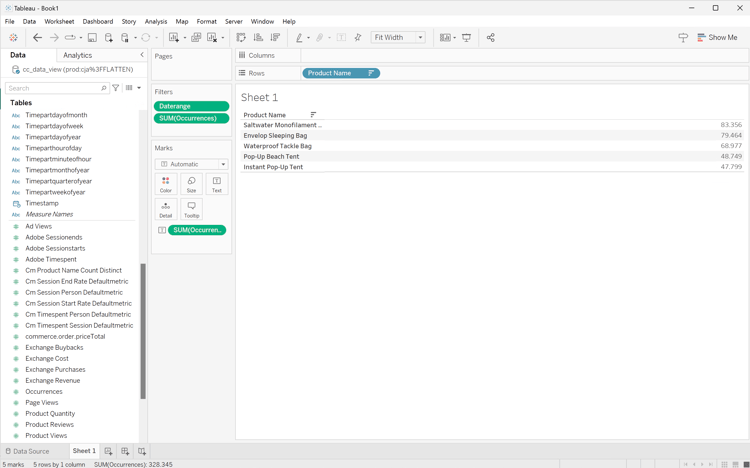
        Your Tableau Desktop should look like below.

        Tableau Desktop Limits

As shown above, this query executed by Tableau Desktop, when defining a Top 5 occurrences filter on product names, fails.

code language-sql
SELECT CAST("cc_data_view"."product_name" AS TEXT) AS "product_name",
  SUM("cc_data_view"."occurrences") AS "sum:occurrences:ok"
FROM "public"."cc_data_view" "cc_data_view"
  INNER JOIN (
  SELECT CAST("cc_data_view"."product_name" AS TEXT) AS "product_name",
    SUM("cc_data_view"."occurrences") AS "$__alias__0"
  FROM "public"."cc_data_view" "cc_data_view"
  GROUP BY 1
  ORDER BY 2 DESC,
    1 ASC
  LIMIT 5
) "t0" ON (CAST("cc_data_view"."product_name" AS TEXT) = "t0"."product_name")
WHERE (("cc_data_view"."daterange" >= (TIMESTAMP '2023-01-01 00:00:00.000')) AND ("cc_data_view"."daterange" < (TIMESTAMP '2024-01-01 00:00:00.000')))
GROUP BY 1

The query executed by Tableau Desktop, when defining a Top 5 filter on occurrences, is shown below. The limit is not visible in the query and applied client side.

code language-sql
SELECT CAST("cc_data_view"."product_name" AS TEXT) AS "product_name",
  SUM("cc_data_view"."occurrences") AS "sum:occurrences:ok"
FROM "public"."cc_data_view" "cc_data_view"
WHERE (("cc_data_view"."daterange" >= (TIMESTAMP '2023-01-01 00:00:00.000')) AND ("cc_data_view"."daterange" < (TIMESTAMP '2024-01-01 00:00:00.000')))
GROUP BY 1
Looker
  1. In the Explore interface of Looker, refresh your connection. Select Setting Clear cache and refresh.

  2. In the Explore interface of Looker, ensure you do have a clean setup. If not, select Setting Remove fields and filters.

  3. Select + Filter underneath Filters.

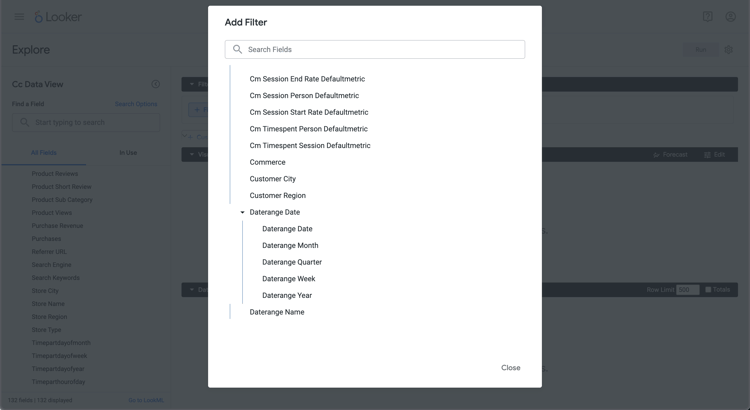
  4. In the Add Filter dialog:

    1. Select ‣ Cc Data View
    2. From the list of fields, select ‣ Daterange Date then Daterange Date.
      Looker filter
  5. Specify the Cc Data View Daterange Date filter as is in range 2023/01/01 until (before) 2024/01/01.

  6. From the ‣ Cc Data View section in the left rail:

    1. Select Product Name.
    2. Select Count underneath MEASURES in the left rail (at the bottom).
  7. Ensure you select (Descending, Sort Order: 1) on the Purchase Revenue column.

  8. Ensure you select (Descending, Sort Order: 1) on the Purchase Revenue column.

  9. Select Run.

  10. Select ‣ Visualization.

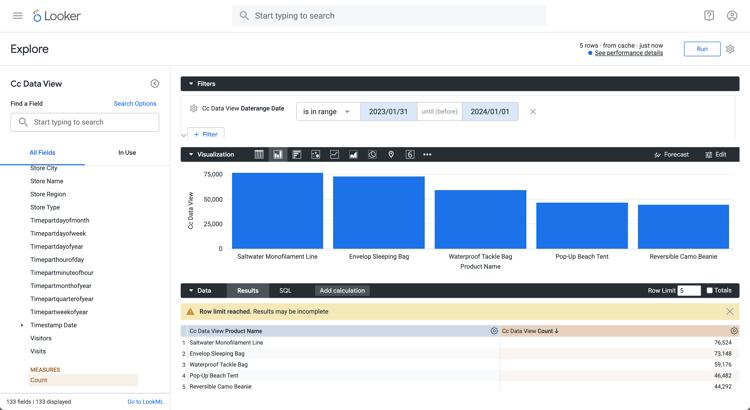
You should see a visualization and table similar as shown below.

Looker count distinct

The query generated by Looker using the BI extension is including FETCH NEXT 5 ROWS ONLY, which implies that the limit is executed through Looker and the BI extension.

code language-sql
-- Looker Query Context '{"user_id":6,"history_slug":"a8f3b1ebd5712413ca1ae695090f70db","instance_slug":"71d4667f0b76c0011463658f45c3f7a3"}'
SELECT
    cc_data_view."product_name"  AS "cc_data_view.product_name",
    COUNT(*) AS "cc_data_view.count"
FROM
    "public"."cc_data_view" AS "cc_data_view"
WHERE ((( cc_data_view."daterange"  ) >= (DATE_TRUNC('day', DATE '2023-01-31')) AND ( cc_data_view."daterange"  ) < (DATE_TRUNC('day', DATE '2024-01-01'))))
GROUP BY
    1
ORDER BY
    2 DESC
FETCH NEXT 5 ROWS ONLY
Jupyter Notebook
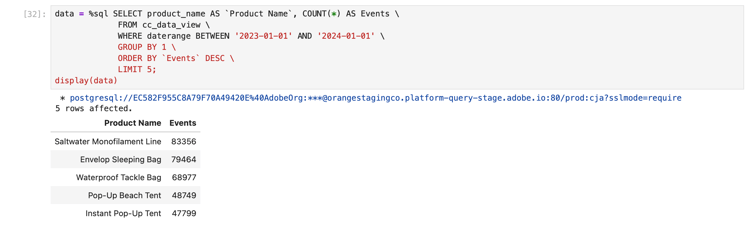
  1. Enter the following statements in a new cell.

    code language-python
    data = %sql SELECT product_name AS `Product Name`, COUNT(*) AS Events \
                FROM cc_data_view \
                WHERE daterange BETWEEN '2023-01-01' AND '2023-02-01' \
                GROUP BY 1 \
                ORDER BY `Events` DESC \
                LIMIT 5;
    display(data)
    
  2. Execute the cell. You should see output similar to the screenshot below.

    Jupyter Notebook Results

The query is excuted by the BI extension as defined in Jupyter Notebook.

RStudio
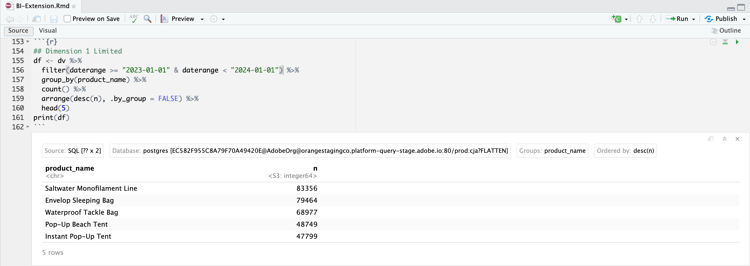
  1. Enter the following statements between ```{r} and ``` in a new chunk.

    code language-r
    ## Dimension 1 Limited
    df <- dv %>%
       filter(daterange >= "2023-01-01" & daterange < "2024-01-01") %>%
       group_by(product_name) %>%
       count() %>%
       arrange(desc(n), .by_group = FALSE) %>%
       head(5)
    print(df)
    
  2. Run the chunk. You should see output similar to the screenshot below.

    RStudio Results

The query generated by RStudio using the BI extension is including LIMIT 5, which implies that the limit is applied through RStudio and the BI extension.

code language-sql
SELECT "product_name", COUNT(*) AS "n"
FROM (
  SELECT "cc_data_view".*
  FROM "cc_data_view"
  WHERE ("daterange" >= '2023-01-01' AND "daterange" < '2024-01-01')
) AS "q01"
GROUP BY "product_name"
ORDER BY "n" DESC
LIMIT 5
recommendation-more-help
080e5213-7aa2-40d6-9dba-18945e892f79