Derived fields guidelines
Customer Journey Analytics derived fields let you transform, classify, and enrich data at query time without modifying source datasets. That flexibility can introduce complexity, performance problems, and maintenance overhead if applied without discipline.
This article provides guidelines (best practices, guardrails, and common pitfalls) for working with derived fields. The intended audience is data architects, product administrators, and analysts who need to:
-
Optimize performance: Identify patterns that slow down the execution of queries or hit system limits, to select the right tool for the job:
-
Improve maintainability: Build derived field logic that is clear, modular, and easy to update.
-
Ensure correctness: Avoid common logical errors in classification, attribution, and data transformation.
The sections in this article are organized by theme. From over-complex rule chains to the misuse of functions like Lookup, Regex Replace, and Next or Previous. Each section includes:
- Patterns to detect: Observable signals in your derived field definitions.
- Risk diagnosis: Why the pattern is problematic. Possible reasons are negative effects on performance, data quality, or maintenance.
- Recommendations: Concrete steps to refactor or improve the implementation.
These guidelines help you to create efficient, scalable, and semantically correct implementations in Customer Journey Analytics. Apply these guidelines when you audit existing data views, design new derived fields, or build governance tools.
High-cardinality derived fields
This section discusses data view default segments that reference high-cardinality derived fields.
Patterns
- Data view default segments that reference a derived field that is built on a high-cardinality dimension (approximately one million or more distinct values). For example: full page URL.
- Simple operations like Lowercase, Trim, or Case When checks on page URL are often more expensive than the same logic on low-cardinality fields such as page name, site section, or URL group.
Risk diagnosis: performance
- Default segments that filter on derived fields touching page URL or other high-cardinality dimensions add latency to every query against the data view.
Recommendations
- Avoid referencing full page URLs or similarly high-cardinality components directly in data view default segments. Push heavy URL logic (complex Case When, Regex Replace, multiple string functions) upstream to Data Prep or lookup datasets so the resulting classifications land on simpler, lower-cardinality dimensions.
- Prefer lower-cardinality keys such as normalized page name, site section, or pre-classified URL groups.
- Periodically audit existing data view default segments and derived fields for references to high-cardinality dimensions (page URL, campaign IDs, raw query strings) and refactor to normalized or grouped keys.
Over-complex Case When rule chains
This section discusses over-complex chains of Case When rules.
Customer Journey Analytics enforces explicit function and operator limits per derived field (for example, maximum number of operators, maximum number of function per type). Over-complex functions and chains within functions are harder to maintain and more error-prone.
Patterns
-
Very large Case When functions with complex If and Else If chains:
- Many conditions (for example: more than 20 operators) or deep nesting (more than 3 or 4 levels of nested Case When If and Else If logic).
- Repeated conditions on the same field with different values.
-
Repeated constant string matching.
accordion Example 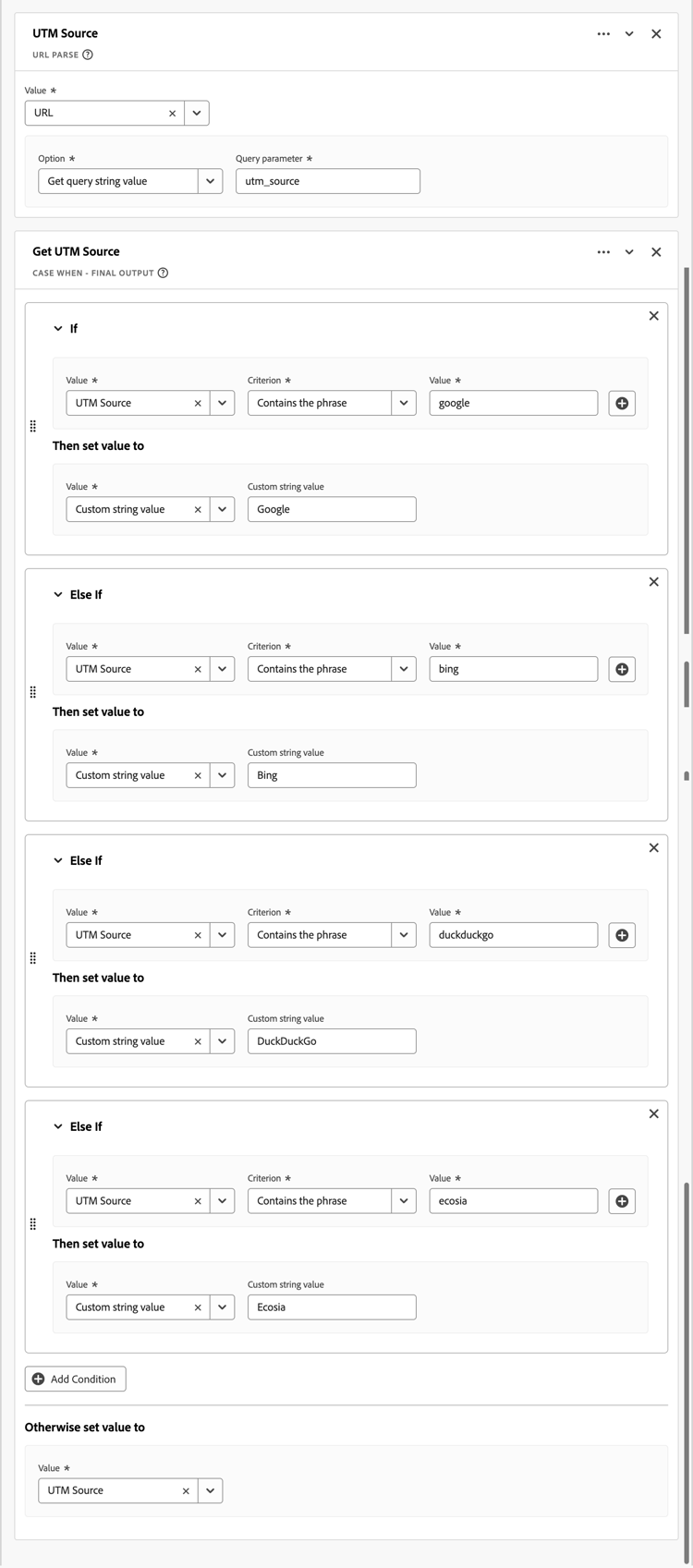
Risk diagnosis: performance, data quality, high maintenance
- Maintainability and error risk: logic encoded as a monolithic rule block is hard to debug and update.
- Potential performance and limit risk: you may hit or approach operator or function limits, especially with classify-like patterns.
Recommendations
- Split into multiple derived fields. For example, separate campaign normalization (mapping inconsistent campaign identifiers to a canonical value) from channel bucketing instead of combining everything in one giant rule.
- Use lookup datasets. Many If Value value Criterion criterion Then set value to value conditions are better implemented as a lookup dataset combined with the Lookup function instead of using long Case When chains.
- Use data view component filters. If part of the logic simply filters out bad values, use include exclude at the data view component level instead of embedding that logic in a derived field.
Wrong usage
This section discusses the wrong use of derived fields. Especially, where alternatives are a better solution.
Patterns
-
A derived field replicates behavior already available in component settings:
-
Case normalization, trimming, or simple filtering (for example: excluding
unknown,undefined, ornull) with no additional complexity. -
Basic bucketing on number ranges.
accordion Example 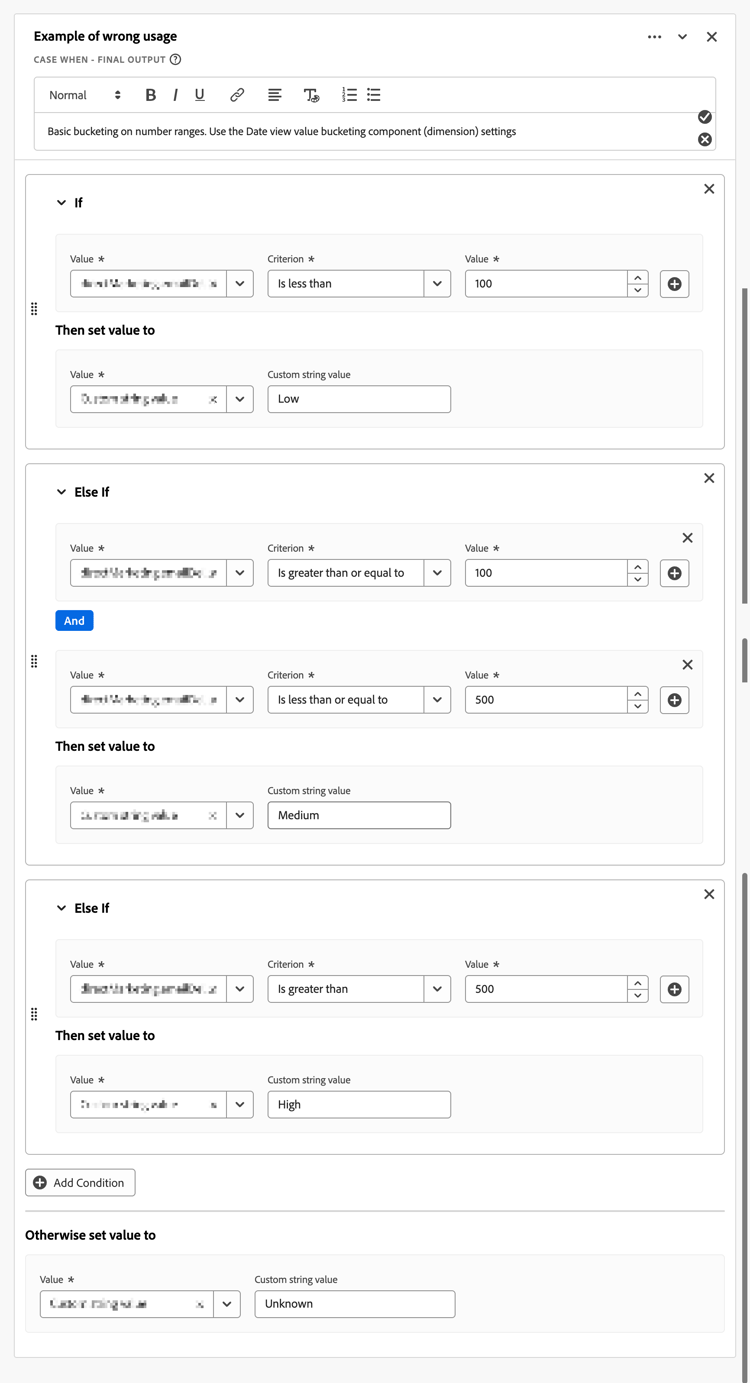
Instead, use value bucketing on a dimension in your Data view.
-
Persistence or attribution logic coded with Next or Previous or manual sequence logic where Data view attribution and expiration settings would suffice.
-
A derived metric that simply counts an existing metric under a condition.
accordion Example 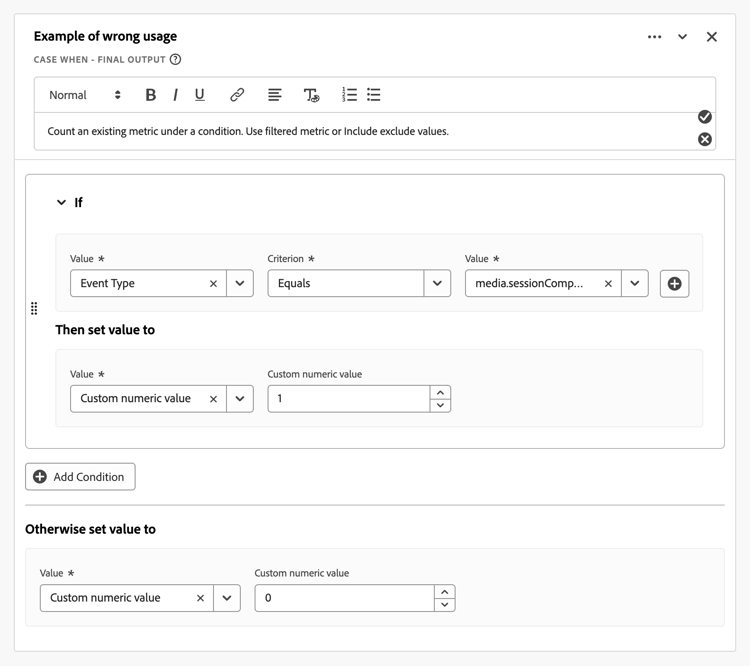
This replicates what a filtered metric or Include exclude values could achieve.
-
Risk diagnosis: data quality, high maintenance
- Redundant complexity: derived fields are used where simpler built-in data view features exist.
- Governance risk: other users may not understand why a derived field exists instead of a native setting. The pattern increases clutter in derived fields administration.
- Reduced reusability: encoding conditional flags as derived fields makes it harder to reuse base metrics with different filters across projects.
Recommendations
-
Trim / Lowercase: use the Substring and Behavior component settings unless you need combined multi-step transformations.
-
Value exclusion: use Include exclude values for metrics or dimension values at the data view component level, not in a derived field.
-
Attribution and persistence: Avoid simulating dimensions in a derived field with Next or Previous or other sequential logic. Use the data view Attribution and Persistence settings for dimensions.
-
Numeric bucketing: keep the derived field numeric and let the data view create a bucketed dimension on top, rather than hard-coding range labels in a Case When chain.
-
Conditional logic: convert simple 0 or 1 flag logic to either:
- the original metric with include or exclude values filter logic as applied in Analysis Workspace.
- a filtered metric using data view component settings configuration.
Misclassifications of metrics and dimensions
This section discusses the misclassification of metrics and dimensions.
Patterns
-
A derived field clearly produces:
- Numeric outputs (count, ratio, or arithmetic) but the component is configured as a dimension.
- Categorical outputs (labels or strings) but the component is configured as a metric.
-
A derived field encodes 0/1 flags as strings.
Customer Journey Analytics allows coercing numeric fields to dimensions and string fields to metrics at the data view level, but misalignment can create confusing reporting.
Risk diagnosis: data quality
- Semantic mismatch: the component type does not match the nature of the derived result, making the component type harder to analyze or aggregate correctly.
Recommendations
-
If the output is numeric:
- Set the component type to Metric in the data view.
- If the component represents a subset metric (for example, Checkout Page Views), use a filtered metric within the data view rather than a derived string plus a calculated metric on top.
-
If the output is a label:
- Set the component type to Dimension and configure attribution and persistence settings accordingly.
Marketing channel and campaign logic pitfalls
This section discusses marketing channel and campaign logic pitfalls.
Patterns
-
Customer Journey Analytics marketing channels are often implemented using derived fields.
- Derived fields implementing marketing channel or campaign bucketing based on URL parameters, referrer, landing page, and more.
- Suspicious ordering: a generic catch-all rule appears before more specific rules are applied.
- Incomplete handling of all possible options: no explicit branch for Referring Domain is not set or Query Parameter is not set.
Risk diagnosis: data quality
- Logic ordering error: later rules in the chain that potentially override specific channels and lead to misclassified traffic.
- Direct traffic mislabeling: unmatched traffic falls into an unintended channel or is labeled as
Other.
Recommendations
- Enforce top-down priority ordering. Place the strongest signals first (for example: internal domains to exclude paid campaign parameters).
- Include a final explicit Otherwise set value to case. Set the fallback to No value to avoid overwriting prior channels. Do not set the value to Custom string value and then the Custom string value to
Direct,NoneorUnclassifiedin this catch-all step. - Use templates. Leverage the marketing-channel derived-field templates where possible. Or at least align the logic with Adobe’s recommended marketing-channel best practices.
Non-normalized string keys used in lookups
This section discusses the use of non-normalized string keys in lookups.
Patterns
- A Lookup function over an event or profile field that feeds a lookup dataset.
- No preceding Lowercase, Trim, or Regex Replace standardizes the key.
- Common candidates: URL, campaign ID, email, account ID.
Risk diagnosis: Data Quality, High Maintenance
- Data quality risk: lookups fail when key casing or whitespace differs from the lookup table, leading to no match values and gaps in reporting.
Recommendations
Regex misuse or overreach
This section discusses the misuse or overreach of the regex functionality for derived fields.
Patterns
-
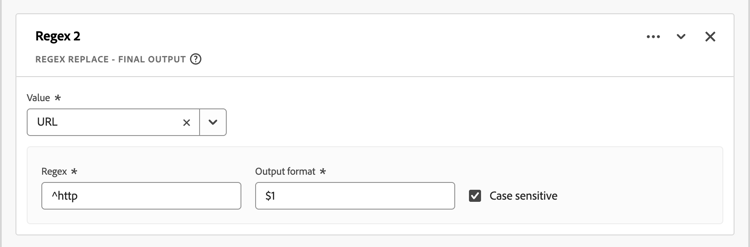
Regex Replace or regex-based conditions use very broad patterns where simpler Case When functions with Contains or Starts with are a simpler and better alternative.
accordion Example 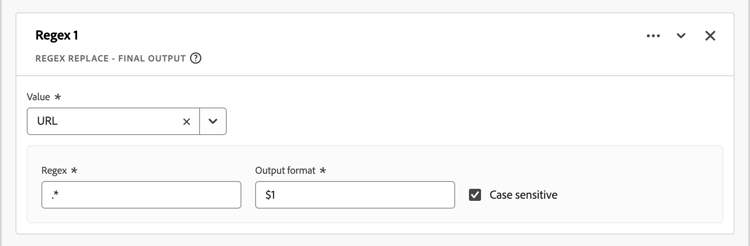
-
Multiple regex conditions overlap or conflict.
-
Heavy regex usage to parse URLs instead of using the URL Parse function.
Risk diagnosis: Performance, Data Quality, High Maintenance
- Performance and maintainability risk: complex regex patterns are harder to debug and may be slower.
- Correctness risk: overly broad regex may capture unintended values.
Recommendations
- Prefer URL Parse for standard URL elements (domain, path, query parameters) rather than Regex Replace.
- For simple pattern checks, use Case When with Contains, Starts with, or Ends with logic instead of regular expressions with Regex Replace.
- Flag regular expressions that use multiple nested groups or alternations for simple patterns. Or regular expressions that you can replace using derived field string functions.
Calculated metric style logic in derived fields
This section discusses the use of calculated style logic in a derived field.
Patterns
-
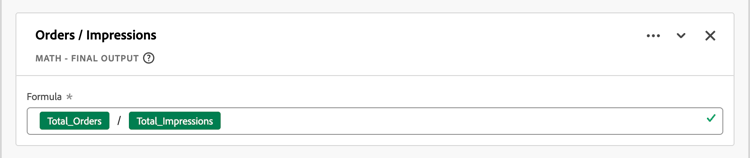
Pure arithmetic on numeric fields inside a derived field (sum, subtraction, division) that looks like a calculated metric.
accordion Examples 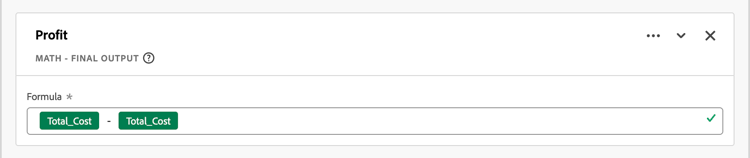
-
No use of string manipulation or classification; the logic is purely numeric.
Risk diagnosis: data quality
-
Governance and design question: the arithmetic may be better placed as:
- A derived field metric (if you want the derived field as a governed standard metric for all users).
- A calculated metric in Analysis Workspace (if the calculated metric is analysis specific).
Recommendations
- If the arithmetic result is generally useful across users and projects, keep the result as a derived field metric. Ensure that the component type is metric and the formatting (currency, percentage) is configured at the data view level.
- If the result is niche or analyst-specific, move the result to a calculated metric and simplify the data view.
Over-usage of Next or Previous or sequential functions
This section discusses the over-usage of Next or Previous or sequential functions.
Patterns
- A derived field uses Next or Previous functions multiple times (close to the documented per-field limit).
- Next or Previous is used to implement persistence-like logic (for example: carrying a campaign forward) instead of using data view persistence.
Risk diagnosis: data quality, high maintenance
- Complexity and fragility: heavy sequential logic is harder to reason about and may break if sessionization rules or ordering change.
- Redundancy with attribution or persistence: some use cases (for example, last touch channel attribution on a session) are better covered by data view attribution settings.
Recommendations
- For patterns that resemble standard attribution, use dimension attribution and persistence settings in the data view instead of simulating them with Next or Previous.
- Reserve Next or Previous for advanced multi-step path or funnel labeling that attribution alone cannot achieve (for example: channel sequence concatenation).
Ignoring session and person-level context
This section discusses ignoring session and person-level context when defining a derived field.
Patterns
-
A derived field implicitly assumes a particular container level (event, session, or person) but:
- The derived field makes no reference to session or person-level attributes.
- Data view session settings conflict with the intended logic.
Risk diagnosis: Data Quality
- Conceptual mismatch: derived field semantics may not match the aggregation level that analysts expect (for example: a persona based field that can change with every event).
Recommendations
- If the logic is intended to be session-level: verify that session settings are configured appropriately, and consider using session-scoped components or summarization in Analysis Workspace or in an integrated BI tool.
- If the logic is intended to be person-level: use profile datasets or lookup datasets and reference these datasets within derived fields.
- Evaluate whether a session-scoped or person-scoped segment in Analysis Workspace would achieve the same outcome more simply than a derived field.
Hitting or nearing documented function limits
This section discusses the implications of hitting or nearing the documented derived field function limits.
Customer Journey Analytics documents maximum functions and operators per derived field, including limits per function type (Lookup, Date Math, Deduplicate, Math, Split, URL Parse, and more).
Patterns
- A derived field uses many Lookup, Math operations, Split or other functions.
- The number of operators is near the documented limits (for example: more than 70% - 80% of allowed counts).
Risk diagnosis: performance, high maintenance
- Scalability risk: future additions may fail or behave unexpectedly if the field hits its function limit.
Recommendations
- Proactively flag when usage exceeds a threshold (for example: > 70% of any function or operator limit).
- Split the logic into multiple derived fields that are chained together (for example: a derived field A that normalizes a lookup key, and a derived field Band normalize_key then lookup_label).
- Use external Data Prep or a lookup dataset where especially large classifications are needed.
Data view-specific optimization rules
This section discusses data view specific optimization rules for derived fields.
Also check the data view configuration for each derived component.
Patterns
- A derived dimension has default attribution (for example: Last touch with session expiration) but the derived field name implies a different semantic (for example:
First Campaign of Visit,Original Source).
Risk diagnosis: data quality
- Semantic mismatch: the dimension’s label suggests a different attribution or expiration behavior (for example: first-touch or original-source) than what is actually configured.
- This mismatch increases the risk that analysts misinterpret reports or compare components that appear similar by name but use different attribution models.
Recommendations
- Adjust the allocation model and expiration on that dimension to align name and behavior. For example, a derived field dimension named
Original Sourceshould use First touch attribution with expiration set to Person.