Understand data discrepancies between data feeds and Analysis Workspace
The data in a data feed export doesn’t always match exactly with the data you see in Analysis Workspace. The information on this page explains some of the main reasons.
Lookback date range (Data feeds) vs. Reporting date range (Analysis Workspace)
The lookback date range in data feeds determines how far back Customer Journey Analytics looks when finding events that qualify for a data feed delivery. For details about the lookback date range, including examples, see Understand the lookback date range.
In that sense, the lookback date range is similar to the reporting date range in Analysis Workspace. However, there are key differences.
Whether data is included in a report or feed
Flexible
Events that fall outside the reporting date range can still be included in a Workspace report if the events are influenced by any of the following factors:
-
Dimension persistence: Can persist beyond the reporting date range when using Session, Custom Time, or Metric expiration. Same as the reporting date range when using Person Reporting Window expiration. Data is aggregated.
-
Segment qualification: Segments can extend beyond the reporting date range by default.
Users can choose to limit the segment to the reporting date range when they create the segment.
-
Session calculation: Sessions can extend beyond the reporting date range.
-
Derived field transformations
Fixed
Events that fall outside the lookback date range are never included in a data feed, regardless of whether they are influenced by the following factors:
- Dimension persistence: Cannot persist beyond the lookback date range, regardless of expiration settings. Data is not aggregated.
- Segment qualification: Always limited to the Lookback date range.
- Session calculation: Always limited to the lookback date range.
- Derived field transformations: Any derived field functions that reference containers use the lookback date range in data feed exports.
For more information about configuring the lookback date range, see Create a data feed.
The time frame to report on
Not the same as the time frame you want to report on.
The time frame to report on is the Frequency window, which can be a single hour or a single day.
Example
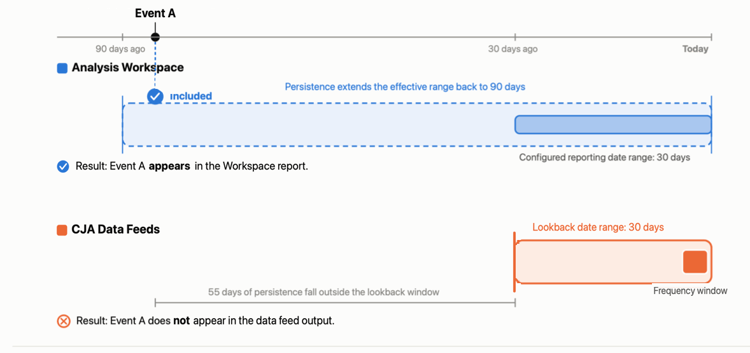
The example below illustrates how differences between the reporting date range and lookback date range can result in data discrepancies between Workspace reports and data feed deliveries.
Event A occurred 85 days ago and sits on a dimension with a 90-day persistence setting (for example, a campaign-click attribution window). The event is included in the Analysis Workspace report and not in the data feed delivery.
Stitching replays
Each time a stitching replay runs, historical identity data is retroactively updated.
Data feeds and Analysis Workspace treat stitching replays differently, as follows:
-
Data feeds: Reflects stitched identity at the time of export only. Replay results are not applied retroactively to exported files.
-
Analysis Workspace: Displays the most current stitched data, updated retroactively each time a replay runs. Historical data changes after each replay, so Workspace always reflects the latest identity resolution.
Late-arriving events
In a data feed, events can arrive after the data feed export window closes.
Data feeds and Analysis Workspace function differently regarding past events, as follows:
-
Data feeds: Exports data within a fixed time window based on when events are received.
Events that arrive after the window closes might not be included in the export. This is influenced by the lookback date range you choose.
-
Analysis Workspace: Processes data at report time, so events are included in reports regardless of when they were received.
Data batching
Sometimes data is submitted in a batch that spans an extended time period.
Data feeds and Analysis Workspace function differently regarding batched data, as follows:
-
Data feeds: Distributes batched data across each day or hour based on the original timestamps. For example, a batch containing 30 days of data is spread over 30 days of exports, so only a small slice appears in any single export.
-
Analysis Workspace: Displays all data in a batch as soon as it is fully processed, regardless of the time range included in the batch.