Auf dieser Seite: Erfahren Sie, wie Sie mit der Aktivität „Optimieren“ mehrere Journey-Pfade erstellen, die auf Experimenten, Targeting und Bedingungen basieren. Dabei wird die frühere Aktivität „Bedingung“ ersetzt.
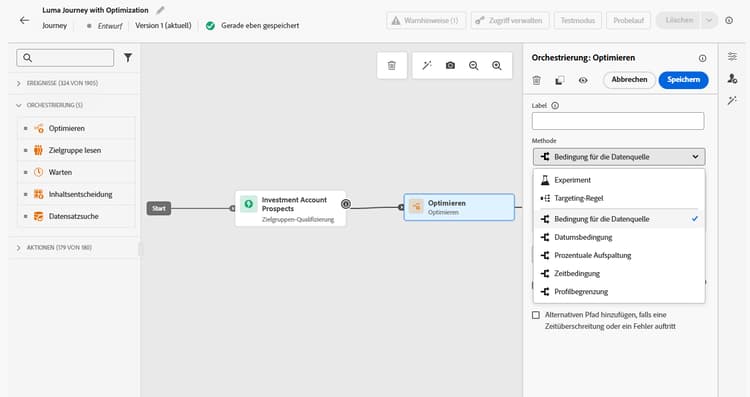
Mit der Aktivität Optimieren können Sie festlegen, wie Einzelpersonen Ihre Journey durchlaufen, indem Sie mehrere Pfade auf der Grundlage spezifischer Kriterien erstellen, darunter Experimente, Targeting und bestimmte Bedingungen. So gewährleisten Sie ein Höchstmaß an Engagement und Erfolg, um hochgradig personalisierte und effektive Journeys zu erstellen.
Was ist ein Journey-Pfad? journey-path
Ein Journey-Pfad kann aus beliebigen der folgenden Variablen bestehen: Sequenzierung von Nachrichten, dazwischen liegende Zeit, Anzahl der Nachrichten oder eine beliebige Kombination dieser drei Variablen.
Ein Pfad kann beispielsweise eine E-Mail enthalten, ein anderer zwei Mobile-Nachrichten und ein dritter eine E-Mail, einen Warteknoten von zwei Stunden und dann eine Mobile-Nachricht.
Drei Möglichkeiten zur Optimierung Ihrer Journeys optimization-methods
Mit der Aktivität Optimieren können Sie die folgenden Aktionen für die Journey-Pfade ausführen:
-
Pfadexperimente ausführen: Testen Sie verschiedene Pfade basierend auf zufälligen Aufspaltungen, um anhand vordefinierter Erfolgsmetriken (z. B. Konversionsrate, Umsatz, Interaktion) zu bestimmen, welche am besten abschneidet.
-
Targeting-Regeln nutzen: Definieren Sie bestimmte Regeln, die erfüllt sein müssen, damit eine Kundin oder ein Kunde zum Eintritt in einen der Journey-Pfade berechtigt ist. Diese können auf Zielgruppensegmenten, Profilattributten oder kontextuellen Daten basieren. Dadurch wird sichergestellt, dass die richtige Zielgruppe in den richtigen Pfad eintritt.
-
Bedingungen anwenden: Erstellen Sie bedingte Pfade basierend auf bestimmten Kriterien wie Datenquellen, Zeit, Datum, Prozentaufspaltungen oder Profilobergrenzen. Dies entspricht der vorherigen Aktivität „Bedingung“.
Funktionsweise how-it-works
Sobald die Journey live ist, werden die Profile anhand der definierten Kriterien bewertet und basierend auf den passenden Kriterien auf den entsprechenden Pfad der Journey weitergeleitet.
Nächste Schritte next-steps
Wählen Sie die Optimierungsmethode aus, die am besten zu Ihrem Anwendungsfall passt:
- Möchten Sie testen und erfahren, welcher Pfad am besten funktioniert? → Gehen Sie zu Pfadexperiment
- Möchten Sie verschiedene Zielgruppen an bestimmte Pfade senden? → Gehen Sie zu Pfad-Targeting
- Möchten Sie eine bedingte Logik erstellen (if/then-Szenarien)? → Gehen Sie zu Bedingungen
This section contains structured knowledge intended to support interpretation, retrieval, and question answering related to this topic.
For complete understanding, this information should be combined with the documentation on this page. Neither source is intended to stand alone; the page describes the feature, while this section provides additional context that helps disambiguate terminology, intent, applicability, and constraints.
- TL;DR: This page introduces the Optimize activity, the replacement for the former Condition activity, which lets users create multiple journey paths using experimentation, targeting rules, or conditional logic.
Intents:
- Understand what the Optimize activity does and how it replaces the former Condition activity
- Create multiple journey paths using path experimentation (A/B testing)
- Define targeting rules to route specific audience segments or profile attributes down separate paths
- Apply conditional logic (if/then) using the Conditions method within the Optimize activity
- Migrate existing journeys that used the Condition activity to the new Optimize activity
Glossary:
- Optimize activity: The journey canvas activity that replaces the former Condition activity and enables creation of multiple paths via experimentation, targeting, or conditions. (product-specific)
- Journey path: A sequence within a journey that can consist of communications, wait times, number of messages, or any combination; profiles are routed to a path based on criteria defined in the Optimize activity. (product-specific)
- Path experimentation: An Optimize method that randomly splits profiles across paths to determine which performs best against predefined success metrics such as conversion rate or revenue. (product-specific)
- Path targeting: An Optimize method that routes profiles to paths based on audience segments, profile attributes, or contextual data. (product-specific)
- Conditions: An Optimize method equivalent to the former Condition activity, creating conditional paths based on data sources, time, date, percentage splits, or profile caps. (product-specific)
Guardrails:
- The former Condition activity has been removed from the UI; existing journeys using it continue to work and now display with a new icon as Optimize activities using the Conditions method
- Custom labels set on former Condition nodes are preserved after the migration to Optimize
Terminology:
- Canonical name: Optimize activity — Acronym: none — variants: journey path optimization, Optimize node
- Synonyms: “Optimize activity (Conditions method)” = “former Condition activity”
- Do not confuse: “Path experimentation” ≠ “Path targeting” — Path experimentation uses random splits to test which path performs best; path targeting uses defined rules to route specific audiences to specific paths
FAQ:
- Q: What happened to the Condition activity? — It has been replaced by the Optimize activity and removed from the UI. Existing journeys that used Condition activities continue to work unchanged; they now display with a new icon as Optimize activities using the Conditions method.
- Q: What are the three methods available in the Optimize activity? — Path experimentation (random A/B splits to find the best-performing path), Path targeting (rule-based routing by audience or profile attributes), and Conditions (if/then conditional logic equivalent to the former Condition activity).
- Q: How does path experimentation differ from path targeting? — Path experimentation randomly splits profiles to test and compare path performance against success metrics; path targeting routes specific audiences or profile types down designated paths based on defined criteria.
- Q: Is path targeting generally available? — Yes, as of June 8, 2026.
- Q: What is a journey path? — A path is a sequence within a journey that can include a combination of communications, wait periods, and message counts; profiles are evaluated and routed to the appropriate path by the Optimize activity criteria.