在此頁面上:設定雲端儲存空間的即時連線,以便匯出Journey Optimizer資料集進行報告、封存和外部資料分析。
Journey Optimizer可讓您與雲端儲存位置建立即時連線,以匯出資料集的內容。
透過定期匯出資料,您可以確保擁有完整且最新的客戶互動記錄,以便隨時用於報告、封存或資料分析目的。
可用的雲端儲存空間目的地 destinations
您可以將資料集匯出至6個雲端儲存空間目的地,這些目的地可從 目錄 標籤中的 目的地 功能表存取。
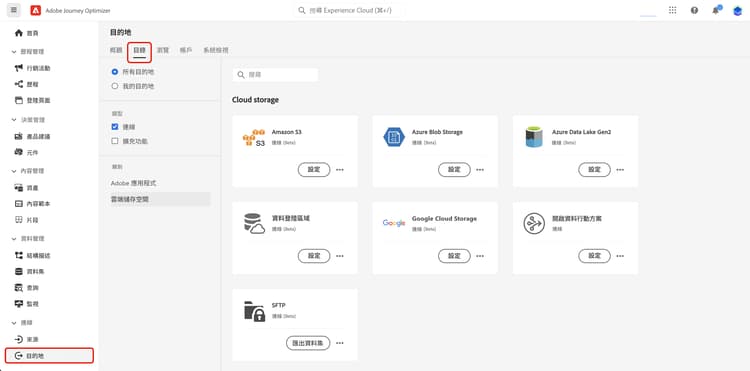
Adobe Experience Platform檔案中提供每個目的地的詳細資訊:
先決條件 prerequisites
若要匯出資料集,您需要下列存取控制許可權。 閱讀存取控制總覽或連絡您的產品管理員以取得必要的許可權。
匯出資料集的關鍵步驟 main-steps
將資料集匯出至雲端儲存位置的主要步驟如下:

每個步驟的詳細資訊可在Adobe Experience Platform檔案中取得。
-
設定您的雲端儲存空間目的地。 如果您尚未這麼做,請從目的地目錄連線至雲端儲存空間目的地。 在Adobe Experience Platform檔案中瞭解如何建立新的目的地連線。
-
選取您要匯出資料集的雲端儲存空間目的地。 在目標目錄中,按一下所需卡片上的 匯出資料集 按鈕,並選取要使用的連線。
note NOTE 如果您使用Adobe Journey Optimizer以及即時客戶設定檔,目的地卡片會顯示「啟用」按鈕,讓您根據已啟用許可權,匯出資料集並啟用此目的地的對象。 -
選取您要匯出至所選目的地的資料集。 深入瞭解可用於匯出的Journey Optimizer資料集
-
排程資料集的匯出。 指定匯出應該何時開始,以及應該發生的頻率。
-
檢查組態結束時顯示的摘要,以檢閱並確認匯出。
匯出完成後,資料集的內容會根據您設定的排程儲存在雲端儲存位置。 瞭解如何驗證資料集匯出是否成功。
可供匯出的可用資料集 datasets
從下表瞭解您可以匯出哪些Journey Optimizer資料集。
將新的自訂屬性欄位新增到選件專案結構描述後,這些新屬性可能在資料集中顯示之前會有長達一小時的延遲。 為避免潛在資料遺失或不一致,建議在做出任何依賴新新增屬性的變更或更新前,至少等待一小時。
報告資料集和裝載中繼資料對應 reporting-payload-metadata-mapping
若要針對程式碼型體驗和決定回應建立自訂報表,請使用 scopeDetails.correlationID 將互動或意見回饋資料聯結至AJO實體資料集,並擷取促銷活動、歷程和訊息中繼資料。 使用 exdRequestID 將單一決定請求連結至分析事件。
如果correlationID遺失(例如,保留對象),請使用匯出的資料集和記錄的加入金鑰,而非解碼未記錄的裝載欄位。 實體資料集查詢範例說明如何在correlationID上聯結。
This section contains structured knowledge intended to support interpretation, retrieval, and question answering related to this topic.
For complete understanding, this information should be combined with the documentation on this page. Neither source is intended to stand alone; the page describes the feature, while this section provides additional context that helps disambiguate terminology, intent, applicability, and constraints.
- TL;DR: This page explains how to set up a live connection to cloud storage destinations so you can export Journey Optimizer datasets for reporting, archival, and external data analysis.
Intents:
- Export Journey Optimizer datasets to a cloud storage destination on a schedule.
- Identify which cloud storage destinations are available.
- Determine which datasets can be exported.
- Obtain the access control permissions required to export datasets.
- Join exported data for custom reporting using documented join keys.
Glossary:
- Dataset export: establishing a live connection with a cloud storage location to export dataset content (product-specific)
- Cloud storage destination: an export target such as Amazon S3, Azure Blob, Azure Data Lake Gen 2, Data Landing Zone, Google Cloud Storage, or SFTP
- AJO Message Export Dataset: stores sent email and SMS message content marked for export; data is retained for seven calendar days from ingestion (product-specific)
scopeDetails.correlationID: used to join interaction or feedback data to the AJO Entity Dataset and retrieve campaign, journey, and message metadata (product-specific)exdRequestID: used to tie a single decision request to analytics events (product-specific)
Guardrails:
- Datasets can be exported to the 6 cloud storage destinations: Amazon S3, Azure Blob, Azure Data Lake Gen 2, Data Landing Zone, Google Cloud Storage, and SFTP.
- Required access control permissions: Manage and Activate Dataset Destinations (Destinations), View Datasets (Data Management), and View Destinations (Destinations).
- AJO Message Export Dataset data is retained for 7 calendar days from ingestion.
- The AJO Message Feedback Event Dataset uses batch ingestion; expect a data latency of up to 2 hours.
- Cloud storage destinations are accessed from the Destinations menu, in the Catalog tab.
Terminology:
- Do not confuse: the Export datasets button (dataset export) ≠ the Activate button (which, when Real-Time Customer profiles are used, exports datasets and activates audiences)
FAQ:
- Q: Which cloud storage destinations can I export to? — Amazon S3, Azure Blob, Azure Data Lake Gen 2, Data Landing Zone, Google Cloud Storage, and SFTP.
- Q: What permissions do I need to export datasets? — Manage and Activate Dataset Destinations, View Datasets, and View Destinations.
- Q: How long is AJO Message Export Dataset data kept? — Seven calendar days from ingestion.
- Q: Where do I start a dataset export? — From the Destinations menu, Catalog tab; select Export datasets on the destination card and choose the connection.
- Q: How do I join exported data for reporting? — Use
scopeDetails.correlationIDto join to the AJO Entity Dataset, andexdRequestIDto tie a single decision request to analytics events.