在此頁面上:瞭解如何使用externalDataLookup協助程式,以動態方式從外部端點擷取資料,並個人化Adobe Journey Optimizer中傳入管道的內容。
Journey Optimizer個人化編輯器中的externalDataLookup協助程式可用來從外部端點動態擷取資料,以用於產生傳入通道(例如程式碼式體驗、網頁和應用程式內訊息通道)的內容。
若要使用協助程式,您必須先在管理 > 組態功能表中定義動作。 「動作」可讓您設定有關外部端點的詳細資訊,例如URL、GET與POST方法、標頭引數、查詢引數、POST內文JSON結構描述和回應JSON結構描述。
定義動作後,即可同時使用兩者:
- 在歷程中,在自訂動作活動中擷取內容,
- 在歷程與傳入行銷活動中,在externalDataLookup協助程式中,擷取傳入動作中的資料。
護欄與限制
也請參閱Journey Optimizer傳入頻道行銷活動和Journeys#GuardrailsandGuidelines中的自訂動作。
- 最大查閱數 — 傳入訊息要求支援最多10個任何型別的查閱,包括外部資料查閱。 超過此限制會導致整個請求失敗。 了解更多
- 預設逾時 — 依預設,Journey Optimizer在呼叫外部端點時會使用300毫秒的逾時。 請聯絡您的Adobe代表,提高端點的此逾時。
- 回應結構描述瀏覽與運算式驗證 — 在個人化編輯器中,插入運算式時無法瀏覽端點回應的結構描述。 Journey Optimizer不會驗證運算式中所使用回應中對JSON屬性的參考。
- 引數支援的資料型別 — 透過externalDataLookup協助程式替代之承載變數引數的支援資料型別為
String、Integer、Decimal、Boolean、listString、listInt、listInteger、listDecimal。 - 自動重新整理更新的動作 — 動作設定的變更不會反映在即時行銷活動和歷程中的對應externalDataLookup呼叫中。 為了反映變更,您需要複製或修改任何在externalDataLookup協助程式中使用動作的即時行銷活動或歷程。
- 變數替代 — 目前,externalDataLookup協助程式引數中不支援使用變數。
- 動態路徑 — 目前不支援動態URL路徑。
- 多重傳遞呈現 — 支援多重傳遞呈現。
- 驗證 — 目前,externalDataLookup協助程式不支援Action設定中的驗證選項。 同時,針對API金鑰式驗證或其他純文字授權金鑰,您可以在動作設定中將它們指定為標頭欄位。
設定動作並使用協助程式
若要定義動作並使用協助程式進行個人化,請遵循下列步驟:
-
建立動作來設定查閱的端點。 每個端點只需要完成一次,且應由技術使用者完成。 瞭解如何設定自訂動作
記下動作ID並加以複製。

-
建立傳入行銷活動或歷程動作。 在此範例中,我們將說明如何在程式碼型體驗JSON動作中使用externalDataLookup協助程式,但可用於任何傳入頻道中的個人化欄位。
-
編輯動作的內容,前往個人化編輯器中的協助程式功能,並導覽至協助程式功能 > 協助程式。
-
按一下
+按鈕以插入externalDataLookup協助程式。 協助程式運算式已插入編輯器中,actionId和result有預留位置值。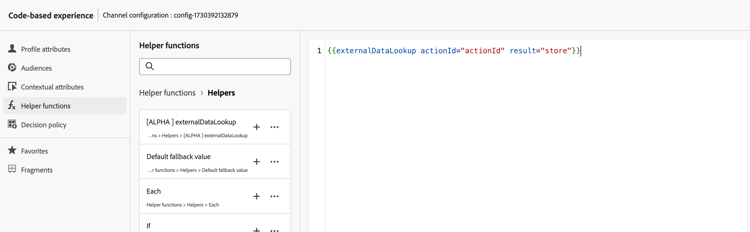
取代預留位置值,如下所示:
actionId:貼上先前複製的動作ID。result:設定您選擇的名稱。 您將使用此結果變數來存取擷取的內容。
-
新增任何變數引數值,以作為端點呼叫的一部分傳遞。 例如,以下說明如何傳遞語言引數和最大專案引數。

-
使用結果變數來存取擷取的資料,並將其插入傳入動作的內容中。 例如,以下說明如何傳回從端點擷取的JSON專案陣列。

運作方式
執行階段執行
當傳入動作包含externalDataLookup協助程式時,會在AEP Edge Network接收並處理Journey Optimizer個人化請求時動態呼叫端點。
這表示外部端點至少需要能夠處理使用者端針對指定表面傳送至AEP Edge Network的並行負載和輸送量。
語法
{{externalDataLookup actionId="d130c8e2-9a2d-45d5-bcb6-bc39865b4a56" result="result" optional-parameters...}}
傳遞引數
呼叫外部端點時,動作中定義的所有常數標頭值、查詢引數和要求裝載值,都會隨動作設定中指定的值傳送。
對於任何變數標頭值、查詢/路徑引數或要求裝載值,您可以使用引數將值動態傳遞至externalDataLookup協助程式。
引數名稱:
- 標頭引數:
header.<parameter-name> - 查詢引數:
query.<parameter-name> - 承載引數:
payload.<parameter-name> - 路徑引數:
dynamic_path.<parameter-name>
例如:
{{externalDataLookup actionId="..." result="result" header.myHeaderParameter="value1" query.myQueryParameter="value2" payload.myPayloadParameter="value3"}}`
引數值可以是固定值,也可以透過參考設定檔欄位或其他內容屬性進行個人化,例如:
{{externalDataLookup actionId="..." result="result" query.myQueryParameter=profile.myProfileValue}}
可使用點標籤法提供裝載引數,以參考巢狀JSON屬性,例如:
{{externalDataLookup actionId="..." result="result" payload.context.channel="web"}}
存取結果
若要存取從外部端點查詢呼叫擷取的資料,您可以使用個人化運算式和協助程式函式,參考動作定義中回應裝載所定義的欄位。
例如,如果動作中的回應裝載看起來像這樣:
{
    "videos": [
        {
            "id": "integer",
            "title": "string",
            "description": "string",
            "thumbnail_url": "string",
            "video_page_url": "string",
            "url": "string",
            "video_type": "string",
            "start_timestamp": "dateOnly",
            "created_on": "dateOnly",
            ...
        }
    ]
}
例如,您可以擷取並存取程式碼型Experience HTML動作中第一個影片的說明,如下所示:
{{externalDataLookup actionId="d130c8e2-9a2d-45d5-bcb6-bc39865b4a56" result="result"}}

First video description: <b>result.videos[0].description</b>
或者,舉例來說,您可以擷取並重複這些專案,以便在程式碼型體驗JSON動作中傳回專案陣列,如下所示:
{{externalDataLookup actionId="d130c8e2-9a2d-45d5-bcb6-bc39865b4a56" result="result"}}

[
{{#each result.videos as |item|}}
    {
        "title": "{{item.title}}",
        "url": "{{item.video_page_url}}",
        "thumbnail_url": "{{item.thumbnail_url}}",
        "start_timestamp": "{{item.start_timestamp}}"
    },
{{/each}}
]
疑難排解
逾時和錯誤處理
Journey Optimizer在呼叫外部端點時使用嚴格的逾時,以維持Adobe Experience Platform Edge Network的低延遲、高輸送量的效能特性。
如果端點逾時或到達端點時發生任何其他型別的錯誤,則結果變數將為空白。 在此情況下,結果變數內對屬性的任何參照也將是空的。 如果您只顯示內容中的屬性,則會顯示為空白。 如果您嘗試在結果中重複執行陣列屬性,將不會傳回任何專案。
如果您想要更順暢地處理逾時或錯誤,藉由顯示遞補內容,您可以檢查查詢結果是否為空白,並在該情況下顯示遞補內容。
例如,您可以顯示單一屬性的遞補值,如下所示:
First video description: {%=result.videos[0].description ?: "none found" %}
或者,您可以有條件地呈現整個內容區塊,如下所示:
{{externalDataLookup actionId="d130c8e2-9a2d-45d5-bcb6-bc39865b4a56" result="result"}}

{%#if result%}
   ... do something with result ...
{%else%}
    ... return fallback content ...
{%/if%}
除錯
為了協助進行偵錯,外部資料查詢的逾時和錯誤詳細資料包含在Adobe Experience Platform Assurance的Edge Delivery檢視中。 如果您在傳入動作中看不到externalDataLookup協助程式的預期結果,您可以啟動Assurance工作階段、從Web或行動實作起始Journey Optimizer呼叫,並使用Edge Delivery檢視來檢查逾時或錯誤詳細資料。
例如:
在執行詳細資訊中的保證追蹤的Edge Delivery區段底下,已新增新的customActions區塊,其請求和回應詳細資訊類似於以下內容。 如果在執行自訂動作時發生任何問題,錯誤區段應該有助於進行偵錯

常見問題 faq-external-data
您可以在下方找到有關外部資料查詢協助程式的常見問題。
需要更多詳細資料? 使用此頁面底部的意見回饋選項來提出您的問題,或與 Adobe Journey Optimizer 社群聯絡。
使用內容屬性>資料串流>事件功能表來瀏覽您使用的體驗事件結構,並插入相關屬性作為引數值,如下所示:
| code language-none |
|---|
|
This section contains structured knowledge intended to support interpretation, retrieval, and question answering related to this topic.
For complete understanding, this information should be combined with the documentation on this page. Neither source is intended to stand alone; the page describes the feature, while this section provides additional context that helps disambiguate terminology, intent, applicability, and constraints.
- TL;DR: This page explains how to configure an Action for an external endpoint and use the
externalDataLookuphelper in the personalization editor to dynamically fetch that data at runtime for personalizing inbound channel content.
Intents:
- Configure an Action defining an external endpoint (URL, HTTP method, parameters, request/response schemas)
- Insert the
externalDataLookuphelper in a personalization expression for an inbound action - Pass variable header, query, payload, or path parameters to the external endpoint at call time
- Access fetched data via the result alias using personalization expressions and helper functions
- Handle timeouts and errors gracefully with fallback content patterns
- Debug external lookup issues using Adobe Experience Platform Assurance
Glossary:
- externalDataLookup: A helper function in the personalization editor that dynamically fetches data from a configured external endpoint at request time, for use in inbound channel content personalization. (product-specific)
- Action: A configuration object in Journey Optimizer (Administration > Configurations) that defines an external endpoint — URL, HTTP method, header/query parameters, POST body schema, and response schema. Required before using
externalDataLookup. (product-specific) - result variable: An arbitrary alias assigned in the
externalDataLookupcall; used to reference all fields from the fetched response in subsequent personalization expressions. - Inbound channels: Channels where content is delivered on demand when a user opens a surface — Code-based Experience, Web, In-App Message. (product-specific)
- AEP Edge Network: The infrastructure that receives personalization requests and triggers the external data lookup call at runtime.
Guardrails:
- Feature is in Limited Availability — only available for a set of organizations.
- Default timeout for external endpoint calls: 300ms (default; contact your Adobe representative to increase this timeout for a specific endpoint).
- Response schema browsing is not supported in the personalization editor; Journey Optimizer does not validate references to JSON attributes from the response used in expressions.
- Supported data types for payload variable parameters:
String,Integer,Decimal,Boolean,listString,listInt,listInteger,listDecimal. - Variable substitution within
externalDataLookuphelper parameters is not currently supported. - Dynamic URL paths are not currently supported.
- Authentication options in the Action configuration are not currently supported by
externalDataLookup; use header fields for API key-based or plaintext authorization as a workaround. - Changes to an Action configuration are not reflected in live campaigns or journeys using that Action; copy or modify any live campaigns/journeys to apply the changes.
- Multi-pass rendering is supported.
- Journey Optimizer does not currently cache external endpoint responses.
- The external endpoint must be able to handle at least as much concurrent load and throughput as the inbound traffic sent to the AEP Edge Network for the given surface.
Terminology:
- Canonical name: externalDataLookup — variants: external data lookup, external data lookup helper, External Data Lookup Helper
- Synonyms: “externalDataLookup” = “external data lookup helper”
- Do not confuse:
actionId(ID of the configured Action, identifying the external endpoint) ≠result(alias for the fetched response data) ≠ parameter names (variable values passed to the endpoint at call time) - Do not confuse: using
externalDataLookupin an inbound personalization action (fetches data dynamically at Edge Network request time) ≠ using a Custom Action in a journey activity (fetches content within a journey flow)
FAQ:
- Q: What happens if the external endpoint times out or returns an error? — The result variable will be empty. Attribute references within the result will display as blank, and array iterations will return no items. Use fallback content patterns — such as
?: "none found"for single attributes or{%#if result%}…{%else%}…{%/if%}for entire content blocks — to handle these cases gracefully. - Q: How do I pass a contextual attribute from the request as a parameter to an external data lookup? — Use the Contextual Attributes > Datastream > Event menu in the personalization editor to browse the Experience Event schema and insert the relevant attribute as a parameter value, for example:
query.myQueryParameter=context.datastream.event.<schemaId>.my.xdm.attribute. - Q: Does Journey Optimizer cache external endpoint responses? — Not currently. Caching will be supported in the future.
- Q: How do I debug issues with externalDataLookup? — Use Adobe Experience Platform Assurance. Start an Assurance session, initiate a Journey Optimizer call from your web or mobile implementation, and use the Edge Delivery view to inspect the customActions block for timeout or error details.
- Q: Can I use authentication in the Action configuration with externalDataLookup? — Authentication options in the Action configuration are not currently supported. For API key-based or other plaintext authorization, specify the credentials as header fields in the Action configuration.