在此頁面上:將優先順序分數指派給歷程、行銷活動和輸入動作,以便您能夠在設定檔符合多個設定檔的資格時,控制哪個通訊優先。
Journey Optimizer可讓您將優先順序分數指派給歷程、行銷活動或歷程 動作 活動中的傳入頻道動作。
當有強制的限制(例如頻率上限)時,優先順序對於優先處理歷程、行銷活動或動作至關重要。
如果客戶符合許多歷程、行銷活動或通訊的資格,而您想要選擇他們應該輸入和接收的欄位,則應利用此欄位。
指派歷程和行銷活動的優先順序分數 priority-journey-campaign
➡️ 在影片中探索此功能
指派優先順序分數對於傳入通訊(例如Web、行動和應用程式內)至關重要。 如果您有多個使用相同管道設定的行銷活動(例如網頁頂端的橫幅),可能會造成問題,因為只顯示一個行銷活動的內容是可行的。 當收件者可能有資格參加多個行銷活動時,優先順序分數是您將插入應顯示哪個行銷活動的偏好設定的位置。
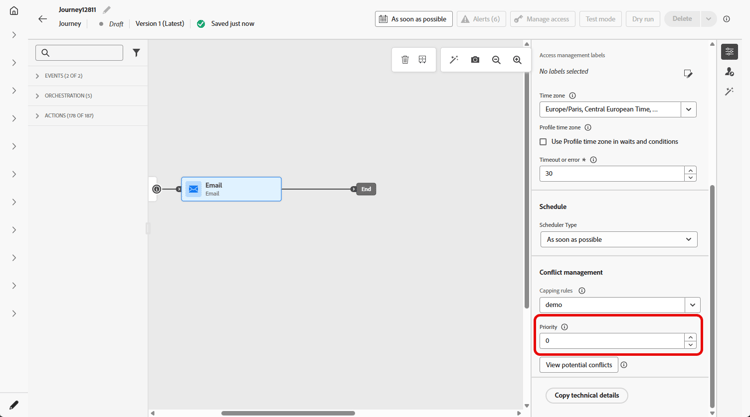
若要指派優先順序分數給歷程或行銷活動,請在歷程或行銷活動屬性中的 優先順序分數 欄位中輸入數值(從0到100)。 數字愈高,優先順序愈高。
如果您創作此行銷活動,且想確定此行銷活動內容已顯示,您可以給予100分。
針對傳入頻道動作指派優先順序分數 priority-action
Journey Optimizer也可讓您為動作活動內的傳入頻道動作指派優先順序分數。
這可讓您在有多個歷程動作或行銷活動使用相同管道設定時,優先處理傳入動作。
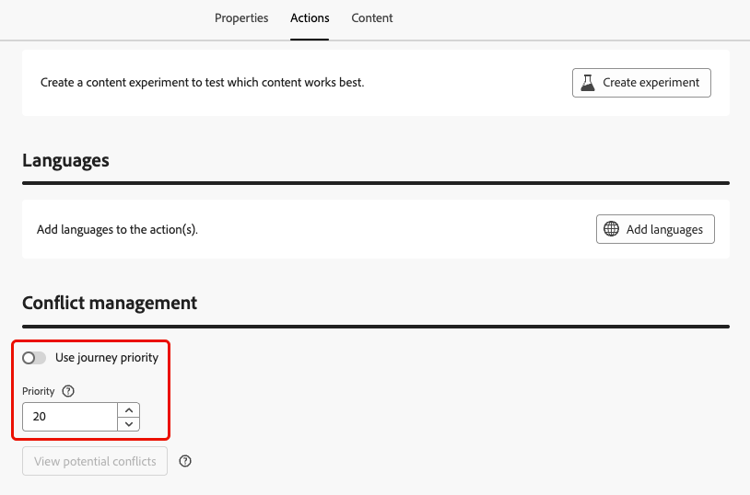
在 衝突管理 區段中,預設會選取 使用歷程優先順序 選項,這表示動作的優先順序分數繼承自歷程的整體優先順序分數。
若要將優先順序分數指派給 動作 活動中定義的輸入動作,請取消選取 使用歷程優先順序 選項,並在 優先順序 欄位中輸入數值(從0到100)。 數字愈高,優先順序愈高。
作法影片 video
This section contains structured knowledge intended to support interpretation, retrieval, and question answering related to this topic.
For complete understanding, this information should be combined with the documentation on this page. Neither source is intended to stand alone; the page describes the feature, while this section provides additional context that helps disambiguate terminology, intent, applicability, and constraints.
- TL;DR: This page explains how to assign a priority score (0-100) to a journey, campaign, or inbound channel action so the most important communication takes precedence when a profile qualifies for more than one under a constraint such as a frequency cap.
Intents:
- Assign a priority score to a journey or campaign in its properties
- Assign a priority score to an inbound channel action in the Action activity
- Give a campaign a score of 100 when you want to make sure its content is shown
- Override the inherited journey priority for an action by unselecting Use journey priority
Glossary:
- Priority score: A numeric value from 0-100 assigned to a journey, campaign, or action; the higher the number, the higher the priority (product-specific)
- Use journey priority: Option, selected by default, that inherits the action’s priority from the overall journey priority score (product-specific)
- Conflict management: Section of the Action activity where the action priority is set (product-specific)
- Inbound channel action: An action of the web, in-app, or code-based inbound channels, defined in the Action activity, to which a priority score can be assigned (product-specific)
Guardrails:
- Enter a numeric value from 0-100 in the Priority score field; the higher the number, the higher the priority.
- In campaigns, priority score is available for the web, in-app, and code-based inbound channels only.
- In the Action activity, priority score is available for the web, in-app, and code-based inbound channels only.
- If two journeys or campaigns have the same priority score, the system does not have a tie-breaking mechanism; ensure priority scores are unique to avoid conflicts.
- In the Action activity, Use journey priority is selected by default, so the action inherits the journey’s priority score until you unselect it.
Terminology:
- Canonical name: priority score — variants: priority
- Synonyms: none
- Do not confuse: journey or campaign “Priority score” ≠ action “Priority” (which by default inherits the journey score via Use journey priority)
FAQ:
- Q: What range can a priority score take? — A numeric value from 0-100, where the higher the number, the higher the priority.
- Q: How do I make sure a specific campaign is shown? — The page gives this example: to make sure the campaign content is shown, give it a score of 100.
- Q: What happens if two items share the same priority score? — The system has no tie-breaking mechanism, so ensure priority scores are unique.
- Q: On which channels is priority score available? — The web, in-app, and code-based inbound channels only.
- Q: How does an action get its priority? — By default it inherits the journey priority via Use journey priority; unselect that option to set a separate value from 0-100.