在此頁面上:限制設定檔可以一次輸入或註冊多少歷程,以便防止通訊超載,並排定最重要的歷程的優先順序。
歷程上限可幫助您限制設定檔可註冊的歷程次數,防止通訊過載。 在Journey Optimizer中,您可以設定兩種型別的上限規則:
- 專案上限會限制設定檔在指定期間內的歷程專案數。
- 並行上限會限制設定檔可同時註冊的歷程數。
這兩種型別的歷程上限都利用優先順序分數來仲裁專案。
➡️ 在影片中探索此功能
建立歷程頻率上限規則 create-rule
若要建立歷程上限規則,請遵循下列步驟:
-
導覽至 商業規則 功能表以存取規則集詳細目錄。
-
選取您要新增上限規則的規則集,或建立新規則集:
-
若要使用現有的規則集,請從清單中選取它。 歷程上限規則只能新增到具有「歷程」網域的規則集。 您可以在 網域 欄的規則集清單中檢查此資訊。

-
若要在新規則集內建立上限規則,請按一下建立規則集,指定規則集的唯一名稱,並從 規則集網域 下拉式清單中選取「歷程」,然後按一下儲存。

-
-
在規則集畫面中,按一下 新增規則 按鈕,然後提供規則的唯一名稱。
-
在 規則型別 下拉式清單中,指定規則的上限型別。
- 歷程專案上限:限制設定檔在指定期間內進入歷程的專案數。
- 歷程並行上限:限制設定檔可同時註冊的歷程數。

-
展開下列各節以瞭解如何設定每種型別的上限:
accordion 設定歷程專案上限規則 - 在 上限 欄位中,設定設定檔可輸入的歷程數目上限。
- 在 期間 欄位中,定義要考慮的時間段。 請注意,持續時間是根據UTC時區。 例如,每日上限將在UTC午夜重設。
在此範例中,我們要限制設定檔在一個月內輸入超過「5」個歷程。
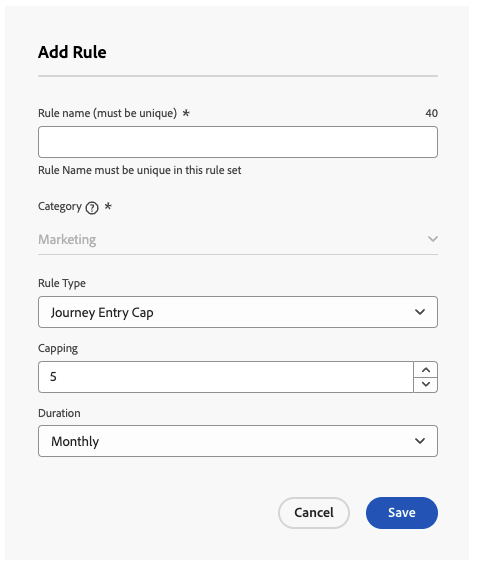
note NOTE 系統會考量套用此相同規則之即將排程歷程的優先順序。 在此範例中,如果行銷人員已輸入4個歷程,而本月有另一個具有較高優先順序的即將排程歷程,則會抑制客戶進入較低優先順序的歷程。 accordion 設定歷程並行上限規則 -
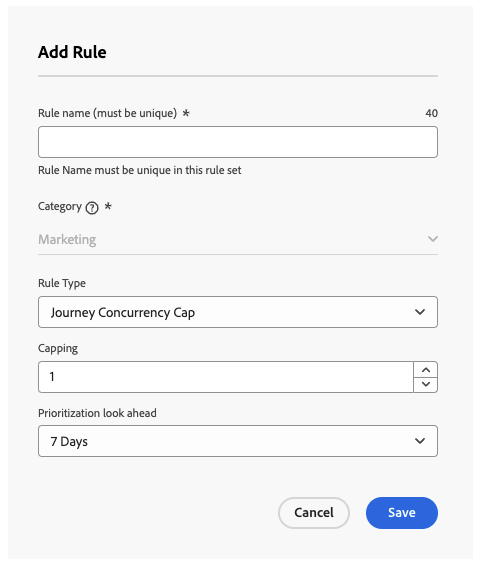
在 上限 欄位中,設定設定檔可同時註冊的歷程數上限。
-
使用 優先順序檢視 欄位,根據所選期間(例如1天、7天、30天)的優先順序分數仲裁歷程專案。
此選項會掃描一週剩餘時間中即將排程的讀取對象歷程,以判斷是否應由於較高優先順序的歷程出現而抑制設定檔進入歷程。 如果設定檔符合多個歷程的資格,這有助於排定進入較高價值歷程的優先順序。
在此範例中,如果設定檔已註冊到包含相同規則集的另一個歷程,我們會限制設定檔進入歷程。 如果未來7天內的另一個歷程有較高的優先順序分數,則設定檔不會進入此歷程。
-
重複上述步驟,視需求將任意數量的規則新增至規則集。
-
當上限規則準備好套用至歷程時,請啟動已新增該規則的規則和規則集。 瞭解如何啟用規則集
將頻率上限規則套用至歷程 apply-capping
若要將上限規則套用至歷程,請存取歷程並開啟其屬性。 在 上限規則 下拉式清單中,選取相關的規則集。 一旦啟動歷程,規則集中定義的上限規則將生效。

監視規則集排除 monitor
歷程上線後,如果規則集導致在 歷程排除 表格中從歷程排除任何專案,您可以簽入歷程報告。 「歷程排除專案」表格包含依規則集和規則名稱的排除專案詳細劃分,深入分析設定檔遭到捨棄的原因。 瞭解如何使用歷程報告

此外,您可以使用Adobe Experience Platform查詢服務來建立查詢,以識別導致設定檔無法進入指定歷程的規則。 查詢範例,包括捨棄子原因(CAP_REACHED或LOWER_PRIORITY),可在此區段中使用。
作法影片 video
This section contains structured knowledge intended to support interpretation, retrieval, and question answering related to this topic.
For complete understanding, this information should be combined with the documentation on this page. Neither source is intended to stand alone; the page describes the feature, while this section provides additional context that helps disambiguate terminology, intent, applicability, and constraints.
- TL;DR: This page explains how to create journey capping rules—entry capping and concurrency capping—inside a journey-domain rule set, and how they use priority scores to arbitrate which journeys a profile enters.
Intents:
- Create a Journey Entry Cap to limit journey entries over a period
- Create a Journey Concurrency Cap to limit simultaneous journey enrollments
- Use Prioritization look ahead to arbitrate entries based on priority scores over a chosen period
- Apply a journey rule set to a journey through the Capping rules drop-down
- Monitor exclusions in the Journey Exclusions table and with Query Service
Glossary:
- Entry capping: Limits the number of journey entries over a given period for a profile (product-specific)
- Concurrency capping: Limits how many journeys a profile can be enrolled in simultaneously (product-specific)
- Prioritization look ahead: Field that arbitrates journey entries based on priority scores over a chosen period, scanning upcoming scheduled Read-Audience journeys (product-specific)
- Arbitration: Using priority scores to arbitrate journey entries (product-specific)
- Capping: Field setting the maximum number of journeys a profile can enter or be enrolled in simultaneously (product-specific)
- CAP_REACHED / LOWER_PRIORITY: Discard sub-reasons that identify why a profile did not enter a journey (product-specific)
Guardrails:
- Journey capping rules can only be added to rule sets with the “journey” domain.
- Both entry capping and concurrency capping leverage priority scores to arbitrate entries.
- Durations are based on the UTC time zone (for example, a Daily cap resets at midnight UTC).
- For entry capping, the system takes into account the priority of upcoming scheduled journeys that have the same rule applied, and can suppress a profile from a lower-priority journey when a higher-priority one is scheduled.
- If a journey is activated immediately, it can take up to 10 minutes for the system to begin suppressing customers; a message displays if you try to publish with a start time less than 10 minutes away.
Terminology:
- Canonical name: journey capping — variants: journey capping & arbitration
- Synonyms: none
- Do not confuse: “Journey Entry Cap” (entries over a period) ≠ “Journey Concurrency Cap” (simultaneous enrollments)
FAQ:
- Q: What is the difference between entry and concurrency capping? — Entry capping limits journey entries over a period; concurrency capping limits how many journeys a profile is enrolled in simultaneously.
- Q: How are journey entries arbitrated? — By priority scores; the Prioritization look ahead scans upcoming scheduled Read-Audience journeys to suppress entry when a higher-priority journey is coming up.
- Q: Why can suppression be delayed after activation? — If a journey is activated immediately, it can take up to 10 minutes for the system to begin suppressing customers.
- Q: How do I find why a profile did not enter a journey? — Check the Journey Exclusions table in the journey report, or query the discard sub-reason (CAP_REACHED or LOWER_PRIORITY).