在此頁面上:瞭解如何在Adobe Journey Optimizer中檢視、管理及建立自訂管道的API認證集,以便您可以跨不同品牌或環境驗證端點的請求,而不會複製管道。
當使用非 None 的驗證型別建立自訂管道時,啟動管道時會自動產生初始API認證集。
您可以從管理 > 管道 > 管道產生器 > API認證檢視、管理和編輯認證。

對相同管道擁有多個認證可讓您將不同的驗證值附加到不同的管道設定 — 例如,針對不同品牌或使用案例 — 而不複製管道定義。
若要編輯現有的認證集,請按一下詳細目錄清單中的專案。 所有欄位都可以編輯。
若要為相同管道建立其他認證,請遵循以下步驟。
-
從 API認證 清單,按一下建立API認證。
-
提供名稱和說明。
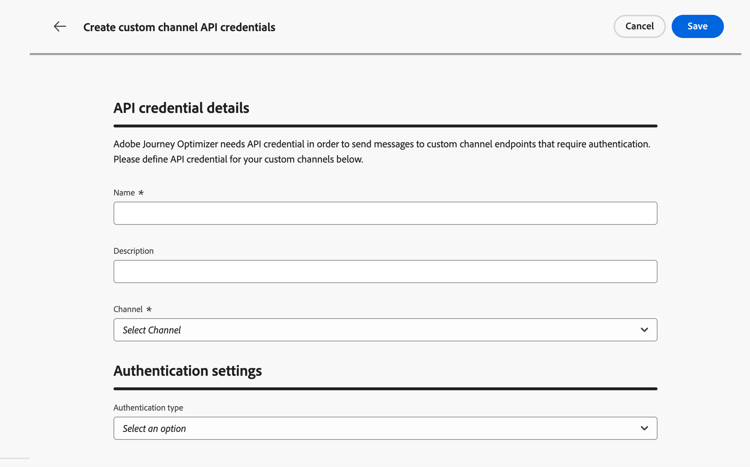
-
選取您要建立認證的管道。
note NOTE 下拉式清單中只會顯示驗證型別為 無 以外的已啟動自訂管道。 -
從清單中選取驗證型別。
-
填寫驗證專用欄位:
- API金鑰 — 提供金鑰名稱、值和位置(查詢引數或標頭)。
- 基本驗證 — 提供使用者名稱和密碼。
- OAuth 2.0 — 設定OAuth 2.0驗證的裝載。 了解更多
-
按一下儲存。
後續步驟 next-steps
如果自訂頻道傳回錯誤碼,請參閱自訂頻道、傳入動作和報表資料集錯誤。
This section contains structured knowledge intended to support interpretation, retrieval, and question answering related to this topic.
For complete understanding, this information should be combined with the documentation on this page. Neither source is intended to stand alone; the page describes the feature, while this section provides additional context that helps disambiguate terminology, intent, applicability, and constraints.
- TL;DR: This page explains how to view, edits, and creates additional API credential sets for a custom channel so that requests to the endpoint can be authenticated across different brands or environments without duplicating the channel.
Intents:
- View and manage existing API credentials for a custom channel
- Edit the fields of an existing credential set
- Create additional credential sets for the same channel
- Attach different authentication values to different channel configurations
Glossary:
- API credentials: A named set of authentication values used to authenticate requests sent to a custom channel endpoint (product-specific)
- Authentication type: The method selected for a credential set, such as API Key, Basic auth, or OAuth 2.0 (product-specific)
- Channel configuration: The configuration to which a specific credential set can be attached (product-specific)
Guardrails:
- When a custom channel is created with an authentication type other than None, an initial set of API credentials is generated automatically when the channel is activated.
- Only activated custom channels with an authentication type other than None appear in the Channel drop-down when creating credentials.
- When editing an existing credential set, all fields are editable.
Terminology:
- Canonical name: API credentials — Acronym: n/a — variants: API credential set, credentials
- Synonyms: “credential set” = “set of API credentials”
- Do not confuse: “API credentials” (authentication values authenticating requests to the endpoint) ≠ “channel configuration” (the configuration to which different authentication values are attached)
FAQ:
- Q: Where do I manage API credentials? — Under Administration > Channels > Channel builder > API credentials.
- Q: Why create multiple credential sets for one channel? — To attach different authentication values to different channel configurations, for example for different brands or use cases, without duplicating the channel definition.
- Q: Which channels appear when I create credentials? — Only activated custom channels with an authentication type other than None.
- Q: Are credentials created automatically? — Yes, an initial set is generated automatically when a channel using authentication is activated.