在此頁面上:請依照此使用案例,建立協調的行銷活動,透過個人化的電子郵件提醒,重新與收件者互動,提醒他們已儲存至願望清單中的產品。
雖然此範例使用 Wishlist 結構描述,但相同的方法適用於任何與 收件者 具有一對多關係的實體,例如購買、訂閱,或任何自訂結構描述,其中每個收件者可能有多個關聯記錄。
此使用案例所需的結構描述:
- 收件者:用作目標維度
- WishlistItems:包含欄位:
creationDate、product、Wishlistid - 產品:包含欄位:
description、priceref、imageurl - 放棄的購物車 (選擇性):包含欄位:
lastmodified

這項精心安排的行銷活動著重於透過提醒訪客儲存至願望清單的產品來重新吸引訪客。 使用Campaign Orchestration,根據願望清單活動以條件定義對象,協助促進訪客回頭轉換。
-
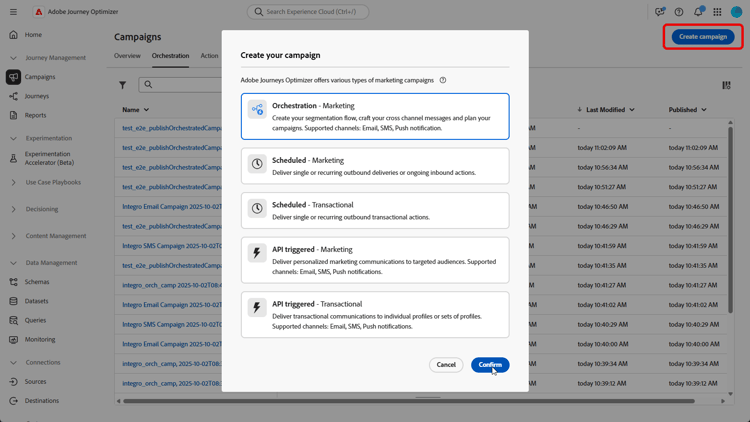
首先,建立專門針對希望清單重新參與的新行銷活動。 這將有助於將傳訊重點放在其已儲存專案以顯示購買意圖的客戶上。
-
填寫您的行銷活動設定。
-
新增 建立對象 活動,以根據願望清單行為識別要定位的客戶群組。

-
設定此對象的描述性標籤,並選擇 收件者 作為目標維度。 然後按一下[繼續] 來設定對象。
-
按一下新增條件,建立下列條件以精簡您的對象:
WishlistItems Exist such as (creationDate greater than or equal to 36 months ago) AND (product is not empty
或AbandonedCarts Exist such as lastmodified greater than or equal to 36 months ago此對象是根據具有願望清單、包含具有產品影像的專案,或在定義的時間範圍內有放棄的購物車的收件者。

-
按一下 計算 以檢視受這些條件影響的設定檔數目,並按一下 檢視結果 以檢查每個條件的詳細資料,並確認對象符合您的目標區段。

-
按一下「確認」。
-
新增 擴充 活動,以使用 願望清單 和 產品資訊 個人化行銷活動。

-
按一下「新增擴充資料」。
-
存取
Targeting dimension > Wishlistitems > Wishlistid。
-
選取收集資料的方式,在此案例中為收集資料,以收集您對象的願望清單詳細資料。
-
選擇要擷取的行數。 依預設,系統會擷取每個願望清單三個專案,但可視行銷活動需求來調整以反白標示較多或較少產品。
-
按一下 新增屬性 以建立下列三個屬性:
Product > descriptionProduct > pricerefProduct > imageurl
這會透過詳細的產品資訊來豐富訊息,以提高轉換率。

-
新增電子郵件活動,為每位客戶建立個人化的重新參與訊息。 按一下編輯內容,開始設計您的內容。
➡️ 進一步瞭解電子郵件個人化

-
完成電子郵件後,按一下您協調行銷活動中的開始,儲存行銷活動並以草稿模式執行。
-
開始草稿模式後,使用願望清單詳細資料預覽對象。
如需深入分析,請按一下輸出結果,然後選取預覽結果。

行銷活動執行後,我們可以探索報表,其提供一組關於行銷活動表現的強大資料和KPI。
➡️ 進一步瞭解報告
This section contains structured knowledge intended to support interpretation, retrieval, and question answering related to this topic.
For complete understanding, this information should be combined with the documentation on this page. Neither source is intended to stand alone; the page describes the feature, while this section provides additional context that helps disambiguate terminology, intent, applicability, and constraints.
- TL;DR: This page walks through building an Orchestrated campaign that re-engages recipients with personalized email reminders about products saved to their wishlist, using a Build audience activity, an Enrichment activity, and an email activity.
Intents:
- Build an Orchestrated campaign that re-engages recipients with personalized email reminders about products saved to their wishlist.
- Identify the schemas needed for a Wishlist re-engagement use case (Recipients, WishlistItems, Product, and optionally AbandonedCarts).
- Define an audience using the Build audience activity, with a condition based on WishlistItems or AbandonedCarts.
- Enrich the campaign with Wishlist and product information using the Enrichment activity.
- Personalize the re-engagement email using the enriched product data.
- Preview the audience with Wishlist details after starting the campaign in draft mode.
Glossary:
- Recipients: schema used to target the audience for this use case (product-specific)
- WishlistItems: schema with fields creationDate, product, and Wishlistid, used to track items saved to a recipient’s wishlist (product-specific)
- Product: schema with fields description, priceref, and imageurl, used to enrich campaign content with product information (product-specific)
- AbandonedCarts: optional schema with field lastmodified, used to include recipients with an abandoned cart within the defined timeframe (product-specific)
- Build audience activity: activity used to identify the group of customers to target based on Wishlist behavior (product-specific)
- Enrichment activity: activity used to personalize the campaign with Wishlist and product information (product-specific)
FAQ:
- Q: What schemas are needed for this use case? — Recipients, WishlistItems, Product, and optionally AbandonedCarts.
- Q: Is the AbandonedCarts schema required? — No, it is listed as optional for this use case.
- Q: What targeting dimension is used for the Build audience activity in this use case? — Recipients.
- Q: What does the audience condition for this use case represent? — Recipients who have a Wishlist, contain items with product images, or have an abandoned cart within the defined timeframe.
- Q: What information does the Enrichment activity add to the campaign? — Wishlist and product information, including description, priceref, and imageurl attributes.
- Q: How is the campaign run after setup? — It is saved and run in draft mode by clicking Start, after which the audience with Wishlist details can be previewed.
Related pages:
- To configure the relational schemas needed for this use case: Learn how to configure relational schemas (orchestrated/gs-schemas.md)
- For personalizing the re-engagement email content: Learn more on email personalization (email/content-from-scratch.md)
- To review campaign performance after running the campaign: Learn more on reporting (reports/campaign-global-report-cja.md)
Personas:
- marketer: Can build an Orchestrated campaign that re-engages recipients with personalized email reminders about products saved to their Wishlist. Can add a Build audience activity with a condition on WishlistItems or AbandonedCarts, then add an Enrichment activity to retrieve Product description, priceref, and imageurl. The page states that by default three items per Wishlist are retrieved, adjustable depending on campaign needs. Where: “Intents”.
Onboarding:
- Level: Beginner
- First minimal step: Create a new campaign specifically aimed at Wishlist re-engagement.
- Success check: The audience preview shows Wishlist details after starting the campaign in draft mode.
- Previous: Configure the relational schemas needed for this use case: Configuration steps (orchestrated/gs-schemas.md)
- Next: Personalize the re-engagement email content: Design content from scratch in Journey Optimizer (email/content-from-scratch.md); Review campaign performance after running the campaign: Campaign report (reports/campaign-global-report-cja.md)