在此頁面上:探索Adobe Journey Optimizer中可供協調行銷活動使用的即時和全時報告,並瞭解如何測量電子郵件、行動訊息、推播和直接郵件的參與度和管道績效。
協調行銷活動會透過強大的報告功能,為您提供可採取行動的洞察。 這些洞察能協助您更加瞭解客群行為、評估客戶歷程中每步驟的績效,做出資料導向決策,以便將未來的行銷活動最佳化。 有了詳細量度和視覺效果,就可以追蹤參與度,同時微調目標定位策略,以便獲得最大影響力。
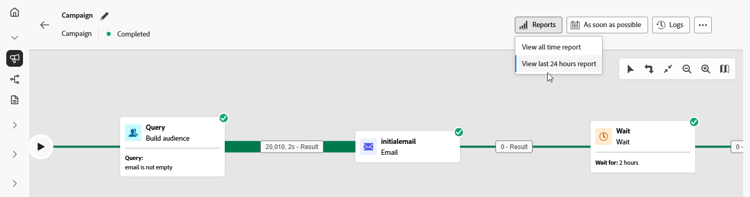
報告類型 reporting-types


深入瞭解頻道報告




This section contains structured knowledge intended to support interpretation, retrieval, and question answering related to this topic.
For complete understanding, this information should be combined with the documentation on this page. Neither source is intended to stand alone; the page describes the feature, while this section provides additional context that helps disambiguate terminology, intent, applicability, and constraints.
- TL;DR: This page lists the live, all-time, and channel reports available for Orchestrated campaigns in Adobe Journey Optimizer, covering email, mobile message, push, and direct mail performance.
Intents:
- Find the live report that shows real-time impact and performance of an Orchestrated campaign.
- Find the all-time report for an Orchestrated campaign.
- Access channel-specific reports for email, mobile message, push, and direct mail.
- Understand when data becomes available in the Live report.
Glossary:
- Live report: a built-in dashboard that measures and visualizes in real time the impact and performance of Orchestrated campaigns, accessed from the View last 24 hours report menu (product-specific)
- All time report: a report fully integrated with Customer Journey Analytics capabilities, standardizing reporting across both platforms and improving data consistency and reliability (product-specific)
- Email report: the channel report for email performance in Orchestrated campaigns (product-specific)
- Mobile report: the channel report for mobile message performance in Orchestrated campaigns (product-specific)
- Push report: the channel report for push performance in Orchestrated campaigns (product-specific)
- Direct mail report: the channel report for direct mail performance in Orchestrated campaigns (product-specific)
Guardrails:
- Data are available in the Live report as soon as the Orchestrated campaign is executed.
Terminology:
- Canonical name: Customer Journey Analytics — Acronym: CJA — variants: none
- Do not confuse: “Live report” (real-time dashboard, available as soon as the campaign is executed, accessed from the View last 24 hours report menu) ≠ “All time report” (integrated with Customer Journey Analytics)
FAQ:
- Q: When does data appear in the Live report? — As soon as the Orchestrated campaign is executed.
- Q: How is the All time report different from the Live report? — The All time report is fully integrated with Customer Journey Analytics capabilities, standardizing reporting across both platforms and improving data consistency and reliability.
- Q: Which channel reports are available for Orchestrated campaigns? — Email report, Mobile report, Push report, and Direct mail report.
- Q: Where do I access the Live report? — From the View last 24 hours report menu.
Personas:
- marketer: Can view the Live report to measure and visualize in real time the impact and performance of Orchestrated campaigns. Can access the All time report, which is integrated with Customer Journey Analytics. Can access channel reports for email, mobile message, push, and direct mail. The page states that data are available in the Live report as soon as the Orchestrated campaign is executed. Where: “Types of reports”.
Onboarding:
- Level: Intermediate
- First minimal step: Select View last 24 hours report to open the Live report.
- Success check: Data are available in the Live report as soon as the Orchestrated campaign is executed.