在此頁面上:瞭解如何使用「儲存對象目標定位」活動,從先前在協調的行銷活動中建立的母體中建立或覆寫可重複使用的對象。
儲存對象活動是 鎖定目標 活動,用來根據先前在協調的行銷活動中產生的母體來建立新對象或更新現有對象。 儲存後,對象會新增至應用程式對象清單,並可從 對象 功能表存取。
它常用於擷取在相同行銷活動工作流程中建立的對象區段,以便在未來的行銷活動中重複使用。 通常會連線到其他目標定位活動,例如 建立對象 或合併,以儲存最終目標定位母體。
請注意,使用 儲存對象 活動時,您無法更新現有的對象。 您只能建立新對象,或使用新定義覆寫現有對象。
設定儲存客群活動 save-audience-configuration
請按照以下步驟,設定「儲存客群」活動:
-
新增 儲存對象 活動至您的協調行銷活動。
-
輸入客群標籤,就能識別已儲存客群。
note NOTE 對象 標籤 在所有行銷活動中必須是唯一的。 您無法重複使用已在其他行銷活動的 儲存對象 活動中使用的對象名稱。 -
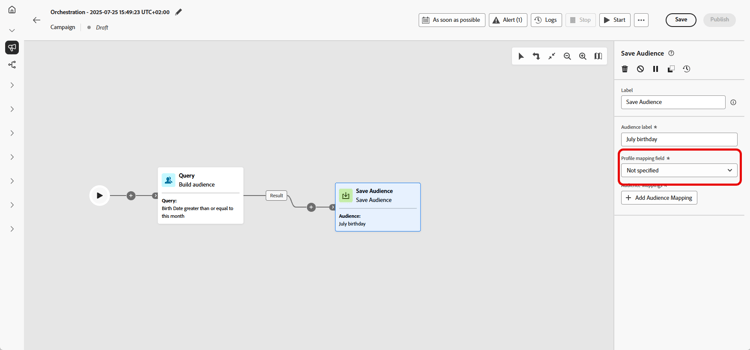
從您的行銷活動目標維度中選擇設定檔對應欄位。 此對應會定義 已儲存對象 中的設定檔在執行期間如何連結至行銷活動的目標維度。
下拉式清單中只有與目前目標維度(即傳入轉變中的維度)相容的對應,才能確保對象與行銷活動內容之間有適當的調解。
-
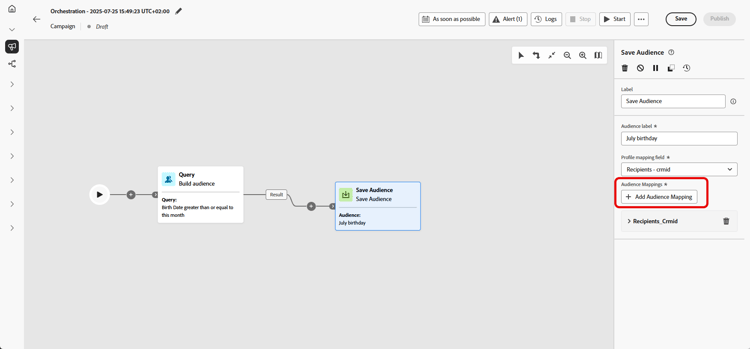
按一下「新增對象對應」以包含來自 目標維度 或擴充的 設定檔屬性 之屬性的其他資料。
這可讓您除了主要設定檔對應之外,將更多資訊與 已儲存的對象 活動建立關聯,以強化目標定位和個人化選項。
-
儲存並發佈協調的行銷活動,以完成設定。 這將能產生並儲存客群。
-
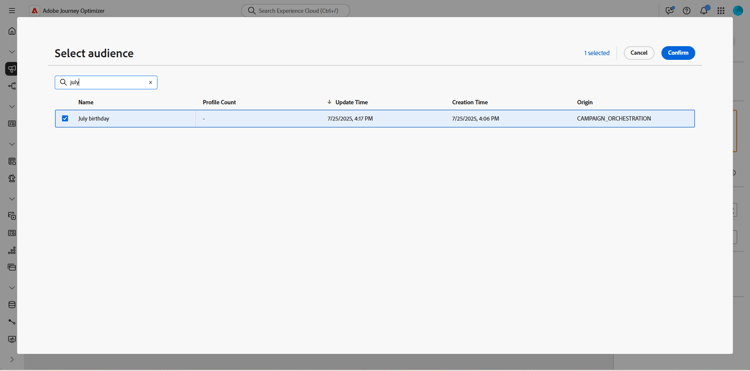
發佈要建立或取代之對象的行銷活動,因為行銷活動處於 草稿模式 時,儲存對象活動未執行。
接著,儲存的對象內容便可在對象的詳細資料檢視中使用,您可以從 對象 功能表存取該內容,或者在鎖定對象時選取內容,例如,使用 讀取對象 活動。
範例 save-audience-example
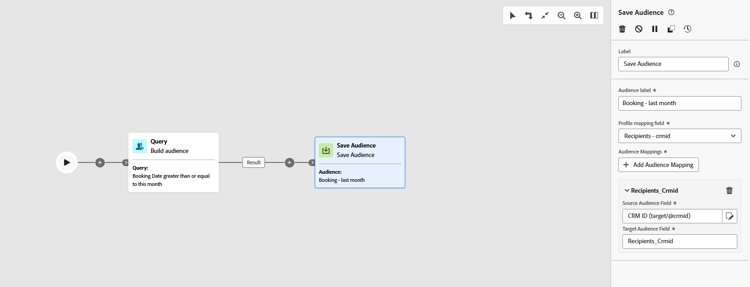
以下範例會示範如何使用鎖定目標,建立簡易客群。 透過在您的「已協調」行銷活動中篩選此母體,查詢可識別過去30天內已預訂旅行的所有收件者。 透過選擇 收件者 — CRMID 作為目標維度,對象會鎖定每個個別預訂事件,而非僅鎖定收件者作為整體。 儲存客群活動接著會擷取以上設定檔,以便建立客群,讓近期購買者可重複使用。
This section contains structured knowledge intended to support interpretation, retrieval, and question answering related to this topic.
For complete understanding, this information should be combined with the documentation on this page. Neither source is intended to stand alone; the page describes the feature, while this section provides additional context that helps disambiguate terminology, intent, applicability, and constraints.
- TL;DR: This page explains how to configure the Save audience activity in an Orchestrated campaign to create a new audience or overwrite an existing one from the population built earlier in the workflow.
Intents:
- Configure the Save audience activity to create or overwrite an audience.
- Enter an audience label that identifies the saved audience.
- Choose a profile mapping field from the Campaign Targeting dimension to link profiles to the saved audience.
- Add audience mappings to associate additional target dimension attributes or enriched profile attributes.
- Access the resulting saved audience from the Audiences menu or select it in a Read audience activity.
Glossary:
- Save audience activity: a Targeting activity that creates a new audience or overwrites an existing one with a new definition, based on the population generated earlier in the Orchestrated campaign (product-specific)
- Audience label: the identifier entered to name the saved audience (product-specific)
- Profile mapping field: the field, chosen from the Campaign Targeting dimension, that defines how profiles in the saved audience are linked to the campaign’s target dimension during execution (product-specific)
- Audience mappings: additional data added from attributes of the Target dimension or enriched Profile attributes, beyond the primary profile mapping (product-specific)
Guardrails:
- The Save audience activity cannot update an existing audience; it can only create a new audience or overwrite an existing one with a new definition.
- The audience label must be unique across all campaigns; an audience name already used in another campaign’s Save audience activity cannot be reused.
- Only profile mappings compatible with the current target dimension (the one from the incoming transition) are available in the profile mapping field dropdown, to ensure proper reconciliation between the audience and the campaign context.
- The Save audience activity does not execute while the campaign is in Draft mode; the campaign must be published for the audience to be created or replaced.
- At publication time, Save audience activities always execute before any message activities in the workflow: the audience shell is created and profiles begin ingesting into the Audience Portal before any channel activity starts processing.
- If the audience definition uses Experience Platform schema attributes labeled with data usage (DULE), those labels are automatically inherited by the saved audience; reapplying them is not necessary.
Terminology:
- Acronym: DULE — variants: Data usage labels
- Do not confuse: “Save audience” (the Targeting activity that creates or overwrites an audience) ≠ “Saved audience” (the resulting audience object, accessible from the Audiences menu or selectable in a Read audience activity).
FAQ:
- Q: Can the Save audience activity update an existing audience’s content? — No, it can only create a new audience or overwrite an existing one with a new definition.
- Q: Does the audience label need to be unique? — Yes, it must be unique across all campaigns; it cannot reuse an audience name already used in another campaign’s Save audience activity.
- Q: When does the Save audience activity execute? — At publication time, before any message activities in the workflow; it does not execute while the campaign is in Draft mode.
- Q: Where can the saved audience be accessed afterward? — From the Audiences menu, or it can be selected when targeting an audience, for example with a Read audience activity.
- Q: Do data usage labels need to be reapplied on the saved audience? — No, if the audience definition uses Experience Platform schema attributes labeled with data usage (DULE), those labels are automatically inherited by the saved audience.
Examples:
- Save audience: a query filters recipients who booked a trip in the last 30 days within an Orchestrated campaign; by choosing Recipients - CRMID as the targeting dimension, the audience targets each individual booking event rather than just the recipient as a whole, and the Save audience activity captures these profiles to create a reusable audience of recent purchasers.
Related pages:
- To create a Campaign Targeting dimension for the profile mapping field: Create your Targeting dimension (orchestrated/target-dimension.md)
- To understand the publication-time execution sequence of activities: Learn more about the publication-time execution sequence (orchestrated/start-monitor-campaigns.md)
- For data usage (DULE) label inheritance: Learn more on Data Governance (action/action-privacy.md)
Personas:
- marketer: Can select Save audience to create a new audience or overwrite an existing one, using the population built earlier in the campaign. Can enter an Audience label, select a Profile mapping field from the Campaign Targeting dimension, and select Add audience mappings for additional attributes. The page states that Save audience cannot update an existing audience; it can only create or overwrite one. Where: “Configure the Save audience activity”.
Onboarding:
- Level: Intermediate
- First minimal step: Add a Save audience activity to your Orchestrated campaign.
- Success check: The content of the saved audience is available in the detail view of the audience, accessible from the Audiences menu.
- Previous: Creating a Campaign Targeting dimension before choosing a Profile mapping field: Create your Targeting dimension (orchestrated/target-dimension.md)
- Next: Understanding the publication-time execution sequence after publishing the campaign: Start and monitor Orchestrated campaigns with Adobe Journey Optimizer (orchestrated/start-monitor-campaigns.md); Confirming how data usage labels are inherited by the saved audience: Data Governance (action/action-privacy.md)