在此頁面上:瞭解如何使用「變更」維度活動,在協調的行銷活動中移動目標維度,例如從願望清單切換至連結至其的收件者。
行銷人員可在協調的行銷活動中,從一個資料實體變更為相關的資料實體,藉此增強受眾目標定位。 這可讓您超越使用者輪廓,並專注於特定行為,例如購買、預訂或其他互動。
若要達成此目的,請使用 變更維度 活動。 它可讓您在協調的行銷活動期間調整目標維度。
設定變更維度活動 configure
請按照以下步驟設定 變更維度 活動:
-
新增 變更維度 活動至您的協調行銷活動。
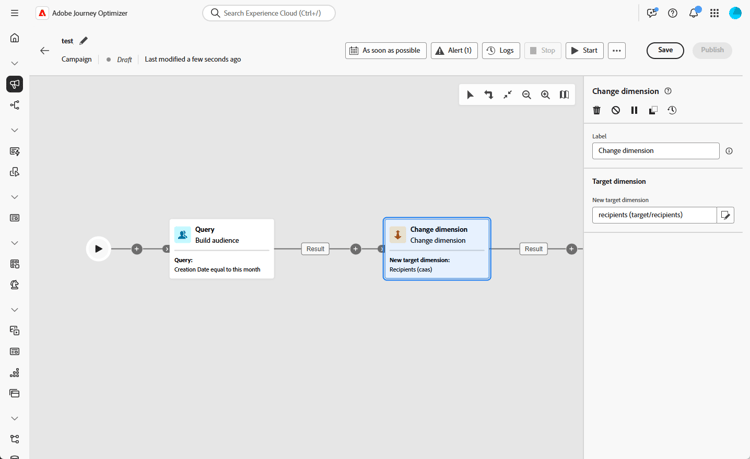
-
定義新目標維度。 「變更」維度步驟使用外部聯結:輸入母體中的所有記錄都會通過,包括新維度中沒有相符條目的記錄。
note important IMPORTANT 新目標維度中沒有相符設定檔的記錄會在訊息傳送時間自動排除。 此排除目前未反映在排除記錄檔中。 若要及早識別不相符的記錄,請在變更維度步驟之後,在轉變上使用 預覽結果 選項,並在繼續之前驗證記錄計數符合您的預期。
範例 example
此使用案例著重於傳送行動訊息給在過去一個月內建立願望清單的設定檔。
從 建立客群 活動開始,使用 願望清單 目標維度來識別所有相關的願望清單。
然後,新增 變更維度 活動,以將目標維度從 願望清單 切換為收件者。 此步驟會確保協調行銷活動目標為連結至這些願望清單的正確設定檔,好讓行動訊息可傳送至預期的設定檔。

This section contains structured knowledge intended to support interpretation, retrieval, and question answering related to this topic.
For complete understanding, this information should be combined with the documentation on this page. Neither source is intended to stand alone; the page describes the feature, while this section provides additional context that helps disambiguate terminology, intent, applicability, and constraints.
- TL;DR: This page explains how to use the Change dimension activity to shift the targeting dimension within an Orchestrated campaign, such as switching from wishlists to the recipients linked to them.
Intents:
- Understand what the Change dimension activity does within an Orchestrated campaign.
- Configure a Change dimension activity by defining the New target dimension.
- Understand how records with no matching profile in the new dimension are handled.
- Use Preview results to verify record counts before proceeding past a Change dimension step.
- Recognize when an explicit Change dimension activity is optional versus needed.
- Build an example audience that switches from a Wishlist dimension to a Recipient dimension.
Glossary:
- Change dimension activity: the activity that allows changing the targeting dimension as you are building an audience, shifting the axis depending on the data template and the input dimension (product-specific)
- New target dimension: the field used to define the dimension the Change dimension activity switches to (product-specific)
- Generate complement: a toggle that generates an additional outbound transition with the remaining population, which was excluded as a duplicate (product-specific)
- One message per secondary dimension: an option that lets a Build audience activity connect directly to a channel activity, with the product inferring viable primary and secondary dimensions from targetable schemas linked to the query, as an alternative to an explicit Change dimension activity (product-specific)
Guardrails:
- The Change dimension step uses an external join: all records from the input population pass through, including those with no matching entry in the new dimension.
- Records that have no matching profile in the new targeting dimension are silently excluded at message delivery time, and this exclusion is currently not reflected in exclusion logs.
Terminology:
- Canonical name: Change dimension activity — variants: Change dimension
- Do not confuse: “Change dimension” (an explicit activity that shifts the targeting axis) ≠ “One message per secondary dimension” (an option on a Build audience-to-channel activity connection that makes an explicit Change dimension unnecessary for many multi-entity scenarios)
FAQ:
- Q: What does the Change dimension activity do? — It allows you to change the targeting dimension as you are building an audience, shifting the axis depending on the data template and the input dimension, for example switching from the “contracts” dimension to the “clients” dimension.
- Q: Do all input records pass through the Change dimension step? — Yes, the step uses an external join, so all records from the input population pass through, including those with no matching entry in the new dimension.
- Q: What happens to records with no matching profile in the new dimension? — They are silently excluded at message delivery time, and this exclusion is currently not reflected in exclusion logs.
- Q: How can I check for non-matching records before proceeding? — Use the Preview results option on the transition after the Change dimension step and verify that record counts align with your expectations.
- Q: Is a Change dimension activity always required to switch dimensions? — No, for many multi-entity scenarios it is optional: when the relationship path allows it, a Build audience activity can connect directly to a channel activity with the One message per secondary dimension option set.
Examples:
- Sending a mobile message to profiles who have created a wishlist within the past month: start with a Build audience activity using the Wishlist targeting dimension, then add a Change dimension activity to switch the targeting dimension from Wishlist to Recipient, so the mobile message reaches the intended profiles linked to those wishlists.
Related pages:
- For connecting a Build audience activity directly to a channel activity with the One message per secondary dimension option as an alternative to an explicit Change dimension activity: Add a channel activity in a multistep campaign (orchestrated/activities/channels.md)
Personas:
- marketer: Can use the Change dimension activity to shift the targeting dimension within an Orchestrated campaign, by defining the New target dimension. Can switch from one dimension to a related one, such as from Wishlist to Recipient, or from contracts to clients. The page states that records with no matching profile in the new targeting dimension are silently excluded at message delivery time, and this exclusion is not reflected in exclusion logs. Where: “Configure the Change dimension activity”.
Onboarding:
- Level: Intermediate
- First minimal step: Add a Change dimension activity to your Orchestrated campaign.
- Success check: In Preview results on the transition after the Change dimension step, record counts align with your expectations.
- Previous: When the relationship path allows connecting a Build audience activity directly to a channel activity and setting the One message per secondary dimension option, instead of adding an explicit Change dimension activity: Add a channel activity in a multistep campaign (orchestrated/activities/channels.md)