在此頁面上:瞭解如何使用Adobe Experience Platform對象入口網站,從CSV檔案匯入對象,並將其識別屬性對應至客戶設定檔。
Adobe Experience Platform對象入口網站可讓您使用CSV檔案匯入對象。
在自訂上傳程式期間,指定要用作身分的CSV屬性,以及它對應到的設定檔身分。 這會在對象資料和設定檔之間建立連結。 如果CSV檔案包含在設定檔中找不到的身分值,則會建立具有該身分值的新設定檔。
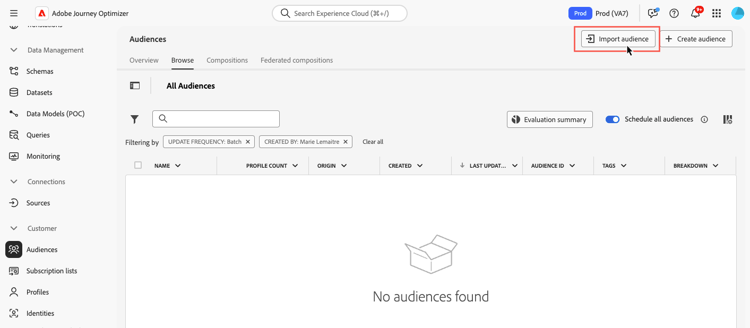
Adobe Experience Platform Segmentation Service檔案提供了有關如何匯入對象的詳細資訊。
瞭解如何在影片中以CSV格式上傳對象:
This section contains structured knowledge intended to support interpretation, retrieval, and question answering related to this topic.
For complete understanding, this information should be combined with the documentation on this page. Neither source is intended to stand alone; the page describes the feature, while this section provides additional context that helps disambiguate terminology, intent, applicability, and constraints.
- TL;DR: This page explains how to import an audience from a CSV file using the Adobe Experience Platform Audience Portal and map its identity attribute to customer profiles.
Intents:
- Import an audience from a CSV file using the Audience Portal
- Specify which CSV attribute to use as the identity and the profile identity it maps to
- Understand what happens when a CSV identity value is not found in the profile
- Understand Incremental read behavior for custom upload and other external audiences
Glossary:
- Custom Upload: Importing an audience into Adobe Experience Platform from a CSV file using the Audience Portal (product-specific)
- Audience Portal: The Adobe Experience Platform Audience Portal, which allows you to import an audience using a CSV file (product-specific)
- Incremental read: A toggle setting that, for custom upload and other external audiences, is not functionally supported today (product-specific)
Guardrails:
- During the custom upload process, you specify the CSV attribute to use as the identity and the profile identity it maps to, establishing a link between the audience data and the profile.
- If the CSV file contains an identity value not found in the profile, a new profile is created with that identity value.
- For custom upload (CSV) and other external audiences, Incremental read is not functionally supported today; on each recurrence the entire audience is retrieved, regardless of the Incremental read toggle setting.
Terminology:
- Canonical name: Custom Upload — Acronym: n/a — variants: CSV upload, custom upload audience
- Synonyms: “Custom upload” = “CSV upload”
FAQ:
- Q: How do I import a custom audience? — Import it from a CSV file using the Adobe Experience Platform Audience Portal.
- Q: What happens if a CSV identity value is not in the profile? — A new profile is created with that identity value.
- Q: Is Incremental read supported for custom upload audiences? — No; it is not functionally supported today, and the entire audience is retrieved on each recurrence regardless of the toggle setting.