在此页面上:使用 Adobe Experience Platform Privacy Service 提交和管理 Adobe Journey Optimizer 的数据访问和删除请求,以便您能够履行数据主体权利并自动遵守隐私法规。
Adobe Experience Platform Privacy Service 提供 RESTful API 和用户界面,帮助您管理客户数据请求。 借助 Privacy Service,您可以提交请求,以访问和删除 Adobe CX Enterprise 应用程序中的个人客户数据,从而促进自动遵守法律和组织隐私法规。
可从 请求 菜单创建和管理隐私请求。
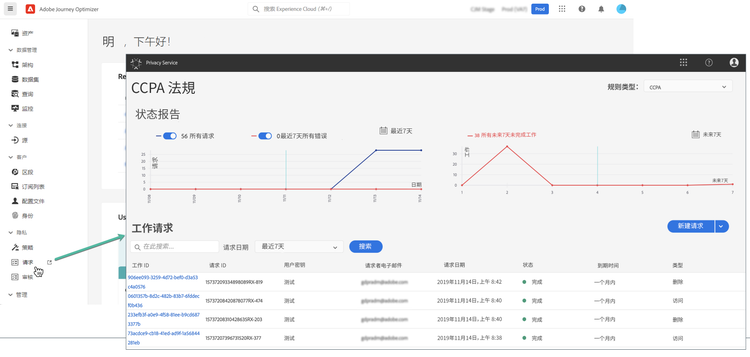
有关隐私服务以及如何创建和管理隐私请求的更多信息,请参阅 Adobe Experience Platform 文档。
管理可发送到 Adobe Journey Optimizer 的个人数据隐私请求 data-privacy-requests
您可以通过两种方式提交个人请求以从 Adobe Journey Optimizer 访问和删除客户数据:
Privacy Service 支持两种类型的请求:数据访问和数据删除。
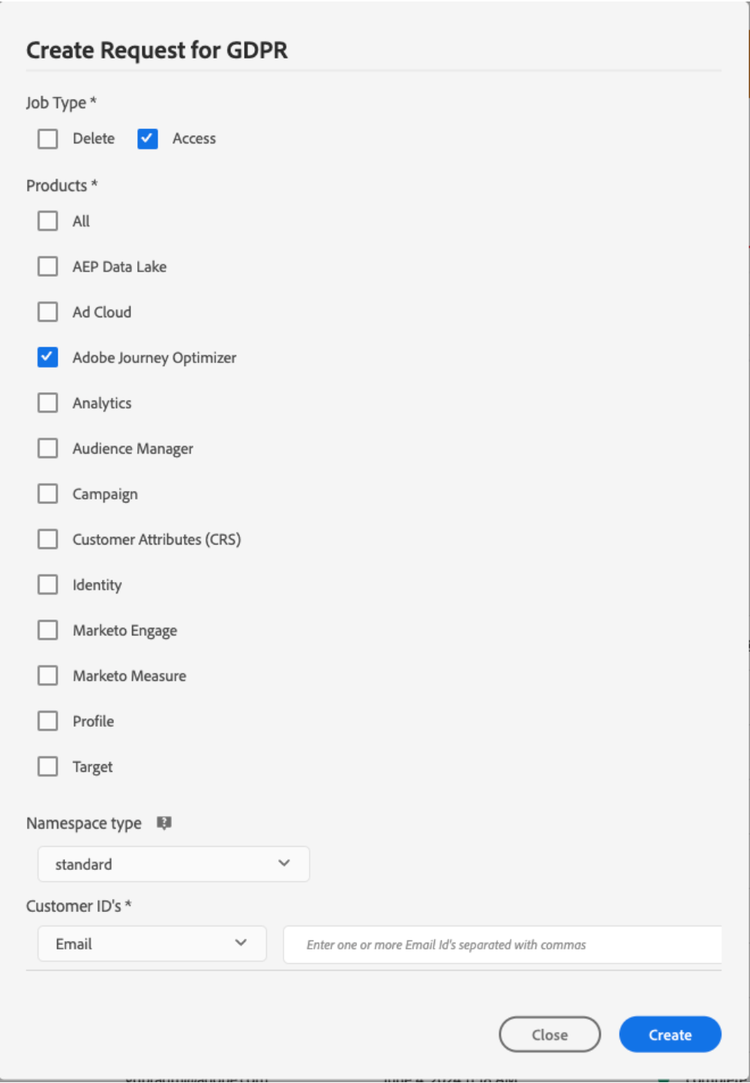
对于访问请求,请从 UI 中指定“Adobe Journey Optimizer”(或在 API 中将“CJM”指定为产品代码)。
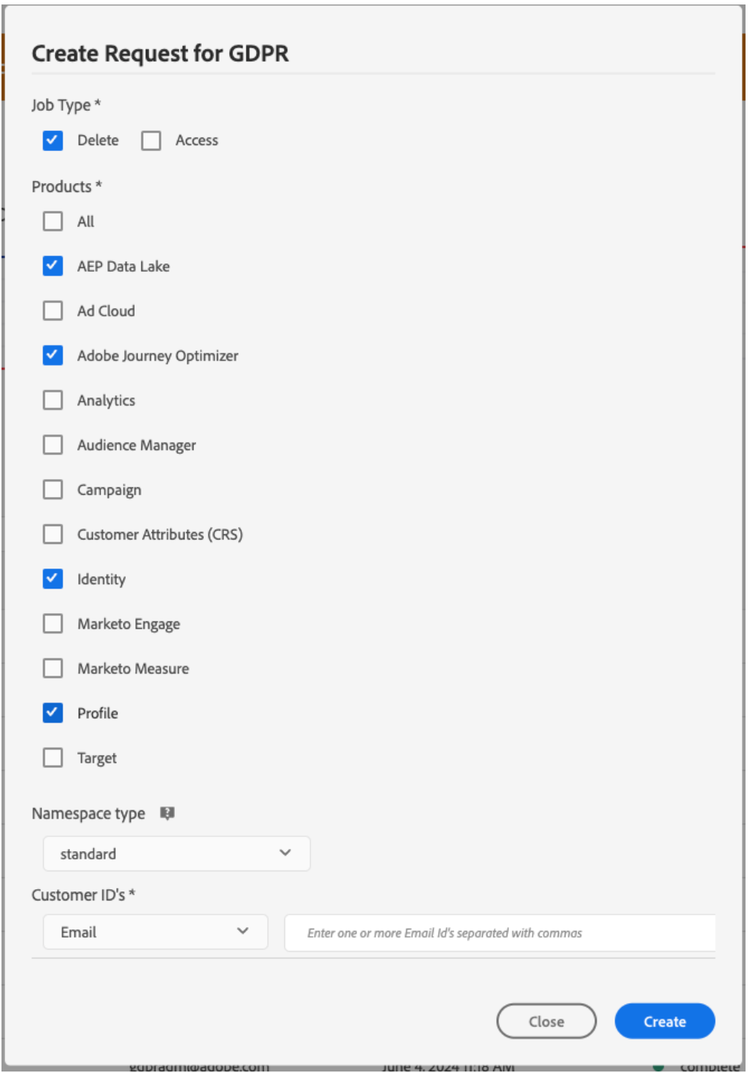
对于删除请求,除了“Adobe Journey Optimizer”请求之外,您还必须向 三个上游服务 提交删除请求,以阻止 Journey Optimizer 重新注入已删除的数据。 如果未指定这些上游服务,“Adobe Journey Optimizer”请求将保持为“正在处理”状态,直到为上游服务创建删除请求为止。
三种上游服务包括:
- 用户档案(产品代码:“profileService”)
- AEP 数据湖(产品代码:“AdobeCloudPlatform”)
- 标识(产品代码:“identity”)
创建访问和删除请求
先决条件
要提出访问和删除 Adobe Journey Optimizer 数据的请求,您必须有:
- Adobe 组织 ID
- 要对其执行操作的人员的身份标识符以及对应的命名空间。有关 Adobe Journey Optimizer 和 Experience Platform 中的标识命名空间的更多信息,请参阅标识命名空间概述。
Journey Optimizer 中用于 API 请求的必填字段值
"companyContexts":
    "namespace": imsOrgID
    "value": <Your Adobe Organization ID Value>

"users":
    "action": either access or delete

    "userIDs":
        "namespace": e.g. email, aaid, ecid, etc.
        "type": standard
        "value": <Data Subject's Identity Identifier>

"include":
    CJM (which is the Adobe product code for Adobe Journey Optimizer)
    profileService (product code for Profile)
    AdobeCloudPlatform (product code for AEP Data Lake)
    identity (product code for Identity)

"regulation":
    gdpr, ccpa, pdpa, lgpd_bra, or nzpa_nzl (which is the privacy regulation that applies to the request)
GDPR 访问请求示例:
通过 UI:
通过 API:
// JSON Request
{
   "companyContexts":[
      {
         "namespace":"imsOrgID",
         "value":"745F37C35E4B776E0A49421B@AdobeOrg"
      }
   ],
   "users":[
      {
         "action":[
            "access"
         ],
         "userIDs":[
            {
               "namespace":"ecid",
               "value":"38400000-8cf0-11bd-b23e-10b96e40000d",
               "type":"standard"
            },
            {
               "namespace":"email",
               "value":"johndoe4@gmail.com",
               "type":"standard"
            }
         ]
      }
   ],
   "include":[
      "CJM"
   ],
   "regulation":"gdpr"
}
// JSON Response
{
    "requestId": "17163122360480365RX-705",
    "totalRecords": 1,
    "jobs": [
        {
            "jobId": "e709b1f4-1796-11ef-b422-eddd0aebc40d",
            "customer": {
                "user": {
                    "key": "John Doe",
                    "action": [
                        "access"
                    ],
                    "userIDs": [
                        {
                            "namespace": "ecid",
                            "value": "38400000-8cf0-11bd-b23e-10b96e40000d",
                            "type": "standard",
                            "namespaceId": 4,
                            "isDeletedClientSide": false
                        },
                        {
                            "namespace": "email",
                            "value": "johndoe4@gmail.com",
                            "type": "standard",
                            "namespaceId": 6,
                            "isDeletedClientSide": false
                        }
                    ]
                }
            }
        }
    ]
}
GDPR 删除请求示例:
通过 UI:
通过 API:
// JSON Request
{
  "companyContexts": [
    {
      "namespace": "imsOrgID",
      "value": "745F37C35E4B776E0A49421B@AdobeOrg"
    }
  ],
  "users": [
    {
      "action": [
          "delete"
      ],
      "userIDs": [
        {
          "namespace": "ecid",
          "value": "38400000-8cf0-11bd-b23e-10b96e40000d",
          "type": "standard"
        },
                {
          "namespace": "email",
          "value": "johndoe4@gmail.com",
          "type": "standard"
        }
      ]
    }
  ],
  "include": [
    "CJM", "profileService", "AdobeCloudPlatform", "identity"
  ],
  "regulation": "gdpr"
}
// JSON Response
{
    "requestId": "17163122360480365RX-705",
    "totalRecords": 1,
    "jobs": [
        {
            "jobId": "e709b1f4-1796-11ef-b422-eddd0aebc40d",
            "customer": {
                "user": {
                    "key": "John Doe",
                    "action": [
                        "delete"
                    ],
                    "userIDs": [
                        {
                            "namespace": "ecid",
                            "value": "38400000-8cf0-11bd-b23e-10b96e40000d",
                            "type": "standard",
                            "namespaceId": 4,
                            "isDeletedClientSide": false
                        },
                        {
                            "namespace": "email",
                            "value": "johndoe4@gmail.com",
                            "type": "standard",
                            "namespaceId": 6,
                            "isDeletedClientSide": false
                        }
                    ]
                }
            }
        }
    ]
}
This section contains structured knowledge intended to support interpretation, retrieval, and question answering related to this topic.
For complete understanding, this information should be combined with the documentation on this page. Neither source is intended to stand alone; the page describes the feature, while this section provides additional context that helps disambiguate terminology, intent, applicability, and constraints.
- TL;DR: This page explains how to use the Adobe Experience Platform Privacy Service to submit and manage data access and deletion requests for Adobe Journey Optimizer so you can fulfill data subject rights and automate compliance with privacy regulations.
Intents:
- Understand how Privacy Service manages data access and deletion requests
- Submit privacy requests through the Privacy Service UI or API
- Identify the product code and upstream services required for delete requests
- Understand the prerequisites and required field values for requests
- Know which privacy regulations can be specified on a request
Glossary:
- Privacy Service: Adobe Experience Platform service that provides a RESTful API and user interface to manage customer requests to access and delete personal customer data (product-specific)
- Privacy request: a data access or data deletion request submitted for Adobe Journey Optimizer, created and managed from the Requests menu (product-specific)
- CJM: the Adobe product code for Adobe Journey Optimizer, used in the API
includefield (product-specific) - Upstream services: Profile (
profileService), AEP Data Lake (AdobeCloudPlatform), and Identity (identity), to which delete requests must also be submitted to prevent Journey Optimizer from reinjecting the deleted data (product-specific) - Requests: the menu from which privacy requests can be created and managed (product-specific)
Guardrails:
- Privacy Service supports two types of requests: data access and data deletion
- For access requests, specify “Adobe Journey Optimizer” from the UI, or “CJM” as the product code in the API
- For delete requests, in addition to the “Adobe Journey Optimizer” request you must also submit delete requests to three upstream services — Profile (
profileService), AEP Data Lake (AdobeCloudPlatform), and Identity (identity) — if these upstream services are not specified, the “Adobe Journey Optimizer” request remains in the “processing” state until delete requests for the upstream services are created - For delete requests, if you do not explicitly include the product name and all applicable namespaces, data is not removed from Adobe Journey Optimizer
- Making a privacy request to Adobe Journey Optimizer will not remove data from all these systems (Platform data lake, Real time customer profile, Identity service); for delete and access requests, you need to call these individual systems to make sure the requests are handled by each of them
- Prerequisites: an Adobe organization ID, and an identity identifier of the person to act on with the corresponding namespace(s)
- In the API, the
regulationfield is the privacy regulation that applies to the request; the page listsgdpr,ccpa,pdpa,lgpd_bra, ornzpa_nzl
Terminology:
- Canonical name: Privacy request
- Synonyms: “Adobe Journey Optimizer” (product name in the UI) = “CJM” (product code in the API)
- Do not confuse: “data access” request ≠ “data deletion” request
- Do not confuse: “Adobe Journey Optimizer” request ≠ the three upstream services (Profile, AEP Data Lake, Identity) that delete requests must also target
FAQ:
- Q: What are the two types of privacy requests? — Data access and data deletion.
- Q: What product code represents Adobe Journey Optimizer in the API? — CJM.
- Q: Why must delete requests also target upstream services? — To prevent Journey Optimizer from reinjecting the deleted data; if these upstream services are not specified, the “Adobe Journey Optimizer” request remains in the “processing” state until delete requests for the upstream services are created.
- Q: Which upstream services must be included in a delete request? — Profile (
profileService), AEP Data Lake (AdobeCloudPlatform), and Identity (identity). - Q: Which values does the page list for the
regulationfield? —gdpr,ccpa,pdpa,lgpd_bra, ornzpa_nzl. - Q: Does a privacy request to Adobe Journey Optimizer remove data from all systems? — No, for delete and access requests, you need to call these individual systems to make sure the requests are handled by each of them.