在此页面上:了解如何使用补充标识符(订单或预订ID等辅助标识符)为每个标识符运行单独的历程实例,并使用其属性个性化消息。
默认情况下,历程在 配置文件ID 的上下文中执行。 这意味着,只要用户档案在给定历程中处于活动状态,它就无法重新进入另一个历程。 为防止出现这种情况,Journey Optimizer允许您在配置文件ID之外捕获补充标识符,例如订单ID、订阅ID、处方ID。
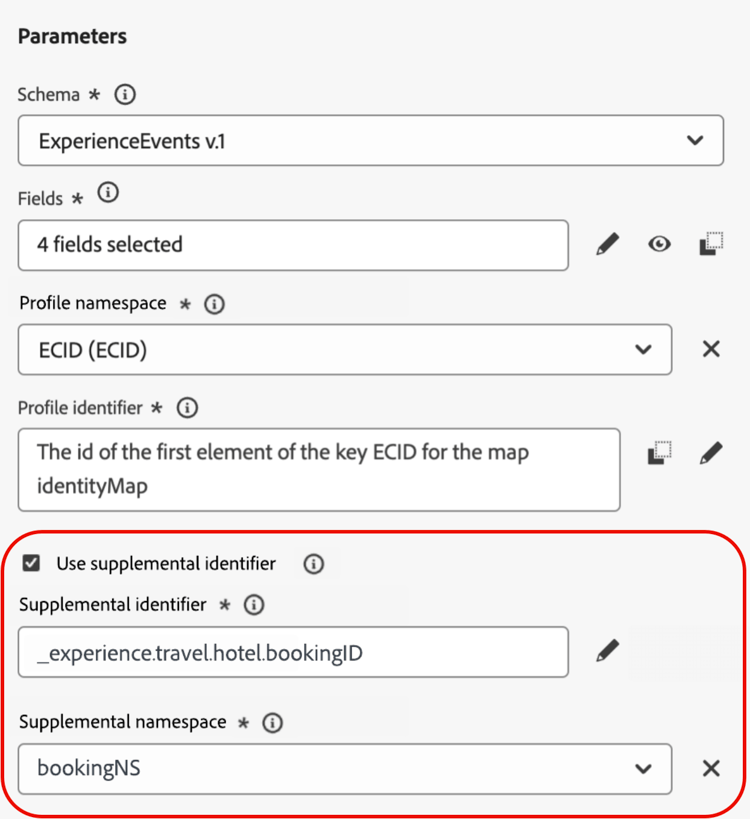
在此示例中,我们已添加 预订ID 作为补充标识符。
这样,历程会在与补充标识符关联的用户档案ID(此处为预订ID)的上下文中执行。 为补充标识符的每个迭代执行历程的一个实例。 如果访客进行了不同的预订,这将允许历程中出现多个相同用户档案ID的入口。
此外,Journey Optimizer允许您利用补充标识符的属性(例如,预订编号、处方续订日期、产品类型)进行消息自定义,从而确保高度相关的通信。
➡️ 通过观看视频了解此功能
护栏和限制 guardrails
-
支持的历程: 事件触发的和 读取受众 历程支持补充标识符。 对于受众资格历程(即以受众资格活动开始的历程),它们不支持。
-
入站操作:当前不支持对入站操作(如应用程序内操作和Web操作)使用补充标识符。
-
并发实例限制:配置文件不能包含超过10个并发历程实例。
-
数据类型和架构结构:补充标识符的类型必须为
string。 它可以是独立的字符串属性,也可以是对象数组中的字符串属性。 独立的字符串属性将生成单个历程实例,而对象数组中的字符串属性将生成每个对象数组的迭代的唯一历程实例。 不支持字符串数组和映射。 -
历程重新进入
补充标识符的历程重入行为遵循现有的重入策略:
- 如果历程是非可重新进入的,则相同的配置文件ID +补充ID组合无法重新进入历程。
- 如果历程通过时间窗口重新进入,则可以在定义的时间窗口后重新输入相同的配置文件ID +补充ID组合。
-
数据使用标签和执行(DULE) — 不对补充ID执行DULE验证检查。 这意味着在历程查找数据治理策略违规时,不会考虑此属性。
-
下游事件配置
如果您在历程的下游使用另一个事件,则必须使用相同的补充ID并具有相同的ID命名空间。
-
读取受众历程
- 业务事件:如果您使用业务事件,则补充数据ID被禁用。
- 事件和上下文字段:补充标识符不能来自事件或历程上下文字段。
- 属性选择:任何非标识属性(或非人员标识)都可以用作所有受众类型(统一配置文件服务、CSV导入和联合受众合成)的补充ID。 不允许基于人员的身份属性。 对于外部受众,请参阅外部受众的补充标识符以了解支持的数据模式和配置要求。
- 读取率:对于使用数组类型补充ID字段的读取受众历程,读取受众活动的读取率限制为每秒500个配置文件的最大值。
具有补充ID的退出标准行为 exit-criteria
前提条件:为补充ID启用了历程(通过单一事件或读取受众活动)
下表说明了配置退出标准时,配置文件在启用了ID的补充历程中的行为:
注意:补充ID命名空间必须与初始节点的命名空间匹配。
添加补充标识符并在历程中利用它 add
要在事件触发的历程中使用补充标识符,请执行以下步骤:
-
将补充ID添加到事件
-
创建或编辑所需的事件。 了解如何配置单一事件
-
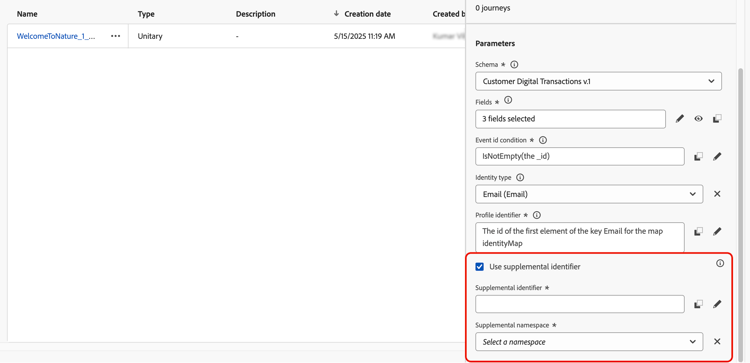
在事件配置屏幕中,选中 Use supplemental identifier 选项。
具有补充标识符选项的
-
使用表达式编辑器选择要用作补充ID的字段(例如,预订ID、订阅ID)。
确保在 高级模式 中使用表达式编辑器来选择属性。
-
-
将事件添加到历程
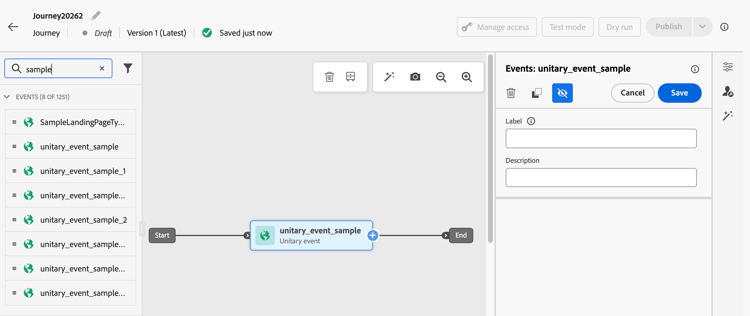
将已配置事件拖到历程画布上。 它会根据用户档案ID和补充ID触发历程条目。
要在读取受众历程中使用补充标识符,请执行以下步骤:
-
在历程中添加和配置读取受众活动
-
在历程中拖动 读取受众 活动。
-
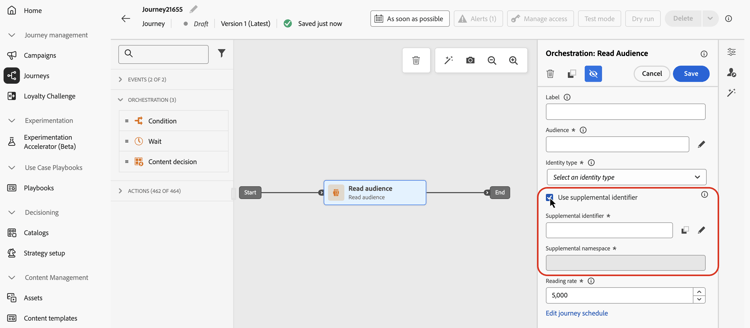
在活动属性窗格中,打开 使用补充标识符 选项。
-
在 补充标识符 字段中,使用表达式编辑器选择补充标识符属性。
对于通过API创建的外部受众(例如从CSV文件导入的受众🔗),如果您的受众每个配置文件ID包含多行,请确保首先启用Express激活 — 请参阅外部受众的补充标识符。
note NOTE 确保在 高级模式 中使用表达式编辑器来选择属性。
-
利用补充ID属性
使用表达式编辑器和个性化编辑器为个性化或条件逻辑引用补充标识符的属性。 可从 上下文属性 菜单访问属性。

对于事件触发的历程,如果您使用数组(例如,多个处方或策略),请使用公式来提取特定元素。
在补充ID为bookingNum且属性位于同一级别bookingCountry的对象数组中,历程将根据bookingNum遍历数组对象,并为每个对象创建历程实例。
-
条件活动中的以下表达式将遍历对象数组,并检查
bookingCountry的值是否等于“FR”:code language-none @event{<event_name>.<object_path>.<object_array_name>.all(currentEventField.<attribute_path>.bookingNum==${supplementalId}).at(0).<attribute_path>.bookingCountry}=="FR" -
电子邮件个性化编辑器中的以下表达式将遍历对象数组,提取适用于当前历程实例的
bookingCountry,并将其显示在内容中:code language-none {{#each context.journey.events.<event_ID>.<object_path>.<object_array_name> as |l|}} {%#if l.<attribute_path>.bookingNum = context.journey.technicalProperties.supplementalId%} {{l.<attribute_path>.bookingCountry}} {%/if%} {{/each}} -
用于触发历程的事件示例:
code language-none "bookingList": [ { "bookingInfo": { "bookingNum": "x1", "bookingCountry": "US" } }, { "bookingInfo": { "bookingNum": "x2", "bookingCountry": "FR" } } ]
补充ID和历程仲裁 arbitration
历程仲裁(包括规则集中的并发上限和条目计数)在配置文件ID级别而非(配置文件ID、补充数据ID)对级别运行。 这意味着并发数量上限为1可能会阻止同一配置文件的第二个历程实例,即使它包含不同的补充ID值也是如此。
在依赖生产中的特定仲裁设置之前,请与Adobe代表联系以获取有关仲裁行为的指导。
相关文档:
外部受众的补充标识符 external-audiences
外部受众支持补充ID,包括从CSV文件🔗导入的受众和使用联合受众合成创建的受众。 配置从CSV或联合受众构成受众读取的历程时,您可以将该受众中的任何非标识属性指定为补充ID。 然后,Journey Optimizer会为每个独特配置文件和补充ID组合创建一个单独的历程实例。
-
用例1:每个唯一配置文件一行+补充ID对
这是外部受众(包括CSV和联合受众构成受众)的主要用例。 受众包含多行,其中每一行表示用户档案(例如,客户)和补充ID(例如,帐户或订单ID)的唯一组合。 每一行都被视为独立的激活记录。
table 0-row-3 1-row-3 2-row-3 3-row-3 profile_id account_id (补充ID) other_attributes customer_001 ACC-1001 … customer_001 ACC-1002 … customer_002 ACC-2001 … 在此示例中,
customer_001有两个帐户。 Journey Optimizer为每个唯一的配置文件+account_id对创建单独的历程实例。 -
用例2:每个配置文件一行,具有补充ID数组
此用例适用于支持数组的受众类型。 受众中的单行包含一个配置文件,该配置文件具有包含多个补充ID值的数组属性。 Journey Optimizer在数组中为每个值创建一个历程实例。
table 0-row-3 1-row-3 2-row-3 profile_id account_ids (数组,补充ID) other_attributes customer_001 [ACC-1001, ACC-1002] … customer_002 [ACC-2001] … 在此示例中,Journey Optimizer为
customer_001生成两个历程实例(每个帐户ID一个)以及customer_002一个实例。 这与Supplemental ID在Unified Profile Service受众中的工作方式一致。
如何配置 external-configuration
对于通过使用用例1(受众有意包含同一配置文件ID的多行)的API创建的外部受众,必须在配置历程之前启用Express Activation。 请参阅下面的先决条件。 联合受众组合受众已自动启用快速激活,因此无需手动步骤。 对于所有其他情况,请直接配置旅程。
| note important |
|---|
| IMPORTANT |
此先决条件适用于通过API创建的所有外部受众(CSV或任何其他外部创建的受众),其中受众有意包含同一配置文件ID的多行(用例1)。 联合受众组合受众始终在组合流中通过expressActivation: true自动创建,不需要执行此步骤。 受众门户UI不支持设置expressActivation — 您必须使用外部受众API。 |
创建时必须启用受众上的expressActivation。 这告知Journey Optimizer独立激活每条记录,而无需按配置文件ID删除重复项。 创建受众后,无法更改此标记。
创建受众时,请使用以下API调用:
端点:
| code language-http |
|---|
|
必需的标头:
| code language-http |
|---|
|
请求正文(设置expressActivation: true):
| code language-json |
|---|
|
| note |
|---|
| NOTE |
expressActivation默认为false。 它必须在创建受众时设置,在创建后无法更改。 联合受众组合受众已自动启用快速激活,无需此标记。 |
有关完整参考,请参阅创建外部受众API文档。
要配置历程,请执行以下操作:
- 打开或创建具有 读取受众 节点的历程。
- 在 读取受众 节点设置中,选择您的外部受众(例如,CSV或联合受众合成受众)。
- 打开 使用补充标识符 选项,然后在 补充标识符 字段中,在 高级模式 中使用表达式编辑器选择要用作辅助标识符的属性(例如,
account_id,order_number)。 - 选定的属性将被视为历程的补充ID — 无需进行身份注册。
重复数据删除行为 external-dedup
当受众启用了Express Activation(为联合受众组合自动设置;必须在其他外部受众(如CSV)的API有效载荷中显式设置)时,Journey Optimizer会根据历程的配置方式处理重复数据删除:
示例用例
这些示例显示了补充标识符如何支持多个相关记录。
策略续订通知
-
方案:保险公司向客户持有的每个有效保单发送续订提醒。
-
执行:
- 个人资料: “John”。
- 补充ID:
"AutoPolicy123", "HomePolicy456"。 - 历程针对每个策略单独执行,并提供个性化的续订日期、服务范围详细信息和高级信息。
订阅管理
-
方案:当触发订阅的事件时,订阅服务会为每个订阅发送定制的消息。
-
执行:
- 个人资料: “Jane”。
- 补充ID:
"Luma Yoga Program ", "Luma Fitness Program"。 - 每个事件都包含订阅ID以及有关该订阅的详细信息。 历程针对每个事件/订阅单独执行,从而允许每个订阅提供个性化的续订优惠。
产品推荐
-
情景:电子商务平台根据客户购买的特定产品发送推荐。
-
执行:
- 个人资料:“Alex”。
- 补充ID:
"productID1234", "productID5678"。 - 历程针对每个产品单独执行,并提供个性化的追加销售机会。
操作方法视频 video
了解如何在Adobe Journey Optimizer中启用并应用补充标识符。
This section contains structured knowledge intended to support interpretation, retrieval, and question answering related to this topic.
For complete understanding, this information should be combined with the documentation on this page. Neither source is intended to stand alone; the page describes the feature, while this section provides additional context that helps disambiguate terminology, intent, applicability, and constraints.
- TL;DR: This page explains how to use supplemental identifiers in Adobe Journey Optimizer journeys to allow a single profile to have multiple concurrent journey instances, each scoped to a distinct secondary ID such as a booking, subscription, or policy ID.
Intents:
- Understand when and why to use a supplemental identifier instead of relying solely on a profile ID
- Configure a supplemental identifier in an event-triggered journey by marking an attribute as an identity in the event schema
- Configure a supplemental identifier in a Read audience journey by enabling the option in the Read audience activity
- Reference supplemental identifier attributes for message personalization and conditional logic using the expression editor
- Apply the correct expression syntax to iterate over object arrays keyed by a supplemental ID
- Identify guardrails and limitations before implementing supplemental identifiers in a journey
Glossary:
- Supplemental identifier: A secondary identifier (e.g., order ID, booking ID, subscription ID) used alongside the profile ID to scope a journey instance to a specific record, enabling multiple concurrent instances per profile (product-specific)
- Profile ID: The primary identifier used by default to execute journeys; a profile active in a journey cannot re-enter another journey without a supplemental ID
- Non-person identifier namespace: An identity namespace that does not represent a person (required for supplemental IDs); must be distinct from the primary identity namespace
- joai namespace: Not applicable to this page (see inbound actions troubleshooting)
- DULE: Data Use Labelling and Enforcement — the data governance policy validation framework in Adobe Experience Platform; supplemental IDs are not subject to DULE checks
Guardrails:
- Supplemental identifiers are supported only for event-triggered and Read audience journeys; not supported for Audience qualification journeys
- A profile cannot have more than 10 concurrent journey instances
- Each journey instance counts toward frequency capping even when created via supplemental identifiers
- The supplemental identifier must be of type
string; string arrays and maps are not supported - The supplemental ID attribute must not be marked as Primary identity in the schema
- The namespace used for the supplemental ID must be a non-person identifier namespace
- After applying the non-person identity namespace to a schema, a new event or field group must be created; existing entities cannot be refreshed
- For Read audience journeys with supplemental IDs: the reading rate is limited to 500 profiles per second per journey instance; only Unified Profile Service audiences are supported; supplemental ID must be a profile field (not an event/context field)
- Downstream events in the same journey must use the same supplemental ID and namespace
- Supplemental ID is disabled for Read audience journeys that use a business event
Terminology:
- Canonical name: Supplemental identifier — Acronym: none — variants: supplemental ID, secondary identifier
- Synonyms: “supplemental identifier” = “supplemental ID” (used interchangeably in the UI and documentation)
- Do not confuse: “supplemental identifier” ≠ “primary identity” — the supplemental ID must never be marked as the primary identity in the schema
FAQ:
- Q: What is a supplemental identifier used for? — It allows a single profile to enter and execute a journey multiple times simultaneously, with each instance scoped to a different secondary record such as a booking, subscription, or policy ID.
- Q: Which journey types support supplemental identifiers? — Event-triggered journeys and Read audience journeys. Audience qualification journeys do not support supplemental identifiers.
- Q: How many concurrent journey instances can a profile have with supplemental identifiers? — A maximum of 10 concurrent journey instances per profile.
- Q: Can I use the supplemental ID attributes for message personalization? — Yes. Reference them via the Contextual attributes menu in the expression editor or personalization editor.
- Q: Does the supplemental ID need to be marked as a Primary identity in the schema? — No. It must be marked as an Identity but must not be set as the Primary identity.
- Q: Are DULE governance policies applied to the supplemental identifier? — No. DULE validation checks are not performed on the supplemental ID.