在此页面上:了解如何使用数据集查找活动在运行时动态检索Adobe Experience Platform记录数据集中的数据,并使用外部数据扩充您的历程,以进行个性化和决策。
数据集查找活动允许您在运行时过程中动态检索来自 Adobe Experience Platform 记录数据集的数据。 通过利用此功能,您可以访问可能不在轮廓或事件负载中的数据,从而确保客户互动既相关又及时。
主要优点:
- 实时个性化:使用扩充数据定制客户体验。
- 动态决策:使用外部数据驱动历程逻辑和操作。
- 增强的数据访问:检索产品元数据、定价表或与特定键关联的关系数据。
必读 must-read
在配置数据集查找之前,请查看这些要求。
数据集启用
必须在Adobe Experience Platform中启用数据集以进行查找。 此部分中有详细信息: 使用 Adobe Experience Platform 数据。
限制和限制
- 每个历程最多包含10个数据集查找活动。
- 最多选择20个字段。
- 查找键数组中最多50个键。
- 扩充数据大小限制为10KB。
其他性能注意事项
以下建议旨在避免交付延迟:
配置数据集查找活动 configure
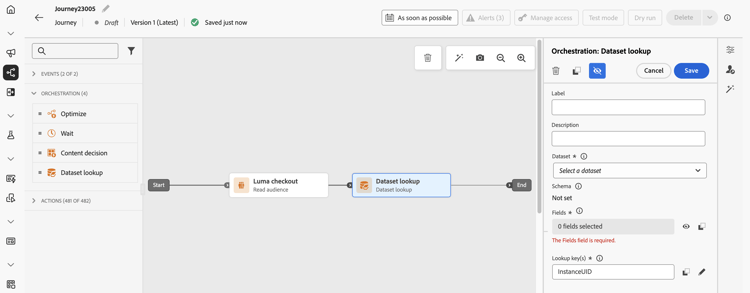
要配置 数据集查找 活动,请执行以下步骤:
-
展开 业务流程 类别并将 数据集查找 活动放入画布中。
历程
-
添加标签和描述。
-
在 数据集 字段中,选择具有所需属性的数据集。
note NOTE 如果您要查找的数据集未显示在列表中,请确保已为其启用查找功能。 有关更多详细信息,请参阅必须读取部分。 -
选择要从数据集中获取的特定字段。
-
您只能选择叶节点(架构最低级别的字段)。 该字段必须是基元值(字符串、数字、布尔值、日期等)。
-
无法选择列表(数组)和映射(键值对象)。
accordion 示例 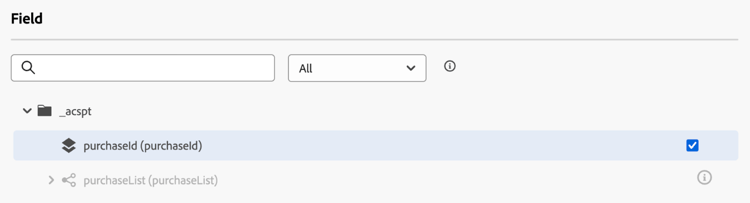
-
-
在 查找键 字段中,选择决策项属性和数据集中都存在的联接键。 系统使用此键在选定的数据集中搜索。
-
键可以是从历程上下文中派生的表达式,例如SKU、电子邮件ID或其他标识符。 示例:
@profile.email或list(@event{purchase_event.products.sku})。 -
仅支持 字符串 或 字符串 列表。
note important IMPORTANT 您必须使用 高级模式 定义查找键,以便数据集查找活动的输出可用作下游的上下文属性。 如果 @datasetLookup{}在条件中返回“未找到数据集查找”错误,请参阅条件活动🔗中的未找到数据集查找错误以了解原因和修复。配置查找键并在单独的表达式编辑器中使用其结果: -
配置键:在数据集查找活动的 查找键 表达式编辑器中,切换到高级模式,定义键并保存活动。 这使查找上下文对下游活动可用。
-
使用结果:在条件的表达式编辑器中,切换到 高级模式 并引用查找输出,例如:
@datasetLookup{MyDatasetLookUpActivity1.entities}。 将MyDatasetLookUpActivity1替换为数据集查找活动的名称。
如果查找输出在下游不可用,请确认已在 高级模式 中定义该键,并且已保存数据集查找活动。 accordion 示例 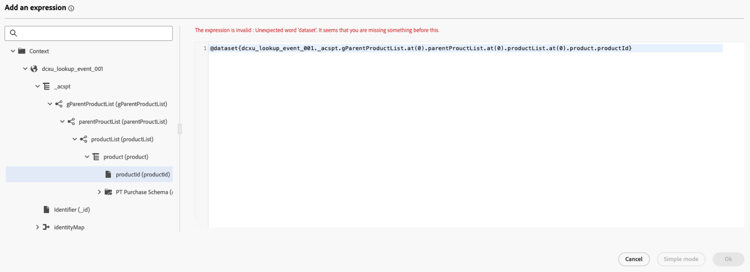
-
在历程中使用扩充数据
数据集查找活动检索的数据作为对象数组存储在历程上下文中。 它可以在历程表达式编辑器和个性化编辑器中使用,从而根据扩充的数据实现条件逻辑和个性化消息传递。
-
历程表达式编辑器:
访问 高级模式 编辑器并使用语法:
@datasetLookup{MyDatasetLookUpActivity1.entities}。 了解如何使用高级表达式编辑器 -
Personalization编辑器:
使用语法:
{{context.journey.datasetLookup.1482319411.entities}}。
用例示例
情景:Send为家庭产品消费超过40美元的用户提供优惠券。
历程流:
-
购买事件:从用户的购物车中捕获SKU。
-
数据集查找活动:
- 数据集:
products-dataset(SKU作为主键)。 - 查找键:
list(@event{purchase_event.products.sku})。 - 要返回的字段:
["SKU", "category", "price"]。
- 数据集:
-
条件活动:
-
过滤类别为“家庭”的SKU。
code language-none @event{purchase_event.products.all( in(currentEventField.sku, @datasetlookup{MyDatasetLookupActivity1.entities.all(currentDatasetLookupField.category == 'household').sku} ) )}
或者
-
汇总家庭产品总支出,并将其与40美元的门槛值进行比较。
code language-none sum(@event{purchase_event.products.all( in(currentEventField.sku, @datasetlookup{MyDatasetLookUpActivity1.entities.all(currentDatasetLookupField.category == 'household').sku} ) )}.price}, ',', true ) > 40
-
-
Personalization编辑器:
使用扩充的数据使电子邮件内容个性化:
code language-none {% let householdTotal = 0 %} {{#each journey.datasetlookup.3709000.entities as |product|}} {%#if get(product, "category") = "household"%} {% let householdTotal = householdTotal + product.price %}{%/if%} {{/each}} "Hi, thanks for spending " + {%= householdTotal %} + " on household products. Here is your reward!"
方案:识别用户档案的哪个电子邮件帐户具有白金会员状态。 在这种情况下,忠诚度帐户与电子邮件ID关联,忠诚度数据在标准配置文件查找存储中不可用。
历程流:
-
配置文件事件触发器:从配置文件或事件上下文中捕获电子邮件ID。
-
数据集查找活动:
- 数据集:
loyalty-member-dataset(通过电子邮件作为主键)。 - 查找键:
@profile.email。 - 要返回的字段:
["email", "loyaltyTier"]。
- 数据集:
-
条件活动:
根据忠诚度级别分支历程:
code language-none @datasetLookup{MyDatasetLookUpActivity1.entity.loyaltyMember.loyaltyTier} == 'Platinum' -
Personalization编辑器:
使用扩充的忠诚度级别数据来个性化出站通信:
code language-none {{context.journey.datasetLookup.1482319411.entity.loyaltyMember.loyaltyTier}}
疑难解答 troubleshooting
条件活动中的“未找到数据集查找”错误 troubleshooting-not-found
症状:条件活动的高级表达式编辑器中的@datasetLookup{}语法返回“未找到数据集查找”错误,即使已在历程中正确配置了数据集查找活动也是如此。
原因:数据集查找活动中的查找键是使用简单模式设置的。 在高级模式下未定义键时,活动输出不会作为下游活动中的上下文属性显示。
修复:打开数据集查找活动,找到 查找键 字段,然后切换到 高级模式 以重新定义键表达式。 保存活动并重新发布历程。
This section contains structured knowledge intended to support interpretation, retrieval, and question answering related to this topic.
For complete understanding, this information should be combined with the documentation on this page. Neither source is intended to stand alone; the page describes the feature, while this section provides additional context that helps disambiguate terminology, intent, applicability, and constraints.
- TL;DR: This page explains how to configure the Dataset lookup activity to dynamically retrieve data from Adobe Experience Platform record datasets at journey runtime for real-time personalization and conditional logic.
Intents:
- Add a Dataset lookup activity to a journey to fetch external Adobe Experience Platform record data at runtime
- Select specific dataset fields (leaf nodes / primitive values) to retrieve during lookup
- Define a lookup key in advanced mode to join journey context with dataset records
- Use enriched dataset data in the journey expression editor or personalization editor
- Troubleshoot “Dataset lookup not found” errors caused by using simple mode for the lookup key
Glossary:
- Dataset lookup activity: A journey orchestration activity that retrieves selected data from Adobe Experience Platform record datasets at runtime by matching a lookup key from the journey context to dataset records (product-specific)
- Leaf node: A field at the lowest level of a schema hierarchy that holds a primitive value (string, number, boolean, date) (product-specific)
- Lookup key: The joining expression (string or list of strings) used to match journey context data against records in the selected dataset (product-specific)
- Enriched data: Data retrieved by a Dataset lookup activity and stored transiently in the journey context for use in downstream activities (product-specific)
Guardrails:
- Maximum of 10 Dataset lookup activities per journey (hard limit).
- Maximum of 20 selected fields (hard limit).
- Maximum of 50 keys in the lookup keys array (hard limit).
- Enriched data size is limited to 10KB (hard limit).
- The dataset must be enabled for lookup in Adobe Experience Platform before it appears in the activity configuration.
- Only leaf nodes (primitive values) can be selected; arrays and maps cannot be selected.
- Only strings or lists of strings are supported as lookup keys.
- The lookup key must be defined in advanced mode; using simple mode causes the activity output to be unavailable as a context attribute downstream.
- Enriched data is transient and available only during journey runtime and in outbound activity personalization.
- To avoid delays in deliverability, up to 5 lookup activities per journey are recommended. Up to 20 attributes per lookup are also recommended.
Terminology:
- Canonical name: Dataset lookup activity
- Synonyms: “lookup key” = “joining key”
FAQ:
- Q: Why does my dataset not appear in the Dataset field dropdown? — The dataset must be enabled for lookup in Adobe Experience Platform. See the linked “Use Adobe Experience Platform data” section for details.
- Q: What should I check if lookup output is unavailable in a condition? — Confirm that the lookup key was defined in advanced mode and that the Dataset lookup activity was saved. In the condition’s separate expression editor, switch to advanced mode and reference the lookup output. If the key was defined using simple mode, redefine it in advanced mode and republish the journey.
- Q: Can I retrieve arrays or map fields from the dataset? — No, only primitive leaf node fields (string, number, boolean, date) can be selected.
- Q: How do I access enriched data in an email? — Use the personalization editor with the syntax
{{context.journey.datasetLookup.1482319411.entities}}. - Q: Is enriched data available after the journey runtime? — No, enriched data is transient and available only during journey runtime and in the personalization of outbound activities.