在此页面上:了解如何使用externalDataLookup帮助程序从外部端点动态获取数据,并对Adobe Journey Optimizer中的入站渠道内容进行个性化。
Journey Optimizer个性化编辑器中的externalDataLookup帮助程序可用于从外部端点动态获取数据,以用于生成入站渠道(如基于代码的体验、Web和应用程序内消息渠道)的内容。
若要使用辅助函数,必须先在管理 > 配置菜单中定义操作。 在操作中,您可以配置有关外部端点的详细信息,例如URL、GET与POST方法、标头参数、查询参数、POST主体JSON架构和响应JSON架构。
定义操作后,可将其同时用于:
- 在历程中,在自定义操作活动中获取内容,
- 在历程和入站营销活动中,在externalDataLookup帮助程序中获取入站操作中的数据。
护栏和限制
另请参阅Journey Optimizer入站渠道营销活动和#GuardrailsandGuidelines中的自定义操作。
- 最大查找数 — 入站消息请求最多支持10个任何类型的查找,包括外部数据查找。 超过此限制将导致整个请求失败。 了解详情
- 默认超时 — 默认情况下,Journey Optimizer在调用外部终结点时使用300毫秒的超时。 请联系您的Adobe代表以增加端点的此超时。
- 响应架构浏览和表达式验证 — 在个性化编辑器中,插入表达式时无法浏览终结点响应的架构。 Journey Optimizer不验证表达式中使用的响应中对JSON属性的引用。
- 参数支持的数据类型 — 通过externalDataLookup帮助程序替换的有效负载变量参数支持的数据类型是
String、Integer、Decimal、Boolean、listString、listInt、listInteger、listDecimal。 - 自动刷新更新的操作 — 对操作配置所做的更改未反映在实时营销活动和历程中的相应externalDataLookup调用中。 为了反映更改,您需要复制或修改任何在externalDataLookup帮助程序中使用操作的实时活动或历程。
- 变量替换 — 目前,在externalDataLookup帮助程序参数中不支持使用变量。
- 动态路径 — 目前,不支持动态URL路径。
- 多通道呈现 — 支持多通道呈现。
- 身份验证 — 目前,externalDataLookup帮助程序不支持Action配置中的身份验证选项。 同时,对于基于API密钥的身份验证或其他纯文本授权密钥,您可以在操作配置中将它们指定为标头字段。
配置操作并使用帮助程序
要定义操作并使用辅助器进行个性化,请执行以下步骤:
-
创建操作以配置查找的端点。 每个端点只需执行一次此操作,应由技术用户执行。 了解如何配置自定义操作
记下操作ID并复制它。

-
创建入站营销活动或历程操作。 对于此示例,我们将说明如何在基于代码的体验JSON操作中使用externalDataLookup帮助程序,但它可用于任何入站渠道的个性化字段。
-
编辑操作的内容,转到个性化编辑器中的辅助函数,然后导航到辅助函数 > 辅助函数。
-
单击
+按钮插入externalDataLookup帮助程序。 帮助程序表达式插入到编辑器中,带有actionId和result的占位符值。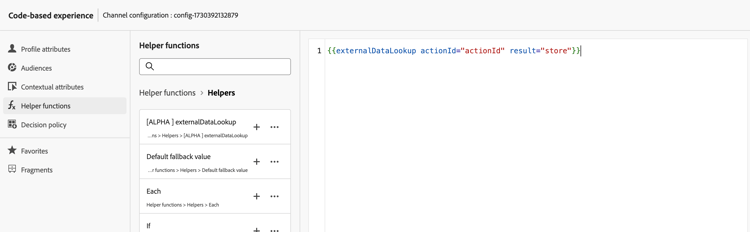
按如下方式替换占位符值:
actionId:粘贴先前复制的操作ID。result:设置您选择的名称。 您将使用此结果变量来访问获取的内容。
-
添加任何要在端点调用中传递的变量参数值。 例如,下面是如何传递语言参数和max items参数的。

-
使用结果变量访问获取的数据,并将其插入到集客操作的内容中。 例如,下面显示了如何返回从端点获取的项目的JSON数组。
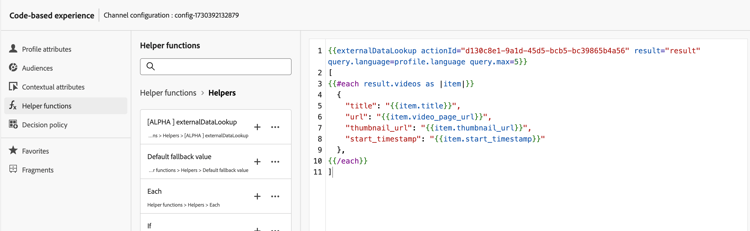
工作原理
运行时执行
当入站操作包含externalDataLookup帮助程序时,将在AEP Edge Network接收并处理Journey Optimizer个性化请求时动态调用端点。
这意味着外部端点需要能够处理的并发负载和吞吐量至少与客户端为给定表面向AEP Edge Network发送的并发负载和吞吐量相同。
句法
{{externalDataLookup actionId="d130c8e2-9a2d-45d5-bcb6-bc39865b4a56" result="result" optional-parameters...}}
传递参数
调用外部端点时,将使用Action配置中给定的值发送在Action中定义的所有常量标头值、查询参数和请求有效负载值。
对于任何变量标头值、查询/路径参数或请求有效负载值,您可以使用参数将值动态传递到externalDataLookup帮助程序。
参数名称:
- 标头参数:
header.<parameter-name> - 查询参数:
query.<parameter-name> - 有效负载参数:
payload.<parameter-name> - 路径参数:
dynamic_path.<parameter-name>
例如:
{{externalDataLookup actionId="..." result="result" header.myHeaderParameter="value1" query.myQueryParameter="value2" payload.myPayloadParameter="value3"}}`
参数值可以是固定值,也可以通过引用配置文件字段或其他上下文属性对其进行个性化,例如:
{{externalDataLookup actionId="..." result="result" query.myQueryParameter=profile.myProfileValue}}
可以使用点表示法提供有效负荷参数以引用嵌套的JSON属性,例如:
{{externalDataLookup actionId="..." result="result" payload.context.channel="web"}}
访问结果
要访问从外部端点查找调用获取的数据,您可以使用个性化表达式和帮助程序函数引用操作定义中响应有效载荷中定义的字段。
例如,如果操作中的响应有效负载如下所示:
{
    "videos": [
        {
            "id": "integer",
            "title": "string",
            "description": "string",
            "thumbnail_url": "string",
            "video_page_url": "string",
            "url": "string",
            "video_type": "string",
            "start_timestamp": "dateOnly",
            "created_on": "dateOnly",
            ...
        }
    ]
}
例如,您可以在基于代码的Experience HTML操作中获取并访问第一个视频的描述,如下所示:
{{externalDataLookup actionId="d130c8e2-9a2d-45d5-bcb6-bc39865b4a56" result="result"}}

First video description: <b>result.videos[0].description</b>
例如,您可以获取并循环访问这些项,以便在基于代码的体验JSON操作中返回项数组,如下所示:
{{externalDataLookup actionId="d130c8e2-9a2d-45d5-bcb6-bc39865b4a56" result="result"}}

[
{{#each result.videos as |item|}}
    {
        "title": "{{item.title}}",
        "url": "{{item.video_page_url}}",
        "thumbnail_url": "{{item.thumbnail_url}}",
        "start_timestamp": "{{item.start_timestamp}}"
    },
{{/each}}
]
故障排除
超时和错误处理
Journey Optimizer在调用外部端点时使用严格的超时来维护Adobe Experience Platform Edge Network的低延迟、高吞吐量的性能特征。
如果端点超时或存在任何其他类型的错误到达端点,则结果变量将为空。 在这种情况下,对结果变量中属性的任何引用也将为空。 如果您只是在内容中显示属性,则会显示为空白。 如果尝试循环遍历结果中的数组属性,则不会返回任何项。
如果您希望通过显示回退内容来更正常地处理超时或错误,则可以检查查找结果是否为空,并在该情况下显示回退内容。
例如,您可以为单个属性显示一个回退值,如下所示:
First video description: {%=result.videos[0].description ?: "none found" %}
或者,您可以有条件地呈现整个内容块,如下所示:
{{externalDataLookup actionId="d130c8e2-9a2d-45d5-bcb6-bc39865b4a56" result="result"}}

{%#if result%}
   ... do something with result ...
{%else%}
    ... return fallback content ...
{%/if%}
调试
为帮助进行调试,外部数据查找的超时和错误详细信息包含在Adobe Experience Platform Assurance的Edge Delivery视图中。 如果在入站操作中未看到externalDataLookup帮助程序的预期结果,则可启动Assurance会话,从Web或移动设备实施启动Journey Optimizer调用,并使用Edge Delivery视图检查超时或错误详细信息。
例如:
在执行详细信息中,在Edge Delivery保证跟踪部分下添加了新的customActions块,其中包含与以下内容类似的请求和响应详细信息。 如果在执行自定义操作时出现任何问题,则错误部分将有助于进行调试

常见问题 faq-external-data
下面是有关外部数据查找帮助程序的常见问题解答。
需要更多信息? 使用本页底部的反馈选项提出问题,或通过 Adobe Journey Optimizer 社区进行联系。
使用上下文属性>数据流>事件菜单浏览您所使用的体验事件架构,并将相关属性作为参数值插入,如下所示:
| code language-none |
|---|
|
This section contains structured knowledge intended to support interpretation, retrieval, and question answering related to this topic.
For complete understanding, this information should be combined with the documentation on this page. Neither source is intended to stand alone; the page describes the feature, while this section provides additional context that helps disambiguate terminology, intent, applicability, and constraints.
- TL;DR: This page explains how to configure an Action for an external endpoint and use the
externalDataLookuphelper in the personalization editor to dynamically fetch that data at runtime for personalizing inbound channel content.
Intents:
- Configure an Action defining an external endpoint (URL, HTTP method, parameters, request/response schemas)
- Insert the
externalDataLookuphelper in a personalization expression for an inbound action - Pass variable header, query, payload, or path parameters to the external endpoint at call time
- Access fetched data via the result alias using personalization expressions and helper functions
- Handle timeouts and errors gracefully with fallback content patterns
- Debug external lookup issues using Adobe Experience Platform Assurance
Glossary:
- externalDataLookup: A helper function in the personalization editor that dynamically fetches data from a configured external endpoint at request time, for use in inbound channel content personalization. (product-specific)
- Action: A configuration object in Journey Optimizer (Administration > Configurations) that defines an external endpoint — URL, HTTP method, header/query parameters, POST body schema, and response schema. Required before using
externalDataLookup. (product-specific) - result variable: An arbitrary alias assigned in the
externalDataLookupcall; used to reference all fields from the fetched response in subsequent personalization expressions. - Inbound channels: Channels where content is delivered on demand when a user opens a surface — Code-based Experience, Web, In-App Message. (product-specific)
- AEP Edge Network: The infrastructure that receives personalization requests and triggers the external data lookup call at runtime.
Guardrails:
- Feature is in Limited Availability — only available for a set of organizations.
- Default timeout for external endpoint calls: 300ms (default; contact your Adobe representative to increase this timeout for a specific endpoint).
- Response schema browsing is not supported in the personalization editor; Journey Optimizer does not validate references to JSON attributes from the response used in expressions.
- Supported data types for payload variable parameters:
String,Integer,Decimal,Boolean,listString,listInt,listInteger,listDecimal. - Variable substitution within
externalDataLookuphelper parameters is not currently supported. - Dynamic URL paths are not currently supported.
- Authentication options in the Action configuration are not currently supported by
externalDataLookup; use header fields for API key-based or plaintext authorization as a workaround. - Changes to an Action configuration are not reflected in live campaigns or journeys using that Action; copy or modify any live campaigns/journeys to apply the changes.
- Multi-pass rendering is supported.
- Journey Optimizer does not currently cache external endpoint responses.
- The external endpoint must be able to handle at least as much concurrent load and throughput as the inbound traffic sent to the AEP Edge Network for the given surface.
Terminology:
- Canonical name: externalDataLookup — variants: external data lookup, external data lookup helper, External Data Lookup Helper
- Synonyms: “externalDataLookup” = “external data lookup helper”
- Do not confuse:
actionId(ID of the configured Action, identifying the external endpoint) ≠result(alias for the fetched response data) ≠ parameter names (variable values passed to the endpoint at call time) - Do not confuse: using
externalDataLookupin an inbound personalization action (fetches data dynamically at Edge Network request time) ≠ using a Custom Action in a journey activity (fetches content within a journey flow)
FAQ:
- Q: What happens if the external endpoint times out or returns an error? — The result variable will be empty. Attribute references within the result will display as blank, and array iterations will return no items. Use fallback content patterns — such as
?: "none found"for single attributes or{%#if result%}…{%else%}…{%/if%}for entire content blocks — to handle these cases gracefully. - Q: How do I pass a contextual attribute from the request as a parameter to an external data lookup? — Use the Contextual Attributes > Datastream > Event menu in the personalization editor to browse the Experience Event schema and insert the relevant attribute as a parameter value, for example:
query.myQueryParameter=context.datastream.event.<schemaId>.my.xdm.attribute. - Q: Does Journey Optimizer cache external endpoint responses? — Not currently. Caching will be supported in the future.
- Q: How do I debug issues with externalDataLookup? — Use Adobe Experience Platform Assurance. Start an Assurance session, initiate a Journey Optimizer call from your web or mobile implementation, and use the Edge Delivery view to inspect the customActions block for timeout or error details.
- Q: Can I use authentication in the Action configuration with externalDataLookup? — Authentication options in the Action configuration are not currently supported. For API key-based or other plaintext authorization, specify the credentials as header fields in the Action configuration.