在此页面上:了解如何创建任何人都可以从共享URL打开的公开登陆页面,并使用这些页面从启用非配置文件的数据集中的匿名访客捕获数据。
登陆页面通常向单击个性化链接(例如来自电子邮件)的访客显示,以便在页面加载时识别访客的个人资料。 使用公共登陆页面,您还可以在 公共URL 上发布任何人都可以打开的登陆页面。 然后,访客可在页面上填写表单并提交数据。
您可以在任意位置(例如在电子邮件、短信消息中或在您的网站上)共享公共URL,并将其用于外部营销活动。
关键特性 lp-anonymous-characteristics
开始之前 lp-anonymous-prerequisites
在创建公共登陆页面之前,请确保:
- 您要用于登陆页面的子域已迁移到Cloudflare。 当您重用已配置的登陆页面子域时,这适用。
创建公共登陆页面 lp-anonymous-create
公共登陆页面与其他登陆页面一样创建,具有一些特定设置:该页面必须可供匿名访客访问,并且它包含的表单应将数据存储在未启用用户档案的数据集中。 要创建配置文件,请执行以下步骤。
-
从左侧菜单浏览到内容管理 > 登陆页面,然后单击创建登陆页面。
-
添加标题和(可选)描述。
-
选择预设。 了解如何创建登陆页面预设
-
选择 数据捕获 作为登陆页面的类型。
note NOTE 只有数据捕获登陆页面允许您嵌入特定表单。 -
单击创建。 此时将显示主页面及其属性。
-
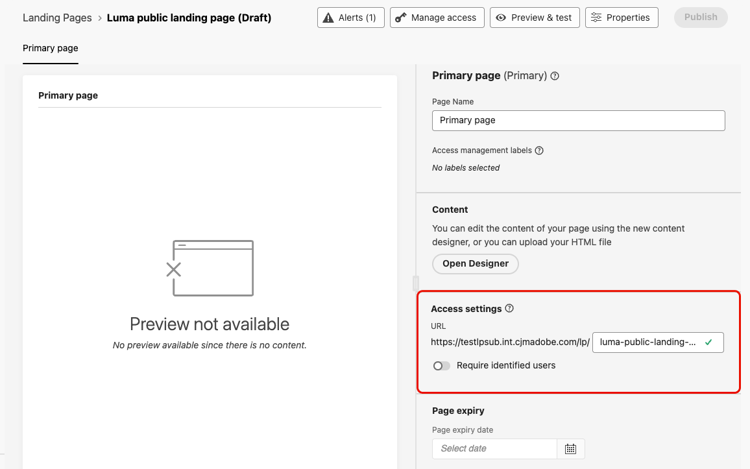
在 访问设置 部分中,定义登陆页面URL。 URL的第一部分是在预设中定义的子域。 在URL旁边的字段中输入URL的唯一结尾。
-
确保禁用了 需要已识别的用户 选项。 启用此选项后,只有已识别的用户档案才能访问该页面。 禁用后,匿名访客可以访问页面。
-
单击 打开Designer 以设计页面的内容。 了解有关登陆页设计器的更多信息
-
将 Structure 组件拖放到您的内容中,然后将 Form 组件拖放到该结构中。
-
在 嵌入表单 部分中,选择已发布的表单,最好链接到未启用配置文件的数据集。
note NOTE Adobe不建议使用链接到启用了配置文件的数据集的表单,因为它可能会创建不必要的配置文件并损坏数据。 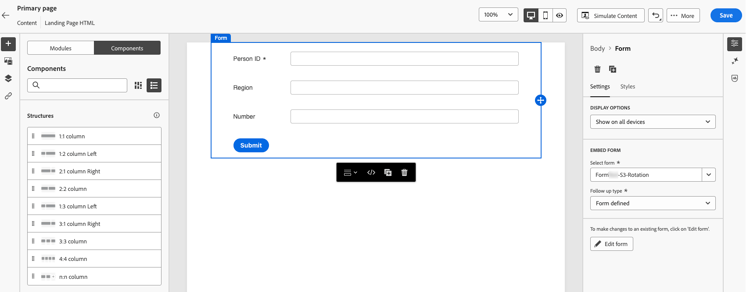
-
在 跟进类型 部分中,定义访客提交表单时发生的情况。 了解详情
-
(可选)定义页面到期日期以及页面到期时执行的操作。 了解详情
-
单击保存,然后使用 预览和测试 测试您的页面。 了解如何操作
-
单击发布。 发布可能需要一些时间。 在发布登陆页面时,您会收到通知。
共享登陆页面 lp-anonymous-share
发布登陆页面后,任何人都可以从其URL访问该页面。 要检查该URL是否为公共的,请复制该URL并将其粘贴到浏览器窗口中。
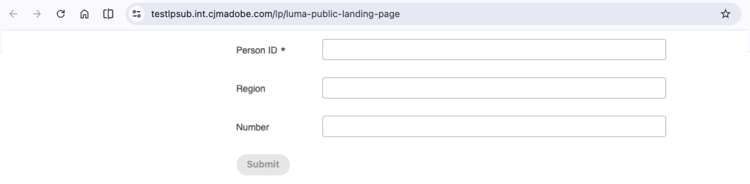
在需要的URL位置(如电子邮件、短信消息或网站上)添加该URL。 若要跟踪来自消息的点击次数,请将跟踪参数添加到URL。
访客提交表单时,数据会发送到表单预设中定义的数据集。 最多留出15分钟时间,以便处理数据并供使用。
护栏和限制 lp-anonymous-limitations
-
将表单数据存储在 启用非配置文件的 数据集中。 公共登陆页面并非旨在创建或丰富用户档案,启用用户档案的数据集可能会发生这种情况,并导致意外用户档案创建和数据损坏。
-
公共登陆页面不支持报表。
-
对于其他登陆页面,无法使用沙盒工具将公共登陆页面复制到另一个沙盒。
-
由于未识别匿名访客,因此请勿在公共登陆页面的内容中根据用户档案数据使用个性化。
相关主题 lp-anonymous-related
This section contains structured knowledge intended to support interpretation, retrieval, and question answering related to this topic.
For complete understanding, this information should be combined with the documentation on this page. Neither source is intended to stand alone; the page describes the feature, while this section provides additional context that helps disambiguate terminology, intent, applicability, and constraints.
- TL;DR: This page explains how to create and publish public landing pages, which are public landing pages that anyone can open from a shared URL and use to submit form data stored in a non-profile enabled dataset, without identifying the visitor.
Intents
- Publish a landing page on a public URL that anonymous visitors can open without being identified.
- Capture data from anonymous visitors with a form, in a non-profile enabled dataset.
- Check the prerequisites before creating a public landing page.
- Create, test, and publish a public landing page.
- Share the public URL of a public landing page in emails, SMS messages, or on a website.
- Identify the limitations that apply to public landing pages.
Glossary
- Public landing page: a Data Capture landing page published on a public URL that anyone can open, without being identified. Visitors can fill in a form on the page and submit data.
- Data Capture landing page: the only type of landing page that lets you embed a specific form, and therefore the type used for public landing pages.
- Non-profile enabled dataset: the type of dataset that is strongly recommended to store data submitted through a public landing page. With a profile-enabled dataset, many lead profiles might be created unnecessarily and existing profiles might be corrupted.
- Require identified users (product-specific): the option that restricts access to identified profiles when enabled. It must be disabled for the page to be accessible to anonymous visitors.
- Cloudflare migration: the migration of a landing page subdomain to Cloudflare, required to use public landing pages when you reuse a landing page subdomain that you already configured.
- Landing page preset: the configuration object, linked to a subdomain, from which a landing page is created.
- Form preset: the configuration object, linked to a non-profile enabled dataset for public landing pages, from which a form is created and published.
Guardrails
- Public landing pages are available in Limited Availability; contact your Adobe representative to request access.
- The landing page subdomain must be migrated to Cloudflare, a landing page preset must exist for that subdomain, and a form, preferably linked to a non-profile enabled dataset, must be created and published from a form preset.
- Form data should be stored in non-profile enabled datasets; public landing pages are not meant to create or enrich profiles, which can happen with a profile-enabled dataset.
- Reporting is not supported for public landing pages.
- Managing allowed IPs is not supported for subdomains used for public landing pages.
- Public landing pages cannot be copied to another sandbox using Sandbox tooling.
- Personalization based on profile data should not be used in the content of a public landing page, because visitors are not identified.
- Submitted data can take up to 15 minutes to be processed and available for use.
Terminology
- Do not confuse a public landing page with a Data Capture landing page for known profiles: the latter is usually opened from a personalized link so that the visitor’s profile can be identified, and the former is opened from a public URL without identification.
- Data submitted through a public landing page is stored in a dataset, not in a profile.
FAQ
- Who can open a public landing page? Anyone with the URL.
- Which type of landing page must I select? Data Capture, as only Data Capture landing pages let you embed a specific form.
- Where is the data submitted by visitors stored? In the non-profile enabled dataset defined in the form preset, not in a profile.
- Do submissions create or enrich profiles? Not with a non-profile enabled dataset, which is strongly recommended. With a profile-enabled dataset, lead profiles might be created unnecessarily and existing profiles might be corrupted.
- Which option must be disabled so that anonymous visitors can access the page? The Require identified users option.
- Do I need to migrate my landing page subdomain to Cloudflare? Yes, when you reuse a landing page subdomain that you already configured.
- Can I use allowed IPs with a public landing page? No, managing allowed IPs is not supported for subdomains used for public landing pages.
- Is reporting available for public landing pages? No.
- How long before submitted data is available? Up to 15 minutes.