在此页面上:了解如何在 Email Designer 中设置电子邮件正文、视口、结构和列级别的背景颜色和图像。
背景可帮助您强化品牌识别,并吸引收件人关注电子邮件中的关键区域。在电子邮件设计器中,您可以在内容的不同级别设置背景颜色或图像(从整体正文到单个结构和列),从而精确控制背景在电子邮件中的渲染方式。
在电子邮件设计器中设置背景时,请牢记以下最佳做法:
- 仅当您的设计需要背景颜色时,才对正文应用背景颜色。
- 尽可能在列级别设置背景颜色。
- 避免在图像或文本组件上使用背景颜色,因为它们更难于管理。
- 发送前,请在实际邮件客户端中测试背景图像,因为渲染效果可能与电子邮件设计器预览不一致。
以下设置允许您在电子邮件内容的任意级别应用背景颜色或图像,从正文一直到单个结构和列。
设置背景颜色 background-color
-
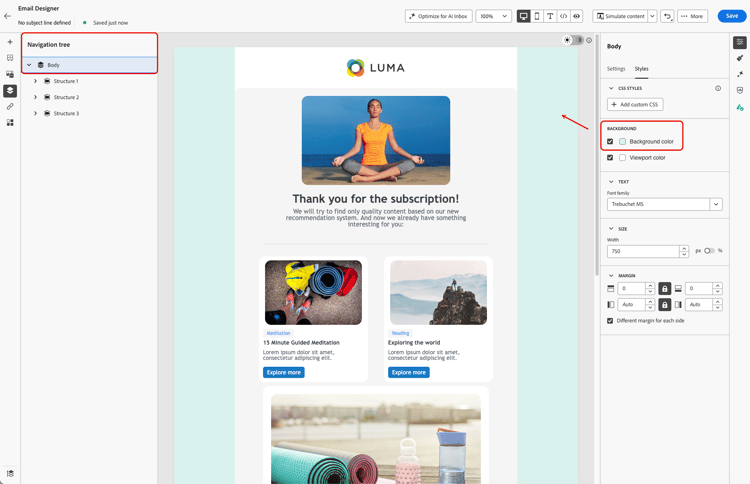
正文背景颜色 – 设置整封电子邮件的背景颜色。请确保在导航树(可从左侧调色板访问)中选择正文,并使用右侧的 样式 选项卡中的专用选项。
-
视口背景颜色 – 设置视口颜色,以便独立于正文背景颜色,为所有结构组件应用相同的背景颜色。

-
结构背景颜色 – 要将背景颜色应用于单个结构组件,请直接在画布中或从左侧调色板中选择它,然后为该结构设置特定颜色。
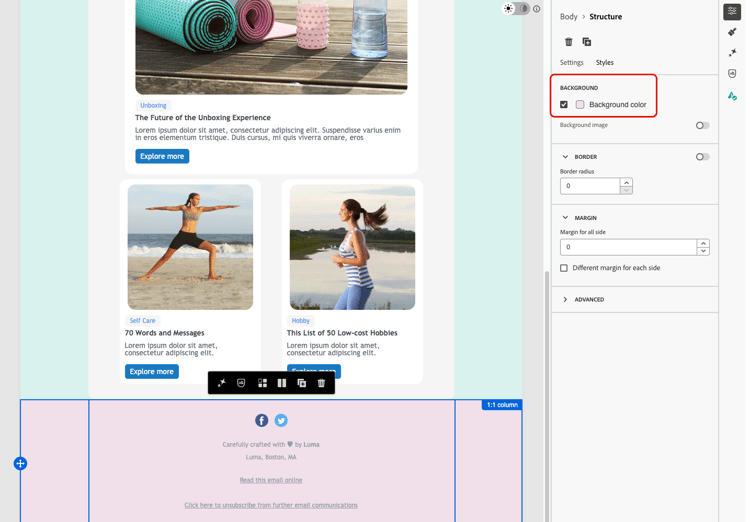
note tip TIP 在这种情况下,切勿设置视口背景颜色,因为它可能会隐藏结构背景颜色。 -
列背景颜色 – 在列级别设置背景颜色。同样,请确保从左侧面板中选择所需的列,并设置该列的特定颜色。

note tip TIP 这是最常见的用例和最佳做法,因为它能让您在编辑电子邮件的其余部分时拥有更大的灵活性。
设置背景图像 background-image
您还可以为结构或列组件的内容设置背景图像。这最常在结构级别使用;在列级别设置一个也是可行的,但很少使用。
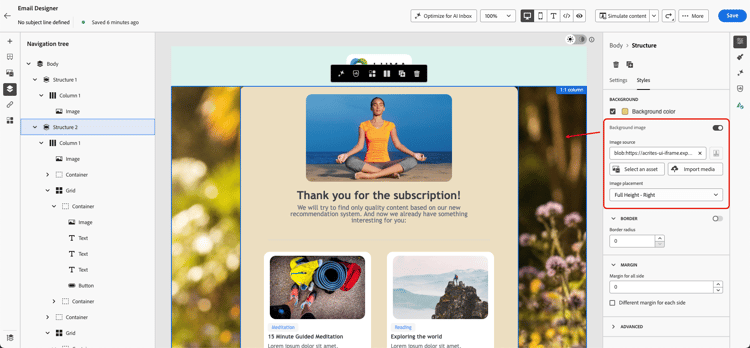
设置背景图像后,使用 图像放置环境 下拉菜单控制图像在结构或列中的填充方式。以下选项可供选择:

缩放以填充,居中:
- 适合 – 将图像沿两个坐标轴拉伸以填满容器,不保留其纵横比。
- 全宽 – 根据容器宽度按比例缩放图像,并使其垂直居中。
- 全高 – 根据容器高度按比例缩放图像,并使其水平居中。
缩放以填充,锚定到边缘:
- 全宽 – 顶部 – 与 全宽 相同,但锚定到容器顶部。溢出的部分在底部被裁剪。
- 全宽 – 底部 – 与 全宽 相同,但锚定到容器底部。溢出的部分在顶部被裁剪。
- 全高 – 左侧 – 与 全高 相同,但锚定到容器左侧。溢出的部分在右侧被裁剪。
- 全高 – 右侧 – 与 全高 相同,但锚定到容器右侧。溢出的部分在左侧被裁剪。
平铺:
- 重复 – 以原始大小平铺图像,填满容器。
定位(不缩放):
- 左、右、中、上、下 – 以原始大小定位图像,并将其锚定到容器的相应边缘或中心。
This section contains structured knowledge intended to support interpretation, retrieval, and question answering related to this topic.
For complete understanding, this information should be combined with the documentation on this page. Neither source is intended to stand alone; the page describes the feature, while this section provides additional context that helps disambiguate terminology, intent, applicability, and constraints.
- TL;DR: This page explains how to set background colors and images at the body, viewport, structure, and column levels of an email in the Email Designer, and Adobe’s best practices for doing so.
Intents:
- Set a Background color for the whole email at the body level
- Apply the same background color to all structure components using Viewport background color
- Set a different background color for a specific structure component
- Set a background color for a specific column
- Set a Background image for a structure or column component and choose an Image placement option
Glossary:
- Background color: A color applied to the whole email when Body is selected in the navigation tree (product-specific)
- Viewport background color: A setting that applies the same background color to all structure components, independently of the body’s background color (product-specific)
- Background image: An image set for the content of a structure or column component; falls back to the background color when not supported (product-specific)
- Image placement: A dropdown that controls how a background image fills its container — by scaling it centered, scaling it anchored to an edge, tiling it, or positioning it without scaling (product-specific)
Guardrails:
- Some email programs / clients do not support background images; when not supported, the background color is used instead, so select an appropriate fallback background color.
- When setting a different background color per structure component, do not set a viewport background color, as it may hide the structure background colors.
- Column-level background color is the most common use case and Adobe’s recommended best practice, for more flexibility when editing the rest of the email content.
- Avoid using background colors on image or text components, as they are harder to manage.
- Apply a background color to the body only if the design requires it.
- A background image can also be set at the column level, though this is rarely used; the same fallback color and Image placement options apply there too.
Terminology:
- Canonical name: Background — Acronym: n/a — variants: background color, background image, image placement
- Do not confuse: “Background color” (body-level, whole email) ≠ “Viewport background color” (same color applied to all structure components)
- Do not confuse: “Background color” (supported broadly by email clients) ≠ “Background image” (not supported by all email clients, falls back to background color)
- Do not confuse the “Scale to fill, centered” Image placement options (Fit, Full Width, Full Height) with the “Scale to fill, anchored to an edge” options (Full Width - Top, Full Width - Bottom, Full Height - Left, Full Height - Right), which control which side is cropped instead of centering the image
FAQ:
- Q: Where does Adobe recommend setting background colors? — At the column level, which is the most common use case and best practice, allowing more flexibility when editing the rest of the email content.
- Q: What happens if a background image is not supported by an email client? — The background color is used instead, so select an appropriate fallback background color.
- Q: How do I apply the same background color to all structure components? — Select Viewport background color, which can be set independently of the body’s background color.
- Q: Why might my per-structure background colors not appear? — A viewport background color may hide the structure background colors; do not set one in that case.
- Q: Can I set a background image at the column level? — Yes, though it is rarely used; the same fallback color behavior and Image placement options described for structures apply there too.
- Q: What is the difference between “Full Width” and “Full Width - Top” / “Full Width - Bottom”? — “Full Width” scales the image proportionally to the container’s width and centers it vertically. The “Top” and “Bottom” variants anchor it to that edge instead, cropping the opposite side rather than centering.
- Q: What is the difference between “Full Height” and “Full Height - Left” / “Full Height - Right”? — “Full Height” scales the image proportionally to the container’s height and centers it horizontally. The “Left” and “Right” variants anchor it to that side instead, cropping the opposite side rather than centering.