在此页面上:了解如何通过上传DDL文件、定义表之间的关系、将架构链接到现有实体以供在编排的营销活动中使用,在Adobe Experience Platform中创建关系架构。
通过创建架构(如忠诚度会员资格、忠诚度交易和忠诚度奖励)来定义编排营销活动所需的关系数据模型。 每个架构必须包含一个主键、一个版本控制属性和适当的关系以引用实体,如 收件人 或品牌。
可以通过界面手动创建架构,或使用DDL文件批量导入架构。
本部分提供分步指导,说明如何通过上传 DDL(数据定义语言)文件在 Adobe Experience Platform 中创建关系型架构。 可使用 DDL 文件预先定义数据模型的结构,包括表、属性、键和关系。
➡️ 在Adobe Experience Platform文档中了解有关关系架构的更多信息
上载DDL文件 ddl-upload
通过上传DDL文件,您可以预先定义数据模型的结构,包括表、属性、键和关系。
支持基于Excel的架构文件上传。 下载提供的模板以轻松准备架构定义。
-
枚举
基于DDL和手动创建架构均支持ENUM字段。 从DDL文件加载架构时,会自动导入文件中定义的枚举,从而允许您定义具有一组固定的允许值的属性。示例如下:
code language-none CREATE TABLE orders ( order_id INT NOT NULL, product_id INT NOT NULL, order_date DATE NOT NULL, customer_id INT NOT NULL, quantity INT NOT NULL, order_status enum ('PENDING', 'SHIPPED', 'DELIVERED', 'CANCELLED'), PRIMARY KEY (order_id, product_id) ); -
复合键和复合关系
关系模式定义支持跨多个字段的复合主键,允许同时使用多个字段来唯一标识记录。
从DDL或Excel文件加载架构时,会自动创建表之间的复合关系。 在实体关系视图中,每个复合链接都显示链接表之间的完整字段配对集。
-
用于数据管理的架构标签
架构字段级别支持标签设置,以强制执行数据管理策略,例如访问控制和使用限制。 有关详细信息,请参阅Adobe Experience Platform文档。
-
登录到Adobe Experience Platform。
-
导航到数据管理 > 架构菜单。
-
单击创建架构。
-
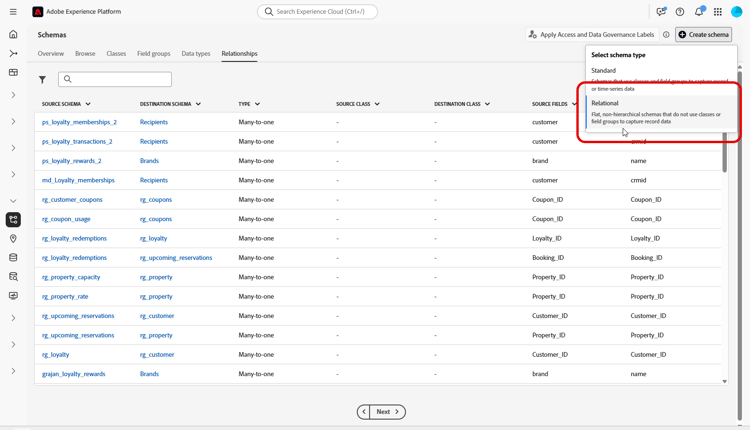
选择 关系 作为架构类型。
-
选择 上传 DDL 文件 以定义实体关系图并创建架构。
表结构必须包含:
- 至少一个主键。
- 版本标识符,如
datetime或number类型的lastmodified字段。 - 对于变更数据捕获(CDC)摄取,为名为
_change_request_type且类型为String的特殊列,它指示数据变更的类型(例如,插入、更新、删除)并启用增量处理。 - DDL文件不能定义超过200个表。
- 表不能引用自身:DDL文件中不允许存在自引用关系。
note important IMPORTANT 用于定位的任何架构必须至少包含一个类型为 String且具有关联 标识命名空间 的标识字段。
这可确保与Adobe Journey Optimizer的定位和身份解析功能兼容。 -
拖放您的 DDL 文件并单击下一步。
请注意,支持DDL文件的最大大小为10MB。 文件名必须仅包含字母、数字、下划线(_)、连字符(-)或空格,并包含单个扩展名。
-
键入您的架构名称。
-
设置每个架构及其列,确保指定了主键和版本描述符。
必须指定一个属性(如
lastmodified)作为版本描述符(类型datetime、long或int),以确保使用最新数据更新数据集。 用户可以更改版本描述符,一旦设置,版本描述符将变为必需。 属性不能同时是主键(PK)和版本描述符。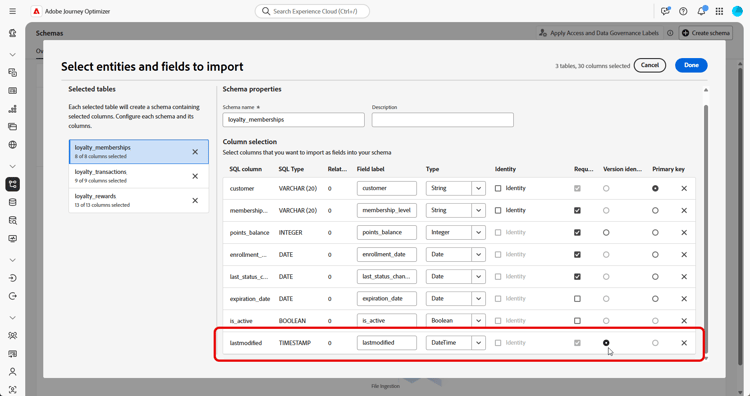
-
将属性标记为
identity并将其映射到定义的身份命名空间。 -
重命名、删除每个表或向每个表添加说明。
-
完成后,单击完成。
您现在可以在画布中验证表和字段定义。 在下面的部分中了解更多信息
定义关系 relationships
创建架构时,可以直接在DDL文件中指定关系。 如果您希望定义文件外部的关系,可以在界面中按照以下步骤定义关系。
-
访问数据模型的画布视图,然后选择要关联的两个表
-
单击“源联接”旁边的

note NOTE 在DDL文件中定义时,支持跨多个字段的复合键。 从DDL或Excel文件加载时,会自动创建表之间的复合关系。 在实体关系视图中,复合链接显示链接表之间的全组字段配对。 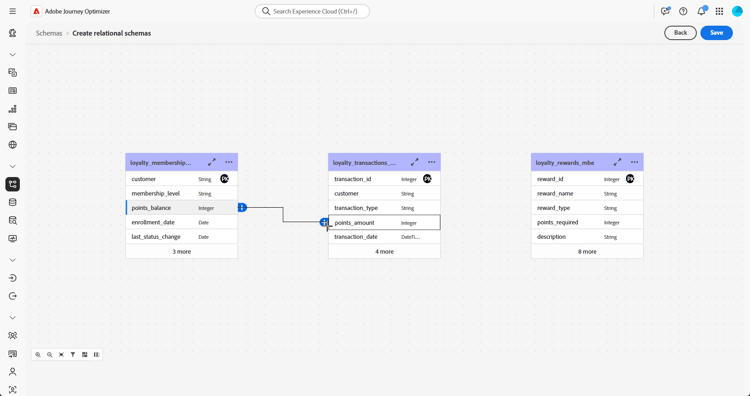
-
填写给定表单以定义链接,配置完毕后单击应用。
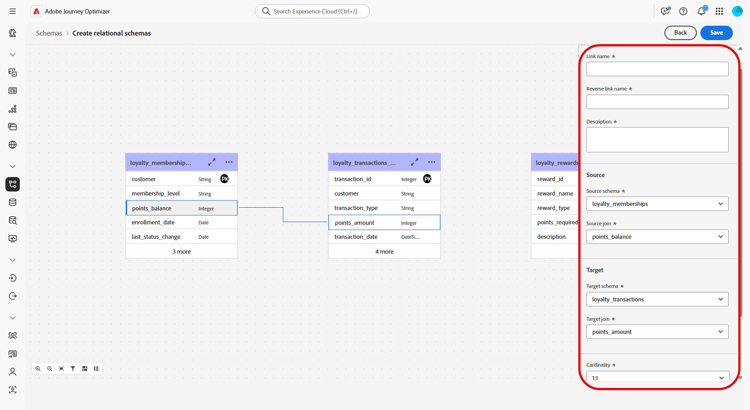
基数:
-
1-N:源表的一个项可以对应目标表的多个项,但目标表的一个项最多对应源表的一个项。
-
N-1:目标表的一个项可以对应源表的多个项,但源表的一个项最多对应目标表的一个项。
-
1-1:源表的一个项最多对应目标表的一个项。
-
-
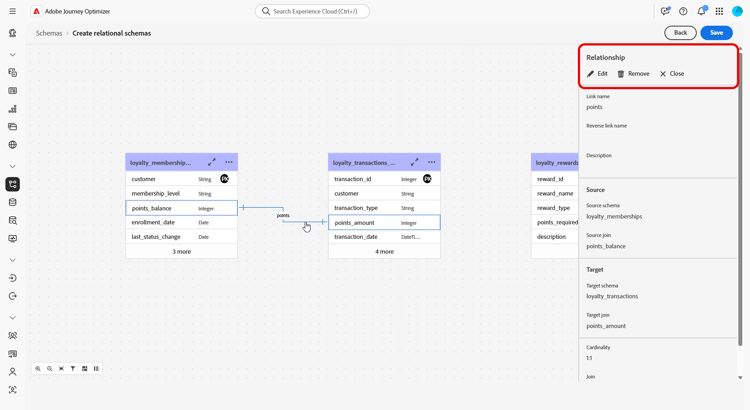
数据模型中定义的所有链接在画布视图中均表示为箭头。 单击两个表之间的箭头可查看详细信息、进行编辑或根据需要移除链接。
-
使用工具栏自定义和调整画布。

-
放大:放大画布,更清楚地查看数据模型的详细信息。
-
缩小:缩小画布大小,以便更全面地查看数据模型。
-
适应视图:调整缩放,适应可见区域内的所有架构。
-
筛选:选择要在画布中显示的架构。
-
强制自动布局:自动排列架构以便更好地进行组织。
-
显示映射:切换小映射叠加,有助于更轻松地浏览大型或复杂的架构布局。
-
全部展开/折叠全部:快速展开或折叠所有架构节点以显示或隐藏其属性。
-
下载:以.png文件格式下载ER图。
-
-
完成后,单击保存。 此操作创建架构和关联的数据集,并启用数据集以用于编排的营销活动。
-
单击打开作业,监控创建作业的进度。 此过程可能需要几分钟时间,具体取决于 DDL 文件中的表数量。
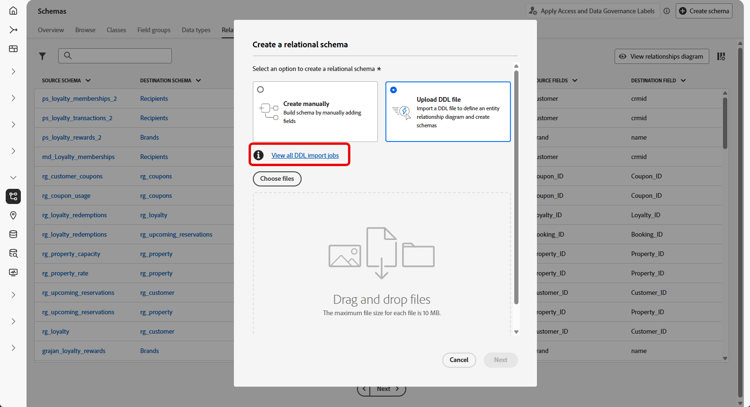
您还可以通过打开 上传DDL文件 窗口并选择 查看所有DDL导入作业 来访问DDL导入作业。
链接架构 link-schema
在 忠诚度交易 架构和 收件人 架构之间建立关系,使每个交易与正确的客户记录相关联。
-
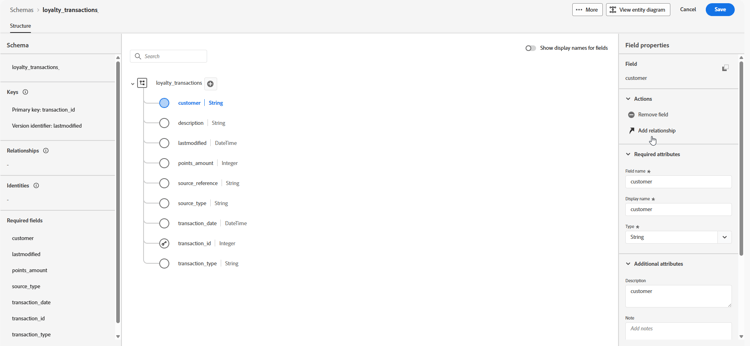
导航到架构,然后打开您之前创建的忠诚度交易。
-
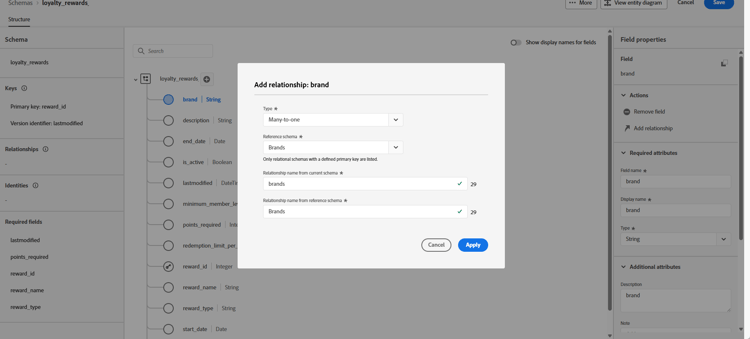
单击客户 字段属性 中的添加关系。
-
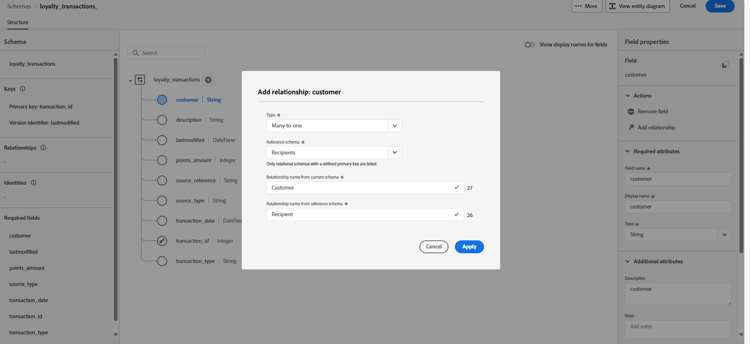
选择 多对一 作为关系类型。
-
与现有的 收件人 架构相关联。
-
输入 当前架构中的关系名称 以及引用架构中的关系名称。
-
单击 应用 保存更改。
继续在 忠诚度奖励 架构和 品牌 架构之间创建关系,将每个奖励条目与相应的品牌关联。
如果架构或数据集返回错误代码,请参阅关系架构和数据集错误。
This section contains structured knowledge intended to support interpretation, retrieval, and question answering related to this topic.
For complete understanding, this information should be combined with the documentation on this page. Neither source is intended to stand alone; the page describes the feature, while this section provides additional context that helps disambiguate terminology, intent, applicability, and constraints.
- TL;DR: This page explains how to create relational schemas in Adobe Experience Platform by uploading a DDL file, defining relationships between tables, and linking schemas to existing entities for use in Orchestrated campaigns.
Intents:
- Upload a DDL file to create relational schemas and define their structure.
- Define relationships between tables in the data model, either within the DDL file or in the interface.
- Link a relational schema to existing profile entities such as Recipients or Brands.
- Identify the required table structure elements: primary key, version identifier, and identity field for targeting.
- Monitor the progress of a DDL import job.
- Resolve schema or dataset errors returned during this process.
Glossary:
- Relational schema: a schema created to define the data model required for Orchestrated campaigns, such as Loyalty Memberships, Loyalty Transactions, or Loyalty Rewards (product-specific)
- DDL file: a Data Definition Language file used to define tables, attributes, keys, and relationships of a data model in advance (product-specific)
- ENUM: a field type supporting a fixed set of allowed values, supported in both DDL-based and manual schema creation (product-specific)
- Composite key / Composite relationships: primary keys or relationships spanning multiple fields, supported in relational schema definitions and created automatically when loading from a DDL or Excel file (product-specific)
- Schema label: a labeling mechanism at the schema field level used to enforce data governance policies such as access control and usage restrictions (product-specific)
- Version descriptor: an attribute (for example
lastmodified) designated to ensure datasets are updated with the latest data; typedatetime,long, orint(product-specific) - Identity field: a field of type
Stringwith an associated identity namespace, required on any schema used for targeting (product-specific) - Cardinality: the type of relationship between two tables — 1-N, N-1, or 1-1 (product-specific)
Guardrails:
- A DDL file must not define more than 200 tables (hard limit).
- A table cannot reference itself: self-referential relationships are not allowed in the DDL file (hard limit).
- The maximum supported size for a DDL file is 10MB (hard limit).
- The DDL file name must contain only letters, numbers, underscores (_), hyphens (-), or spaces, and include a single extension (hard limit).
- The table structure must contain at least one primary key and a version identifier, such as a
lastmodifiedfield of typedatetimeornumber. - For Change Data Capture (CDC) ingestion, the table structure must contain a special column named
_change_request_typeof typeString. - Any schema used for targeting must include at least one identity field of type
Stringwith an associated identity namespace, to ensure compatibility with Adobe Journey Optimizer’s targeting and identity resolution capabilities. - An attribute cannot be both a primary key (PK) and a version descriptor.
- The version descriptor becomes mandatory once set, though users can change it.
- Only relationships explicitly defined within the DDL file are recognized by the system; any entity relationships that exist outside of the DDL file are ignored and not processed.
- The View relationships diagram from the Relationship tab is read-only; to create or edit a relationship, the schema must be opened from the Browse tab instead.
- Saving the data model creates the schemas and associated data sets and enables the data set for use in Orchestrated campaigns.
Terminology:
- Canonical name: relational schema — variants: schema
- Do not confuse: “1-N” cardinality (one source occurrence can have several target occurrences, but one target occurrence has at most one corresponding source occurrence) ≠ “N-1” cardinality (one target occurrence can have several source occurrences, but one source occurrence has at most one corresponding target occurrence) ≠ “1-1” cardinality (one source occurrence can have at most one corresponding target occurrence)
- Do not confuse: “primary key” (uniquely identifies records) ≠ “version descriptor” (ensures datasets are updated with the latest data) — an attribute cannot be both
FAQ:
- Q: What must a table structure contain to create a relational schema from a DDL file? — At least one primary key, a version identifier such as a
lastmodifiedfield of typedatetimeornumber, and for CDC ingestion a_change_request_typecolumn of typeString. - Q: Is there a limit on the number of tables in a DDL file? — Yes, a DDL file must not define more than 200 tables.
- Q: Can a table reference itself in the DDL file? — No, self-referential relationships are not allowed in the DDL file.
- Q: What is the maximum DDL file size? — 10MB.
- Q: What is required for a schema used for targeting? — At least one identity field of type
Stringwith an associated identity namespace. - Q: Are relationships defined outside the DDL file recognized? — No, only relationships explicitly defined within the DDL file are recognized; entity relationships that exist outside of the DDL file are ignored and not processed.
- Q: Where can a relationship be created or edited? — From the Browse tab; the View relationships diagram from the Relationship tab is read-only.
Related pages:
- For ingesting data into a dataset after creating relational schemas: Ingest data (orchestrated/ingest-data.md)
- For resolving a schema or dataset error code: Relational schema and dataset errors (orchestrated/relational-schema-errors.md)
Personas:
- developer: Can create relational schemas by uploading a DDL file that defines tables, attributes, keys, and relationships. Can use ENUM fields with a fixed set of allowed values, and composite primary keys and composite relationships spanning multiple fields. The page states that any schema used for targeting must include at least one identity field of type String with an associated identity namespace. Where: “Upload a DDL file”.
- admin: Can select Relational as the Schema type and select Upload DDL file to define an entity relationship diagram. Can navigate the Data Management > Schema menu to create a schema, then select Open Jobs to monitor the DDL import job. The page states that a DDL file must not define more than 200 tables and must not exceed 10MB in size. Where: “Guardrails”.
Onboarding:
- Level: Experienced
- First minimal step: Select Relational as your Schema type.
- Success check: You can now verify the table and field definitions within the canvas.
- Next: After creating relational schemas, ingest data into your dataset: Configuration steps (orchestrated/ingest-data.md); If a schema or dataset returns an error code: Relational schema and dataset errors (orchestrated/relational-schema-errors.md)