预期生命周期值分析
本主题将演示如何设置功能板,以帮助您了解客户的存留期价值增长和预期存留期价值。
此分析仅适用于采用新架构的Pro客户。 如果您的帐户有权访问Persistent Views侧栏下的Manage Data功能,则表明您使用的是新架构,可以按照此处列出的说明自行构建此分析。
在开始使用之前,您想要熟悉同类群组Report Builder。
计算列
如果使用30天月,则在 订单 表中创建的列:
-
Column name:
Months between first order and this order -
Column type:
Same Table -
Column equation:CALCULATION -
Column input: A =
Seconds between customer's first order date and this order -
Datatype:Integer -
定义:
case when A is null then null when A <= 0 then '1'::int else (ceil(A)/2629800)::int end -
Column name:
Months since order -
Column type:
Same Table -
Column equation:CALCULATION -
Column input: A =
created_at -
Datatype:Integer -
定义:
case when created_at is null then null else (ceil((extract(epoch from current_timestamp) - extract(epoch from created_at))/2629800))::int end
如果使用 orders 日历 月,则在 表中创建的列:
-
Column name:
Calendar months between first order and this order -
Column type:
Same Table -
Column equation:CALCULATION -
Column inputs:
A=created_atB=Customer's first order date
-
Datatype:Integer -
定义:
case when (A::date is null) or (B::date is null) then null else ((date_part('year',A::date) - date_part('year',B::date))*12 + date_part('month',A::date) - date_part('month',B::date))::int end -
Column name:
Calendar months since order -
Column type:
Same Table -
Column equation:CALCULATION -
Column input:
A=created_at -
Datatype:Integer -
定义:
case when A is null then null else ((date_part('year',current_timestamp::date) - date_part('year',A::date))*12 + date_part('month',current_timestamp::date) - date_part('month',A::date))::int end -
Column name:
Is in current month? (Yes/No) -
Column type:
Same Table -
Column equation:CALCULATION -
Column input: A =
created_at -
Datatype:String -
定义:
case when A is null then null when (date_trunc('month', current_timestamp::date))::varchar = (date_trunc('month', A::date))::varchar then 'Yes' else 'No' end
量度
量度说明
要创建的量度
-
按第一订单日期不同的客户
- 如果启用来宾订单,请使用
customer_email
- 如果启用来宾订单,请使用
-
在
orders表中 -
此量度执行对非重复值计数
-
在
customer_id列上 -
按
Customer's first order date时间戳排序
报告
报表说明
按月份每个客户的预期收入
-
量度
A:Revenue (hide)Calendar months between first order and this order<= X(为X选取一个合理的数字,例如24个月)Is in current month?=No
-
量度:Revenue -
Filter:
-
量度
B:All time customers (hide)Is in current month?=No
-
Metric:
New customers by first order date -
Filter:
-
量度
C:All time customers by month since first order (hide)Calendar months since order<= XIs in current month?=No
-
Metric:
New customers by first order date -
Filter:
-
Formula:
Expected revenue -
Formula:
A / (B - C) -
Format:Currency
其他图表详细信息
-
Time period:
All time -
时间间隔:
None -
Group by:
Calendar months between first order and this order— 全部显示 -
使用
group by旁边的铅笔图标将All time customers量度的group by更改为“独立” -
按如下方式编辑
Show top/bottom字段:- Revenue:
Top 24 sorted by Calendar months between first order and this order - All time customers:
Top 24 sorted by All time customers - All time customers by month since first order:
Top 24 sorted by All time customers by month since first order
- Revenue:
按同类群组每月平均收入
- 量度
A:Revenue -
Metric view:Cohort - Cohort date:
Customer's first order date - Perspective:
Average value per cohort member
按同类群组列出的每月累计平均收入
- 量度
A:Revenue -
Metric view:Cohort - Cohort date:
Customer's first order date - Perspective:
Cumulative average value per cohort member
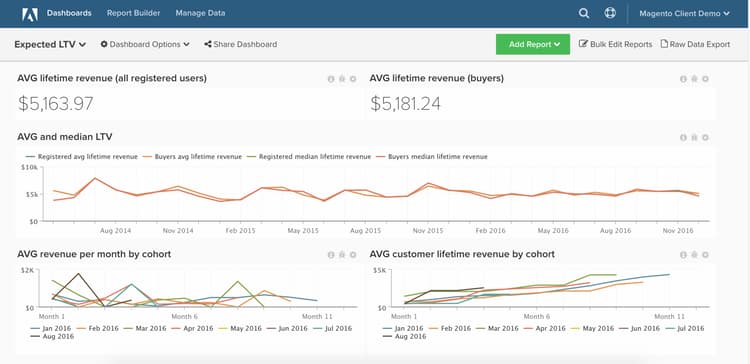
在编译所有报告后,您可以根据需要将报告组织在功能板上。 结果可能与页面顶部的图像类似。
如果您在构建此分析时遇到任何问题,或只是想与专业服务团队接洽,请联系支持人员。