Configurar Amazon S3 para fornecimento de público
Saiba como configurar e conectar seu armazenamento do Amazon S3 na interface do usuário do Adobe Real-Time CDP Collaboration aos dados de público-alvo de origem para ativação e análise de sobreposição.
Consulte o guia Configurar permissões do AWS para fornecimento de público-alvo para obter instruções de configuração passo a passo.
Visão geral overview
Use este fluxo de trabalho para originar e gerenciar públicos próprios diretamente de Amazon S3. Após a configuração, o Collaboration automaticamente origina públicos-alvo do seu bucket do S3 e os disponibiliza para insights e ativação.
Os públicos-alvo originados por meio do S3 seguem as mesmas regras de governança e manipulação de dados que os originados do Adobe Experience Platform.
Pré-requisitos prerequisites
Antes de configurar sua conexão de dados S3, verifique o seguinte:
-
Você tem acesso a um Amazon S3bucket ativo contendo arquivos de público-alvo que estão em conformidade com a Especificação de Origem de Público-Alvo (v1.3).
-
Você criou uma função IAM no AWS que concede à Adobe permissão para acessar seu bucket usando o método função assumida (não chaves de acesso/secretas). Consulte Configurar permissões do AWS para fornecimento de público-alvo para obter instruções detalhadas. A função IAM deve incluir as seguintes permissões:
ListBucketGetBucketLocationGetObject
-
Você tem os seguintes valores prontos:
- ARN (Nome do Recurso da Amazon) da função do IAM
- Nome do bucket do S3
- Caminho da pasta (o prefixo do diretório que contém seus arquivos de público-alvo)
Configurar sua conexão com o Amazon S3 configure-aws-s3-connection
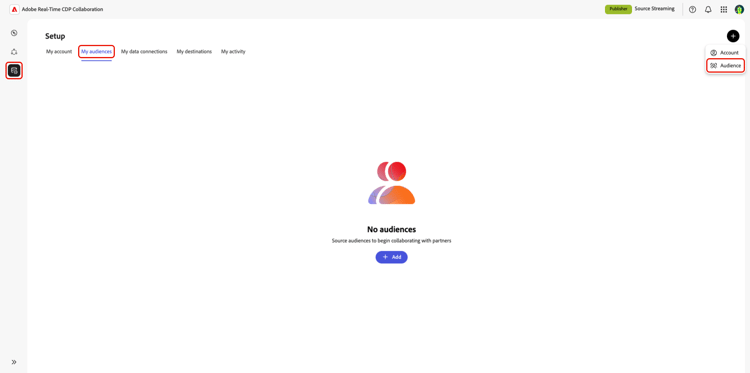
Na guia Meus públicos-alvo do espaço de trabalho Configuração, selecione o ícone adicionar (

Se este for seu primeiro público-alvo, você também poderá selecionar a opção Adicionar.
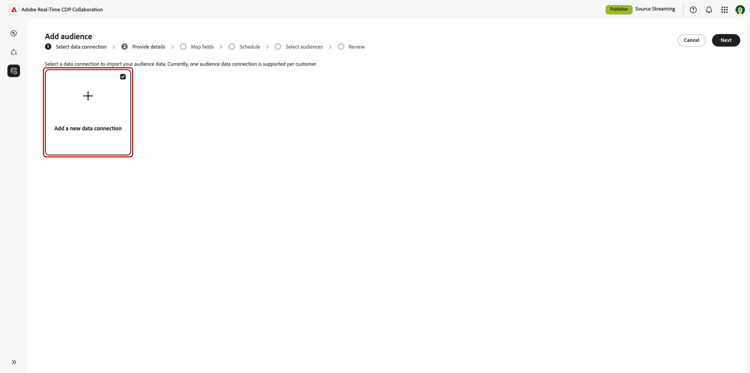
O fluxo de trabalho Adicionar público-alvo é exibido. Selecione Adicionar nova conexão de dados e Avançar.
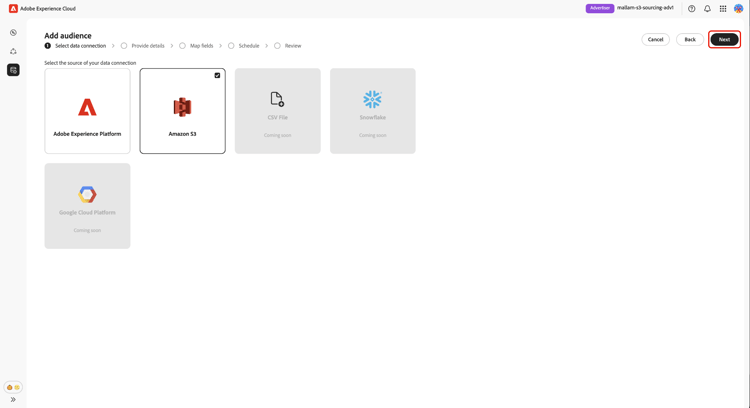
Selecione Amazon S3 como conexão de dados select-aws-s3
Selecione Amazon S3 como conexão de dados, seguido de Próximo.
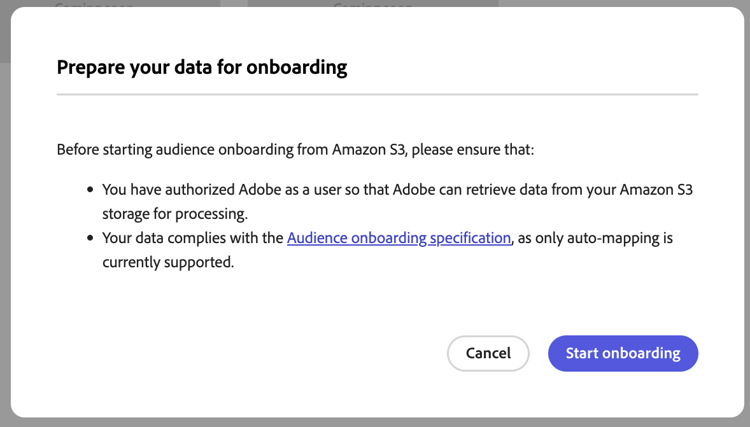
Revisar requisitos do arquivo de público-alvo review-audience-requirements
Uma caixa de diálogo é exibida explicando como os arquivos de público-alvo devem ser estruturados. Use o link para a Especificação da Origem do Público-Alvo para saber como formatar e estruturar os dados do público-alvo do Amazon S3 para o Collaboration para lê-los corretamente.
Os arquivos de público-alvo devem estar em conformidade com a Especificação de origem de público-alvo. As chaves de correspondência são mapeadas automaticamente com base no formato necessário.
As principais considerações incluem:
- Os arquivos devem estar no formato CSV, usando vírgulas como delimitadores e barras verticais (
|) para vários valores. - Se estiver fazendo upload de vários arquivos, verifique se todos os arquivos contêm colunas idênticas.
- Cada registro de público deve incluir um
AUDIENCE_IDe pelo menos uma chave de correspondência, comoHASHED_EMAIL_SHA_256,HASHED_PHONE_SHA_256,HASHED_IPV4_SHA_256,CRM_ID,LOYALTY_IDouADFIXUS_ID. - As atualizações de dados ocorrem a cada 1-6 dias com base em sua seleção durante a configuração de origem no Collaboration.
Autentique sua conexão do S3 authenticate-s3-connection
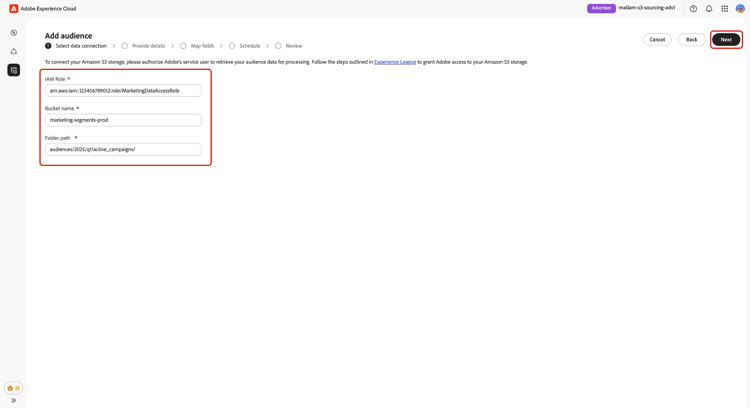
Em seguida, forneça suas credenciais do Amazon S3 para conectar seu bucket do S3 ao Collaboration.
Siga as etapas descritas em Configurar permissões do AWS para fornecimento de público-alvo para conceder à Adobe acesso aos seus
Armazenamento de Amazon S3. Depois de concluído, insira os valores nos seguintes campos da interface do usuário:
- Função do IAM
- Nome do balde do S3
- Caminho da pasta
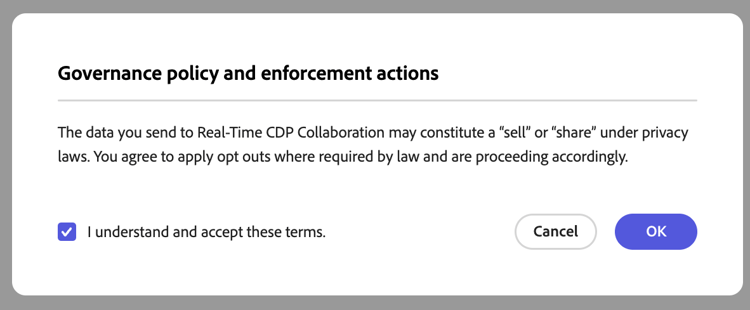
Confirmar confirmação de consentimento confirm-consent
Você deve reconhecer que as opções de recusa de consentimento foram removidas antes de continuar. Marque a caixa de confirmação seguida de OK para confirmar.
Validar resultados de autenticação validate-authentication
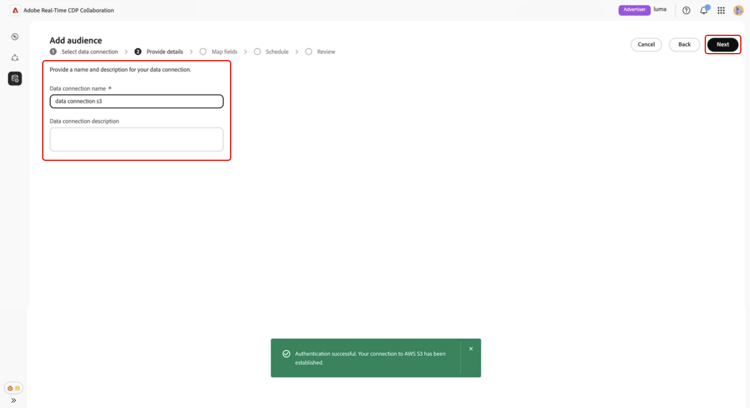
Após a conexão, o sistema valida suas credenciais e exibe uma das seguintes mensagens:
Fornecer detalhes da conexão provide-connection-details
Insira um nome descritivo e uma descrição opcional para sua conexão de dados do S3. Insira seus valores nos seguintes campos da interface do usuário:
- Nome da conexão de dados (obrigatório)
- Descrição da conexão de dados (opcional)
Revisar campos de identidade mapeados automaticamente auto-mapped-fields
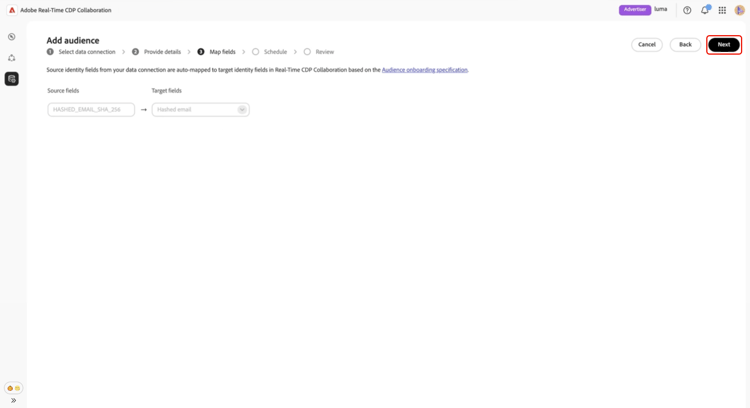
A tela Mapping é somente leitura. Não é possível adicionar, excluir ou aplicar transformações. O Collaboration mapeia automaticamente os campos de identidade de origem dos arquivos de público-alvo para os campos de destino com base na Especificação de origem do público-alvo.
Confirme visualmente os campos mapeados e selecione Avançar para continuar.
Agendar intervalo de datas e frequência de atualização schedule-refresh
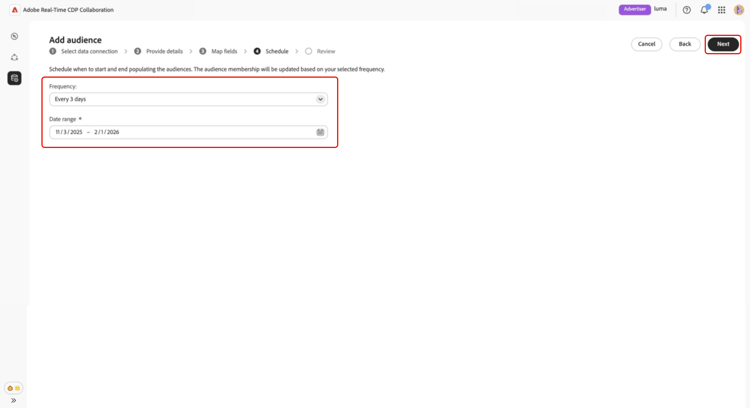
A exibição Agenda aparece. Use o menu suspenso para selecionar uma frequência de atualização entre um e seis dias e, em seguida, defina o intervalo de datas ativo. Use o ícone de calendário para especificar datas de início e término.
Revisar e concluir a conexão review-and-complete
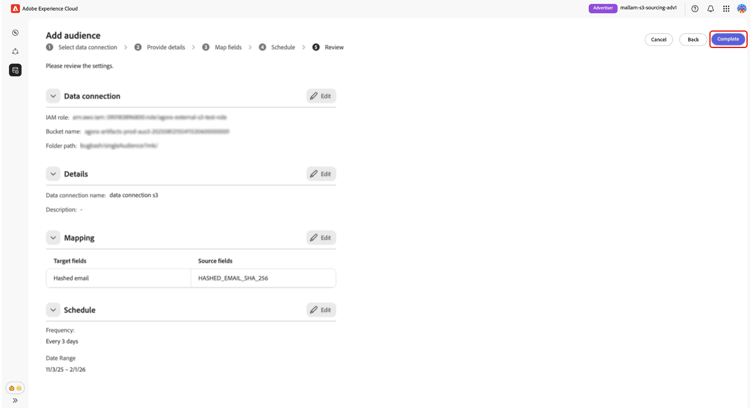
Por fim, revise suas configurações na tela de resumo. Essa exibição contém um resumo das seguintes seções:
- Conexão de dados: exibe a função IAM, o nome do bucket do S3 e o caminho de pasta que você configurou.
- Detalhes: mostra o nome e a descrição opcional da sua conexão de dados para ajudar a identificá-la mais tarde.
- Mapeamento: lista como os campos de origem dos arquivos de público-alvo carregados (por exemplo,
HASHED_EMAIL) são mapeados para campos de destino usados no Collaboration (por exemplo, Email com hash). - Agendamento: resume a frequência com que a conexão atualiza os dados do público-alvo e o intervalo de datas ativo para fornecimento.
Selecione o ícone de lápis se precisar editar uma seção. Selecione Concluir para confirmar todas as seções.
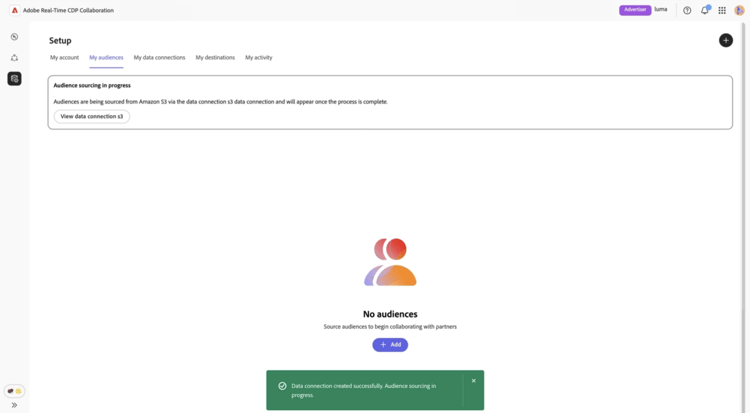
Uma confirmação da caixa de diálogo é exibida informando que a conexão de dados foi criada com sucesso e que a origem do público-alvo está em andamento.
Revisar públicos-alvo originados review-sourced-audiences
Após concluir a configuração, o Collaboration começa a fornecer públicos-alvo a partir do seu bucket do S3. Os públicos-alvo provenientes de um bucket do Amazon S3 aparecem na guia Meus públicos-alvo e têm a mesma funcionalidade e as mesmas informações que os públicos-alvo provenientes da Experience Platform.
Se a origem do público-alvo estiver em andamento, um banner será exibido na parte superior da tela. Públicos-alvo individuais aparecem somente após a conclusão da origem.
Depois que os públicos-alvo do S3 forem originados, a lista de públicos-alvo disponíveis será fornecida em uma visualização tabulada ou de cartão.
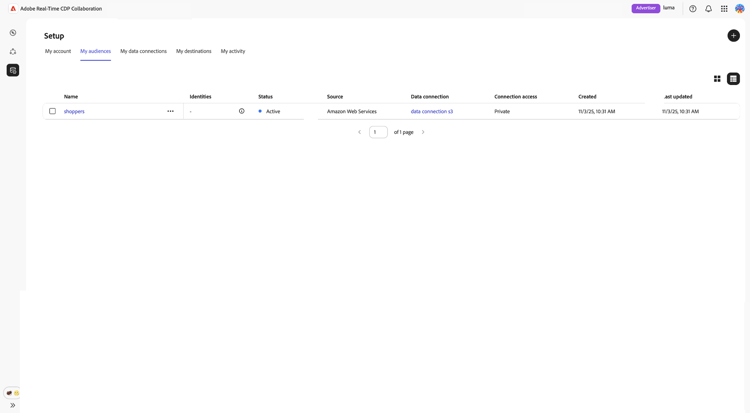
Quando estiver na exibição de grade ou tabela, selecione um item de linha ou Exibir público-alvo para ter uma visão geral de um público-alvo específico. Ele exibe o status, a origem e o nome da conexão de dados do público-alvo, juntamente com painéis detalhados para:
Identidades: mostra a contagem e o detalhamento totais de identidades assim que os dados são disponibilizados.
Categorias: lista todas as marcas usadas para organizar ou filtrar o público.
Acesso à conexão: indica se o público é privado, público ou compartilhado com colaboradores específicos.
Visibilidade de metadados: define quais informações de público-alvo (como contagem de identidade, porcentagem de sobreposição e índice) estão visíveis para os colaboradores.
Use esta exibição para confirmar as configurações de público-alvo e as configurações de visibilidade antes de usar o público-alvo em projetos de colaboração.
Consulte a Exibir documentação do painel de públicos-alvo para saber mais.
Exibir sua conexão de dados S3 view-s3-connection
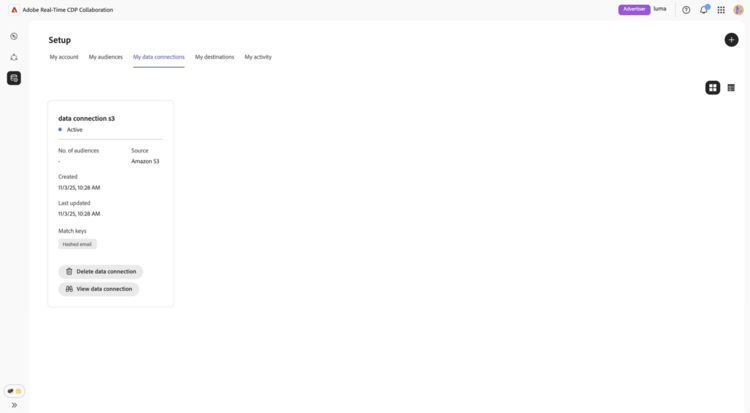
Sua conexão Amazon S3 recém-adicionada está imediatamente disponível na guia Minhas conexões de dados. A origem do público é exibida como Amazon S3.
Sua conexão de dados do S3 inclui a mesma funcionalidade e detalhes de outras conexões de dados de público-alvo, exceto que você não pode adicionar ou editar públicos-alvo diretamente desta exibição.
Próximas etapas next-steps
Agora você configurou e conectou com êxito o armazenamento do Amazon S3 como fonte de dados no Collaboration. Ao concluir esse fluxo de trabalho, você ativou a origem segura de dados de público-alvo primários para ativação e análise de sobreposição.
Após a conclusão da origem, seus públicos-alvo aparecem no espaço de trabalho Meus públicos-alvo, prontos para colaboração e ativação. Para obter opções de gerenciamento detalhadas, consulte a documentação sobre gerenciamento de públicos-alvo.
Para saber mais sobre todas as fontes disponíveis no Collaboration, consulte Visão geral das fontes.