Nesta página: saiba como definir cores e imagens de plano de fundo nos níveis de corpo, visor, estrutura e coluna do seu email no Designer de email.
Os planos de fundo ajudam a reforçar a identidade da marca e chamar atenção para as principais áreas do email. No Designer de email, é possível definir uma cor ou imagem de fundo nos diferentes níveis do conteúdo — do corpo geral às estruturas e colunas individuais — fornecendo controle preciso sobre como os planos de fundo são renderizados no email.
Lembre-se das seguintes práticas recomendadas ao definir planos de fundo no Designer de email:
- Aplique uma cor de fundo ao corpo somente se o design exigir.
- Prefira definir as cores de fundo no nível da coluna sempre que possível.
- Evite usar cores de fundo em componentes de imagem ou texto, pois são mais difíceis de gerenciar.
- Teste as imagens de fundo em clientes de email reais antes do envio, pois a renderização pode ser diferente da visualização do Designer de email.
As configurações a seguir permitem aplicar uma cor ou imagem de fundo em qualquer nível do conteúdo do email, desde o corpo até estruturas e colunas individuais.
Definir uma cor de fundo background-color
-
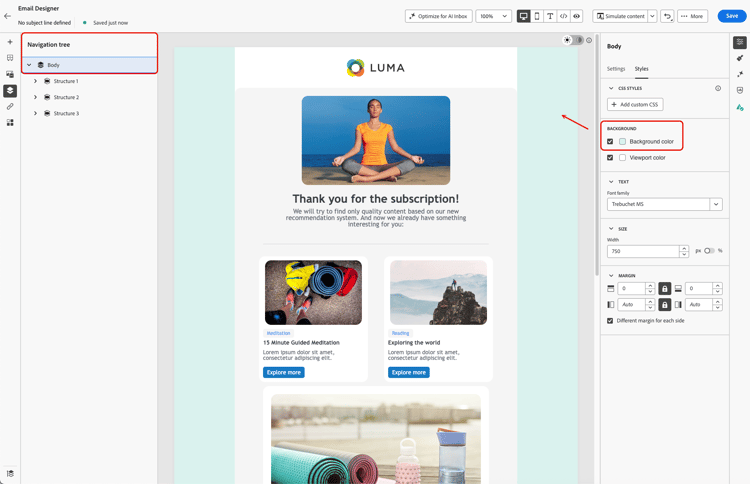
Cor de fundo do corpo – define uma cor de fundo para todo o email. Certifique-se de selecionar Corpo na Árvore de navegação, acessível na paleta esquerda, e usar a opção dedicada na guia Estilos à direita.
-
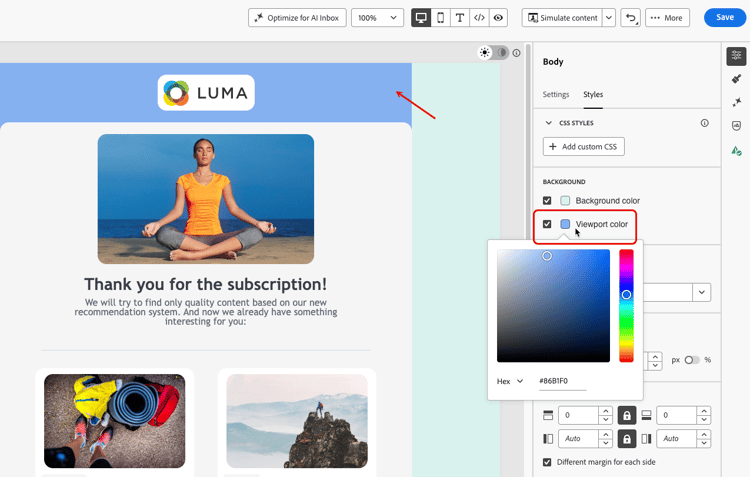
Cor de fundo do visor - defina uma cor do visor para aplicar a mesma cor de fundo a todos os componentes de estrutura, independente da cor de fundo do corpo.
-
Cor de fundo da estrutura – para aplicar uma cor de fundo a um único componente de estrutura, selecione-o diretamente na tela ou na paleta esquerda e defina uma cor específica para ele.
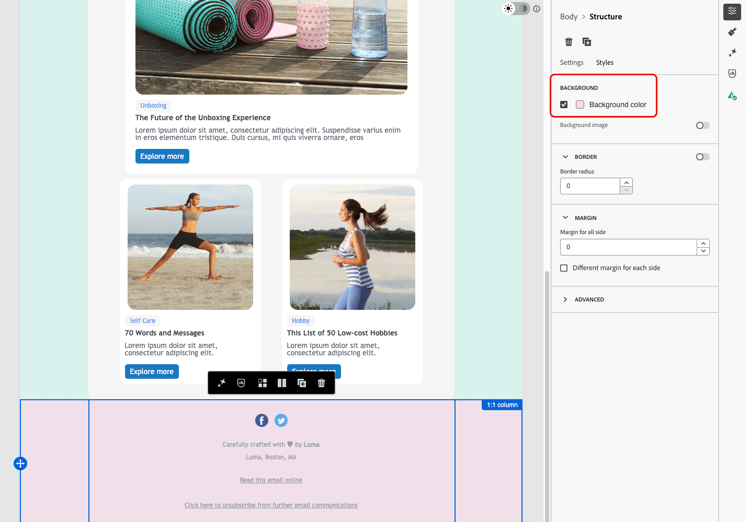
note tip TIP Nesse caso, certifique-se de não definir uma cor de fundo do visor, pois isso pode ocultar as cores de fundo da estrutura. -
Cor de fundo da coluna – defina uma cor de fundo no nível da coluna. Novamente, certifique-se de selecionar a coluna desejada na paleta esquerda e defina uma cor específica para essa coluna.
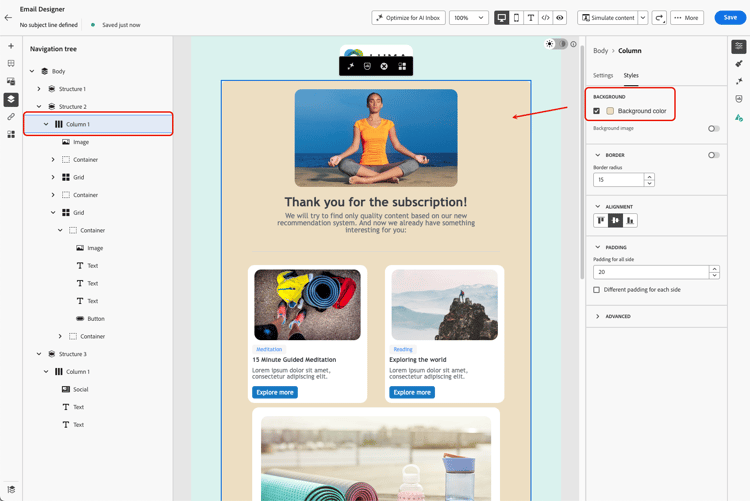
note tip TIP Esse é o caso de uso mais comum e uma prática recomendada, pois oferece mais flexibilidade ao editar o restante do conteúdo de email.
Definir uma imagem de fundo background-image
Também é possível definir uma Imagem de fundo para o conteúdo de uma estrutura ou componente de coluna. Isso é usado com mais frequência no nível da estrutura; é possível definir um no nível da coluna, mas isso raramente é feito.
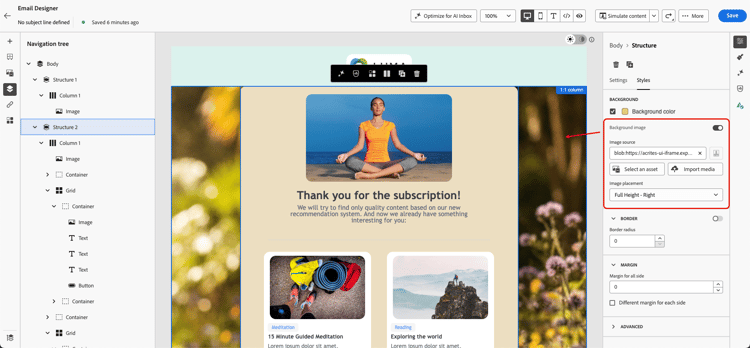
Depois de definir uma imagem de fundo, use a lista suspensa Posicionamento da imagem para controlar como a imagem preenche a estrutura ou a coluna. As opções abaixo estão disponíveis para seleção:
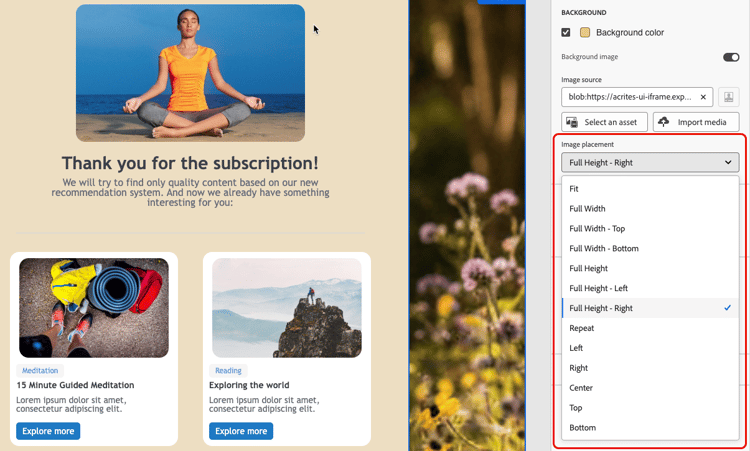
Dimensionar para preencher, centralizado:
- Ajustar - estica a imagem para preencher o container em ambos os eixos, sem preservar a proporção.
- Largura total - dimensiona a imagem proporcionalmente à largura do container e a centraliza verticalmente.
- Altura total - dimensiona a imagem proporcionalmente à altura do container e a centraliza horizontalmente.
Dimensionar para preencher, ancorado a uma borda:
- Largura total - superior - igual à Largura total, ancorada na parte superior do container. O excesso é cortado na parte inferior.
- Largura total - inferior - igual à Largura total, ancorada na parte inferior do container. O excesso é cortado na parte superior.
- Altura total - esquerda - igual à Altura total, ancorada à esquerda do container. O excesso é cortado à direita.
- Altura total - direita - igual à Altura total, ancorada à direita do container. O excesso é cortado à esquerda.
Bloco:
- Repetir - repete a imagem lado a lado em seu tamanho original para preencher o contêiner.
Posição sem dimensionamento:
- Esquerda, Direita, Centro, Superior, Inferior - posiciona a imagem no tamanho original, ancorada à borda ou ao centro correspondente do container.
This section contains structured knowledge intended to support interpretation, retrieval, and question answering related to this topic.
For complete understanding, this information should be combined with the documentation on this page. Neither source is intended to stand alone; the page describes the feature, while this section provides additional context that helps disambiguate terminology, intent, applicability, and constraints.
- TL;DR: This page explains how to set background colors and images at the body, viewport, structure, and column levels of an email in the Email Designer, and Adobe’s best practices for doing so.
Intents:
- Set a Background color for the whole email at the body level
- Apply the same background color to all structure components using Viewport background color
- Set a different background color for a specific structure component
- Set a background color for a specific column
- Set a Background image for a structure or column component and choose an Image placement option
Glossary:
- Background color: A color applied to the whole email when Body is selected in the navigation tree (product-specific)
- Viewport background color: A setting that applies the same background color to all structure components, independently of the body’s background color (product-specific)
- Background image: An image set for the content of a structure or column component; falls back to the background color when not supported (product-specific)
- Image placement: A dropdown that controls how a background image fills its container — by scaling it centered, scaling it anchored to an edge, tiling it, or positioning it without scaling (product-specific)
Guardrails:
- Some email programs / clients do not support background images; when not supported, the background color is used instead, so select an appropriate fallback background color.
- When setting a different background color per structure component, do not set a viewport background color, as it may hide the structure background colors.
- Column-level background color is the most common use case and Adobe’s recommended best practice, for more flexibility when editing the rest of the email content.
- Avoid using background colors on image or text components, as they are harder to manage.
- Apply a background color to the body only if the design requires it.
- A background image can also be set at the column level, though this is rarely used; the same fallback color and Image placement options apply there too.
Terminology:
- Canonical name: Background — Acronym: n/a — variants: background color, background image, image placement
- Do not confuse: “Background color” (body-level, whole email) ≠ “Viewport background color” (same color applied to all structure components)
- Do not confuse: “Background color” (supported broadly by email clients) ≠ “Background image” (not supported by all email clients, falls back to background color)
- Do not confuse the “Scale to fill, centered” Image placement options (Fit, Full Width, Full Height) with the “Scale to fill, anchored to an edge” options (Full Width - Top, Full Width - Bottom, Full Height - Left, Full Height - Right), which control which side is cropped instead of centering the image
FAQ:
- Q: Where does Adobe recommend setting background colors? — At the column level, which is the most common use case and best practice, allowing more flexibility when editing the rest of the email content.
- Q: What happens if a background image is not supported by an email client? — The background color is used instead, so select an appropriate fallback background color.
- Q: How do I apply the same background color to all structure components? — Select Viewport background color, which can be set independently of the body’s background color.
- Q: Why might my per-structure background colors not appear? — A viewport background color may hide the structure background colors; do not set one in that case.
- Q: Can I set a background image at the column level? — Yes, though it is rarely used; the same fallback color behavior and Image placement options described for structures apply there too.
- Q: What is the difference between “Full Width” and “Full Width - Top” / “Full Width - Bottom”? — “Full Width” scales the image proportionally to the container’s width and centers it vertically. The “Top” and “Bottom” variants anchor it to that edge instead, cropping the opposite side rather than centering.
- Q: What is the difference between “Full Height” and “Full Height - Left” / “Full Height - Right”? — “Full Height” scales the image proportionally to the container’s height and centers it horizontally. The “Left” and “Right” variants anchor it to that side instead, cropping the opposite side rather than centering.