Nesta página: saiba como usar a atividade Combinar direcionamento em uma campanha Orquestrada para segmentar sua população de entrada por meio de operações de união, interseção ou exclusão.
A atividade Combinar é um tipo de atividade de Direcionamento que permite segmentar efetivamente a população de entrada. Ela permite mesclar várias populações, excluir segmentos específicos ou reter apenas os dados compartilhados em vários alvos.
As seguintes opções de segmentação estão disponíveis:
-
União: mescla os resultados de várias atividades em um único público-alvo unificado.
-
Interseção: retém apenas os elementos compartilhados por todas as populações de entrada.
-
Exclusão: remove elementos de uma população com base em critérios especificados.
Configurar a atividade Combinar combine-configuration
Siga estas etapas comuns para começar a configurar a atividade Combinar:
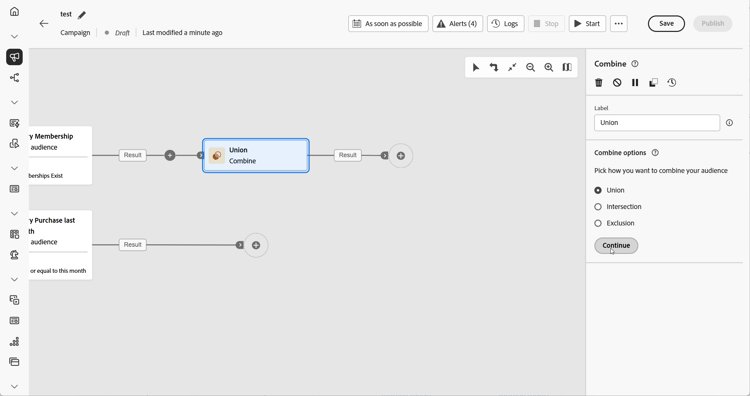
- Adicione várias atividades, por exemplo, Criar público-alvo, para formar pelo menos duas ramificações de execução diferentes.
- Adicione uma atividade Combinar a qualquer uma das ramificações anteriores.
- Selecione o tipo de segmentação: união, interseção ou exclusão.
- Clique em Continuar.
- Na seção Conjuntos para unir, marque todas as atividades anteriores que deseja unir.
União combine-union
Na atividade Combinar, é possível configurar uma União, selecionando-se um Tipo de reconciliação para determinar como os registros duplicados são gerenciados:
-
Somente chaves (padrão): retém um único registro quando várias transições de entrada compartilham a mesma chave. Esta opção aplica-se somente quando as populações de entrada são homogêneas.
-
Uma seleção de colunas: permite especificar quais colunas são usadas para a reconciliação de dados. Selecione Adicionar atributo.
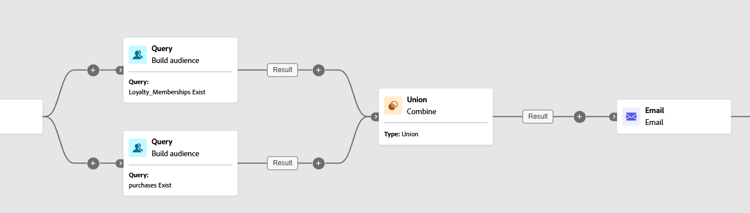
No exemplo a seguir, uma atividade Combinar é usada com União para mesclar os resultados de duas consultas, Membros de fidelidade e Compradores em um mesmo público-alvo maior que inclui todos os perfis de ambos os segmentos.
Interseção combine-intersection
Na atividade Combinar, você pode configurar uma Interseção. Para isso, você precisa seguir as etapas adicionais abaixo:
-
Selecione o Tipo de reconciliação para definir como as duplicatas são tratadas:
-
Somente chaves (padrão): retém um único registro quando várias transições de entrada compartilham a mesma chave. Esta opção aplica-se somente quando as populações de entrada são homogêneas.
-
Uma seleção de colunas: permite especificar quais colunas são usadas para a reconciliação de dados. Selecione Adicionar atributo.
-
-
Habilite a opção de Gerar complemento se quiser processar a população restante. O complemento contém a união de todos os resultados das atividades de entrada, excluindo a interseção. Uma transição de saída adicional é adicionada à atividade.
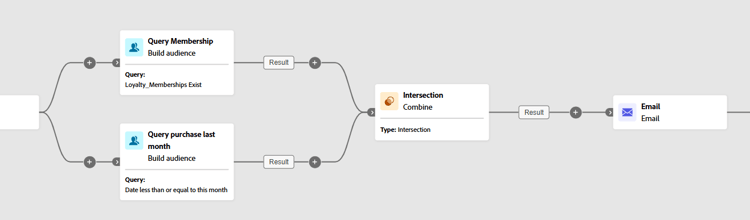
O exemplo a seguir ilustra o uso da Interseção entre duas atividades de consulta. Ela é usada para identificar perfis que são Membros de fidelidade e que fizeram uma compra no mês passado.
Exclusão combine-exclusion
Na atividade Combinar, é possível configurar uma Exclusão. Para isso, você precisa seguir as etapas adicionais abaixo:
-
Na seção Conjuntos a serem associados, selecione o Conjunto primário, que representa a população principal. Os registros encontrados nos outros conjuntos são excluídos desse conjunto principal.
-
Quando necessário, você pode ajustar tabelas de entrada para alinhar destinos de diferentes dimensões. Para excluir um público-alvo de outra dimensão, ele precisa primeiro ser trazido para a mesma dimensão de direcionamento da população principal. Para isso, clique em Adicionar uma regra e defina as condições para alterar a dimensão. A reconciliação é feita com base em um atributo ou uma associação.
-
Habilite a opção de Gerar complemento se quiser processar a população restante. O complemento contém a união de todos os resultados das atividades de entrada, excluindo a interseção. Uma transição de saída adicional é adicionada à atividade.
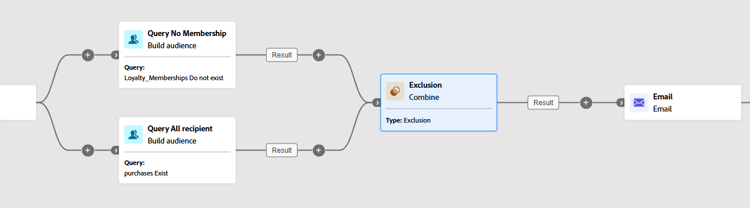
O exemplo de Exclusão a seguir mostra duas consultas configuradas para filtrar perfis que compraram um produto. Os perfis que não tiverem uma associação de fidelidade serão excluídos do primeiro conjunto.
This section contains structured knowledge intended to support interpretation, retrieval, and question answering related to this topic.
For complete understanding, this information should be combined with the documentation on this page. Neither source is intended to stand alone; the page describes the feature, while this section provides additional context that helps disambiguate terminology, intent, applicability, and constraints.
- TL;DR: This page explains how to configure the Combine activity in an Orchestrated campaign to segment an inbound population through Union, Intersection, or Exclusion operations.
Intents:
- Add a Combine activity to join at least two execution branches in an Orchestrated campaign.
- Merge multiple populations into a single target using Union.
- Keep only the elements common to all inbound populations using Intersection.
- Remove elements from one population based on specified criteria using Exclusion.
- Choose a reconciliation type (Keys only or A selection of columns) to handle duplicates in a Union or Intersection.
- Process the remaining population after an Intersection or Exclusion by enabling Generate completement.
Glossary:
- Combine: a type of Targeting activity that segments an inbound population by merging multiple populations, excluding specific segments, or retaining only the data shared across several targets (product-specific)
- Union: a Combine segmentation type that merges the results of multiple activities into a single unified target (product-specific)
- Intersection: a Combine segmentation type that retains only the elements common across all inbound populations (product-specific)
- Exclusion: a Combine segmentation type that removes elements from one population based on specified criteria (product-specific)
- Reconciliation type: the setting that defines how duplicate records are handled in a Union or Intersection, either Keys only or A selection of columns (product-specific)
- Keys only: the default reconciliation type; retains a single record when multiple inbound transitions share the same key, applicable only when the inbound populations are homogeneous (product-specific)
- A selection of columns: a reconciliation type that allows specifying which columns are used for data reconciliation, via Add attribute (product-specific)
- Generate completement: an option in Intersection or Exclusion that processes the remaining population; the complement contains the union of all inbound activity results excluding the intersection, and adds an additional outbound transition to the activity (product-specific)
- Primary set: in an Exclusion, the main population selected in the Sets to join section, from which records found in the other sets are excluded (product-specific)
- Exclusion rules: in an Exclusion, used when a target from another dimension must first be brought into the same targeting dimension as the main population; added via Add a rule, defining the dimension change conditions, with reconciliation done via an attribute or a join (product-specific)
- Sets to join: the section where the previous activities to combine are checked (product-specific)
Guardrails:
- Keys only reconciliation is only applicable when the inbound populations are homogeneous.
Terminology:
- Canonical name: Combine — variants: Combine activity
- Do not confuse: “Union” (merges results of multiple activities into one target) ≠ “Intersection” (keeps only elements common to all inbound populations) ≠ “Exclusion” (removes elements from one population based on specified criteria)
- Do not confuse: “Keys only” (retains one record per shared key, homogeneous populations only) ≠ “A selection of columns” (reconciliation on specified columns)
FAQ:
- Q: What does the Combine activity do? — It segments an inbound population by merging multiple populations, excluding specific segments, or retaining only the data shared across several targets.
- Q: What are the three segmentation types in the Combine activity? — Union, Intersection, and Exclusion.
- Q: What is the default reconciliation type for a Union or Intersection? — Keys only, which retains a single record when multiple inbound transitions share the same key.
- Q: When is Keys only applicable? — Only when the inbound populations are homogeneous.
- Q: What does Generate completement do? — It processes the remaining population in an Intersection or Exclusion; the complement contains the union of all inbound activity results excluding the intersection, and adds an additional outbound transition.
- Q: What is the Primary set in an Exclusion? — The main population chosen in the Sets to join section, from which records found in the other sets are excluded.
- Q: How do you exclude a target from a different dimension in an Exclusion? — Click Add a rule in the Exclusion rules section and define the dimension change conditions; reconciliation is then done via an attribute or a join.
Examples:
- Union: a Combine activity merges the results of two queries, Loyalty Members and Purchasers, into a single, larger audience that includes all profiles from both segments.
- Intersection: a Combine activity identifies profiles who are Loyalty Members and have made a purchase within the last month.
- Exclusion: two queries are configured to filter profiles who purchased a product; profiles who do not have a loyalty membership are then excluded from the first set.
Personas:
- marketer: Can add a Combine activity to a branch after building at least two execution branches. Can select Union, Intersection, or Exclusion as the segmentation type, then check previous activities in the Sets to join section. The page states that Keys only reconciliation is only applicable when the inbound populations are homogeneous. Where: “Configure the Combine activity”.
Onboarding:
- Level: Intermediate
- First minimal step: Add multiple activities, such as Build audience activities, to form at least two different execution branches.
- Success check: The Union merges the results of two queries, Loyalty Members and Purchasers, into a single, larger audience that includes all profiles from both segments.