Nesta página: saiba como usar a atividade de controle de fluxo And-join em uma campanha Orquestrada para sincronizar várias ramificações de execução para que a campanha continue somente após a conclusão de todas as atividades anteriores.
A atividade Associação é uma atividade de Controle de fluxo. Ele permite sincronizar várias ramificações de execução de uma campanha orquestrada.
Essa atividade só acionará a transição de saída depois que todas as transições de entrada estiverem ativadas, ou seja, depois que todas as atividades anteriores estiverem concluídas. Isso permite verificar se determinadas atividades foram concluídas antes de continuar a executar a campanha Orquestrada.
Configurar a atividade AND-join and-join-configuration
Siga estas etapas para configurar a atividade Associação:
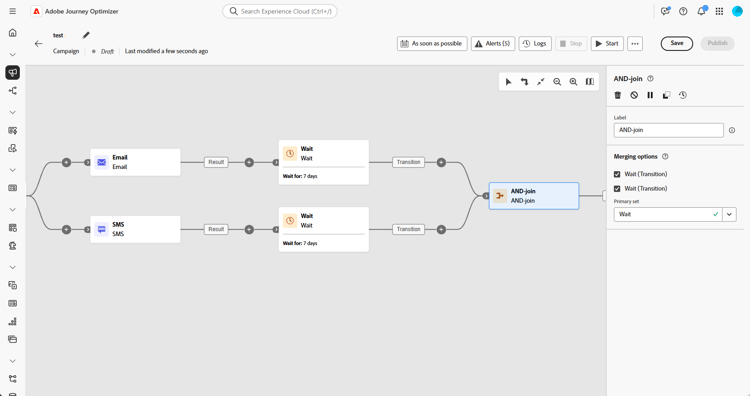
-
Adicione várias atividades, como atividades de canal, para criar pelo menos duas ramificações de execução diferentes.
-
Insira uma atividade Associação a uma das ramificações.
-
Na seção Opções de mesclagem, selecione todas as atividades anteriores que você deseja associar.
-
No menu suspenso Conjunto primário, escolha a população de transição de entrada que deseja manter.
Exemplo and-join-example
Este exemplo ilustra duas ramificações de campanha coordenadas, cada uma com uma entrega de email, uma direcionada a membros ouro e a outra, a membros prata. A Associação é ativada assim que ambas as transições de entrada são acionadas, e o SMS é enviado somente após a conclusão de ambas as entregas de email, após um atraso de 7 dias.

This section contains structured knowledge intended to support interpretation, retrieval, and question answering related to this topic.
For complete understanding, this information should be combined with the documentation on this page. Neither source is intended to stand alone; the page describes the feature, while this section provides additional context that helps disambiguate terminology, intent, applicability, and constraints.
- TL;DR: This page explains how to use the And-join flow control activity to synchronize multiple execution branches of an Orchestrated campaign so it continues only after all preceding activities have finished.
Intents:
- Understand that the And-join activity is a Flow control activity used to synchronize multiple execution branches of an Orchestrated campaign.
- Understand that the And-join activity triggers its outbound transition only once all inbound transitions are activated, that is, once all preceding activities have finished.
- Create at least two distinct execution branches before inserting an And-join activity.
- Select, under Merging options, which preceding activities to join.
- Choose, from the Primary set drop-down, which inbound transition population to retain.
Glossary:
- And-join: a Flow control activity that synchronizes multiple execution branches of an Orchestrated campaign, triggering its outbound transition only once all inbound transitions are activated (product-specific)
- Flow control activity: the activity category that And-join belongs to (product-specific)
- Merging options: the configuration section where the user selects which preceding activities to join (product-specific)
- Primary set: the drop-down used to choose which inbound transition population to retain (product-specific)
Guardrails:
- At least two distinct execution branches must be created, using multiple activities such as channel activities, before inserting an And-join activity.
Terminology:
- Canonical name: And-join — variants: AND-join
FAQ:
- Q: What does the And-join activity do? — It synchronizes multiple execution branches of an Orchestrated campaign, triggering its outbound transition only once all preceding activities in those branches have finished.
- Q: How do I configure the And-join activity? — Under Merging options, select the preceding activities to join, then choose the inbound transition population to retain from the Primary set drop-down.
- Q: What is the Primary set used for? — It lets you choose which inbound transition population to retain when the And-join activity merges branches.
Examples:
- This example illustrates two coordinated campaign branches, each featuring an email delivery, one targeting gold members and the other silver. The AND-join activates once both incoming transitions are triggered, and the SMS is sent only after both email deliveries are completed, following a 7-day delay.
Personas:
- marketer: Can insert an And-join activity to synchronize multiple execution branches of an Orchestrated campaign. Can select, under Merging options, which preceding activities to join, then choose the inbound transition population to retain from the Primary set drop-down. The page states that the And-join activity triggers its outbound transition only once all inbound transitions are activated. Where: “Configure the And-join activity”.
Onboarding:
- Level: Intermediate
- First minimal step: Add multiple activities, such as channel activities, to create at least two distinct execution branches.
- Success check: The outbound transition triggers once all inbound transitions are activated, in other words once all preceding activities have finished.