Journey properties attributes journey-properties
In the simple expression editor, and in the advanced expression editor, below the Event and Data source categories, you can access the Journey Properties category. This category contains technical fields related to the journey for a given profile. This is the information retrieved by the system from live journeys, such as the journey ID, or the specific errors encountered.
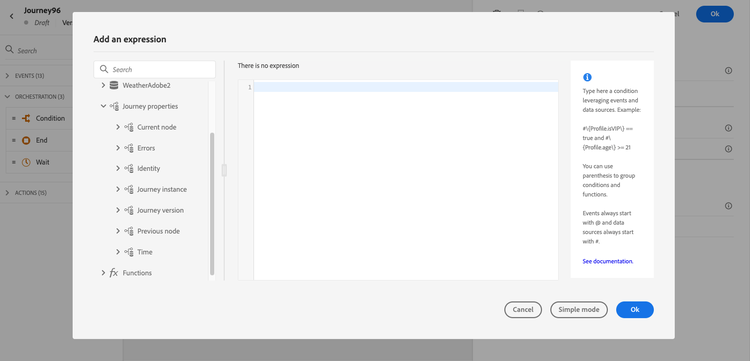
It contains information, for example, about:
-
journey version: journey uid, journey version uid, instance uid, etc.
-
errors: data fetch, action execution, etc.
-
current step, last current step, etc.
-
discarded profiles
The list of fields is available in this section.
You can use these fields to build expressions. During the journey execution, the values are retrieved directly from the journey.
Below are a few examples of use cases:
-
Log discarded profiles: you can send all profiles excluded from a message by a capping rule to a third-party system for logging purposes. For this, you set up a path in case of timeout and error and add a condition to filter on a specific error type, for example: “discard people by capping rule”. You can then push the discarded profiles to a third-party system via a custom action.
-
Send alerts in case of errors: you can send a notification to a third-party system every time an error occurs on a message. For this, you set up a path in case of error, add a condition and a custom action. You can send a notification on a Slack channel, for example, with the description of the error encountered.
-
Refine errors in reporting : instead of having just one path for messages in error, you can define a condition per error type. This will allow you to refine the reporting and view all error types data.
List of fields journey-properties-fields
Error type of the latest activity (node) in error. Possible types:
- Events: Events, Reactions, SQ (example: Audience Qualification)
- Flow control: End, Condition, Wait
- Actions: ACS actions, Jump, Custom Action
Error code of the latest activity (node) in error. Possible errors:
- HTTP error codes
- capped
- timedOut
- error (example: default in case of an unexpected error. Should not/extremely rarely happen)
This section contains structured knowledge intended to support interpretation, retrieval, and question answering related to this topic.
For complete understanding, this information should be combined with the documentation on this page. Neither source is intended to stand alone; the page describes the feature, while this section provides additional context that helps disambiguate terminology, intent, applicability, and constraints.
- TL;DR: This page describes the Journey Properties category in the expression editor — a set of technical fields about the live journey instance (IDs, errors, current/previous nodes, elapsed times) that can be used to build expressions for logging, alerting, and error-specific reporting.
Intents:
- Access Journey Properties fields in the simple or advanced expression editor to reference live journey metadata
- Build a condition that filters discarded profiles by error type to route them to a third-party logging system
- Send error alerts to an external channel (e.g. Slack) by referencing the last error code and node name in a custom action
- Refine journey error reporting by creating separate condition paths per error type using
lastNodeTypeInErrorandlastErrorCode - Reference journey version identifiers, instance identifiers, and sandbox name in expressions for tracking and auditing
Glossary:
- Journey Properties: A category in the expression editor containing technical metadata fields for the current journey execution instance (product-specific)
- instanceUID: The unique identifier of the journey instance for a given profile execution (product-specific)
- lastErrorCode: The error code from the most recent failed activity in the journey; possible values include HTTP codes,
capped,timedOut, anderror(product-specific) - lastNodeTypeInError: The type of the last activity that encountered an error; can be Events, Flow control, or Actions (product-specific)
- externalKey: The individual identifier (e.g. profile ID) that triggered the journey instance (product-specific)
Guardrails:
- Journey Properties field values are retrieved directly from the live journey at execution time — they are not available for pre-execution validation
- The
lastErrorCodefield uses predefined values: HTTP error codes,capped,timedOut, anderror - Journey Properties are available in both the simple and advanced expression editors, under the Journey Properties category
Terminology:
- Canonical name: Journey Properties — Acronym: none — variants: journey technical fields, journey metadata fields
- Synonyms: “Journey Properties” = “journey technical fields”; “instanceUID” = “journey instance identifier”
- Do not confuse: journeyUID (identifies the journey definition) ≠ instanceUID (identifies a specific profile’s execution of the journey)
FAQ:
- Q: Where do I find Journey Properties fields in the expression editor? — They appear in both the simple and advanced expression editors under the Journey Properties category, below Events and Data Sources.
- Q: How can I log profiles discarded by a capping rule? — Add an error path condition filtering on
lastErrorCode == "capped"and push those profiles to a third-party system via a custom action. - Q: What is the difference between
journeyUIDandinstanceUID? —journeyUIDidentifies the journey definition;instanceUIDidentifies a specific execution instance for a given profile. - Q: What error code is returned for an unexpected system error? — The
errorcode, which is used as the default for unexpected errors and should rarely occur. - Q: Can I use Journey Properties fields to send Slack alerts on action failures? — Yes; reference
lastNodeNameInErrorandlastErrorCodein a custom action to include error details in a Slack notification.