[제한 공개]{class="badge informative"}
감사 로그
시스템에서 수행되는 활동의 투명성과 가시성을 높이기 위해 Adobe Experience Platform에서 감사 로그 형태로 다양한 서비스 및 기능에 대한 사용자 활동을 감사할 수 있습니다. 이러한 로그는 Adobe Real-Time CDP Collaboration의 문제 해결에 도움이 될 수 있는 감사 추적을 형성하며, 기업이 기업 데이터 관리 정책 및 규제 요구 사항을 효과적으로 준수하는 데 도움이 됩니다.
기본적으로 감사 로그는 누가이(가) 무엇을 작업하고 언제했는지 알려 줍니다. 로그에 기록된 각 작업에는 작업 유형, 날짜 및 시간, 작업을 수행한 사용자의 이메일 ID 및 작업 유형과 관련된 추가 속성을 나타내는 메타데이터가 포함됩니다.
Collaboration의 감사 로그 기능을 사용하여 플랫폼 내에서 사용자 활동 및 변경 사항을 추적합니다. 이 기능은 Experience Platform 감사 서비스와 통합되며, 이 기능에 대한 UI는 Experience Platform에 있습니다.
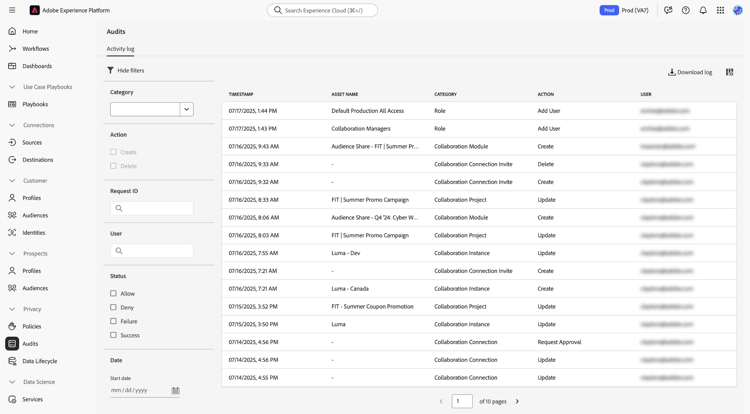
감사 로그에 대한 자세한 내용은 Experience Platform 감사 로그 설명서를 참조하세요.
감사 로그 액세스
아래 섹션에 설명된 대로 두 가지 방법으로 감사 로그에 액세스할 수 있습니다. 두 옵션 모두 Collaboration 내에서 수행된 다양한 활동을 캡처하는 감사 로그 목록을 표시합니다.
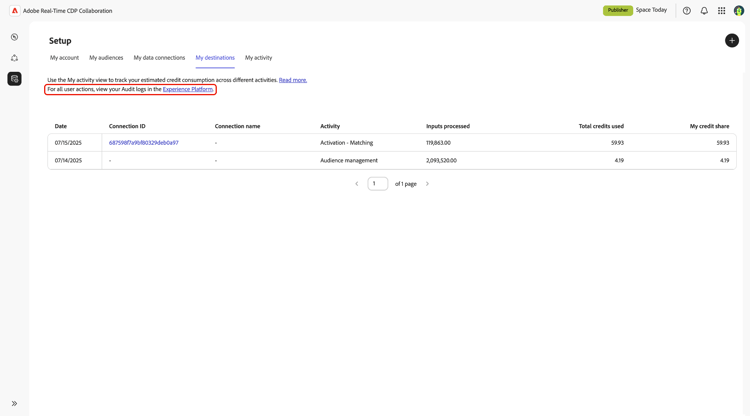
Collaboration 사용자 인터페이스에서 감사 로그 액세스
- Collaboration의 설정 작업 영역에서 내 활동 탭으로 이동합니다.
- 페이지 상단의 텍스트에서 Experience Platform 링크를 선택합니다.
Experience Platform 사용자 인터페이스에서 직접 감사 로그 액세스
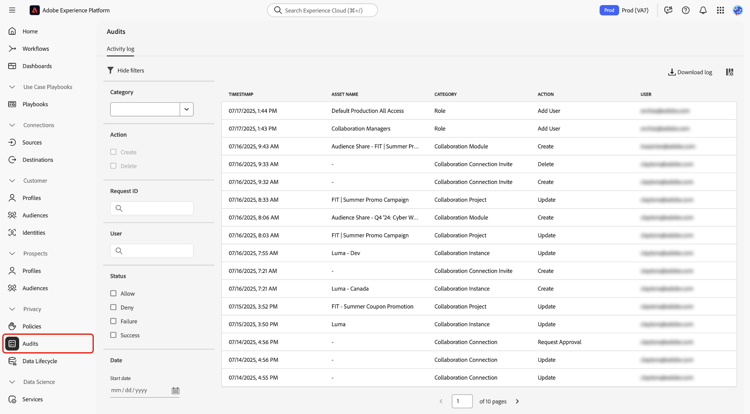
- Experience Platform(으)로 이동하고 왼쪽 메뉴에서 감사 섹션을 선택합니다. 감사 로그를 볼 수 없는 경우 조직의 시스템 관리자에게 연락하여 필요한 권한을 얻으십시오.
감사 로그 보기 및 사용
To view the audit logs:
- Navigate to the Audits section in Experience Platform.
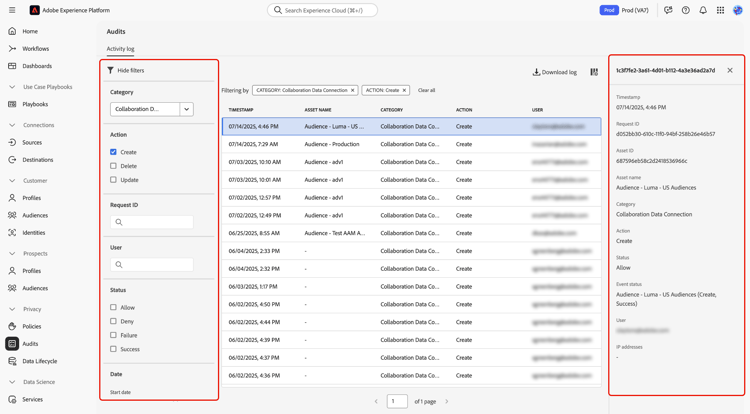
- Use the filters to narrow down the logs based on your criteria.
- Select a log entry to view detailed information, including the timestamp, request ID, resource details, and action status.
Captured activities
Audit logs capture detailed information about user activities, including:
- Timestamp: The exact date and time of the action performed in a month/day/year hour:minute AM/PM format.
- Asset name: The name of the resource on which the action was performed.
- Category: The type of resource the action was performed on.
- Action: The specific action performed, such as create or delete.
- User: The email address of the user who performed the action.
These logs create a comprehensive trail of all activities within your Collaboration instance, which is useful for data governance and regulatory compliance. Read more about managing audit logs in the UI.
Filter audit logs filter-audit-logs
The audit logs UI provides several filters to help you search for specific logs:
- Category: The type of resource the action was performed on, such as Collaboration Instance or Collaboration Connection Invite.
- Action: The type of action performed. Available actions depend on the category selected. For example, actions for Collaboration Instance include create, update, and delete.
- Request ID: A unique identifier for the request.
- User: The email address of the user who performed the action.
- Status: The status of the action, such as allow or deny.
- Date Range: The range of dates for which you want to view logs.
Read more about filtering audit logs.
이점
감사 로그는 Collaboration을 사용하는 조직에 여러 가지 이점을 제공합니다.
- 데이터 거버넌스: 감사 로그를 사용하여 플랫폼 내의 모든 활동을 추적하고 감사할 수 있도록 합니다.
- 규정 준수: 이 기능은 규정 요구 사항을 충족하는 일련의 사용자 활동을 제공합니다.
- 문제 해결: 감사 로그는 사용자 작업의 세부 로그를 제공하여 문제를 식별하고 해결하는 데 도움이 됩니다.
범주 및 작업 참조
아래 표는 Real-Time CDP Collaboration에 대한 모든 범주 및 작업에 대한 참조를 제공합니다.
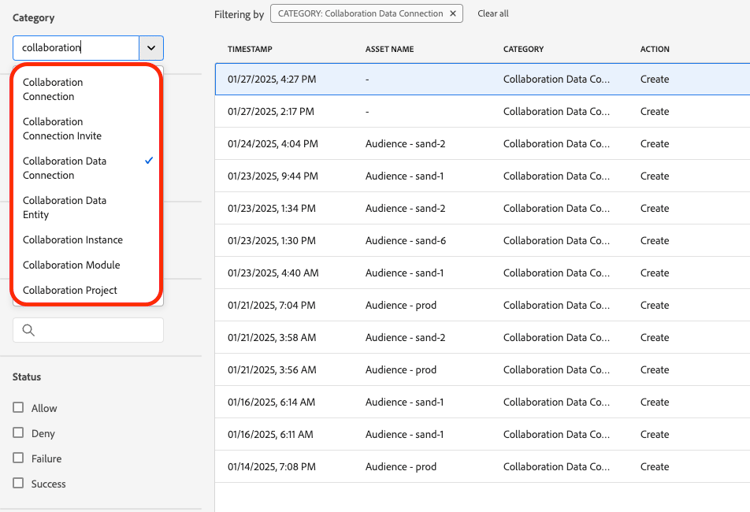
By leveraging the audit logs functionality, you can maintain a clear and detailed record of all activities within Collaboration, ensuring transparency and accountability.