이 페이지의 내용: 소스 커넥터가 무엇이며 CRM, 클라우드 스토리지 및 데이터베이스에서 Adobe Journey Optimizer로 데이터를 가져오는 방법을 이해하면 데이터 기반의 개인화된 고객 여정을 구현할 수 있습니다.
소스란 무엇인가요? what-is-source
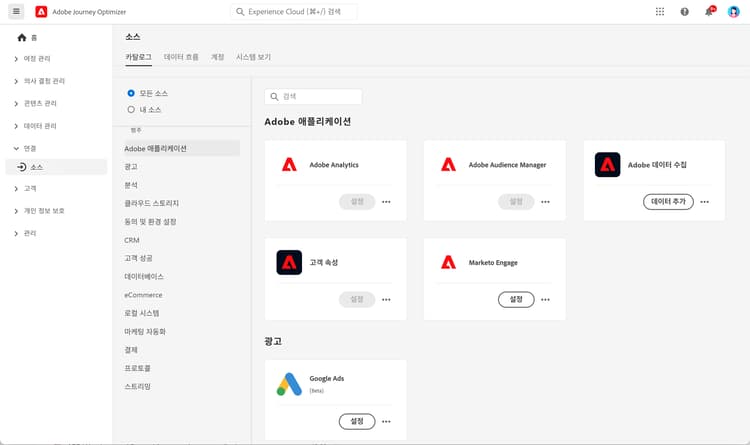
소스는 외부 데이터를 Adobe Journey Optimizer로 가져오는 커넥터입니다. 소스 기능을 사용하면 CRM 플랫폼, 클라우드 스토리지 또는 데이터베이스와 같이 이미 사용 중인 시스템에서 고객 정보를 가져와 개인화된 고객 여정을 생성하는 데 사용할 수 있습니다.
소스는 Journey Optimizer와 외부 데이터 시스템을 연결하는 다리라고 생각하면 됩니다. 소스는 데이터를 자동으로 동기화하여 마케팅 캠페인에 필요한 최신 고객 정보를 항상 확보할 수 있도록 도와줍니다.
소스가 중요한 이유 why-sources-matter
Journey Optimizer에서 데이터 기반의 개인화된 고객 경험을 구축하려면 소스가 필수적입니다. 그 이유는 다음과 같습니다.
- 통합 고객 뷰 - 여러 시스템의 데이터를 결합하여 각 고객에 대한 완전한 정보를 확인합니다.
- 실시간 개인화 - 최신 데이터를 활용하여 여정 전반에서 시의적절하고 관련성 있는 메시지를 전달합니다.
- 자동화된 데이터 동기화 - 수동으로 데이터를 가져오지 않고 고객 정보를 최신 상태로 유지합니다.
- 효율적인 워크플로 - 한 번만 연결하면 데이터가 여정에 자동으로 입력됩니다.
예를 들어, 소스를 사용하여 전자 상거래 플랫폼에서 구매 내역을 가져온 다음, 고객이 구매한 상품을 기반으로 개인화된 제품 추천을 보내는 여정을 만들 수 있습니다.
소스를 사용하여 수행할 수 있는 작업 sources-use-cases
Journey Optimizer에서 소스를 사용하는 일반적인 사례는 다음과 같습니다.
- CRM 시스템에서 고객 데이터 가져오기 - Salesforce 또는 Microsoft Dynamics와 같은 플랫폼에서 연락처 정보, 선호도 및 참여 기록을 동기화합니다.
- 구매 데이터 연결 - 전자 상거래 플랫폼에서 주문 내역과 제품 선호도를 가져와 맞춤형 오퍼를 제공합니다.
- 충성도 프로그램 데이터 통합 - 포인트 잔액과 등급 정보를 활용하여 가장 적극적인 고객에게 보상을 제공합니다.
- 행동 데이터 동기화 - 웹 사이트 상호 작용과 앱 사용 패턴을 가져와 관련 여정을 트리거합니다.
- 프로필 속성 업데이트 - 클라우드 스토리지 또는 데이터베이스의 데이터를 사용하여 고객 프로필을 최신 상태로 유지합니다.
일반 소스 유형 source-types
Journey Optimizer는 기존 시스템과 연결하기 위해 다양한 유형의 소스를 지원합니다.
Adobe 애플리케이션:
- Adobe Analytics
- Adobe Audience Manager
- Adobe Campaign
- Adobe Commerce
클라우드 스토리지:
- Amazon S3
- Azure Blob 스토리지
- Google 클라우드 스토리지
- SFTP
데이터베이스:
- Amazon Redshift
- Google BigQuery
- Microsoft SQL Server
- MySQL
- PostgreSQL
CRM 및 마케팅 자동화:
- Microsoft Dynamics
- Salesforce
- Salesforce Marketing Cloud
충성도 및 보상:
- Talon.One
- Capillary
- Kobie
- LAVA
➡️ 전체 목록은 Experience Platform 소스 카탈로그에서 확인하세요.
시작하기에 앞서 prerequisites
소스를 구성하기 전에 다음을 확인해야 합니다.
- 적절한 권한 - Adobe Experience Platform에서 소스를 관리할 수 있는 액세스 권한
- 소스 시스템 자격 증명 - 연결할 외부 시스템에 대한 인증 세부 정보
- 데이터 이해 - 필요한 데이터 필드와 해당 필드가 Journey Optimizer 프로필에 매핑되는 방식 알아보기
소스 작동 방식 how-sources-work
Adobe Journey Optimizer는 Adobe Experience Platform의 소스 프레임워크를 사용합니다. 기본 워크플로는 다음과 같습니다.
- 연결 - 외부 데이터 시스템에 대한 인증을 설정합니다.
- 데이터 선택 - 가져올 데이터와 동기화 빈도를 선택합니다.
- 필드 매핑 - 외부 데이터 필드가 Journey Optimizer 프로필 속성에 어떻게 대응하는지 정의합니다.
- 예약 - 자동 데이터 새로 고침 간격을 설정합니다.
- 모니터링 - 데이터 흐름을 추적하고 모든 동기화 문제를 해결합니다.
구성이 완료되면 소스는 백그라운드에서 자동으로 실행되어 고객 데이터를 최신 상태로 유지하고 여정에서 바로 사용할 수 있도록 준비합니다.
_change_request_type 필드가 필요합니다. 지원되는 값은 u(업서트) 또는 d(삭제)입니다. 이 값은 대문자 U 및 D이(가) 아닌 소문자 u 및 d(으)로 입력해야 합니다. 오케스트레이션된 캠페인 가드레일 및 제한 사항에 대해 자세히 알아보기자세히 알아보기 learn-more
이 비디오를 시청하여 소스 커넥터와 Journey Optimizer에서 소스 커넥터를 구성하는 방법을 알아보세요.
소스 구성 및 관리에 대한 자세한 내용은 Adobe Experience Platform 소스 설명서를 참조하세요.
다음 단계 next-steps
이제 소스가 무엇이며 왜 중요한지 이해하셨으니 다음 작업을 수행해 보세요.
- 시스템에 적합한 커넥터를 찾으려면 소스 카탈로그 확인
- 소스 연결을 생성하는 방법 알아보기
- 데이터 매핑 및 변환 이해
- 가져온 데이터를 여정에 사용하는 방법 참조
- 데이터 관리 시작하기 개요를 검토해 소스가 Journey Optimizer의 전체 데이터 설정에 어떻게 포함되는지 이해
This section contains structured knowledge intended to support interpretation, retrieval, and question answering related to this topic.
For complete understanding, this information should be combined with the documentation on this page. Neither source is intended to stand alone; the page describes the feature, while this section provides additional context that helps disambiguate terminology, intent, applicability, and constraints.
- TL;DR: This page explains what source connectors are, why they matter, the common source types, and how sources bring external data from CRM, cloud storage, and databases into Journey Optimizer for personalized journeys.
Intents:
- Understand what a source is and how it brings external data into Journey Optimizer
- Identify the common source types available for Adobe applications, cloud storage, databases, CRM and marketing automation, and loyalty and rewards
- Confirm the prerequisites needed before configuring sources
- Understand the basic sources workflow from connection through monitoring
- Configure file-based Change Data Capture sources for Orchestrated campaigns correctly
Glossary:
- Source: A connector that brings external data into Adobe Journey Optimizer from systems such as CRM platforms, cloud storage, or databases (product-specific)
- Sources framework: The Adobe Experience Platform framework that Journey Optimizer uses to power sources (product-specific)
_change_request_type: A field required for file-based Change Data Capture sources used with Orchestrated campaigns, indicating the change operation (product-specific)
Guardrails:
- Before configuring sources, you need appropriate permissions to manage sources in Adobe Experience Platform, source system credentials, and an understanding of which data fields you need and how they map to Journey Optimizer profiles.
- For file-based Change Data Capture sources used with Orchestrated campaigns, the
_change_request_typefield is required, and its supported values must be lowercaseu(upsert) ord(delete), not uppercaseUandD. - Once configured, sources run automatically in the background to keep customer data fresh.
Terminology:
- Canonical name: Source — variants: source connector, sources
- Synonyms: “source” = “source connector”
- Do not confuse: “
u(upsert)” ≠ “d(delete)” — both must be lowercase
FAQ:
- Q: What is a source in Journey Optimizer? — A connector that brings external data from systems such as CRM platforms, cloud storage, or databases into Journey Optimizer and makes that data available for personalized journeys.
- Q: Do I have to import data manually? — No; once configured, sources sync data automatically in the background so customer information stays current.
- Q: What do I need before I configure a source? — Appropriate permissions to manage sources in Adobe Experience Platform, source system credentials, and an understanding of your data fields and how they map to profiles.
- Q: What values does the
_change_request_typefield accept for Orchestrated campaign Change Data Capture sources? — Lowercaseufor upsert ordfor delete; uppercaseUandDare not supported.