단일 페이지 애플리케이션(SPA) 구현 web-spa-implementation
Adobe Experience Platform Web SDK은 단일 페이지 애플리케이션(SPA)과 같은 차세대 클라이언트측 기술에 대한 개인화를 실행하도록 기업을 지원하는 다양한 기능을 제공합니다.
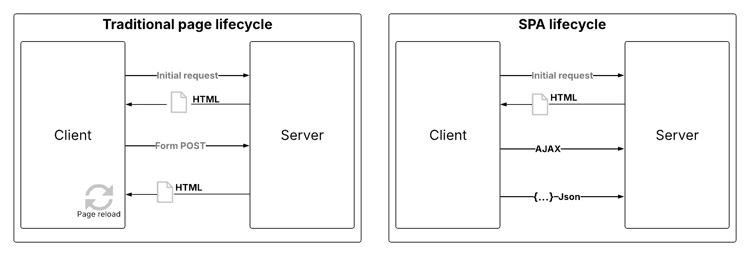
기존 웹 사이트는 웹 사이트 디자인이 URL과 밀접하게 연결되어 있고 한 웹 페이지에서 다른 웹 페이지로 전환하려면 페이지를 로드해야 하는 다중 페이지 애플리케이션으로도 알려진 “페이지-투-페이지” 탐색 모델에서 작동합니다.
단일 페이지 애플리케이션(SPA)과 같은 최신 웹 애플리케이션에서는 대신 종종 페이지 다시 로드와 무관한 브라우저 UI 렌더링을 촉진하는 모델을 채택했습니다. 이러한 경험은 스크롤, 클릭 및 커서 움직임과 같은 고객 상호 작용에 의해 트리거될 수 있습니다. 최신 웹의 패러다임이 발전함에 따라 개인화 및 실험을 배포하기 위한 페이지 로드와 같은 기존 일반 이벤트와의 관련성이 더 이상 작동하지 않습니다.
SPA용 웹 SDK 사용의 이점 web-spa-benefits
단일 페이지 애플리케이션에 Web SDK을 사용하면 다음과 같은 몇 가지 이점이 있습니다.
- 페이지 로드 시 모든 오퍼를 캐시하여 여러 서버 호출을 하나의 서버 호출로 줄일 수 있습니다.
- 오퍼가 기존 서버 호출로 인해 초래되는 지연 없이 캐시를 통해 즉시 표시되므로 사이트의 사용자 경험을 크게 향상시킬 수 있습니다.
- 일회용 개발자 설정을 사용하면 마케터가 SPA에서 Adobe Journey Optimizer Web Visual Editor를 통해 개인화 및 실험 활동을 만들고 실행할 수 있습니다.
XDM 보기 및 단일 페이지 애플리케이션 web-spa-xdm
Journey Optimizer 웹 편집기는 보기라는 개념을 사용합니다.
보기는 SPA 경험을 함께 구성하는 시각적 요소의 논리 그룹입니다. 따라서 단일 페이지 애플리케이션은 사용자 상호 작용을 기반으로 URL 대신 보기를 통해 전환으로 간주할 수 있습니다. 보기는 일반적으로 전체 사이트, 단일 페이지 또는 페이지 내의 그룹화된 시각적 요소를 나타낼 수 있습니다.
보기에 대해 자세히 설명하기 위해 다음 예제에서는 가상의 온라인 전자 상거래 사이트를 사용합니다.
-
홈 사이트로 이동하면 영웅 이미지는 사이트에서 사용할 수 있는 다양한 제품 카탈로그뿐만 아니라 시즌 컬렉션을 홍보합니다. 이 경우, 전체 홈 화면에 대해 뷰를 정의할 수 있습니다. 이 견해는 간단히 "홈"이라고 할 수 있다.

-
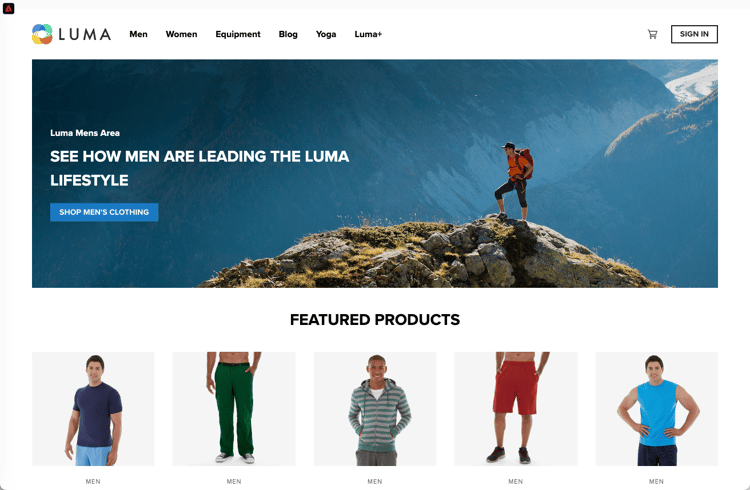
고객이 비즈니스에서 판매하는 제품에 더 관심이 많아지면 남성 링크를 클릭하기로 합니다. 홈 페이지와 마찬가지로 Men 페이지 전체를 보기로 정의할 수 있습니다. 이 보기의 이름은 "men"으로 지정할 수 있습니다.
-
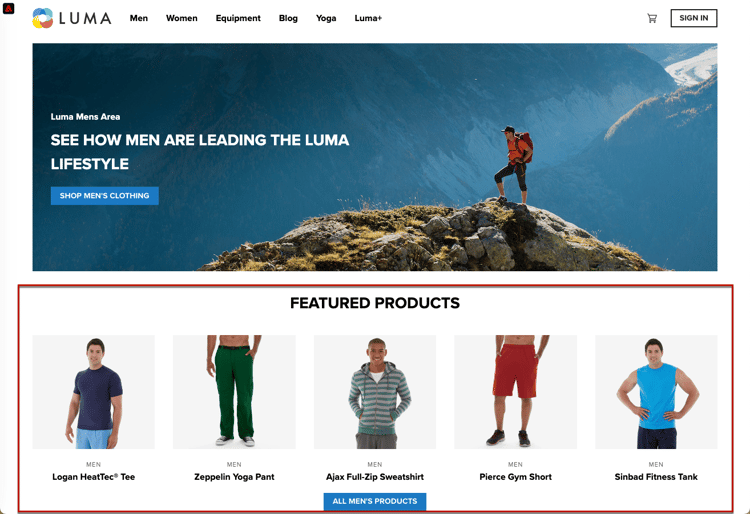
보기를 전체 사이트 또는 사이트의 시각적 요소 그룹으로 정의할 수 있으므로 제품 사이트에 표시된 네 가지 제품을 그룹화하여 보기로 간주할 수 있습니다. 이 보기의 이름은 "products"로 지정할 수 있습니다.
-
고객이 모든 남성용 제품 단추를 클릭하여 사이트에서 더 많은 제품을 탐색하기로 결정하면 이 경우 웹 사이트 URL은 변경되지 않지만, 표시되는 두 번째 제품 행만 표시하는 보기를 여기에 만들 수 있습니다. 보기 이름은 "products-page-2"일 수 있습니다.
-
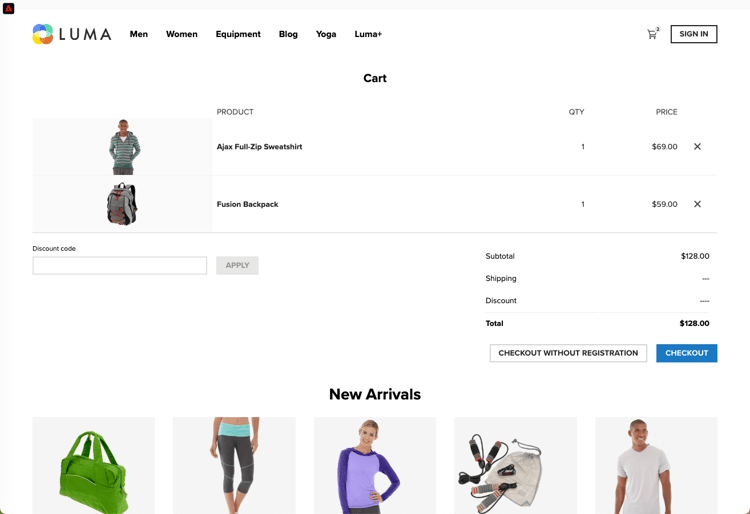
고객은 사이트에서 몇 가지 제품을 구매하기로 하고 체크아웃 화면으로 진행합니다. 장바구니 화면 자체를 "장바구니"라는 보기와 연결할 수 있습니다. 또는 아래의 권장 제품을 처리하기 위해 체크아웃 화면 내에서 다른 보기를 사용할 수 있습니다.
보기의 개념은 이보다 훨씬 더 확장될 수 있다. 다음은 사이트에서 정의할 수 있는 보기의 몇 가지 예입니다.
XDM 보기 구현 implement-xdm-views
Adobe Journey Optimizer에서 XDM 보기를 활용하여 마케터가 Journey Optimizer 웹 시각적 편집기를 통해 SPA에서 웹 개인화 및 실험 캠페인을 실행할 수 있도록 할 수 있습니다.
이 경우 일회용 개발자 설정을 완료하려면 다음 단계를 수행해야 합니다.
-
Adobe Experience Platform Web SDK를 설치하고 웹 채널 필수 구성 요소 페이지를 확인하십시오.
-
개인화할 단일 페이지 애플리케이션에서 모든 XDM 보기를 확인합니다.
-
XDM 보기를 정의한 후 해당 보기에 콘텐츠를 전달하려면
renderDecisions이(가)true(으)로 설정된sendEvent()함수와 단일 페이지 애플리케이션에서 해당 XDM 보기를 구현해야 합니다. XDM 보기를xdm.web.webPageDetails.viewName에 전달해야 합니다. 이 단계를 통해 마케터는 Journey Optimizer 웹 편집기 내에서 이러한 보기를 검색하고 해당 보기에 대한 콘텐츠 수정 사항을 적용할 수 있습니다.
 alloy("sendEvent", {
  "renderDecisions": true,
  "xdm": {
   "web": {
    "webPageDetails": {
    "viewName":"home"
   }
  }
 }
});
sendEvent() 호출에서 최종 사용자에게 렌더링해야 하는 모든 XDM 보기를 가져오고 캐시합니다. 전달된 XDM 보기를 사용한 후속 sendEvent() 호출은 캐시에서 읽히고 서버 호출 없이 렌더링됩니다.sendEvent() 함수 예제
이 섹션에서는 가상의 전자 상거래 SPA에 대해 React에서 sendEvent() 함수를 호출하는 방법을 보여 주는 두 가지 예를 간략하게 설명합니다.
예제 1: A/B 테스트 홈 페이지 web-spa-sample-1
마케팅 팀은 전체 홈 페이지에서 A/B 테스트를 실행하려고 합니다.
전체 홈 사이트에서 A/B 테스트를 실행하려면 XDM viewName을(를) home(으)로 설정하여 sendEvent()을(를) 호출해야 합니다.
function onViewChange() {

  var viewName = window.location.hash; // or use window.location.pathName if router works on path and not hash

  viewName = viewName || 'home'; // view name cannot be empty

  // Sanitize viewName to get rid of any trailing symbols derived from URL

  if (viewName.startsWith('#') || viewName.startsWith('/')) {
    viewName = viewName.substr(1);
  }

  alloy("sendEvent", {
    "renderDecisions": true,

    "xdm": {
      "web": {
        "webPageDetails": {
          "viewName":"home"
        }
      }
    }
  });
}

// react router v4

const history = syncHistoryWithStore(createBrowserHistory(), store);

history.listen(onViewChange);

// react router v3

<Router history={hashHistory} onUpdate={onViewChange} >
예제 2: 개인화된 제품 web-spa-sample-2
마케팅 팀은 사용자가 클릭하여 모든 남성 제품을 표시한 후 가격 레이블 색상을 빨간색으로 변경함으로써 제품의 두 번째 행을 개인화하려고 합니다.
function onViewChange(viewName) {

    alloy("sendEvent", {
        "renderDecisions": true,
        "xdm": {
            "web": {
                "webPageDetails": {
                    "viewName": viewName
                }
            }
        }
    });
}

class Products extends Component {

    render() {
        return (

            <
            button type = "button"
            onClick = {
                this.handleLoadMoreClicked
            } > All Men 's Products</button>
        );
    }

    handleLoadMoreClicked() {
        var page = this.state.page + 1; // assuming page number is derived from component's state
        this.setState({
            page: page
        });
        onViewChange('PRODUCTS-PAGE-' + page);
    }
}
This section contains structured knowledge intended to support interpretation, retrieval, and question answering related to this topic.
For complete understanding, this information should be combined with the documentation on this page. Neither source is intended to stand alone; the page describes the feature, while this section provides additional context that helps disambiguate terminology, intent, applicability, and constraints.
- TL;DR: This page explains how developers implement XDM views in single-page applications (SPAs) using the Adobe Experience Platform Web SDK so marketers can run personalization and experimentation on those views through the Journey Optimizer web visual editor.
Intents:
- Understand how XDM views represent SPA experiences instead of URLs
- Perform the one-time developer setup to implement XDM views
- Deliver content to views using
sendEvent()withrenderDecisionsset totrue - Pass the XDM view name in
xdm.web.webPageDetails.viewName - Invoke
sendEvent()in React for view changes in an SPA
Glossary:
- Single-page application (SPA): A modern web application that uses browser UI rendering often independent of page reloads, triggered by interactions such as scrolls, clicks, and cursor movements (product-specific)
- View: A logical group of visual elements which together make up an SPA experience; can represent a whole site, a single page, or grouped visual elements within a page (product-specific)
- XDM view: A view that can be leveraged in Adobe Journey Optimizer to run web personalization and experimentation campaigns on SPAs via the web visual editor (product-specific)
viewName: The XDM field (xdm.web.webPageDetails.viewName) that carries the view being rendered (product-specific)
Guardrails:
- Implementing XDM views requires a one-time developer setup performed in order: install the Adobe Experience Platform Web SDK, check the web channel prerequisites, determine all XDM views to personalize, and implement
sendEvent()withrenderDecisionsset totrueand the corresponding XDM view. - The XDM view must be passed in
xdm.web.webPageDetails.viewName. - A view name cannot be empty.
- On the first
sendEvent()call, all XDM views that should be rendered are fetched and cached; subsequentsendEvent()calls with XDM views passed in are read from the cache and rendered without a server call.
Terminology:
- Canonical name: XDM view — Acronym: n/a — variants: view, viewName
- Synonyms: “single-page application” = “SPA”
- Do not confuse: “multi-page application” (page-to-page navigation requiring a page load) ≠ “single-page application” (browser UI rendering independent of page reloads)
FAQ:
- Q: What is a view in the context of SPAs? — A logical group of visual elements that make up an SPA experience; it can be a whole site, a single page, or grouped elements within a page.
- Q: Where is the view name passed? — In
xdm.web.webPageDetails.viewNamewithin thesendEvent()call. - Q: Does every view change trigger a server call? — No; the first
sendEvent()call fetches and caches all views to be rendered, and subsequent calls with views passed in are served from the cache without a server call. - Q: What enables marketers to discover views in the web editor? — Implementing
sendEvent()withrenderDecisionsset totrueand the corresponding XDM view allows marketers to discover the views inside the Journey Optimizer web editor.
Personas:
- developer: Can install the Adobe Experience Platform Web SDK and check the web channel prerequisites. Can determine all XDM views in the single-page application and implement the sendEvent() function with renderDecisions set to true, passing the view in xdm.web.webPageDetails.viewName. The page states that a view name cannot be empty. Where: “Implementing XDM views”.
Onboarding:
- Level: Intermediate
- First minimal step: Install the Adobe Experience Platform Web SDK and check the web channel prerequisites.
- Success check: Marketers can discover the XDM views inside the Journey Optimizer web editor and apply content modifications to them.
- Previous: Check the web channel prerequisites before implementing XDM views: Web channel prerequisites (web/web-prerequisites.md)