이 페이지에서: 끝점 URL, 헤더, 인증, 제한 정책 및 메시지 페이로드 구조를 정의하여 채널 빌더를 사용하여 Adobe Journey Optimizer에서 사용자 지정 채널을 만드는 방법을 알아봅니다.
캠페인 및 여정에서 사용자 지정 채널을 사용하려면 관리자가 먼저 채널을 만들어야 합니다. 여기에는 끝점, 인증, 제한 정책 및 메시지 페이로드 구조 정의가 포함됩니다.
채널 빌더 섹션은 새 사용자 지정 채널을 정의하는 중앙 인터페이스입니다. 사용자 지정 채널을 만들고 구성할 수 있을 뿐만 아니라 API 자격 증명을 관리하고 하위 도메인을 위임할 수 있습니다.
사용자 지정 채널 액세스 및 관리 access-channel-builder
채널 빌더에 액세스하고 사용자 지정 채널을 관리하려면 아래 단계를 따르십시오.
-
왼쪽 탐색 레일에서 관리 > 채널(으)로 이동합니다.
-
채널 빌더 섹션에서 사용자 지정 채널을 선택합니다.

-
인벤토리는 현재 상태 및 외부 끝점에 연결하는 데 사용되는 인증 유형을 포함하여 샌드박스의 모든 사용자 지정 채널을 나열합니다.
-
사용자 지정 채널을 만든 상태(초안, 활성 또는 보관됨)별로 필터링하고 이름별로 검색할 수 있습니다.
-
채널을 편집하려면 인벤토리에서 해당 이름을 클릭하고 변경한 다음 저장합니다. 활성 채널의 경우 특정 필드만 편집할 수 있습니다. 자세히 알아보기.
note caution CAUTION 활성 채널에서 전송률 조절 또는 다시 시도 설정 수정은 진행 중인 모든 실행과 이후의 실행에 대해 즉시 적용됩니다. -
채널을 보관하려면 인벤토리에서 채널을 열고 보관을 클릭하세요.
활성 채널을 보관하면 캠페인 작업 선택기, 여정 작업 팔레트, 채널 구성 및 콘텐츠 템플릿 등 모든 선택 드롭다운에서 활성 채널이 제거됩니다. 이미 채널을 사용하고 있는 기존 여정 및 캠페인은 정상적으로 계속 작동합니다.
사용자 정의 채널 만들기 create-channel
새 사용자 지정 채널을 만들려면 아래 단계를 수행하십시오.
-
사용자 지정 채널 만들기 단추를 클릭하여 채널 만들기 양식을 엽니다. 먼저 사용자 지정 채널에 대한 일반 설정을 정의합니다.

-
속성 섹션에서 사용자 지정 채널의 이름을(를) 입력하십시오. 이 이름은 여정 캔버스, 캠페인 작업 선택기 및 오케스트레이션된 캠페인 채널 목록에 표시됩니다.
note NOTE 이름은 고유해야 하고, 문자(A-Z)로 시작하고, 영숫자나 특수문자( _, ., -)만 포함되어야 하며, 1문자보다 커야 합니다. -
기본 아이콘 라이브러리에서 아이콘을 선택하거나, 컴퓨터에서 SVG 파일을 선택할 수 있습니다.
note NOTE 파일은 150KB 이하여야 합니다. 이 아이콘은 여정 캔버스에서 채널 이름 옆에 표시됩니다. 업로드된 아이콘이 없으면 기본 아이콘이 사용됩니다.
-
선택적 설명을 입력하십시오.
끝점 구성 설정 endpoint-configuration
외부 메시징 시스템의 HTTP URL인 끝점을 구성해야 합니다. Journey Optimizer은(는) 프로필이 캠페인이나 여정에서 유효할 때 개인화된 페이로드를 사용하여 이 끝점에 POST 요청을 보냅니다.

-
끝점 구성 섹션에서 외부 메시징 시스템의 호스트 URL을(를) 입력합니다. 예:
https://api.my-messaging-provider.com/v1/messages.note important IMPORTANT 외부 메시징 시스템에서 Journey Optimizer이(가) HTTP POST를 통해 호출할 수 있는 HTTPS 끝점을 노출해야 합니다. 끝점은 다음과 같아야 합니다. - 채널이 정의하는 페이로드 포맷(JSON)을 수락합니다.
- 채널 빌더에서 사용할 수 있는 인증 방법 중 하나를 지원합니다. 자세히 알아보기
- 요청을 성공적으로 수신했음을 확인하려면 HTTP 2xx 응답을 반환합니다.
-
필요에 따라 헤더를 추가합니다. 헤더는 HTTP 요청 수준에서 전송되는 키-값 쌍입니다. 이 요청은 엔드포인트에 대한 모든 요청과 함께 전송되며, 일반적으로 인증 토큰, 콘텐츠 유형 사양 또는 외부 시스템에 필요한 기타 메타데이터에 사용됩니다.
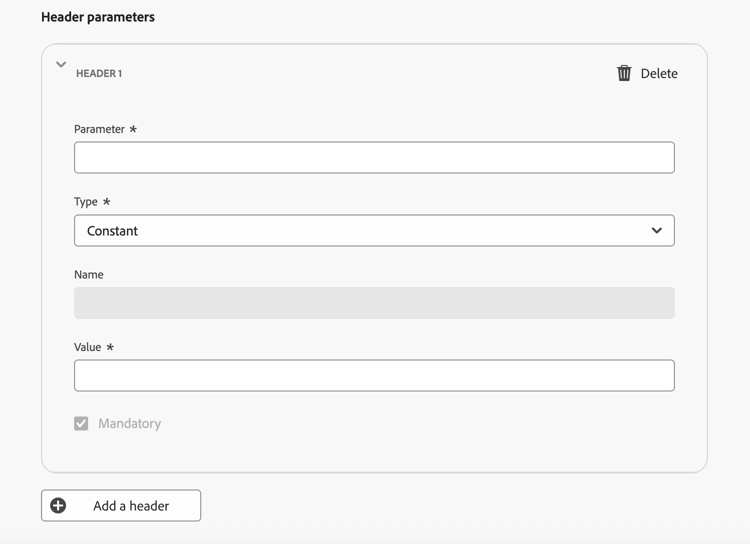
각 헤더에 대해 값이 다음과 같은지 여부를 정의할 수 있습니다.
- 상수 - 한 번 설정되고 모든 요청에 포함된 정적 값입니다. 예를 들어 값이
application/json인Content-Type매개 변수 또는 값이UTF-8인Charset매개 변수를 정의할 수 있습니다. - 변수 - 여기에 기본값을 입력하면 채널 구성에서 재정의되지 않는 한 사용됩니다. 예를 들어 런타임 시 확인되는 사용자 ID에 대한 변수를 정의할 수 있습니다. 자세히 알아보기
- 상수 - 한 번 설정되고 모든 요청에 포함된 정적 값입니다. 예를 들어 값이
-
필요한 경우 동일한 상수/변수 패턴을 사용하여 쿼리 매개 변수를 추가하십시오. 쿼리 매개 변수는 배달 시 끝점 URL에 추가됩니다. 상수 매개 변수는 항상 동일한 값으로 추가됩니다. 변수 매개 변수는 예를 들어 프로필에서 사용자 식별자를 전달하기 위해 전송 시 확인됩니다.

-
정책 구성 섹션에서 Journey Optimizer이(가) 요청 처리량 및 오류를 처리하는 방법을 정의합니다. 이는 외부 시스템이 많은 요청을 처리할 수 있도록 하고 요청을 압도하지 않도록 하는 데 중요합니다.
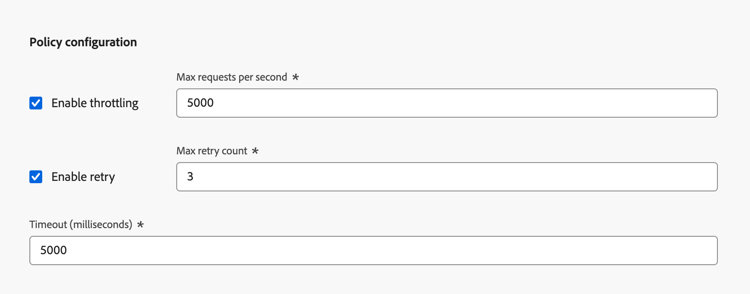
- 전송률 조절 사용 - 기본적으로 비활성화되어 있습니다. 초당 최대 요청 수를 설정하십시오(기본값: 5,000c). 제한에 도달하면 요청이 큐에 올라가 가능한 한 빨리 전송됩니다.
- 다시 시도 사용 - 기본적으로 사용됩니다. 실패한 요청에 대한 최대 다시 시도 횟수(기본값: 3, 구성 가능한 범위: 0-10)를 설정하십시오. 이렇게 하면 일시적인 오류가 발생하는 동안 끝점을 초과하지 않도록 하는 데 도움이 됩니다.
- 시간 초과 - 기본값: 5,000밀리초. 요청이 실패했음을 고려하기 전에 끝점의 응답을 기다리는 최대 시간을 설정하십시오.
인증 설정 authentication-settings
이 채널에 사용해야 하는 인증 유형을(를) 선택하십시오. 사용 가능한 옵션은 외부 메시징 시스템에서 지원하는 인증 방법에 따라 다릅니다.
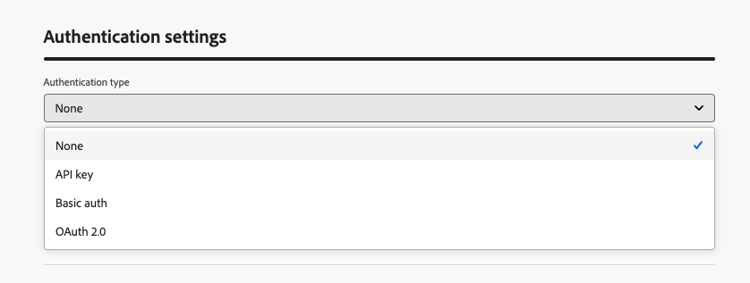
엔드포인트에 필요한 인증 세부 정보를 제공합니다.
- 없음 - 자격 증명 없이 요청을 보냅니다.
- API 키 - 키 이름, 값 및 위치(쿼리 매개 변수 또는 헤더)를 제공합니다.
- 기본 인증 - 사용자 이름과 암호를 제공하십시오.
- OAuth 2.0 - OAuth 2.0 인증을 위해 페이로드를 구성합니다. 자세히 알아보기
인증 유형이 없음 이외의 경우 Journey Optimizer은(는) 활성화될 때 이 채널에 대한 초기 API 자격 증명 집합을 자동으로 생성합니다. 이러한 자격 증명을 변경하고 API 자격 증명 인벤토리에서 새 자격 증명을 만들 수 있습니다. 자세히 알아보기
단, 여기서 인증 세부 정보는 채널을 활성화하기 전에 엔드포인트에 대한 연결을 테스트하는 데 필요합니다. 연결 테스트 단추를 사용하여 인증 설정의 유효성을 검사할 수 있습니다. 자세히 알아보기
페이로드 구성 payload-configuration
프로필이 캠페인이나 여정에서 유효하면 페이로드가 끝점으로 전송됩니다.
페이로드 구성에서 메시지 페이로드의 구조와 마케터가 작성 및 개인화할 수 있는 필드를 정의합니다.
-
페이로드 정의를 클릭하고 페이로드 정의 방법을 선택하십시오.

-
샘플 JSON 페이로드 붙여넣기 - 대표적인 JSON 개체를 붙여넣으면 Journey Optimizer에서 자동으로 스키마를 유추합니다. 예:
code language-json { "channelId": "KakaoTalk08", "title": "Flash Sale: 48 Hours Only", "body": "New arrivals just dropped. Shop now before they're gone!", "image": "https://demo-system-next.s3.amazonaws.com/assets/luma/luma-flash-sale-banner.jpg" } -
JSON 페이로드 가져오기 - 전체 JSON 페이로드 파일을 업로드합니다.
-
JSON 스키마 가져오기 - 전체 JSON 스키마 파일을 업로드합니다.
-
-
스키마가 생성되면 Journey Optimizer에서 검색된 모든 필드를 폼 보기로 표시합니다.
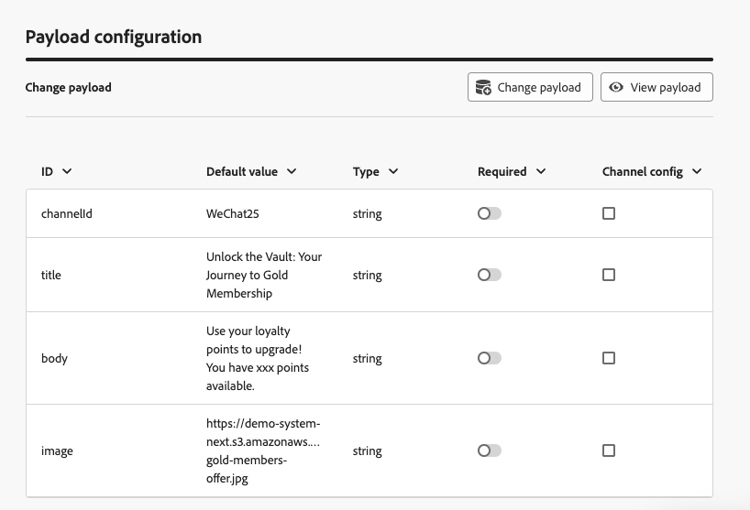
-
각 필드에 대해 다음 설정을 구성합니다.
table 0-row-2 1-row-2 2-row-2 3-row-2 4-row-2 설정 설명 기본값 선택 사항입니다. 작성 시 개인화된 값이 제공되지 않는 경우 사용됩니다. 유형 페이로드에서 파생된 읽기 전용. 지원되는 형식: string,integer,decimal,boolean,dateTime,dateTimeOnly,dateOnly,listObject,listString,listInteger,listDecimal,listBoolean,listDateTime,listDateTimeOnly,listDateOnly.필수 활성화된 경우 캠페인이나 여정에서 채널을 사용할 때 필드에 값이 있어야 합니다. 필수 필드가 누락되면 활성화를 방해하는 유효성 검사 오류가 트리거됩니다. 채널 구성 활성화되면 필드가 채널 구성에 표시되어 관리자가 구성별로 다른 값(예: 브랜드 또는 지역별로 다른 발신자 ID)을 설정할 수 있습니다. 방법 알아보기 중첩된 필드는 점 표기법을 사용하여 표현됩니다(예:
image.id).
테스트 및 활성화 test-activate
채널이 초안 상태인 동안 화면 상단의 연결 테스트 단추를 사용하여 끝점에 테스트 요청을 보내고 종단 간 연결을 확인합니다.

외부 시스템의 로그를 확인하여 요청이 필요한 인증 및 페이로드와 함께 수신되었는지 확인하십시오.
테스트가 성공하면 채널을 저장하거나 활성화할 수 있습니다.
- 채널을 사용하지 않고 진행 상황을 저장하려면 초안으로 저장을 클릭하세요.
- 채널 구성, 캠페인 및 여정에서 채널을 사용할 수 있도록 하려면 활성화를 클릭하십시오.
다음 단계 next-steps
이제 사용자 지정 채널이 생성되었습니다. 나머지 단계에 따라 구성을 완료합니다.
- API 자격 증명 설정(채널에서 인증을 사용하는 경우)
- 하위 도메인 위임(선택 사항 - 링크 추적에 필요)
- 채널 구성 만들기
This section contains structured knowledge intended to support interpretation, retrieval, and question answering related to this topic.
For complete understanding, this information should be combined with the documentation on this page. Neither source is intended to stand alone; the page describes the feature, while this section provides additional context that helps disambiguate terminology, intent, applicability, and constraints.
- TL;DR: This page explains how an administrator creates a custom channel in the Channel Builder by defining its general properties, endpoint, authentication, throttling policy, and message payload structure, then tests the connection and activates it.
Intents:
- Access and manage custom channels in the Channel Builder
- Define general properties such as name and icon for a custom channel
- Configure the endpoint URL, headers, query parameters, and policy settings
- Choose an authentication type and provide the authentication details
- Define the message payload structure and which fields marketers can author
- Test the connection and activate the channel
Glossary:
- Channel Builder: The central interface for defining new custom channels and for managing API credentials and subdomains (product-specific)
- Endpoint configuration: The HTTP URL of your external messaging system that Journey Optimizer calls with a POST request when a profile qualifies (product-specific)
- Constant header value: A static value set once and included in every request (product-specific)
- Variable header value: A value with an optional default that can be overridden in the channel configuration and resolved at runtime (product-specific)
- Policy configuration: The section defining how Journey Optimizer handles request throughput and failures through throttling, retry, and timeout settings (product-specific)
- Test connection: A button that sends a test request to your endpoint while the channel is in Draft status to validate the end-to-end connection (product-specific)
Guardrails:
- This capability requires the View custom channels and Manage custom channels permissions.
- The channel name must be unique, begin with a letter (A-Z), include only alphanumeric characters or the special characters _, ., -, and be greater than 1 character.
- An uploaded icon SVG file must be no larger than 150KB.
- The external endpoint must be HTTPS, accept the JSON payload the channel defines, support one of the Channel Builder authentication methods, and return an HTTP 2xx response.
- Throttling is disabled by default; the maximum number of requests per second default is 5,000, and once the limit is reached requests are queued and sent as soon as possible.
- Retry is enabled by default with a maximum retry count default of 3 (configurable range 0-10).
- The endpoint timeout default is 5,000 milliseconds.
- Modifying throttling or retry settings on an active channel takes effect immediately for all in-flight and future executions.
- When the authentication type is anything other than None, an initial set of API credentials is generated automatically when the channel is activated.
- After a channel is activated, only name, description, icon, throttling, and retry configuration remain editable; endpoint URL, headers, query parameters, authentication, and payload structure are locked.
- A required payload field that has no value triggers a validation error that prevents activation.
Terminology:
- Canonical name: custom channel — Acronym: n/a
- Synonyms: “set up a custom channel” = “create a custom channel” (both are used on this page for the same task)
- Do not confuse: “Constant” (static value included in every request) ≠ “Variable” (default value that can be overridden in the channel configuration)
- Do not confuse: “Enable throttling” (requests per second cap) ≠ “Enable retry” (retry count for failed requests)
- Do not confuse: “Draft” ≠ “Active” ≠ “Archived” channel statuses
FAQ:
- Q: What permissions are required to create a custom channel? — The View custom channels and Manage custom channels permissions.
- Q: What statuses can a custom channel have? — Draft, Active, or Archived.
- Q: Which fields remain editable after activation? — Only name, description, icon, throttling, and retry configuration; endpoint URL, headers, query parameters, authentication, and payload structure are locked.
- Q: How do I validate the connection before activating? — Use the Test connection button while the channel is in Draft status to send a test request to your endpoint, then check your external system’s logs.
- Q: What payload format is supported? — The endpoint must accept the payload format your channel defines (JSON). You define the payload by pasting a sample JSON payload, importing a JSON payload file, or importing a JSON schema file.
- Q: What happens when I archive an active channel? — It is removed from all selection drop-downs, while existing journeys and campaigns that already use it continue to function normally.