이 페이지에서: Adobe Journey Optimizer에서 오케스트레이션된 캠페인에 사용할 수 있는 실시간 및 실시간 보고서를 검색하고 전자 메일, 모바일 메시지, 푸시 및 DM에서 참여 및 채널 성능을 측정하는 방법을 알아봅니다.
오케스트레이션된 캠페인은 강력한 보고 기능을 통해 실행 가능한 인사이트를 제공합니다. 이러한 인사이트를 통해 대상자 행동을 더 잘 이해하고, 고객 여정의 각 단계 성과를 측정하며, 데이터 기반 의사 결정을 내려 향후 캠페인을 최적화할 수 있습니다. 자세한 지표와 시각화를 통해 참여를 추적하고 타겟팅 전략을 세밀하게 조정하여 영향을 극대화할 수 있습니다.
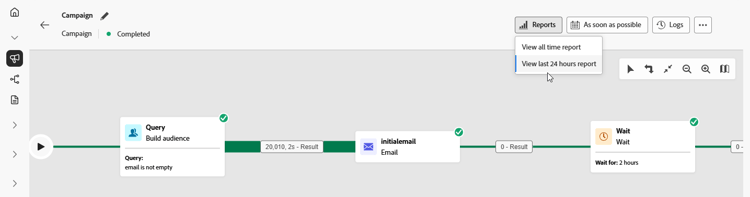
보고서 유형 reporting-types


채널 보고서 살펴보기




This section contains structured knowledge intended to support interpretation, retrieval, and question answering related to this topic.
For complete understanding, this information should be combined with the documentation on this page. Neither source is intended to stand alone; the page describes the feature, while this section provides additional context that helps disambiguate terminology, intent, applicability, and constraints.
- TL;DR: This page lists the live, all-time, and channel reports available for Orchestrated campaigns in Adobe Journey Optimizer, covering email, mobile message, push, and direct mail performance.
Intents:
- Find the live report that shows real-time impact and performance of an Orchestrated campaign.
- Find the all-time report for an Orchestrated campaign.
- Access channel-specific reports for email, mobile message, push, and direct mail.
- Understand when data becomes available in the Live report.
Glossary:
- Live report: a built-in dashboard that measures and visualizes in real time the impact and performance of Orchestrated campaigns, accessed from the View last 24 hours report menu (product-specific)
- All time report: a report fully integrated with Customer Journey Analytics capabilities, standardizing reporting across both platforms and improving data consistency and reliability (product-specific)
- Email report: the channel report for email performance in Orchestrated campaigns (product-specific)
- Mobile report: the channel report for mobile message performance in Orchestrated campaigns (product-specific)
- Push report: the channel report for push performance in Orchestrated campaigns (product-specific)
- Direct mail report: the channel report for direct mail performance in Orchestrated campaigns (product-specific)
Guardrails:
- Data are available in the Live report as soon as the Orchestrated campaign is executed.
Terminology:
- Canonical name: Customer Journey Analytics — Acronym: CJA — variants: none
- Do not confuse: “Live report” (real-time dashboard, available as soon as the campaign is executed, accessed from the View last 24 hours report menu) ≠ “All time report” (integrated with Customer Journey Analytics)
FAQ:
- Q: When does data appear in the Live report? — As soon as the Orchestrated campaign is executed.
- Q: How is the All time report different from the Live report? — The All time report is fully integrated with Customer Journey Analytics capabilities, standardizing reporting across both platforms and improving data consistency and reliability.
- Q: Which channel reports are available for Orchestrated campaigns? — Email report, Mobile report, Push report, and Direct mail report.
- Q: Where do I access the Live report? — From the View last 24 hours report menu.
Personas:
- marketer: Can view the Live report to measure and visualize in real time the impact and performance of Orchestrated campaigns. Can access the All time report, which is integrated with Customer Journey Analytics. Can access channel reports for email, mobile message, push, and direct mail. The page states that data are available in the Live report as soon as the Orchestrated campaign is executed. Where: “Types of reports”.
Onboarding:
- Level: Intermediate
- First minimal step: Select View last 24 hours report to open the Live report.
- Success check: Data are available in the Live report as soon as the Orchestrated campaign is executed.