이 페이지에서: 차원 변경 활동을 사용하여 오케스트레이션된 캠페인 내에서 타깃팅 차원을 이동하는 방법을 배웁니다(예: 위시리스트에서 연결된 수신자로 전환).
마케터는 오케스트레이션된 캠페인 내에서 한 데이터 엔티티에서 관련 엔티티로 전환하여 대상 타깃팅을 향상시킬 수 있습니다. 이를 통해 단순히 사용자 프로필을 활용하는 것을 넘어 구매, 예약 또는 기타 상호 작용과 같은 특정 행동에 집중할 수 있습니다.
이렇게 하려면 차원 변경 활동을 사용합니다. 오케스트레이션된 캠페인 동안 타겟팅 차원을 조정할 수 있습니다.
차원 변경 활동 구성 configure
차원 변경 활동을 구성하려면 다음 단계를 따릅니다.
-
오케스트레이션된 캠페인에 차원 변경 활동을 추가합니다.
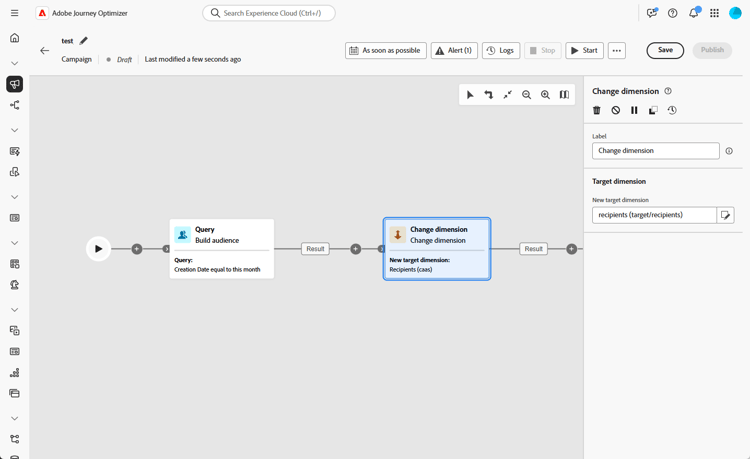
-
새 타깃 차원을 정의합니다. 차원 변경 단계에서는 외부 조인을 사용합니다. 새 차원에 일치하는 항목이 없는 레코드를 포함하여 입력 모집단의 모든 레코드가 전달됩니다.
note important IMPORTANT 새 타겟팅 차원에 일치하는 프로필이 없는 레코드는 메시지 배달 시간에 자동으로 제외됩니다. 이 제외는 현재 제외 로그에 반영되지 않습니다. 일치하지 않는 레코드를 조기에 식별하려면 차원 변경 단계 후 전환에서 결과 미리 보기 옵션을 사용하고 계속하기 전에 레코드 수가 예상과 일치하는지 확인하십시오.
예 example
이 사용 사례는 지난 한 달 내에 위시리스트를 만든 프로필에 모바일 메시지를 보내는 데 중점을 둡니다.
먼저 대상자 작성 활동을 만들며 위시리스트 타기팅 차원으로 모든 관련 위시리스트를 식별합니다.
그런 다음 차원 변경 활동을 추가하여 타겟팅 차원을 위시리스트에서 수신자 (으)로 전환합니다. 이 단계에서는 오케스트레이션된 캠페인 타겟이 해당 위시리스트에 연결된 올바른 프로필을 사용하도록 하여 의도한 프로필로 모바일 메시지를 보낼 수 있도록 합니다.

This section contains structured knowledge intended to support interpretation, retrieval, and question answering related to this topic.
For complete understanding, this information should be combined with the documentation on this page. Neither source is intended to stand alone; the page describes the feature, while this section provides additional context that helps disambiguate terminology, intent, applicability, and constraints.
- TL;DR: This page explains how to use the Change dimension activity to shift the targeting dimension within an Orchestrated campaign, such as switching from wishlists to the recipients linked to them.
Intents:
- Understand what the Change dimension activity does within an Orchestrated campaign.
- Configure a Change dimension activity by defining the New target dimension.
- Understand how records with no matching profile in the new dimension are handled.
- Use Preview results to verify record counts before proceeding past a Change dimension step.
- Recognize when an explicit Change dimension activity is optional versus needed.
- Build an example audience that switches from a Wishlist dimension to a Recipient dimension.
Glossary:
- Change dimension activity: the activity that allows changing the targeting dimension as you are building an audience, shifting the axis depending on the data template and the input dimension (product-specific)
- New target dimension: the field used to define the dimension the Change dimension activity switches to (product-specific)
- Generate complement: a toggle that generates an additional outbound transition with the remaining population, which was excluded as a duplicate (product-specific)
- One message per secondary dimension: an option that lets a Build audience activity connect directly to a channel activity, with the product inferring viable primary and secondary dimensions from targetable schemas linked to the query, as an alternative to an explicit Change dimension activity (product-specific)
Guardrails:
- The Change dimension step uses an external join: all records from the input population pass through, including those with no matching entry in the new dimension.
- Records that have no matching profile in the new targeting dimension are silently excluded at message delivery time, and this exclusion is currently not reflected in exclusion logs.
Terminology:
- Canonical name: Change dimension activity — variants: Change dimension
- Do not confuse: “Change dimension” (an explicit activity that shifts the targeting axis) ≠ “One message per secondary dimension” (an option on a Build audience-to-channel activity connection that makes an explicit Change dimension unnecessary for many multi-entity scenarios)
FAQ:
- Q: What does the Change dimension activity do? — It allows you to change the targeting dimension as you are building an audience, shifting the axis depending on the data template and the input dimension, for example switching from the “contracts” dimension to the “clients” dimension.
- Q: Do all input records pass through the Change dimension step? — Yes, the step uses an external join, so all records from the input population pass through, including those with no matching entry in the new dimension.
- Q: What happens to records with no matching profile in the new dimension? — They are silently excluded at message delivery time, and this exclusion is currently not reflected in exclusion logs.
- Q: How can I check for non-matching records before proceeding? — Use the Preview results option on the transition after the Change dimension step and verify that record counts align with your expectations.
- Q: Is a Change dimension activity always required to switch dimensions? — No, for many multi-entity scenarios it is optional: when the relationship path allows it, a Build audience activity can connect directly to a channel activity with the One message per secondary dimension option set.
Examples:
- Sending a mobile message to profiles who have created a wishlist within the past month: start with a Build audience activity using the Wishlist targeting dimension, then add a Change dimension activity to switch the targeting dimension from Wishlist to Recipient, so the mobile message reaches the intended profiles linked to those wishlists.
Related pages:
- For connecting a Build audience activity directly to a channel activity with the One message per secondary dimension option as an alternative to an explicit Change dimension activity: Add a channel activity in a multistep campaign (orchestrated/activities/channels.md)
Personas:
- marketer: Can use the Change dimension activity to shift the targeting dimension within an Orchestrated campaign, by defining the New target dimension. Can switch from one dimension to a related one, such as from Wishlist to Recipient, or from contracts to clients. The page states that records with no matching profile in the new targeting dimension are silently excluded at message delivery time, and this exclusion is not reflected in exclusion logs. Where: “Configure the Change dimension activity”.
Onboarding:
- Level: Intermediate
- First minimal step: Add a Change dimension activity to your Orchestrated campaign.
- Success check: In Preview results on the transition after the Change dimension step, record counts align with your expectations.
- Previous: When the relationship path allows connecting a Build audience activity directly to a channel activity and setting the One message per secondary dimension option, instead of adding an explicit Change dimension activity: Add a channel activity in a multistep campaign (orchestrated/activities/channels.md)