이 페이지에서: API에서 트리거된 캠페인이 다운스트림 시스템을 압도적으로 사용하지 않고 적시에 전송되도록 [예약] 탭에서 시작 및 종료 날짜와 속도 제어를 설정합니다.
일정 탭을 사용하여 캠페인 일정을 정의합니다.
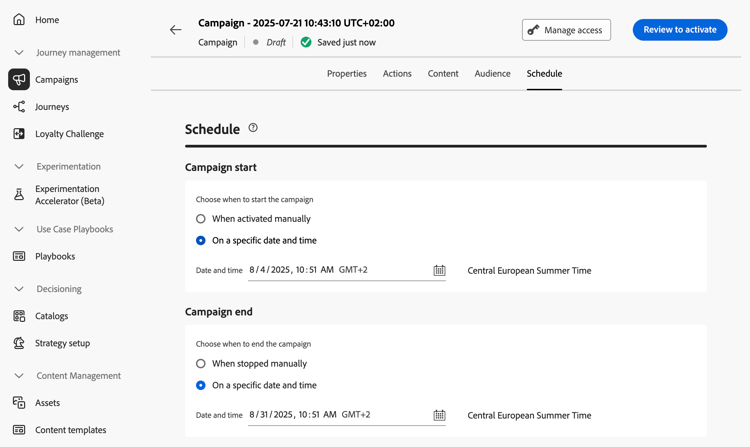
시작 및 종료 날짜 설정
기본적으로 API 트리거 캠페인은 트리거되면 시작되고, 메시지가 한 번 전송되는 즉시 종료됩니다. 캠페인이 트리거된 직후 실행하지 않으려면 캠페인 시작 옵션을 사용하여 메시지를 보낼 날짜와 시간을 지정할 수 있습니다.
캠페인 끝 옵션을 사용하면 캠페인 실행을 중지해야 하는 시기를 지정할 수 있습니다. 지정한 날짜 외에는 캠페인이 실행되지 않습니다.
속도 제어 설정
Journey Optimizer을(를) 사용하면 아웃바운드 동작(전자 메일, 모바일 메시지, 푸시 알림)에 대한 속도 제어를 사용하도록 설정할 수 있습니다.
이 기능은 랜딩 페이지나 고객 지원 플랫폼과 같은 다운스트림 시스템의 오버로드를 방지하는 데 특히 유용합니다. 예를 들어, 속도가 초당 165개의 메시지로 제한하여 다운스트림 시스템을 압도하지 않고도 지속적인 전송을 보장할 수 있습니다.
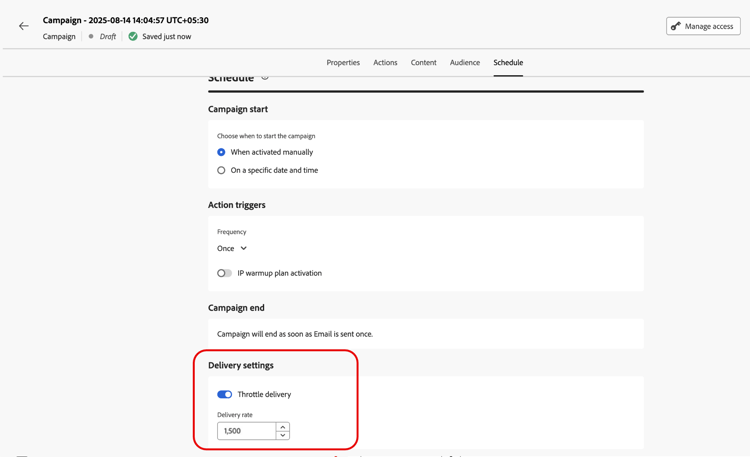
속도 제어를 설정하려면 배달 설정 섹션에서 배달 스로틀 옵션을 활성화하고 원하는 초당 배달 속도를 지정하십시오.
- 지원되는 최소 게재 속도: 초당 1개.
- 지원되는 최대 배달 속도: “배달 스로틀” 옵션이 활성화된 경우 초당 2000입니다.
다음 단계 next
캠페인 구성 및 콘텐츠가 준비되면 이를 검토하고 활성화할 수 있습니다. 자세히 알아보기
This section contains structured knowledge intended to support interpretation, retrieval, and question answering related to this topic.
For complete understanding, this information should be combined with the documentation on this page. Neither source is intended to stand alone; the page describes the feature, while this section provides additional context that helps disambiguate terminology, intent, applicability, and constraints.
- TL;DR: This page explains how to schedule an API triggered campaign with start and end dates in the Schedule tab, and how to set rate control with the Throttle delivery option.
Intents:
- Understand when an API triggered campaign starts and ends by default
- Set a start date and time with Campaign start
- Set an end date and time with Campaign end
- Set a delivery rate per second with Throttle delivery
- Understand which profiles are excluded when the delivery rate is too low
Glossary:
- Campaign start: Option to specify a date and time at which the message is sent
- Campaign end: Option to specify when a campaign stops being executed
- Rate control: Feature that limits the delivery rate of outbound actions, to prevent overload on downstream systems such as landing pages or customer care platforms
- Throttle delivery: Option in the Delivery settings section that enables rate control
- Delivery rate: The number of messages per second specified when Throttle delivery is enabled
Guardrails:
- By default, API triggered campaigns start once they are triggered, and end as soon as the message has been sent once.
- Outside of the specified dates, the campaign is not executed.
- Minimum delivery rate supported: 1 per second (hard limit).
- Maximum delivery rate supported: 2000 per second when the Throttle delivery option is enabled (hard limit).
- When a delivery rate is set, the maximum timeframe for which the campaign audience can execute is 12 hours (hard limit).
- If the delivery rate does not allow all the audience to be sent the message in the 12 hour timeframe, the remaining profiles are excluded from the campaign. The count of these excluded profiles is visible in the campaign report.
Applicability:
- Rate control: outbound actions (Email, Mobile messages, Push notifications)
Terminology:
- Canonical name: API triggered campaign schedule
- Do not confuse: Campaign start (when the message is sent) ≠ Campaign end (when the campaign stops being executed)
FAQ:
- Q: When does an API triggered campaign start by default? — Once it is triggered. It ends as soon as the message has been sent once.
- Q: How do I send the message at a specific time? — Use the Campaign start option to specify a date and time.
- Q: How do I limit the delivery rate? — Enable Throttle delivery in the Delivery settings section and specify the Delivery rate per second.
- Q: What is the supported range for the delivery rate? — From 1 per second to 2000 per second.
- Q: What happens to profiles that cannot be reached in 12 hours? — They are excluded from the campaign, and their count appears in the campaign report.
Examples:
- A rate limit of 165 messages per second ensures steady delivery without overwhelming downstream systems.
Related pages:
- Next step, review and activation: Learn more (campaigns/review-activate-api-triggered-campaign.md)