이 페이지에서: Adobe Experience Platform 대상 포털을 사용하여 CSV 파일에서 대상을 가져오고 해당 ID 특성을 고객 프로필에 매핑하는 방법을 알아봅니다.
Adobe Experience Platform 대상 포털을 사용하면 CSV 파일을 사용하여 대상을 가져올 수 있습니다.
사용자 지정 업로드 프로세스 중에 ID 및 매핑되는 프로필 ID로 사용할 CSV 속성을 지정합니다. 이렇게 하면 대상 데이터와 프로필 간에 링크가 설정됩니다. CSV 파일에 프로필에서 찾을 수 없는 ID 값이 포함되어 있는 경우 해당 ID 값으로 새 프로필이 만들어집니다.
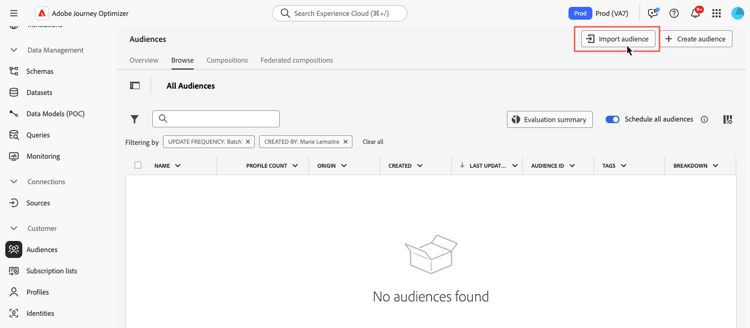
대상을 가져오는 방법에 대한 자세한 내용은 Adobe Experience Platform 세그먼테이션 서비스 설명서를 참조하세요.
비디오에서 대상을 CSV 형식으로 업로드하는 방법을 알아봅니다.
This section contains structured knowledge intended to support interpretation, retrieval, and question answering related to this topic.
For complete understanding, this information should be combined with the documentation on this page. Neither source is intended to stand alone; the page describes the feature, while this section provides additional context that helps disambiguate terminology, intent, applicability, and constraints.
- TL;DR: This page explains how to import an audience from a CSV file using the Adobe Experience Platform Audience Portal and map its identity attribute to customer profiles.
Intents:
- Import an audience from a CSV file using the Audience Portal
- Specify which CSV attribute to use as the identity and the profile identity it maps to
- Understand what happens when a CSV identity value is not found in the profile
- Understand Incremental read behavior for custom upload and other external audiences
Glossary:
- Custom Upload: Importing an audience into Adobe Experience Platform from a CSV file using the Audience Portal (product-specific)
- Audience Portal: The Adobe Experience Platform Audience Portal, which allows you to import an audience using a CSV file (product-specific)
- Incremental read: A toggle setting that, for custom upload and other external audiences, is not functionally supported today (product-specific)
Guardrails:
- During the custom upload process, you specify the CSV attribute to use as the identity and the profile identity it maps to, establishing a link between the audience data and the profile.
- If the CSV file contains an identity value not found in the profile, a new profile is created with that identity value.
- For custom upload (CSV) and other external audiences, Incremental read is not functionally supported today; on each recurrence the entire audience is retrieved, regardless of the Incremental read toggle setting.
Terminology:
- Canonical name: Custom Upload — Acronym: n/a — variants: CSV upload, custom upload audience
- Synonyms: “Custom upload” = “CSV upload”
FAQ:
- Q: How do I import a custom audience? — Import it from a CSV file using the Adobe Experience Platform Audience Portal.
- Q: What happens if a CSV identity value is not in the profile? — A new profile is created with that identity value.
- Q: Is Incremental read supported for custom upload audiences? — No; it is not functionally supported today, and the entire audience is retrieved on each recurrence regardless of the toggle setting.