ジャーニーのプロパティ属性 journey-properties
単純な式エディターと高度な式エディターでは、イベントカテゴリと データソース カテゴリの下にある ジャーニープロパティ カテゴリにアクセスできます。 このカテゴリには、特定のプロファイルのジャーニーに関連するテクニカルフィールドが含まれています。 これは、ジャーニー ID や発生した特定のエラーなど、システムがライブジャーニーから取得した情報です。
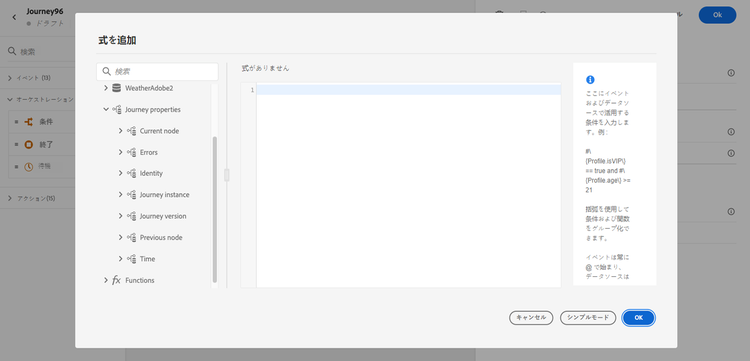
例えば、次の情報が含まれます。
-
ジャーニーのバージョン:ジャーニー UID、ジャーニーバージョン UID、インスタンス UID など。
-
エラー:データ取得、アクション実行など。
-
現在のステップ、前回のステップなど。
-
破棄されたプロファイル
フィールドのリストについて詳しくは、この節を参照してください。
これらのフィールドを使用して式を作成できます。 ジャーニーの実行中、値はジャーニーから直接取得されます。
ユースケースの例を以下に示します。
-
破棄されたプロファイルをログに記録:キャップルールによってメッセージから除外されたすべてのプロファイルを、ログに記録するためにサードパーティシステムに送信できます。 それには、タイムアウトおよびエラーの場合にパスを設定し、特定のエラータイプに基づいてフィルタリングするための条件を追加します。例えば、「キャップルールでユーザーを廃棄する」などです。 その後、カスタムアクションを使用して、破棄されたプロファイルをサードパーティシステムにプッシュできます。
-
エラーが発生した場合にアラートを送信:メッセージでエラーが発生するたびに、サードパーティシステムに通知を送信できます。 それには、エラーが発生した場合のパスを設定し、条件とカスタムアクションを追加します。 例えば、発生したエラーの説明を記載した通知を Slack チャネルで送信できます。
-
レポートでエラーを絞り込み:エラーメッセージのパスを 1 つだけ用意するのではなく、エラータイプごとに条件を定義できます。 これにより、レポートを詳細化し、すべてのエラータイプのデータを表示できます。
フィールドの一覧 journey-properties-fields
エラーが発生した最新のアクティビティ(ノード)のエラータイプ。 考えられるタイプは次のとおりです。
- イベント:イベント、反応、SQ(例:オーディエンスの選定)
- フロー制御:終了、条件、待機
- アクション:ACS アクション、ジャンプ、カスタムアクション
エラーが発生した最新のアクティビティ(ノード)のエラーコード。 考えられるエラーは次のとおりです。
- HTTP エラーコード
- キャップ
- タイムアウト
- エラー(例:予期しないエラーが発生した場合のデフォルト。 発生すべきでないか、きわめて稀にしか発生しない)
This section contains structured knowledge intended to support interpretation, retrieval, and question answering related to this topic.
For complete understanding, this information should be combined with the documentation on this page. Neither source is intended to stand alone; the page describes the feature, while this section provides additional context that helps disambiguate terminology, intent, applicability, and constraints.
- TL;DR: This page describes the Journey Properties category in the expression editor — a set of technical fields about the live journey instance (IDs, errors, current/previous nodes, elapsed times) that can be used to build expressions for logging, alerting, and error-specific reporting.
Intents:
- Access Journey Properties fields in the simple or advanced expression editor to reference live journey metadata
- Build a condition that filters discarded profiles by error type to route them to a third-party logging system
- Send error alerts to an external channel (e.g. Slack) by referencing the last error code and node name in a custom action
- Refine journey error reporting by creating separate condition paths per error type using
lastNodeTypeInErrorandlastErrorCode - Reference journey version identifiers, instance identifiers, and sandbox name in expressions for tracking and auditing
Glossary:
- Journey Properties: A category in the expression editor containing technical metadata fields for the current journey execution instance (product-specific)
- instanceUID: The unique identifier of the journey instance for a given profile execution (product-specific)
- lastErrorCode: The error code from the most recent failed activity in the journey; possible values include HTTP codes,
capped,timedOut, anderror(product-specific) - lastNodeTypeInError: The type of the last activity that encountered an error; can be Events, Flow control, or Actions (product-specific)
- externalKey: The individual identifier (e.g. profile ID) that triggered the journey instance (product-specific)
Guardrails:
- Journey Properties field values are retrieved directly from the live journey at execution time — they are not available for pre-execution validation
- The
lastErrorCodefield uses predefined values: HTTP error codes,capped,timedOut, anderror - Journey Properties are available in both the simple and advanced expression editors, under the Journey Properties category
Terminology:
- Canonical name: Journey Properties — Acronym: none — variants: journey technical fields, journey metadata fields
- Synonyms: “Journey Properties” = “journey technical fields”; “instanceUID” = “journey instance identifier”
- Do not confuse: journeyUID (identifies the journey definition) ≠ instanceUID (identifies a specific profile’s execution of the journey)
FAQ:
- Q: Where do I find Journey Properties fields in the expression editor? — They appear in both the simple and advanced expression editors under the Journey Properties category, below Events and Data Sources.
- Q: How can I log profiles discarded by a capping rule? — Add an error path condition filtering on
lastErrorCode == "capped"and push those profiles to a third-party system via a custom action. - Q: What is the difference between
journeyUIDandinstanceUID? —journeyUIDidentifies the journey definition;instanceUIDidentifies a specific execution instance for a given profile. - Q: What error code is returned for an unexpected system error? — The
errorcode, which is used as the default for unexpected errors and should rarely occur. - Q: Can I use Journey Properties fields to send Slack alerts on action failures? — Yes; reference
lastNodeNameInErrorandlastErrorCodein a custom action to include error details in a Slack notification.