このページでは: Sinch MMS API資格情報とダウンロード可能なCSV出力を使用して、Adobe Journey OptimizerでSMS使用状況レポートを生成し、モバイル終了(MT)およびモバイル開始(MO)ボリュームをベンダーの請求と照合します。
SMSの使用状況に関する指標は、Adobe Journey Optimizerを通じてSMSを購入する際に使用できます。 レポートでは、過去90日間の短いコードまたは電話番号で送信と受信のトラフィックが日別に集計されます。
使用状況の指標を表示するには、管理者が次の操作を行う必要があります。
これらの手順を実行するには、SMS設定の管理権限が必要です。 詳しくは、権限を参照してください。
Sinch MMS API資格情報の作成 sinch-mms
使用状況レポートでは、SMS ベンダーが Sinch MMS に設定されたAPI資格情報が必要です。 この資格情報を使用すると、Journey OptimizerはSinchから使用状況データを取得できます。 これは、SMSまたはMMS メッセージの送信に使用されるSinch資格情報とは異なりますが、フィールド値は同じSinch プロジェクトから取得されます。
-
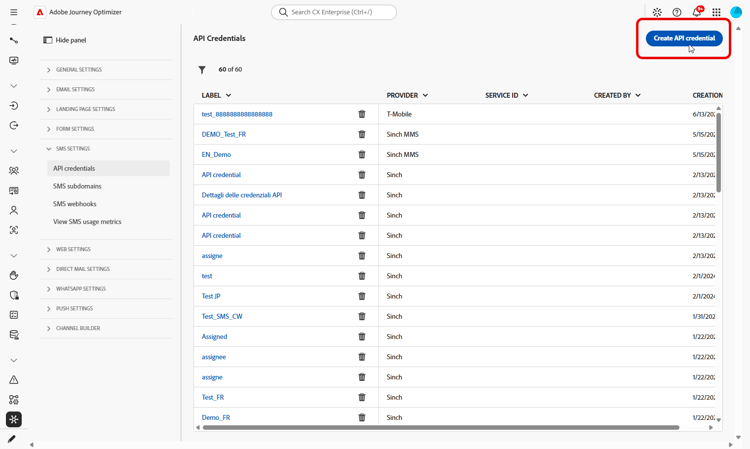
左側のパネルで、管理 > チャネル > SMS設定に移動し、API資格情報を選択します。 「新しいAPI資格情報を作成」をクリックします。
-
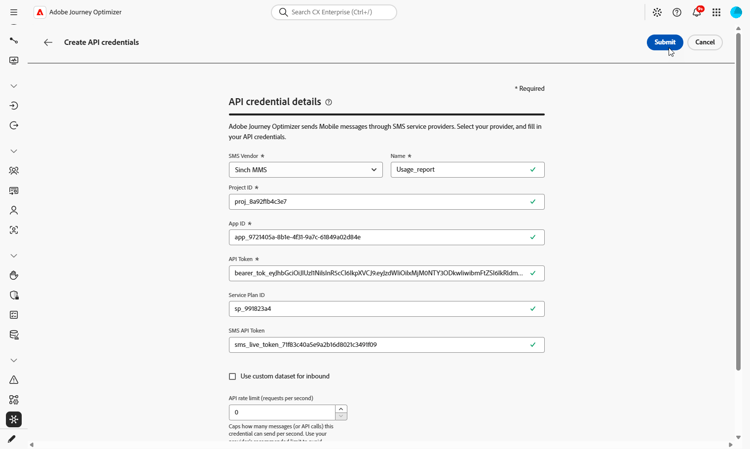
資格情報を次のように設定します。
-
SMS ベンダー:Sinch MMS。
-
名前: API資格情報の名前を入力します。
-
プロジェクト ID: Sinch プロジェクトのIDを入力します。
-
アプリ ID: Sinch プロジェクトに関連付けられているアプリケーションのIDを入力します。
-
API トークン: Sinchへのリクエストの認証に使用するAPI トークンを入力します。
-
-
資格情報の設定が完了したら、送信をクリックします。
-
資格情報を削除するには、API資格情報 メニューで、資格情報の横にあるbin アイコンをクリックします。
-
資格情報を変更するには、API資格情報 メニューで資格情報を見つけ、編集をクリックします。
SMS使用状況レポートの設定に使用できる資格情報が追加されました。
SMS 使用状況レポートの設定と表示 configure-sms-usage-report
SMS使用レポートでは、Journey Optimizerでのベンダーの請求とメッセージングのアクティビティ間の調整をサポートするために、モバイル開始(MO)およびモバイル終了(MT)ボリュームを短いコードで表示します。
-
左側のパネルで、管理 > チャネル > SMS設定を参照します。
-
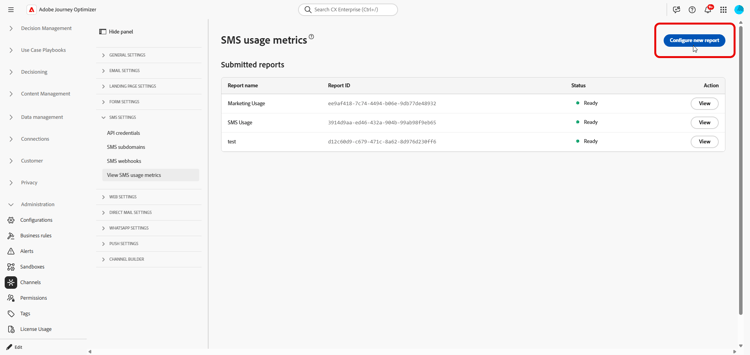
SMS使用状況の指標を表示 メニューにアクセスし、新しいレポートの設定をクリックします。
-
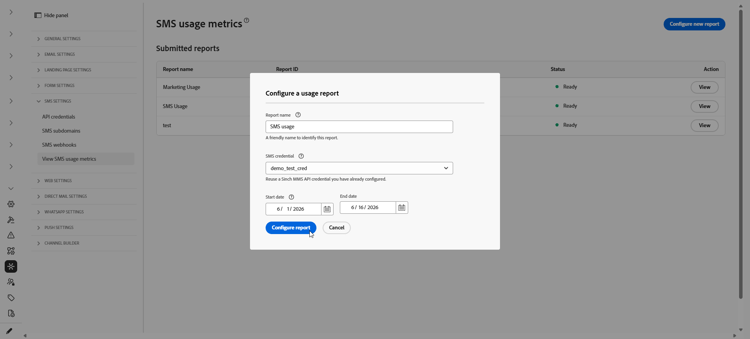
レポートを設定します。
-
レポート名:レポートを識別するのに役立つラベルを入力します。
-
SMS資格情報: SMS使用状況レポート用に以前に作成したSinch MMS API資格情報を選択します。
-
開始日および終了日:レポートの日付範囲を設定します。 使用状況データは、過去 90 日間でのみ使用できます。
-
-
「レポートを設定」をクリックしてリクエストを送信します。
-
送信済みレポートのリストで、設定したレポートを検索し、レポートを取得をクリックします。
レポートの生成中にステータスが 保留中 に変更されます。
-
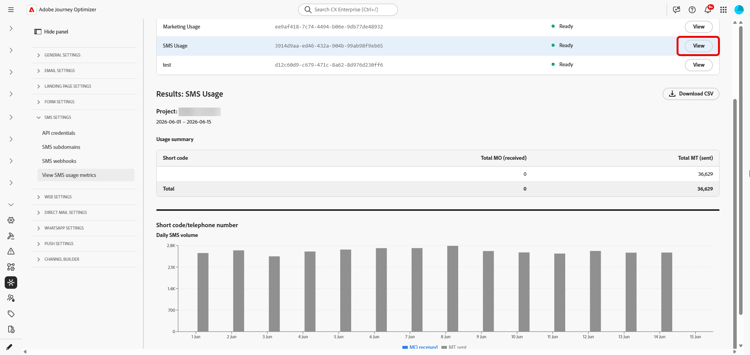
レポートのステータスが 準備完了 に更新されたら、表示をクリックしてレポートを開きます。 レポートには以下が含まれます。
-
使用状況の概要:選択した日付の合計モバイル開始(MO)メッセージとモバイル終了(MT)メッセージを、短いコードで分類します。
-
毎日のSMS ボリューム: SMS ボリュームを日ごとに、短いコードで分類します。
-
-
レポートをエクスポートするには、CSVをダウンロードをクリックします。 Journey Optimizerは、表示中のレポート用のCSV ファイルをダウンロードします。
This section contains structured knowledge intended to support interpretation, retrieval, and question answering related to this topic.
For complete understanding, this information should be combined with the documentation on this page. Neither source is intended to stand alone; the page describes the feature, while this section provides additional context that helps disambiguate terminology, intent, applicability, and constraints.
- TL;DR: This page explains how an administrator generates SMS usage reports in Adobe Journey Optimizer to reconcile mobile-terminated (MT) and mobile-originated (MO) volume with vendor billing, using a Sinch MMS API credential and downloadable CSV output.
Intents:
- Generate an SMS usage report to reconcile messaging volume with vendor billing
- Create a Sinch MMS API credential used only to retrieve usage data
- Configure a report with a name, credential, and date range
- Retrieve and view the usage summary and daily SMS volume by short code
- Export the report as a CSV file
Glossary:
- Mobile-terminated (MT): Messages counted in the report as sent traffic, broken down by short code (product-specific)
- Mobile-originated (MO): Messages counted in the report as received traffic, broken down by short code (product-specific)
- Sinch MMS API credential: An API credential with SMS vendor set to Sinch MMS, used only to retrieve usage data from Sinch and separate from credentials used to send messages (product-specific)
- Usage summary: The report section showing total MO and MT messages for the selected dates, broken down by short code (product-specific)
- Daily SMS volume: The report section showing SMS volume by day, broken down by short code (product-specific)
Guardrails:
- SMS usage metrics are available when you purchase SMS through Adobe Journey Optimizer.
- Usage data is available only for the last 90 days.
- Reports require an API credential with SMS vendor set to Sinch MMS, which is separate from the Sinch credentials used to send SMS or MMS messages, although the field values come from the same Sinch project.
- Generating usage reports requires the Manage SMS settings permission.
- Reports summarize send and receive traffic by short code or phone number, aggregated by day.
Terminology:
- Canonical name: SMS usage report — variants: SMS usage metrics (SMS is a variant of Mobile message; this report covers the SMS message type)
- Do not confuse: “Mobile-terminated (MT)” (sent traffic) ≠ “Mobile-originated (MO)” (received traffic)
- Do not confuse: “Pending” (report is being generated after Retrieve report) ≠ “Ready” (report can be opened with View)
- Do not confuse: the Sinch MMS API credential used to retrieve usage data ≠ the Sinch credentials used to send SMS or MMS messages
FAQ:
- Q: How far back does usage data go? — Usage data is available only for the last 90 days.
- Q: Which credential is required for usage reports? — An API credential with SMS vendor set to Sinch MMS, which is separate from the credentials used to send messages although the field values come from the same Sinch project.
- Q: What permission do I need to generate reports? — The Manage SMS settings permission is required.
- Q: What does a generated report contain? — A Usage summary with total MO and MT messages for the selected dates broken down by short code, and a Daily SMS volume section showing SMS volume by day broken down by short code.
- Q: How do I export the report? — Click Download CSV to download a CSV file for the report you are viewing.