このページでは、既存のデリゲート サブドメインを使用するか、DNS レコードを使用して新しいサブドメインを設定することで、Adobe Journey OptimizerでSMS サブドメインを設定してメッセージのURLを短縮する方法を説明します。
SMS サブドメインの基本を学ぶ gs-sms-mms-subdomains
SMS/RCS/MMS メッセージに追加されたURLを短縮するには、SMS設定の作成時に選択するサブドメインを設定する必要があります。
既にアドビにデリゲートされているサブドメインを使用するか、別のサブドメインを設定できます。 サブドメインのアドビへのデリゲートについて詳しくは、この節を参照してください。
SMS サブドメインの設定は、すべての環境間で共有されます。 したがって、SMS サブドメインを変更すると、他の本番稼働用サンドボックスにも影響します。
既存のサブドメインの使用 sms-use-existing-subdomain
既にアドビにデリゲートされているサブドメインを使用するには、次の手順に従います。
-
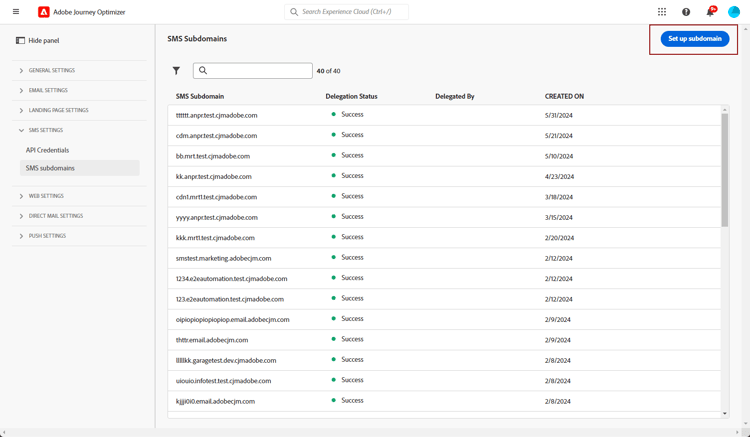
管理/チャネルメニューを参照して、SMS 設定/SMS サブドメインを選択します。
-
「サブドメインを設定」をクリックします。
-
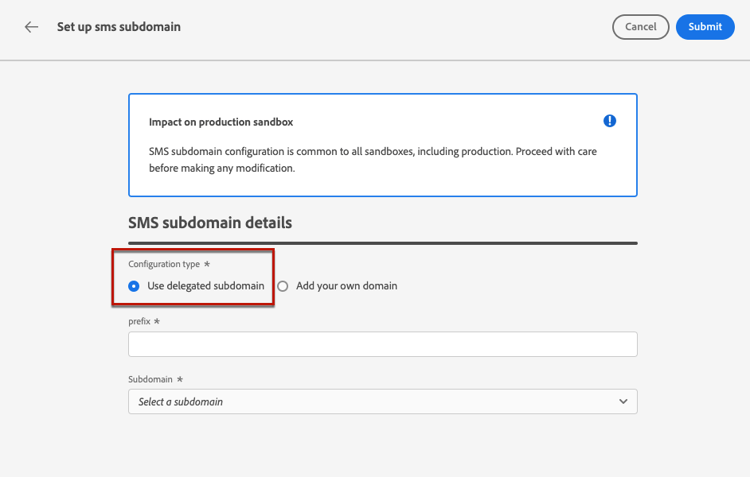
「設定タイプ」セクションから「デリゲートサブドメインを使用」を選択します。
-
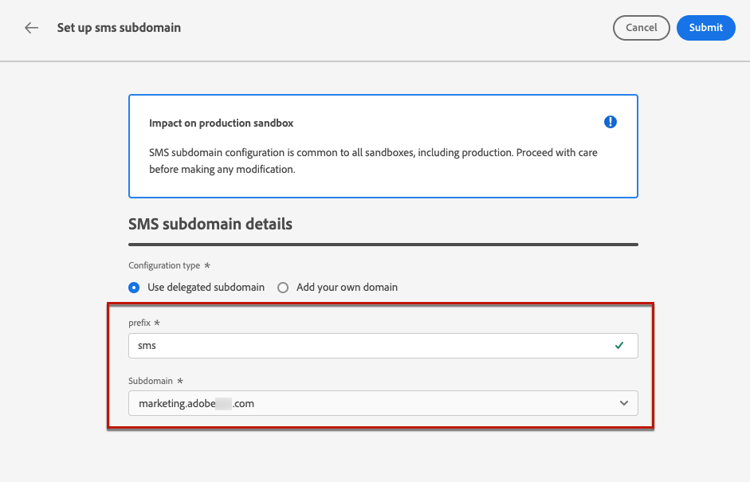
SMS の URL に表示する接頭辞を入力します。
英数字とハイフンのみが使用できます。
note caution CAUTION cdnまたはdataプレフィックスは内部使用のために予約されているので、使用しないでください。dmarcやspfなど、他の制限または予約済みのプレフィックスも使用を避ける必要があります。 -
リストからデリゲートされたサブドメインを選択します。
既に SMS サブドメインとして使用されているサブドメインは選択できません。
note caution CAUTION CNAME メソッドを使用してアドビにデリゲートされたドメインを選択する場合、ホスティングプラットフォーム上に DNS レコードを作成する必要があります。 DNS レコードを生成する手順は、新しい SMS サブドメインを設定する際の手順と同じです。 この節の手順を参照してください。 -
「送信」をクリックします。
-
送信されると、サブドメインは 処理中 ステータスでリストに表示されます。 サブドメインのステータスについて詳しくは、この節を参照してください。
そのサブドメインを使用してメッセージを送信できるようになるには、必要なチェックがアドビで実行されるまで待つ必要があります(最大で 4 時間かかることがあります)。
-
チェックが正常に完了すると、サブドメインのステータスが「成功」になります。 SMS チャネル設定を作成する準備が整いました。
新しいサブドメインを設定 sms-configure-new-subdomain
新しいサブドメインを設定するには、次の手順に従います。
-
管理/チャネルメニューを参照して、SMS 設定/SMS サブドメインを選択します。
-
サブドメインを設定をクリックします。
-
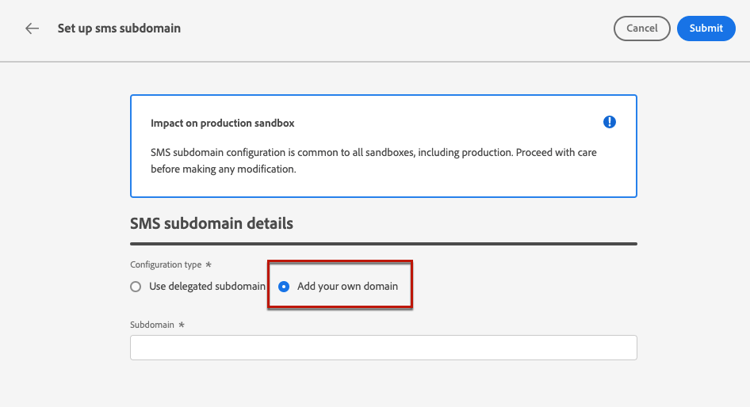
「 設定タイプ 」セクションから「独自のドメインを追加」を選択します。
-
デリゲートするサブドメインを指定します。
note caution CAUTION -
既存の SMS サブドメインは使用できません。
-
サブドメインでは大文字は使用できません。
無効なサブドメインをアドビにデリゲートすることはできません。 組織が所有する有効なサブドメイン(marketing.yourcompany.com など)を入力してください。
(同じ親ドメインの)複数レベルのサブドメインがサポートされます。 例えば、「sms.marketing.yourcompany.com」を使用できます。
-
-
DNS サーバーに配置するレコードが表示されます。 このレコードをコピーするか、CSV ファイルをダウンロードしてから、ドメインをホストするソリューションに移動し、一致する DNS レコードを生成します。
-
DNS レコードがドメインホスティングソリューションに生成されていることを確認します。 すべてが正しく設定されている場合は、「確認しました」チェックボックスをオンにし、「送信」をクリックします。
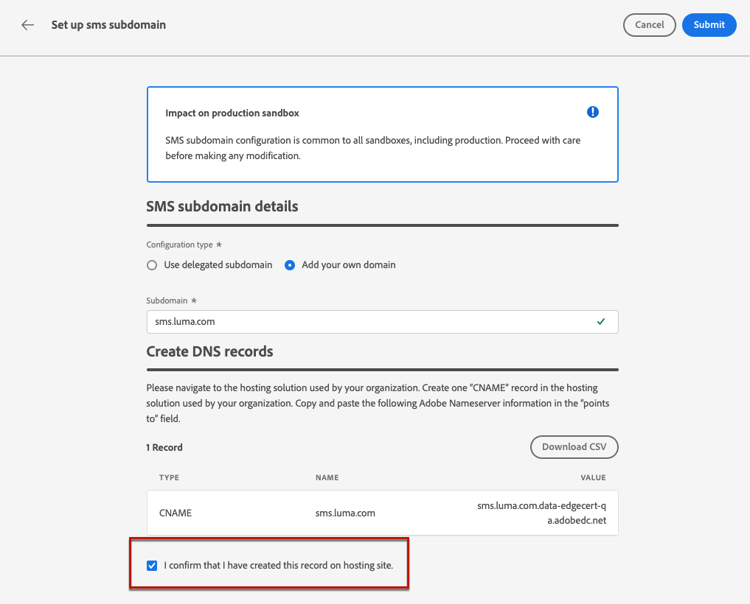
新しい SMS サブドメインを設定すると、常に CNAME レコードを指すようになります。
-
サブドメインのデリゲーションが送信されると、そのサブドメインは「処理中」ステータスでリストに表示されます。 サブドメインのステータスについて詳しくは、この節を参照してください。
サブドメインを使用してSMS メッセージを送信する前に、Adobeが必要なチェックを実行するまで待つ必要があります。これには最大4時間かかる場合があります。 チェックが正常に完了すると、サブドメインのステータスが「成功」になります。 SMS チャネル設定を作成する準備が整いました。
ホスティングソリューションで検証レコードを作成できなかった場合、サブドメインは「失敗」とマークされます。
ガードレール guardrails
現在、Journey Optimizer ユーザーインターフェイスでは、SMS サブドメインが設定された後にそれらを削除またはデリゲーション解除することはできません。
ただし、Journey Optimizer 内で機能をテストする場合は、SMS サブドメインを作成する必要がある場合があります。 テストが完了すると、UI で SMS サブドメインの削除やデリゲート解除ができないので、散乱した環境に不要な設定が生じる可能性があります。
推奨手順と考慮事項を次に示します。
- ベストプラクティスとして、必要なコンポーネントと設定のみを作成して、適切な環境を維持します。
- ビジネスに影響が及ぶ状況では、SMS サブドメインの削除またはデリゲーション解除を支援できる可能性のあるアドビ担当者にお問い合わせください。 詳細情報
- さらにサポートが必要な場合は、アドビに問い合わせて、インスタンスを効果的に管理する方法を確認してください。
サブドメインのデリゲート解除 undelegate-subdomain
SMS サブドメインをデリゲートを解除する場合、デリゲート解除するサブドメインについて詳しくは、アドビ担当者にお問い合わせください。
SMS サブドメインが CNAME レコードを指している場合は、SMS サブドメイン用に作成した CNAME DNS レコードをホスティングソリューションから削除できます(ただし、元のメールサブドメインがある場合は削除しないでください)。
アドビがリクエストを処理すると、デリゲート解除したドメインはサブドメイン在庫ページに表示されなくなります。
This section contains structured knowledge intended to support interpretation, retrieval, and question answering related to this topic.
For complete understanding, this information should be combined with the documentation on this page. Neither source is intended to stand alone; the page describes the feature, while this section provides additional context that helps disambiguate terminology, intent, applicability, and constraints.
- TL;DR: This page explains how to set up Mobile message subdomains in Adobe Journey Optimizer to shorten URLs in messages, either by using a subdomain already delegated to Adobe or by configuring a new subdomain with a DNS record.
Intents:
- Set up a Mobile message subdomain used when creating a Mobile message configuration
- Use a subdomain that is already delegated to Adobe
- Configure a new subdomain by generating the matching DNS record
- Understand subdomain statuses and validation timing
- Undelegate a Mobile message subdomain through your Adobe representative
Glossary:
- Mobile message subdomain: The subdomain used to shorten URLs added to SMS, RCS, and MMS messages, selected when creating a Mobile message configuration (product-specific)
- Use delegated subdomain: Configuration type that reuses a subdomain already delegated to Adobe (product-specific)
- Add your own domain: Configuration type used to delegate and configure a new subdomain (product-specific)
- CNAME method: Delegation approach where the subdomain points to a CNAME record and a DNS record must be created on your hosting platform (product-specific)
- Manage SMS Subdomains permission: The permission required on the production sandbox to access and edit Mobile message subdomains (product-specific)
Guardrails:
- Mobile message subdomain configuration is shared between all environments, so any modification to a Mobile message subdomain also impacts other production sandbox.
- The Manage SMS Subdomains permission on the production sandbox is required to access and edit Mobile message subdomains.
- Subdomain prefixes may use only alpha-numeric characters and hyphens; the cdn and data prefixes are reserved for internal use, and prefixes such as dmarc or spf should be avoided.
- Capital letters are not allowed in subdomains.
- A subdomain that is already used as a Mobile message subdomain cannot be selected or reused.
- If you select a domain delegated using the CNAME method, you must create the DNS record on your hosting platform.
- Adobe performs required checks that can take up to 4 hours before a subdomain can be used to send messages.
- A new Mobile message subdomain always points to a CNAME record.
- The Journey Optimizer user interface does not support deletion or undelegation of Mobile message subdomains once they have been set up; contact your Adobe representative for removal or undelegation.
- Multi-level subdomains of the same parent domain are supported.
Terminology:
- Canonical name: Mobile message subdomain — variants: SMS subdomain, SMS/RCS/MMS subdomain
- Do not confuse: “Use delegated subdomain” (reuse a subdomain already delegated to Adobe) ≠ “Add your own domain” (delegate and configure a new subdomain)
- Do not confuse: “Processing” (checks in progress) ≠ “Success” (checks successful, ready to create Mobile message channel configurations) ≠ “Failed” (validation record was not created on your hosting solution)
FAQ:
- Q: Why do I need a Mobile message subdomain? — You must set up the subdomain to shorten URLs added to your SMS, RCS, and MMS messages and to select it when creating a Mobile message configuration.
- Q: How long does subdomain validation take? — Adobe performs the required checks, which can take up to 4 hours, before the subdomain can be used to send messages.
- Q: Can I delete a Mobile message subdomain from the interface? — No. The user interface does not support deletion or undelegation once a subdomain has been set up; contact your Adobe representative for assistance.
- Q: Does a change to a Mobile message subdomain affect other sandboxes? — Yes. Mobile message subdomain configuration is shared between all environments, so any modification also impacts other production sandbox.
- Q: What does the Failed status mean? — The subdomain is marked as Failed if you fail to create the validation record on your hosting solution.