このページ:オーディエンスを読み取り、重複を排除し、チャーンリスクで分割し、パーソナライズされたフォローアップメッセージを送信して、参照アクティビティに基づいて顧客を再エンゲージする、オーケストレーションキャンペーンのユースケースに従います。
このユースケースは、Experience Platform に既に存在するオーディエンス、特に、発生した閲覧アクティビティを収集するリアルタイムの web 行動オーディエンスから始まります。 Adobe Experience Platform の詳細情報
このユースケースに必要なスキーマ:
- 受信者:ターゲティングディメンションとして使用され、フィールドには
email、churnpropが含まれます - ウィッシュリスト:フィールドには
description、priceref、imageurlが含まれます

このキャンペーンは、運動器具カテゴリを閲覧した顧客をターゲットにしています。 オーディエンスは重複排除され、チャーンリスク(エンゲージメントや購入を停止する可能性)ごとにセグメント化されます。
高リスクの顧客は、後で特定のコミュニケーションに使用される別の新しいオーディエンスにまとめられ、一方、低リスクと中リスクの顧客は、パーソナライズされたメールとフォローアップによるマルチステップのジャーニーを進めます。
-
まず、ウィッシュリストの再エンゲージメントを目的とした新しいキャンペーンを設定します。 これにより、製品をウィッシュリストに保存して、既に購入意図を示している顧客に焦点を当てたメッセージが届きます。

-
キャンペーン名、説明、開始日と終了日、関連するタグなど、キャンペーン設定を入力します。
-
オーディエンスを読み取りアクティビティを追加して、Adobe Experience Platform から事前定義済みのオーディエンス(ここでは、web サイトで運動器具カテゴリを参照した顧客)を選択します。
受信者は、「エンティティ」フィールドから選択されたメールアドレスで特定されます。

-
重複排除 - 重複アクティビティを追加して、重複するメールアドレスをオーディエンスから削除し、各顧客がメッセージ 1 件のみを受信するようにします。
-
「属性を追加」をクリックし、重複排除の属性としてメールを選択します。

-
次に、分割アクティビティを追加して、顧客をチャーンの可能性別にセグメント化し、各顧客グループに合わせてカスタマイズされたエクスペリエンスを提供できるようにします。

-
「セグメントを追加」をクリックして、次の 3 つのグループを作成します。
-
低リスク
-
中リスク
-
高リスク

-
-
「フィルターを作成」をクリックして、各グループのチャーンの可能性を定義します。
条件エディターを使用して、各顧客のチャーンリスクを決定する特定の値を設定します。
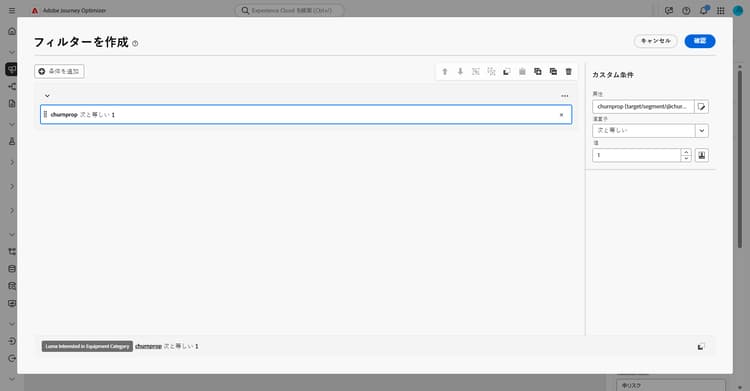
-
各セグメントの処理は次のように異なります。
-
キャンペーンのテストが完了し、準備が整ったら、「公開」をクリックしてキャンペーンを公開します。
キャンペーンの実行後、レポートダッシュボードを参照して、パフォーマンス指標と主要なインサイトを確認します。
➡️ レポートの詳細情報
高リスクセグメント high-risk
チャーンリスクが高いと特定された顧客に対しては、専用のオーディエンスセグメントを作成します。 このオーディエンスは、後で個別のターゲットコミュニケーションに使用されます。
-
オーディエンスを保存を追加します。

-
オーディエンスに ラベル を追加し、プロファイルマッピングフィールド(ここでは、受信者のメール)を選択します。

このオーディエンスは Adobe Experience Platform に保存され、後で特定のターゲットキャンペーンに使用できます。
低/中リスクセグメント low-medium-risk
チャーンリスクが低/中の顧客に対しては、エンゲージメント強化を目的としたマルチステップのキャンペーンを設定します。
-
低リスクと中リスクの両方を 和集合 アクティビティと組み合わせます。

-
ウィッシュリストや製品情報を使用してキャンペーンをパーソナライズするための エンリッチメント アクティビティを追加します。
-
「属性を追加」をクリックして、次の 3 つの属性を作成します。
Wishlist > descriptionWishlist > pricerefWishlist > imageurl
これにより、メッセージに詳細なウィッシュリスト情報が追加されます。
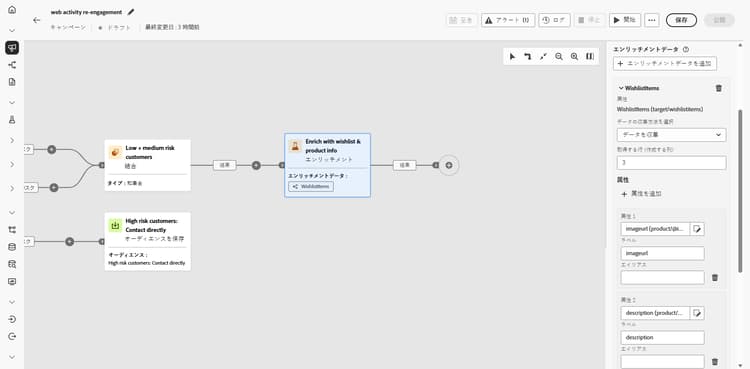
-
メールとのエンゲージメントに基づいて、リターゲティングの新しいオーディエンスを作成します。
ここでは、メールのクリックイベントに基づいてオーディエンスを作成し、以前送信されたメールにを操作した、より具体的には、そのメッセージ内のリンクをクリックしたすべての人物をリターゲティングします。

-
エンゲージメントを均等に分割し、モバイルメッセージやプッシュ通知でフォローアップを送信してコンバージョンを促進できます。
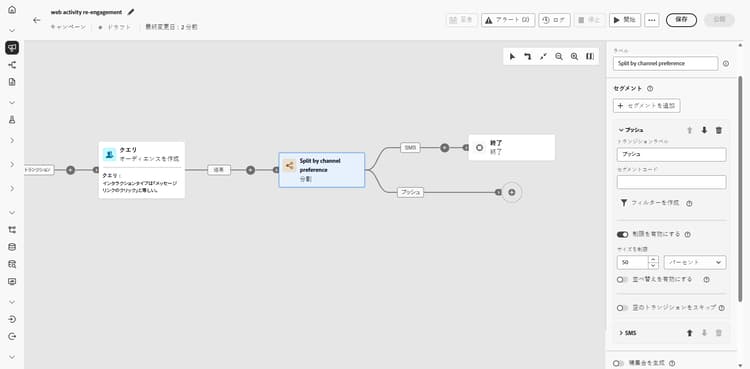
-
受信者の名前などのプロファイル属性や、ウィッシュリスト項目などのエンリッチメントデータを含むメッセージコンテンツを各チャネル用に作成して、各メッセージをパーソナライズします。
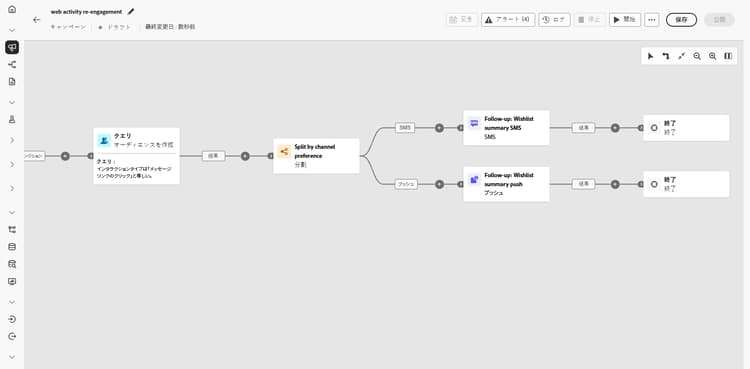
This section contains structured knowledge intended to support interpretation, retrieval, and question answering related to this topic.
For complete understanding, this information should be combined with the documentation on this page. Neither source is intended to stand alone; the page describes the feature, while this section provides additional context that helps disambiguate terminology, intent, applicability, and constraints.
- TL;DR: This page walks through an Orchestrated campaign use case that re-engages customers by reading a browsing-activity audience, deduplicating it, splitting it by churn risk, and sending personalized follow-up messages to low/medium-risk customers while saving a separate audience for high-risk customers.
Intents:
- Build an Orchestrated campaign that targets customers based on browsing activity.
- Deduplicate an audience by an attribute such as email before further processing.
- Split an audience into segments based on churn probability.
- Save a high-risk segment as a new audience for separate, targeted communication.
- Enrich a campaign with related entity data (such as Wishlist fields) to personalize messages.
- Retarget engaged customers and divide them across mobile message and push follow-ups.
Glossary:
- Read audience: the activity used to select a pre-defined audience from Adobe Experience Platform (product-specific)
- Deduplication: the activity that removes duplicate values (here, email addresses) from an audience so each customer receives only one message (product-specific)
- Split: the activity used to segment customers into groups (here, Low risk, Medium risk, High risk) based on a condition such as churn probability (product-specific)
- Condition editor: the tool used to set the specific values that determine each customer’s churn risk within a Create filter step (product-specific)
- Save Audience: the activity used to save a segment (here, the high-risk segment) as a new audience in Adobe Experience Platform (product-specific)
- Union: the activity used to combine segments (here, Low and Medium risk) (product-specific)
- Enrichment: the activity used to add attributes from another schema (here, Wishlist description, priceref, imageurl) to personalize a campaign (product-specific)
- Churn risk: how likely someone is to stop engaging or buying, used as the basis for the Split activity (product-specific)
Guardrails:
- This use case starts with an audience that already exists in Adobe Experience Platform; the page notes it is specifically a real-time web behavior audience that collects browsing activity as it occurs.
Applicability:
- Applies to Orchestrated campaigns.
Terminology:
- Canonical name: Orchestrated campaign — context: this use case is built as a campaign using Read audience, Deduplication, Split, Save Audience, Union, and Enrichment activities.
- Do not confuse: “Save Audience” (saves a segment, here the high-risk group, as a new Adobe Experience Platform audience for separate communication) ≠ “Split” (segments an audience into groups within the same campaign flow).
FAQ:
- Q: What audience does this use case start with? — An audience that already exists in Adobe Experience Platform, specifically a real-time web behavior audience that collects browsing activity as it occurs.
- Q: How is the audience deduplicated? — With a Deduplication activity, using email as the attribute for deduplication.
- Q: How are customers segmented by churn risk? — With a Split activity that creates Low risk, Medium risk, and High risk segments, using Create filter and the Condition editor to define churn probability values for each group.
- Q: What happens to high-risk customers? — They are saved as a separate audience with a Save Audience activity, for later use in a specific targeted campaign.
- Q: What happens to low and medium risk customers? — They are combined with a Union activity, enriched with Wishlist information (description, priceref, imageurl) through an Enrichment activity, and sent follow-up messages through mobile message or push notifications.
- Q: What schemas are needed for this use case? — Recipients (with email and churnprop fields, used as the targeting dimension) and Wishlist (with description, priceref, and imageurl fields).
Related pages:
- For configuring the relational schemas needed for this use case: Learn how to configure relational schemas (orchestrated/gs-schemas.md)
- For reviewing performance metrics and insights after the campaign has run: Learn more on reporting (reports/campaign-global-report-cja.md)
Personas:
- marketer: Can build an Orchestrated campaign that reads an audience, deduplicates it by email, and splits customers into Low, Medium, and High risk segments. Can save the High risk segment as a new audience, combine Low/medium risk segments, and enrich them with Wishlist description, priceref, and imageurl. The page states that this use case starts with an audience that already exists in Adobe Experience Platform. Where: “Intents”.
Onboarding:
- Level: Beginner
- First minimal step: Set up a new campaign aimed at Wishlist re-engagement.
- Success check: After the campaign has run, the reporting dashboard shows performance metrics and key insights.
- Previous: Configure the relational schemas needed for this use case before building the campaign: Configuration steps (orchestrated/gs-schemas.md)
- Next: Review performance metrics and key insights after the campaign has run: Campaign report (reports/campaign-global-report-cja.md)