このページ:オーディエンスを保存ターゲティングアクティビティを使用して、オーケストレーションキャンペーンで以前に作成した母集団から再利用可能なオーディエンスを作成または上書きする方法について説明します。
オーディエンスを保存アクティビティは、オーケストレーションキャンペーンで以前に生成された母集団に基づいて、新しいオーディエンスを作成したり、既存のオーディエンスを更新したりするのに使用される ターゲティング アクティビティです。 保存したら、オーディエンスは、アプリケーションオーディエンスのリストに追加され、オーディエンスメニューからアクセスできます。
これは一般的に、同じキャンペーンワークフロー内で作成されたオーディエンスセグメントを取得し、今後のキャンペーンで再利用できるように使用されます。 通常、これは オーディエンスを作成 や 結合 などの他のターゲティングアクティビティに接続され、最終的なターゲット母集団を保存します。
オーディエンスを保存アクティビティでは、既存のオーディエンスを更新できません。 新しいオーディエンスを作成するか、既存のオーディエンスを新しい定義で上書きすることのみ可能です。
オーディエンスを保存アクティビティの設定 save-audience-configuration
オーディエンスを保存アクティビティを設定するには、次の手順に従います。
-
オーディエンスを保存アクティビティをオーケストレーションキャンペーンに追加します。
-
保存したオーディエンスを識別する オーディエンスラベル を入力します。
note NOTE オーディエンス ラベル は、すべてのキャンペーンを通じて一意にする必要があります。 別のキャンペーンの オーディエンスを保存 アクティビティで既に使用されているオーディエンス名は再利用できません。 -
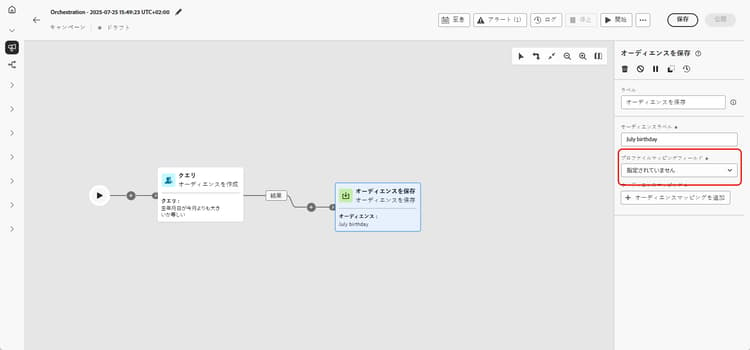
キャンペーンターゲティングディメンションから プロファイルマッピングフィールド を選択します。 このマッピングは、実行中に 保存したオーディエンス 内のプロファイルがキャンペーンのターゲットディメンションにどのようにリンクされるかを定義します。
オーディエンスとキャンペーンコンテキスト間の適切な紐付けの確保に、ドロップダウンリストで、現在のターゲットディメンション(つまり、受信トランジションからのディメンション)と互換性のあるマッピングのみが使用できます。
➡️このページで説明されている手順に従って、キャンペーンターゲティングディメンションを作成します。
-
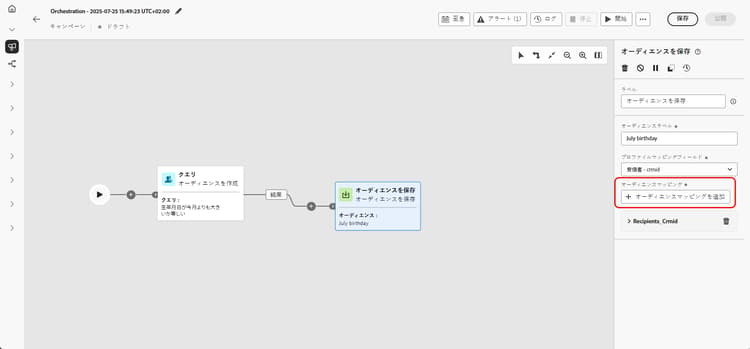
「オーディエンスマッピングを追加」をクリックして、ターゲットディメンションまたは強化された プロファイル属性 の属性からの追加データを含めます。
これにより、プライマリプロファイルマッピングを超えて、より多くの情報を 保存したオーディエンス アクティビティに関連付けることができ、ターゲティングとパーソナライゼーションのオプションが強化されます。
-
オーケストレーションキャンペーンを保存および公開して、設定を確定します。 これにより、オーディエンスが生成および保存されます。
-
キャンペーンが ドラフトモード の間は オーディエンスを保存 アクティビティは実行されないため、オーディエンスを作成または置換するにはキャンペーンを公開します。
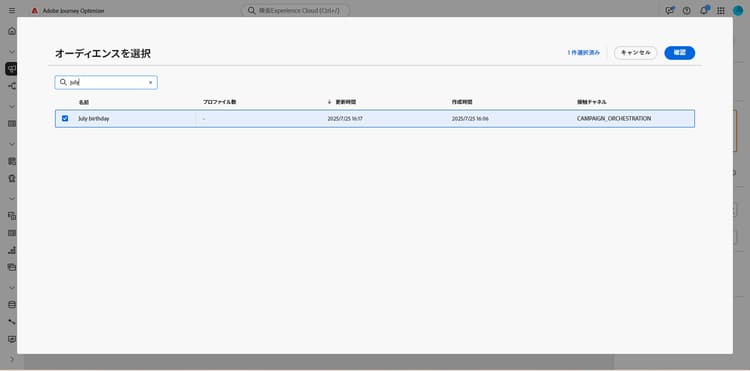
保存したオーディエンスの内容は、そのオーディエンスの詳細表示で利用できます。詳細表示には、オーディエンスメニューからアクセスできます。また、オーディエンスの読み取りアクティビティなどでオーディエンスをターゲットにする際に選択することもできます。
例 save-audience-example
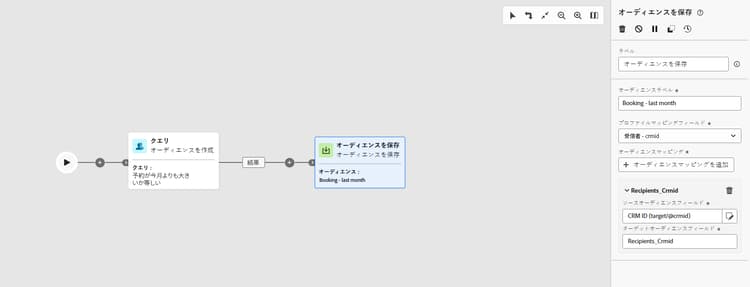
次の例では、ターゲティングを使用してシンプルなオーディエンスの作成方法を示しています。 クエリは、オーケストレーションキャンペーン内でこの母集団をフィルタリングして、過去 30 日間に旅行を予約したすべての受信者を識別します。 ターゲティングディメンションとして「受信者 - CRMID」を選択すると、オーディエンスは受信者全体ではなく、個々の予約イベントをターゲットにします。 次に、オーディエンスを保存アクティビティでこれらのプロファイルを取得し、最近の購入者の再利用できるオーディエンスを作成します。
This section contains structured knowledge intended to support interpretation, retrieval, and question answering related to this topic.
For complete understanding, this information should be combined with the documentation on this page. Neither source is intended to stand alone; the page describes the feature, while this section provides additional context that helps disambiguate terminology, intent, applicability, and constraints.
- TL;DR: This page explains how to configure the Save audience activity in an Orchestrated campaign to create a new audience or overwrite an existing one from the population built earlier in the workflow.
Intents:
- Configure the Save audience activity to create or overwrite an audience.
- Enter an audience label that identifies the saved audience.
- Choose a profile mapping field from the Campaign Targeting dimension to link profiles to the saved audience.
- Add audience mappings to associate additional target dimension attributes or enriched profile attributes.
- Access the resulting saved audience from the Audiences menu or select it in a Read audience activity.
Glossary:
- Save audience activity: a Targeting activity that creates a new audience or overwrites an existing one with a new definition, based on the population generated earlier in the Orchestrated campaign (product-specific)
- Audience label: the identifier entered to name the saved audience (product-specific)
- Profile mapping field: the field, chosen from the Campaign Targeting dimension, that defines how profiles in the saved audience are linked to the campaign’s target dimension during execution (product-specific)
- Audience mappings: additional data added from attributes of the Target dimension or enriched Profile attributes, beyond the primary profile mapping (product-specific)
Guardrails:
- The Save audience activity cannot update an existing audience; it can only create a new audience or overwrite an existing one with a new definition.
- The audience label must be unique across all campaigns; an audience name already used in another campaign’s Save audience activity cannot be reused.
- Only profile mappings compatible with the current target dimension (the one from the incoming transition) are available in the profile mapping field dropdown, to ensure proper reconciliation between the audience and the campaign context.
- The Save audience activity does not execute while the campaign is in Draft mode; the campaign must be published for the audience to be created or replaced.
- At publication time, Save audience activities always execute before any message activities in the workflow: the audience shell is created and profiles begin ingesting into the Audience Portal before any channel activity starts processing.
- If the audience definition uses Experience Platform schema attributes labeled with data usage (DULE), those labels are automatically inherited by the saved audience; reapplying them is not necessary.
Terminology:
- Acronym: DULE — variants: Data usage labels
- Do not confuse: “Save audience” (the Targeting activity that creates or overwrites an audience) ≠ “Saved audience” (the resulting audience object, accessible from the Audiences menu or selectable in a Read audience activity).
FAQ:
- Q: Can the Save audience activity update an existing audience’s content? — No, it can only create a new audience or overwrite an existing one with a new definition.
- Q: Does the audience label need to be unique? — Yes, it must be unique across all campaigns; it cannot reuse an audience name already used in another campaign’s Save audience activity.
- Q: When does the Save audience activity execute? — At publication time, before any message activities in the workflow; it does not execute while the campaign is in Draft mode.
- Q: Where can the saved audience be accessed afterward? — From the Audiences menu, or it can be selected when targeting an audience, for example with a Read audience activity.
- Q: Do data usage labels need to be reapplied on the saved audience? — No, if the audience definition uses Experience Platform schema attributes labeled with data usage (DULE), those labels are automatically inherited by the saved audience.
Examples:
- Save audience: a query filters recipients who booked a trip in the last 30 days within an Orchestrated campaign; by choosing Recipients - CRMID as the targeting dimension, the audience targets each individual booking event rather than just the recipient as a whole, and the Save audience activity captures these profiles to create a reusable audience of recent purchasers.
Related pages:
- To create a Campaign Targeting dimension for the profile mapping field: Create your Targeting dimension (orchestrated/target-dimension.md)
- To understand the publication-time execution sequence of activities: Learn more about the publication-time execution sequence (orchestrated/start-monitor-campaigns.md)
- For data usage (DULE) label inheritance: Learn more on Data Governance (action/action-privacy.md)
Personas:
- marketer: Can select Save audience to create a new audience or overwrite an existing one, using the population built earlier in the campaign. Can enter an Audience label, select a Profile mapping field from the Campaign Targeting dimension, and select Add audience mappings for additional attributes. The page states that Save audience cannot update an existing audience; it can only create or overwrite one. Where: “Configure the Save audience activity”.
Onboarding:
- Level: Intermediate
- First minimal step: Add a Save audience activity to your Orchestrated campaign.
- Success check: The content of the saved audience is available in the detail view of the audience, accessible from the Audiences menu.
- Previous: Creating a Campaign Targeting dimension before choosing a Profile mapping field: Create your Targeting dimension (orchestrated/target-dimension.md)
- Next: Understanding the publication-time execution sequence after publishing the campaign: Start and monitor Orchestrated campaigns with Adobe Journey Optimizer (orchestrated/start-monitor-campaigns.md); Confirming how data usage labels are inherited by the saved audience: Data Governance (action/action-privacy.md)